dnt: shipping a Deno module to npm without rewriting it by hand
Deno to npm package build tool.
At a glance
- What is it?
- The Deno to Node Transform tool takes a Deno module, rewrites its specifiers, injects shims for the Deno globals, type checks the result, emits ESM, CommonJS and declaration files, and then runs your Deno.test cases under Node. The catch is that it is a bridge with edges: top level await blocks CommonJS, and the polyfill and shim options are where the real decisions live.
- Who is it for?
- dnt suits a Deno author who wants to publish the same module to npm without maintaining a second implementation, and who can accept that the npm build is a generated artefact with its own configuration. It does not suit a package that must ship CommonJS and uses top level await, because dnt errors in that combination, and it does not suit a team that wants full control over the emitted bundle rather than a transform of the source.
- Can I use it commercially?
- Yes. MIT is a permissive licence: you can use, modify and sell software built on it, as long as you keep its copyright and licence notices.
- Is it still maintained?
- Yes. The repository last received commits 37 days ago.
- What is it written in?
- Mainly Rust, according to GitHub's language statistics.
Answers come from the project's GitHub data, last synced on November 7, 2026, and from our analysis. They are not legal advice.
Star history
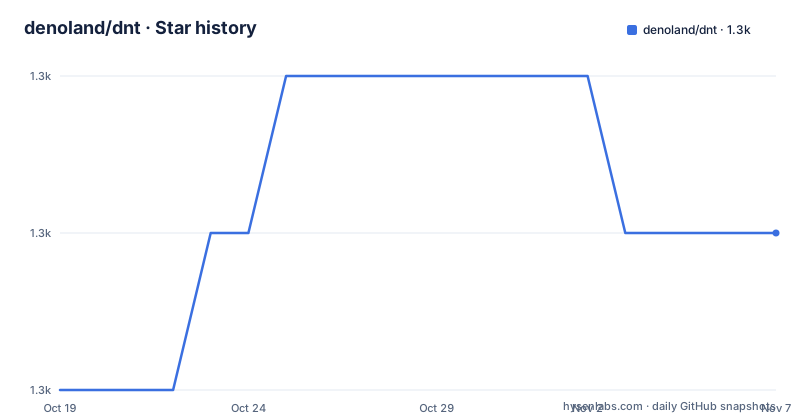
- denoland/dnt1,337 ★ · +1
| Repository | 2026-10-19 | 2026-11-07 |
|---|---|---|
| denoland/dnt | 1.3k | 1.3k |
1 Stars in the last 19 days, measured from the daily GitHub snapshot. Compare with other projects
Editorial analysis
What the dnt pipeline actually does
dnt takes a Deno module and creates an npm package for use in Node.js. The README describes the work as a pipeline with four stages.
The first stage is the transformation, and it is the bulk of the work. It transforms Deno code to Node, including the files found by `deno test`. Within that, it rewrites module specifiers, injects shims for any `Deno` namespace or other global name usages as specified, rewrites esm.sh specifiers to bare specifiers and includes those dependencies in a package.json, downloads remote modules that cannot be resolved to an npm package and rewrites the specifiers to make them local, and allows mapping any specifier to an npm package.
The second stage type checks the output. The third emits ESM, CommonJS and TypeScript declaration files along with a package.json file. The fourth runs the final output in Node.js through a test runner that calls all the `Deno.test` calls.
That last stage is the one worth pausing on. The tests you wrote for Deno are run again under Node against the transformed output, which means the build verifies the transform rather than trusting it. The example build log shows the sequence of phases, ending with the test runner output:
[dnt] Transforming...
[dnt] Running npm install...
[dnt] Building project...
[dnt] Type checking ESM...
[dnt] Emitting ESM package...
[dnt] Emitting script package...
[dnt] Running tests...
The `Running npm install...` line explains why a Node toolchain is needed at build time even though the source is Deno.
The build script is a small TypeScript file
Setup is three steps. Add the package, write a build script, run it and publish.
The dependency is added with:
deno add jsr:@deno/dntThe build script is an ordinary TypeScript file, conventionally `scripts/build_npm.ts`:
import { build, emptyDir } from "@deno/dnt";

await emptyDir("./npm");

await build({
  entryPoints: ["./mod.ts"],
  outDir: "./npm",
  shims: {
    deno: true,
  },
  package: {
    name: "your-package",
    version: Deno.args[0],
    description: "Your package.",
    license: "MIT",
    repository: {
      type: "git",
      url: "git+https://github.com/username/repo.git",
    },
    bugs: {
      url: "https://github.com/username/repo/issues",
    },
  },
  postBuild() {
    // steps to run after building and before running the tests
    Deno.copyFileSync("LICENSE", "npm/LICENSE");
    Deno.copyFileSync("README.md", "npm/README.md");
  },
});
Two details in that example are worth copying. The package version comes from `Deno.args[0]`, so the build script is version-agnostic and the version is passed on the command line. And the `postBuild` hook runs after the build and before the tests, which is where the LICENSE and README copies go, so the published tarball has them and the test run happens against a complete package.
The build and publish steps are:
# run script
deno run -A scripts/build_npm.ts 0.1.0

# go to output directory and publish
cd npm
npm publish
The output directory is `npm/`, and the README suggests adding it to `.gitignore`, which tells you the artefact is generated rather than committed.
The CommonJS constraint that will bite you
Top level await does not work in CommonJS or UMD, and dnt will error if a top level await is used and you are outputting CommonJS or UMD code. The README is unambiguous: if you want to output a CommonJS or UMD package you have to restructure your code to not use any top level awaits, or you set the `scriptModule` build option to `false`.
This is the sharpest edge in the whole tool, because top level await is idiomatic in modern Deno and Node ESM code, and the error appears at build time rather than at publish time. The two options are:
await build({
  // ...etc...
  scriptModule: false,
});
Turning `scriptModule` off drops the CommonJS output entirely and leaves you with ESM only. The consequence is a published package that npm consumers on older CommonJS toolchains cannot require, so the decision is a compatibility trade rather than a build flag.
The same option appears again in the polyfills section, because the `importMeta` polyfill can only be disabled when `scriptModule` is `false`, since `import.meta` is not valid CommonJS.
Everything in the pipeline is switchable. The README lists `typeCheck`, `test`, `declaration` and `scriptModule` as individually disableable and enabled by default:
await build({
  // ...etc...
  typeCheck: false,
  test: false,
  declaration: false,
  scriptModule: false,
});
Turning off `test` is the option to think hardest about, because it is the stage that verifies the transform actually works under Node.
Type checking only the ESM output by default
By default only the ESM output is type checked, and the README gives the reason: performance. It then recommends type checking both the ESM and the script output by setting `typeCheck` to the string `"both"`.
So the default is a deliberate trade of coverage for speed, and the documentation tells you to override it. If your package ships both module formats, the CommonJS output is the one most likely to break, since the two module systems have different resolution rules and the shims are applied differently.
The escape hatch for a noisy check is `filterDiagnostic`, a function that receives a diagnostic and returns a boolean:
await build({
  // ...etc...
  filterDiagnostic(diagnostic) {
    if (
      diagnostic.file?.fileName.endsWith("fmt/colors.ts")
    ) {
      return false; // ignore all diagnostics in this file
    }
    return true;
  },
});
The README says this is especially useful for ignoring type checking errors in remote dependencies, which is the common case: you did not write the remote code, and its type errors are not your problem, but they do fail the build.
The filter is per file, matched by file name suffix, and returning `false` drops the diagnostic. The trade is that a filter written too broadly will hide errors in your own code that happen to live under the same path, so the suffix should be as specific as possible.
Polyfills, shims and the Node globals you have to supply
The polyfill system exists because dnt adds polyfills for language features that may not exist in the environment implied by `compilerOptions.target`. The supported names are `arrayFindLast`, `arrayFromAsync`, `errorCause`, `importMeta`, `objectHasOwn`, `promiseWithResolvers` and `stringReplaceAll`.
The opt-out is per feature:
await build({
  // ...etc...
  polyfills: {
    importMeta: false,
  },
});
You can also pass `true` or `false` instead of an object to enable or disable every polyfill at once, and anything you do not specify continues to be decided by the target. So `polyfills` overrides the target rather than replacing it, which is a subtle but useful distinction.
One more detail: the polyfills also provide the type declarations for the features they polyfill, so opting out of one means relying on your `compilerOptions.lib` declarations for it instead. Turning off a polyfill is therefore also a decision about where your types come from.
The shims are a separate mechanism. dnt shims the globals specified in the build options, and the `deno: true` flag in the example enables shimming for the `Deno` namespace. The shims come from a separate project, `denoland/node_deno_shims`, which is where the actual global definitions live.
The Node environment the tests run in may still be missing globals that the distributed code assumes, and the `testPreloadModule` option exists for that. The example loads `Headers` and `Response` from `npm:undici` and assigns them onto `globalThis`:
import { Headers, Response } from "npm:undici";

Object.assign(globalThis, { Headers, Response });
The module is transformed and type checked like the test files, and it is not included in the npm package. It is loaded once for each of the emitted script and ESM output, before any test file.
Test isolation and the global hook collision
By default all the test files run in the same process, so the module state of a test file can affect the next one. The README gives a concrete failure: the global hooks of `@std/testing/bdd` error with "Cannot add global hooks after a global test is registered" when a second test file uses them.
That is a specific and recognisable failure, and it is a consequence of a reasonable default. The fix is to set `testIsolation` to `"process"`, which runs each test file in its own process, matching what `deno test` does by running each file in its own isolate:
await build({
  // ...etc...
  testIsolation: "process",
});
The cost is stated plainly: it is slower because it starts a process per test file, and a preload module is loaded before each test file rather than once per output.
That second half is easy to miss. If you use `testPreloadModule` to patch `globalThis` for your tests, switching to process isolation multiplies that setup cost by the number of test files, and the preload module is doing work per file rather than once.
The pairing to keep in mind is that `deno test` runs each file in its own isolate, so a Deno project that passes locally can still fail under dnt until the isolation option is set.
The Rust rewrite and what is in the repository
The project is now written in Rust. The primary language in the repository metadata is Rust, and the `Cargo.toml` defines a workspace with two members, `rs-lib` and `wasm`, alongside a `lib/` directory, a `wasm/` directory, `transform.ts` and `mod.ts`.
The release profile is tuned for size rather than speed, which is the tell for a tool that ships as a JSR package:
[profile.release]
codegen-units = 1
incremental = true
lto = true
opt-level = "z"
`opt-level = "z"` optimises for size, with link time optimisation on and a single codegen unit.
The dependency list shows that dnt builds on the Deno ecosystem's own Rust crates rather than reimplementing module resolution. It uses `deno_graph` with the `swc` feature for the module graph, `deno_resolver` with the `graph` feature, `deno_lockfile`, `deno_config`, `deno_cache_dir`, `deno_error` and `deno_path_util`. The `wasm` workspace member and the `wasm/` directory suggest a WebAssembly build of part of the pipeline, which is a natural fit for a tool that has to be runnable in constrained environments.
The repository also has `deno.jsonc` and `deno.lock` for the TypeScript side, `rust-toolchain.toml`, a `.rustfmt.toml` and a `.clippy.toml`, plus a `tests/` directory.
The licence is MIT, the repository is not archived, and the last push was on 2026-10-01, the same day as release 0.44.0, following 0.43.2 in August and 0.43.0 in July. The version is below 1.0 and the numbers move quickly, so pinning a version matters for a build tool.
Editorial conclusion
dnt suits a Deno author who wants to publish the same module to npm without maintaining a second implementation, and who can accept that the npm build is a generated artefact with its own configuration. It does not suit a package that must ship CommonJS and uses top level await, because dnt errors in that combination, and it does not suit a team that wants full control over the emitted bundle rather than a transform of the source. Before adopting it, run the build once and read the generated `npm` directory, decide whether to keep the `scriptModule` output, and if you use the `Deno` namespace check the shim options in the build script rather than assuming the defaults cover what your code touches.
Frequently asked questions
How do I add dnt to a Deno project?
Run `deno add jsr:@deno/dnt`, then create a build script that imports `build` and `emptyDir` from `@deno/dnt` and calls `build` with your entry points, output directory and package metadata.
Does dnt run my Deno tests under Node?
Yes. The pipeline runs the final output in Node.js through a test runner that calls all the `Deno.test` calls, and the build log shows the test phase after the ESM and script packages are emitted. The test step can be disabled with the `test` option.
Why does dnt fail when I use top level await?
Top level await does not work in CommonJS or UMD, so dnt errors when you are outputting CommonJS or UMD code. You either restructure the code to avoid top level await or set the `scriptModule` build option to `false`.
How do I type check both the ESM and the CommonJS output?
Set the `typeCheck` build option to `"both"`. By default only the ESM output is type checked, for performance reasons, and the README recommends checking both.
What is the testPreloadModule option for?
It loads a module before the tests run, to set up the Node.js environment without affecting the distributed code, for example when the distributed code assumes a global such as `Headers` or `Response` that Node.js does not provide. It is transformed and type checked like the test files and is not included in the npm package.
Official sources
Add this badge to your README
If you maintain this project, the badge below links readers to this analysis and shows its maintenance status from the daily GitHub snapshot. Paste the markdown into your README; add ?metric=license or ?metric=stars to the image URL for a different field.

[](https://hysenlabs.com/projects/denoland-dnt)Star history chart for your README
[](https://hysenlabs.com/projects/denoland-dnt)Was this useful?