Ruff: A Rust-Based Linter and Formatter That Replaces a Python Toolchain
Ruff is a Python linter and code formatter written in Rust, bundling over 900 rules with Flake8, isort, and Black compatibility plus automatic error fixing.
At a glance
- What is it?
- Ruff is a single Rust binary that lints, formats, and sorts imports for Python, claiming 10-100x speedups over Flake8 and Black. It targets teams tired of managing multiple tools, but its aggressive rule set and formatter parity demands a migration check.
- Who is it for?
- Adopt Ruff if you want a single, fast tool to replace Flake8, Black, isort, and several plugins, and if you have compared its formatter's output with Black's on your own code. Do not adopt it if you rely on a niche flake8 plugin that Ruff has not reimplemented, or if your team requires byte-for-byte Black formatting.
- Can I use it commercially?
- Yes. MIT is a permissive licence: you can use, modify and sell software built on it, as long as you keep its copyright and licence notices.
- Is it still maintained?
- Yes. The repository received new commits within the last day.
- What is it written in?
- Mainly Rust, according to GitHub's language statistics.
Answers come from the project's GitHub data, last synced on November 13, 2026, and from our analysis. They are not legal advice.
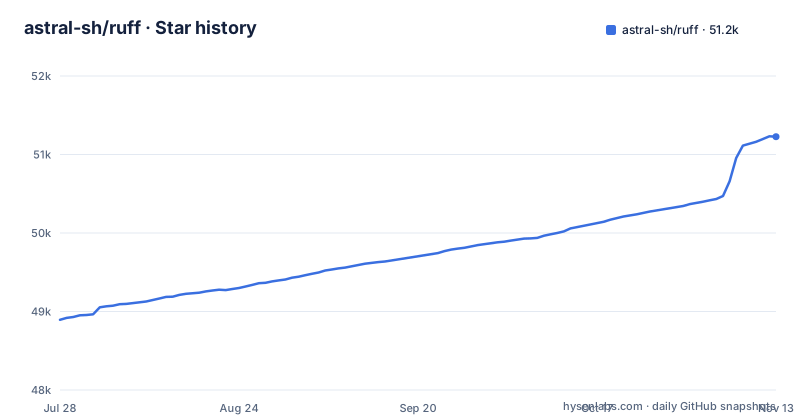
Star history
- astral-sh/ruff51,227 ★ · +2,333
| Repository | 2026-07-28 | 2026-11-13 |
|---|---|---|
| astral-sh/ruff | 48.9k | 51.2k |
2,333 Stars in the last 108 days, measured from the daily GitHub snapshot. Compare with other projects
Editorial analysis
The Problem: Python Tooling Sprawl and Slow Feedback Loops
Python projects traditionally need separate tools for linting, formatting, import sorting, and modernizing syntax. Flake8 handles style and common bugs, Black reformats, isort sorts imports, and pyupgrade rewrites old syntax. Running all of them sequentially is slow, and each has its own configuration file and plugin ecosystem. Ruff solves this by combining those responsibilities into one Rust binary. The README claims it is 10-100x faster than existing linters and formatters, and it can replace Flake8 plus dozens of plugins, Black, isort, pydocstyle, pyupgrade, and autoflake. The target user is a Python developer or team that wants faster feedback in local development and CI, without juggling multiple tools. The speed claims come from the README and its quoted testimonials, not from a measurement you have run, so treat them as directional.
How Ruff Works: A Single Binary with Built-in Caching
Ruff is written in Rust, which gives it a compiled, single-binary distribution. The README highlights built-in caching to avoid re-analyzing unchanged files, which is how it maintains speed across repeated runs. The linter has over 900 built-in rules, including native re-implementations of popular Flake8 plugins like flake8-bugbear. This means you do not install plugins; the rules are compiled into the binary. The formatter aims for drop-in parity with Black, and the import sorting matches isort's behavior. This is a different approach from Flake8, which loads plugins as Python modules at runtime, adding overhead. Ruff's design trades plugin flexibility for speed and a unified interface.
Getting Started: Installation and Basic Commands
Ruff is available on PyPI, so you can install it with `pip install ruff`, or use `uv tool install ruff@latest` for a global install, or `uv add --dev ruff` for a project dependency. There are also standalone installers for macOS, Linux, and Windows, which avoid requiring a Python environment. The README shows example commands: `ruff check` lints all files in the current directory, and `ruff format` formats them. You can also invoke it directly with `uvx [email protected] check` to run a specific version without installing. Configuration lives in `pyproject.toml`, which Ruff reads automatically. The README mentions hierarchical and cascading configuration, meaning you can have per-directory overrides, which is useful for monorepos. For a quick start, you run `ruff check` and `ruff format` on a codebase and see what changes. The tool also has a playground at play.ruff.rs to test rules without installing.
Rule Coverage and Fix Support: More Than a Linter
Ruff's linter includes over 900 rules, covering standard flake8 checks, bugbear-style bug detection, and even pyupgrade rules that modernize syntax. The README mentions automatic fix support, such as removing unused imports. This is a significant advantage over Flake8, which often requires separate fixers like autoflake. You configure Ruff through `pyproject.toml`. The README's feature list does not name specific rule codes, so you would need to consult the docs for the full catalog. The breadth of rules means you can likely drop several tools, but it also means you need to audit which rules are enabled by default. For teams migrating, the risk is that a plugin you rely on is not reimplemented, forcing you to keep the old tool alongside.
The Formatter: Near-Black Parity, But Not Identical
Ruff's formatter claims drop-in parity with Black, but the README links a FAQ page on how the formatter compares to Black. This is a genuine limitation: if your project has committed to Black's exact formatting, Ruff may produce different output in edge cases.The README says 'drop-in parity' and links the Black comparison FAQ. The formatter is designed to be fast, but speed is not the only trade-off. Teams that use Black with custom line length or skip-string-normalization will need to carry those settings over to Ruff's configuration. The practical advice is to run `ruff format --check` in CI to see if your code is already compliant. If you have a large codebase, expect an initial reformatting diff, which can be disruptive.
Configuration and Monorepo Support: Hierarchical and Cascading
Ruff's configuration system is one of its strengths. The README highlights hierarchical and cascading configuration, which means you can have a root `pyproject.toml` and per-directory overrides. This is useful for monorepos where different projects have different rule sets. For example, you might enable stricter rules for a core library but relax them for scripts. Configuration is read from `pyproject.toml`, and the README links the configuration docs for details. The cascading behavior is similar to how ESLint works, where configs inherit and override. This is a contrast to Flake8, which uses a single `.flake8` file at the root or in the user's home directory. Ruff's approach gives you more control but also more complexity. If you have a simple project, the defaults might suffice, but for a monorepo, you need to plan your config hierarchy carefully to avoid unexpected rule changes.
Maintenance and License: Active Development, MIT, and Upgrade Costs
Ruff is under active development, with releases every week or two: 0.17.3 on 2026-10-27, 0.17.2 on 2026-10-22, and 0.17.1 on 2026-10-15. This cadence means new rules and fixes arrive frequently, but it also means you need to track updates for behavior changes. The project is backed by Astral, the company behind uv and ty. The license is MIT, which is permissive for commercial use. The maintenance cost is low in terms of dependencies, since Ruff is a single binary, but you must update it regularly to get rule improvements. The README mentions Python 3.15 compatibility, so it keeps pace with new Python versions. For upgrade cost, you can pin a version in your `pyproject.toml` or use `uv` to manage it. The active development is a double-edged sword: you get fixes, but you also risk rule changes that alter your lint results. The alternative is to stay on a stable version and only upgrade when needed.
Alternatives and Trade-offs: Flake8, Black, and the Plugin Ecosystem
The main alternative is to keep using Flake8 with plugins, Black, and isort as separate tools. Flake8 offers a plugin ecosystem that Ruff cannot fully replicate, even with 900 rules. If you use a niche plugin like flake8-print or flake8-django, you need to check if Ruff has an equivalent. The README says Ruff reimplements popular plugins, but not all. The difference in approach is that Flake8 loads plugins dynamically, so you can add any plugin, while Ruff compiles rules into the binary, so you are limited to what the project has implemented. Another alternative is to use a tool like pyright or mypy for type checking, but that is a different concern. Ruff does not do type checking, so you still need a type checker. The trade-off is speed and integration versus flexibility. If your team uses a small set of plugins, Ruff is likely a drop-in replacement. If you rely on a long tail of plugins, you may need to keep Flake8 for those specific checks.
Editorial conclusion
Adopt Ruff if you want a single, fast tool to replace Flake8, Black, isort, and several plugins, and if you have compared its formatter's output with Black's on your own code. Do not adopt it if you rely on a niche flake8 plugin that Ruff has not reimplemented, or if your team requires byte-for-byte Black formatting. Before switching, run `ruff check` and `ruff format` on a representative subset, compare the diff against your current setup, and verify that your pre-commit hooks and CI can use the standalone installer or pip package. The project is under active development, so pin a version (like 0.17.3) to avoid surprises.
Frequently asked questions
Which linter is better, Pylint or Ruff?
The project does not compare them as linters. Its replacement list names Flake8 plus dozens of plugins, Black, isort, pydocstyle, pyupgrade, autoflake, and more, and Pylint appears only in a pyproject keyword and in a testimonial that measures Ruff against pylint on a 250k line module. A FAQ page covers how the linter compares to Flake8.
Which formatter is better, Ruff or Black?
The project claims drop-in parity with Black and links a FAQ page explaining how the formatter compares to Black, and the formatter is the format subcommand, for example `ruff format` for all files in the current directory. The overview states the parity claim without publishing a catalogue of where the output differs.
How to ignore Ruff error?
The README's feature list does not mention the suppression syntax. What it does give you is over 900 built-in rules with native re-implementations of popular Flake8 plugins, pyproject.toml support, hierarchical and cascading configuration for monorepos, built-in caching so unchanged files are not re-analyzed, and fix support for automatic correction, with the full documentation at docs.astral.sh/ruff.
Can Ruff replace pylint?
Pylint is not in the project's stated replacement list, which covers Flake8 plus dozens of plugins, Black, isort, pydocstyle, pyupgrade, autoflake, and more, so the documented claim is about those tools rather than about Pylint. Pylint is named as a keyword in the project file and in one testimonial, where pylint takes about 2.5 minutes on a 250k line module and Ruff takes 0.4 seconds on the entire codebase.
Official sources
Where developers are discussing it
Posts on Hacker News, dev.to and Lobsters that link to this repository, found by our scan of those communities. 1 in the last 30 days; newest first.
- Don't Write More Prompts. Install These 10 Trending 'Skills' Insteaddev.to · Nov 8, 2026 · 18 points · 6 comments
- I shipped a linter for checks that cannot fail. It had four of them.dev.to · Oct 8, 2026 · 4 points · 20 comments
Add this badge to your README
If you maintain this project, the badge below links readers to this analysis and shows its maintenance status from the daily GitHub snapshot. Paste the markdown into your README; add ?metric=license or ?metric=stars to the image URL for a different field.

[](https://hysenlabs.com/projects/astral-sh-ruff)Star history chart for your README
[](https://hysenlabs.com/projects/astral-sh-ruff)Was this useful?