Handy: offline push-to-talk dictation that pastes into any text field, with a stdin hook and a beta CLI
Project brief: A free, open source, and extensible speech-to-text application that works completely offline.
At a glance
- What is it?
- Handy is an MIT-licensed desktop app, written mostly in Rust on Tauri, that records while you hold a shortcut, transcribes locally with Whisper or Parakeet V3, and pastes the result where your cursor is. This look covers how that pipeline works, the install paths, the transcription hook, and the macOS hardware limits the project itself calls out.
- Who is it for?
- Handy suits people who want dictation into any app without sending audio to a server, and who are comfortable granting microphone and accessibility permissions to a 0.10.0 desktop app. Windows users who want to rewrite text before it is pasted should look elsewhere, since the transcription hook is offered only on macOS and Linux.
- Can I use it commercially?
- Yes. MIT is a permissive licence: you can use, modify and sell software built on it, as long as you keep its copyright and licence notices.
- Is it still maintained?
- Yes. The repository last received commits 1 day ago.
- What is it written in?
- Mainly Rust, according to GitHub's language statistics.
Answers come from the project's GitHub data, last synced on November 13, 2026, and from our analysis. They are not legal advice.
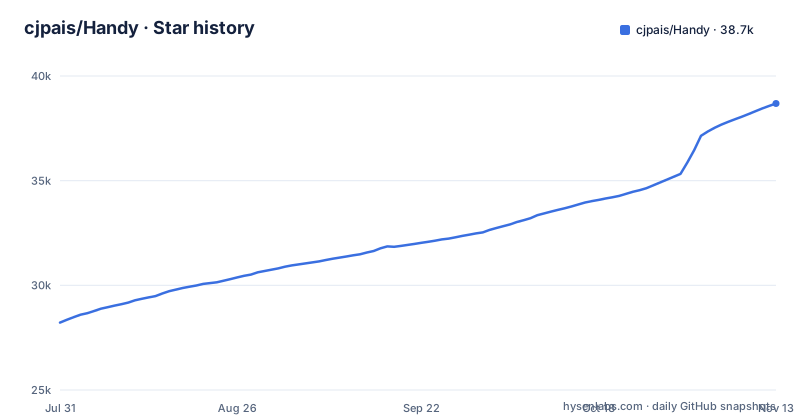
Star history
- cjpais/Handy38,686 ★ · +10,466
| Repository | 2026-07-31 | 2026-11-13 |
|---|---|---|
| cjpais/Handy | 28.2k | 38.7k |
10,466 Stars in the last 105 days, measured from the daily GitHub snapshot. Compare with other projects
Editorial analysis
Hold a shortcut, speak, release, and the text lands in the focused field
Handy does one job: it turns speech into text inside whatever application currently has focus. You press a configurable keyboard shortcut and either hold it to record and release to stop, or tap it once to start and again to stop. If you only want one behavior, Hold-only and Toggle-only modes are available. When recording ends, Handy transcribes the audio and pastes the result directly into the active text field, so there is no separate editor window to copy from.
Before any model sees the audio, silence is filtered out with Silero voice activity detection. The whole chain runs on your own computer, and no audio is sent to a cloud service. The price of that design is that Handy needs real system access: on first launch you grant microphone permission so it can record, and accessibility permission so it can paste into other apps. If you decline either, the push-to-talk loop breaks at that step.
Whisper sizes for GPU machines, Parakeet V3 for CPU-only ones
Handy lets you choose the model that does the transcription, and the choice is really a choice about your hardware. The Whisper options come in Small, Medium, Turbo and Large, and they use GPU acceleration when a GPU is available. Parakeet V3 is the CPU-optimized alternative, and it adds automatic language detection, so you do not have to set the spoken language yourself.
That split matters on laptops without a usable GPU: Whisper gets GPU acceleration only when there is a GPU to use, while Parakeet V3 is the option tuned for the CPU. Users of the Raycast extension can switch models and languages without opening Handy's own settings, which helps if you move between languages during the day.
The frontend pins a package called @handy-computer/models at version 0.2.3, and the repository carries scripts named check:model-languages and sync:catalog, so the list of available models and the languages each covers are maintained as a catalog inside the project rather than hard coded in one place.
The Homebrew cask and winget package are not maintained by the Handy developers
The primary download is the GitHub releases page or handy.computer. Two package managers also carry it:
brew install --cask handywinget install cjpais.HandyBoth are convenient, but the project states plainly that neither the Homebrew cask nor the winget package is maintained by its developers. The consequence is that the developers do not control when those packages are updated or how they are built. If you need a specific release, download it directly from GitHub.
On Debian and Ubuntu, install the downloaded .deb through APT so its dependencies are pulled in:
sudo apt install ./Handy_*.debDo not use dpkg -i unless the dependencies are already installed. If that has already happened, the repair is `sudo apt --fix-broken install`. After any install method, open Settings and set your preferred shortcuts before the first recording.
Remote-control flags reach a running instance, but the CLI is still beta
Handy accepts command-line flags on macOS, Windows and Linux. One group is forwarded to an instance that is already running, through a single-instance plugin, which makes it possible to bind recording to a window manager key, a script, or another launcher:
handy --toggle-transcription    # Toggle recording on/off
handy --toggle-post-process     # Toggle recording with post-processing on/off
handy --cancel                  # Cancel the current operation
The second group changes how Handy starts:
handy --start-hidden            # Start without showing the main window
handy --no-tray                 # Start without the system tray icon
handy --debug                   # Enable debug mode with verbose logging
handy --help                    # Show all available flags
They combine for autostart setups, such as `handy --start-hidden --no-tray`. On macOS the binary sits inside the app bundle, so call it by its full path:
/Applications/Handy.app/Contents/MacOS/Handy --toggle-transcriptionThe project describes this interface as largely a beta feature. Treat any automation built on these flags as something to recheck after each upgrade.
The transcription hook runs without your shell PATH and does not exist on Windows
On macOS and Linux, an executable placed at hooks/transcription inside Handy's app data folder can rewrite text right before it is pasted. That folder is ~/Library/Application Support/com.pais.handy/ on macOS and ~/.local/share/com.pais.handy/ on Linux. Handy writes the text to the hook's stdin, after any LLM post-processing, and pastes whatever the hook prints to stdout. One trailing newline is stripped, and empty output pastes nothing.
Three details decide whether a hook behaves. First, Windows has no hook at all, so Windows users cannot reshape output this way. Second, if the hook fails or runs past 30 seconds, Handy silently pastes the original text, so a broken hook looks like no hook. Third, the hook does not inherit your shell's PATH: Handy launched from the Dock or Finder only sees /usr/bin:/bin:/usr/sbin:/sbin, which means tools such as /opt/homebrew/bin/opencc must be called by absolute path. This example prefixes # when Terminal is frontmost:
mkdir -p ~/Library/Application\ Support/com.pais.handy/hooks
cd ~/Library/Application\ Support/com.pais.handy/hooks
cat > transcription << 'EOF'
#!/bin/bash
app=$(osascript -e 'tell application "System Events" to get name of first application process whose frontmost is true')
if [ "$app" = "Terminal" ]; then echo "# $(cat)"; else cat; fi
EOF
chmod +x transcription
fn shortcuts never fire on third-party keyboards, and Bluetooth mics degrade playback on macOS
Two macOS problems are listed by the project as known issues, and both are outside what a settings change can fully fix.
Shortcuts that include the fn or Globe key only work on Apple keyboards, meaning a Mac's built-in keyboard or an Apple external keyboard. On a third-party keyboard they will never trigger, even while it is plugged into the same Mac. The project attributes this to hardware, not to a Handy bug. If you dock a MacBook to a non-Apple keyboard, pick a shortcut without fn, or you will find dictation dead on your desk while it still works on the laptop.
The second issue concerns Bluetooth headset microphones. Recording through one can temporarily lower playback quality or volume, because Bluetooth switches into bidirectional audio while the mic is open. The workaround is to keep the headphones as the output device and select the Mac's built-in microphone, or an external one, as Handy's input. If you rely on a headset mic for calls, expect your music or call audio to change every time you dictate.
A Tauri app at 0.10.0 with frequent releases and a debug mode built in
Handy is a Tauri application: the backend lives in src-tauri and is written in Rust, while the interface is React built with Vite and TypeScript, and package.json pulls Tauri plugins for global shortcuts, the clipboard, autostart, SQL storage and an updater. The repository also includes a Nix flake, Playwright tests, and contributor guides for code and translations, with platform-specific build steps kept in BUILD.md.
The current version is 0.10.0, released on 2 November 2026, which is also the date of the last push. Before that came v0.9.8 on 3 October 2026 and v0.9.7 on 18 September 2026. The project calls itself actively developed and points to its GitHub issues for known problems.
When something misbehaves, an advanced debug mode opens with Cmd+Shift+D on macOS or Ctrl+Shift+D on Windows and Linux, and the --debug flag starts Handy with verbose logging. Collect those logs before filing an issue.
Editorial conclusion
Handy suits people who want dictation into any app without sending audio to a server, and who are comfortable granting microphone and accessibility permissions to a 0.10.0 desktop app. Windows users who want to rewrite text before it is pasted should look elsewhere, since the transcription hook is offered only on macOS and Linux. Before relying on it, check whether your shortcut uses the fn key on a third-party keyboard, whether you dictate through a Bluetooth headset on macOS, and whether your scripts depend on the CLI flags, which are still beta.
Frequently asked questions
How do I use Handy speech to text?
Install Handy, grant microphone and accessibility permissions, and set a shortcut in Settings. Hold the shortcut while you speak (or tap to toggle), and when you stop, Handy transcribes locally and pastes the text into the app you are using.
How to use Handy from a script or hotkey tool?
Run handy --toggle-transcription to start or stop recording in an already-running instance, or handy --cancel to cancel the current operation. On macOS, call /Applications/Handy.app/Contents/MacOS/Handy directly. The CLI is described as largely a beta feature.
Does Handy send my audio to the cloud?
No. Handy filters silence with Silero VAD and transcribes with a local Whisper or Parakeet V3 model on your own computer, without sending audio to a cloud service.
Official sources
Add this badge to your README
If you maintain this project, the badge below links readers to this analysis and shows its maintenance status from the daily GitHub snapshot. Paste the markdown into your README; add ?metric=license or ?metric=stars to the image URL for a different field.

[](https://hysenlabs.com/projects/cjpais-handy)Star history chart for your README
[](https://hysenlabs.com/projects/cjpais-handy)Was this useful?