fastwebsockets: a Rust RFC6455 implementation that hands you the frames
A fast RFC6455 WebSocket implementation
At a glance
- What is it?
- fastwebsockets is a Rust implementation of the WebSocket protocol that passes the Autobahn test suite and is fuzzed with libfuzzer, and its defining choice is that it hands the application raw frames instead of assembled messages. That makes it fast and small, and it makes fragmentation, compression and the HTTP upgrade your problem unless you opt into the parts it provides.
- Who is it for?
- Adopt fastwebsockets if you are writing a WebSocket server in Rust, you want control over frames, and you are prepared to deal with message assembly and the HTTP upgrade yourself or through the upgrade feature. Do not adopt it if you need permessage-deflate, which the README states is not supported yet, or if you want a library that returns whole messages.
- Can I use it commercially?
- Yes. Apache-2.0 is a permissive licence: you can use, modify and sell software built on it, as long as you keep its copyright and licence notices.
- Is it still maintained?
- Yes. The repository last received commits 100 days ago.
- What is it written in?
- Mainly Rust, according to GitHub's language statistics.
Answers come from the project's GitHub data, last synced on November 7, 2026, and from our analysis. They are not legal advice.
Star history
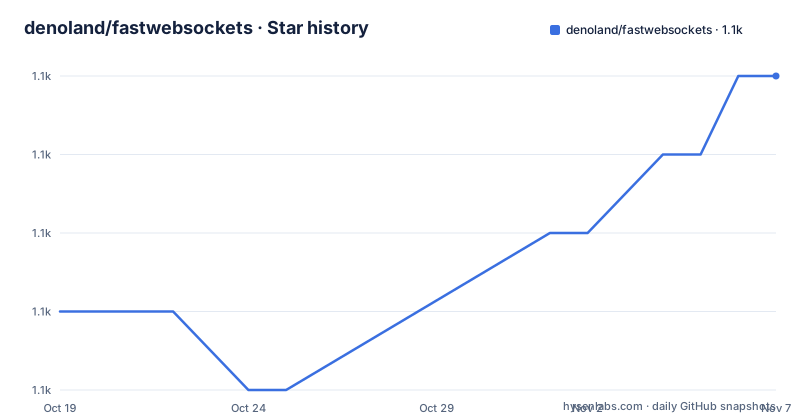
- denoland/fastwebsockets1,139 ★ · +3
| Repository | 2026-10-19 | 2026-11-07 |
|---|---|---|
| denoland/fastwebsockets | 1.1k | 1.1k |
3 Stars in the last 19 days, measured from the daily GitHub snapshot. Compare with other projects
Editorial analysis
Two ways to use the same implementation
The README states the choice in plain terms: you can use fastwebsockets as a raw WebSocket frame parser and deal with spec compliance yourself, or you can use it as a full-fledged WebSocket client and server.
That distinction is the heart of the library. A higher level WebSocket library gives you messages, and message semantics mean the library decides when a fragmented message is complete, how the control frames are handled and when a close handshake happens. fastwebsockets gives you frames, and the decision about what those frames mean is yours.
The payoff is control. The example loop is a small program you can read in one go, and every step in it is something you chose:
use fastwebsockets::{Frame, OpCode, WebSocket};

async fn handle_client(
  mut socket: TcpStream,
) -> Result<(), WebSocketError> {
  handshake(&mut socket).await?;

  let mut ws = WebSocket::after_handshake(socket);
  ws.set_writev(true);
  ws.set_auto_close(true);
  ws.set_auto_pong(true);

  loop {
    let frame = ws.read_frame().await?;

    match frame {
      OpCode::Close => break,
      OpCode::Text | OpCode::Binary => {
        let frame = Frame::new(true, frame.opcode, None, frame.payload);
        ws.write_frame(frame).await?;
      }
    }
  }

  Ok(())
}
Three setters show the trade-off in miniature. set_writev(true) enables vectored writes, set_auto_close(true) lets the library answer a close frame for you, and set_auto_pong(true) answers pings. Each is a switch between doing the work yourself and letting the library do it, and each default is the lighter option.
The project is Apache-2.0 licensed, the crate version in Cargo.toml is 0.10.0 with edition 2021, and the last push to the repository was on 2026-07-31. The repository has no GitHub releases, so the crates.io version is the record of what has shipped.
FragmentCollector exists because the default is raw frames
The fragmentation section is the one to read twice, because it is where fastwebsockets differs most from what most Rust developers have used.
By default, fastwebsockets gives the application raw frames with FIN set. The README contrasts this with other crates, naming tungstenite as the example that gives you a single message with all the frames concatenated. So the same stream of bytes produces a different shape of API depending on the library.
If you want the assembled behaviour, you wrap the socket in FragmentCollector:
let mut ws = WebSocket::after_handshake(socket);
let mut ws = FragmentCollector::new(ws);

let incoming = ws.read_frame().await?;
// Always returns full messages
assert!(incoming.fin);
The comment in the example is the guarantee, always returns full messages. The wrapper sits between your socket and the frame reader, and it reassembles the continuation frames for you.
The design point is worth stating plainly because it explains the library's appeal. In the default mode, a fragmented message arrives as several calls to read_frame, and the application has to know that a message started with a frame whose FIN bit is false and continues until a frame with FIN set arrives. That is bookkeeping every application would otherwise write, and getting it wrong is a source of protocol bugs. fastwebsockets lets you skip that bookkeeping when you want to, and lets you keep it when the raw view is what your application needs.
The example that uses FragmentCollector is the echo server, where the application wants whole messages so it can send them back. The raw frame example in the earlier section is a case where the application wants to see exactly what arrived.
The upgrade feature brings hyper and an executor to implement
WebSocket connections start as HTTP, so something has to perform the upgrade. The README is clear about the split of responsibility.
Enable the upgrade feature to do server-side upgrades and client-side handshakes, and the feature is powered by hyper. The server side looks like this:
use fastwebsockets::upgrade;
use hyper::{Request, body::{Incoming, Bytes}, Response};
use http_body_util::Empty;
use anyhow::Result;

async fn server_upgrade(
  mut req: Request<Incoming>,
) -> Result<Response<Empty<Bytes>>> {
  let (response, fut) = upgrade::upgrade(&mut req)?;

  tokio::spawn(async move {
    if let Err(e) = handle_client(fut).await {
      eprintln!("Error in websocket connection: {}", e);
    }
  });

  Ok(response)
}
The interesting part is that upgrade::upgrade returns a response and a future, and the future is what becomes the socket. The HTTP response is returned to the client while the WebSocket conversation continues on the future, which is why the handler has to spawn it.
The client side uses the handshake module, and the example shows what you take on when you go that way. The request is built with the Upgrade and Connection headers, a Sec-WebSocket-Key generated by handshake::generate_key(), and Sec-WebSocket-Version set to 13, and then handshake::client is called with the request and the stream.
The extra cost is the executor. The example defines a SpawnExecutor struct and implements hyper::rt::Executor for it so that the hyper runtime is tied to the tokio runtime:
// Tie hyper's executor to tokio runtime
struct SpawnExecutor;

impl<Fut> hyper::rt::Executor<Fut> for SpawnExecutor
where
  Fut: Future + Send + 'static,
  Fut::Output: Send + 'static,
{
  fn execute(&self, fut: Fut) {
    tokio::task::spawn(fut);
  }
}
That is a real cost of the design. The library does the protocol, and the runtime plumbing is yours to write.
The Axum path is a feature flag away
If you are already on Axum, the integration is described in one line: enable the Axum integration with features = ["upgrade", "with_axum"] in Cargo.toml.
The example shows a complete server in a few lines. A Router with a single route, a tokio listener bound to 0.0.0.0:3000, and a handler that takes an upgrade::IncomingUpgrade, calls ws.upgrade() to get the response and the future, spawns the future, and returns the response.
The one detail worth noticing is that the handler inside the Axum example uses FragmentCollector, not the raw WebSocket. It creates the collector from the upgraded future, reads frames, breaks on OpCode::Close, and writes text or binary frames back. So the Axum path shows the more common shape, where the application sees whole messages.
The dependency set for that path is visible in Cargo.toml. The axum integration is three optional dependencies, axum-core 0.5.0, http 1 and async-trait 0.1, and the example target that uses them is declared in the manifest with required-features = ["upgrade", "with_axum"].
The same manifest pattern applies to the other examples. The echo_server, autobahn_client, tls_client and tls_server examples all require the upgrade feature, and echo_server_split requires both upgrade and unstable-split, which is the one feature name in the visible part of the manifest that signals an experimental area.
permessage-deflate is not supported, and that changes your design
The README states the compression limitation in a single line, and it is a significant one: permessage-deflate is not supported yet.
For a WebSocket library, that is a boundary that shapes deployments rather than a footnote. If your traffic is text and you rely on the per message deflate extension to reduce bandwidth, this library cannot give it to you as it stands. The client and the server both have to agree on the extension, and one side offering it is not a workaround.
There is a second consequence, which is about what the application does with the payload. Because there is no built in compression, and because the default mode hands you raw frames, the size of the data you buffer and the decision about when to compress are both yours.
The README also documents the testing that gives some confidence in the parts that are supported. The implementation passes the Autobahn TestSuite, which is the conformance suite for the protocol, and it is fuzzed with LLVM's libfuzzer. The repository layout backs this up with an autobahn/ directory, a fuzz/ directory and a benches/ directory that the README links from the badge row at the top, alongside the tests/ directory.
So the picture is a protocol implementation that has been held to a conformance suite and to fuzzing, with a specific and currently unclosed gap in the compression support. That is a reasonable position for a library to be in, as long as you know about the gap before you design around it.
The Cargo manifest is the feature documentation
The package manifest is worth reading in full, because the feature flags are the whole configuration surface.
The default feature set is a single entry, default = ["simd"], and the corresponding optional dependency is simdutf8 at 0.1.5. So a plain cargo build of the crate gets the SIMD accelerated UTF-8 handling and nothing else. The upgrade feature is the one that pulls in the HTTP machinery, and it is a list of six optional dependencies: hyper with the http1, server and client features, pin-project, base64, sha1, hyper-util and http-body-util. The base64 and sha1 entries are there for the handshake key generation.
The always-on dependency list is short and tells you about the scope of the crate. tokio is declared with default-features = false and only the io-util feature, which is all the crate needs from the runtime because it does nothing but read and write frames. Then utf-8 0.7.5, rand 0.9.3, thiserror 1.0.40 and bytes 1.5.0.
The manifest also shows that this is a workspace with care taken over the examples. Every example target is declared with its own required-features list, so cargo build without the right features simply does not try to build an example that would not compile.
The repository root has the supporting files you would expect from a project with this structure: a rust-toolchain file, a.rustfmt.toml, a.cargo/ directory, the autobahn/ and fuzz/ directories for the conformance and fuzzing work, and the benches/ directory the README links for benchmarks.
tungstenite and the other direction: messages instead of frames
The alternative is named in the README itself, and the difference is the whole design decision rather than a matter of degree.
tungstenite gives you a single message with all the frames concatenated. fastwebsockets gives you raw frames with FIN set by default, and offers FragmentCollector if you want the assembled behaviour. The two libraries differ in who owns the message boundary: in one, the library decides where a message ends, and in the other your code does unless you opt in.
The consequence shows up in the shape of the application. With a message oriented library you write a receive loop that yields a message and a send call that sends one. With fastwebsockets in its default mode you write a receive loop that yields a frame, and you decide what a FIN bit of false means for your protocol, how continuation frames are stitched, and what happens if a peer sends a fragment you did not expect. The library is happy to let you make those choices, which is exactly the point and exactly the extra work.
There is a middle ground in fastwebsockets itself, and it is the option most applications should take. Wrapping the socket in FragmentCollector gives the message oriented behaviour while keeping the rest of the library, so the question is not fastwebsockets or tungstenite but whether you want the raw frame view or the assembled one. The fragmentation section exists precisely because some workloads need the first and most need the second.
The other difference is the HTTP upgrade. fastwebsockets leaves the upgrade to the upgrade feature and hyper, and in the client case asks you to implement hyper's executor trait. A library that owns more of the connection lifecycle asks less of you at the cost of less control over it.
Editorial conclusion
Adopt fastwebsockets if you are writing a WebSocket server in Rust, you want control over frames, and you are prepared to deal with message assembly and the HTTP upgrade yourself or through the upgrade feature. Do not adopt it if you need permessage-deflate, which the README states is not supported yet, or if you want a library that returns whole messages. Verify first which features your build needs, since the default set is only simd and the upgrade feature pulls in hyper, and check that the version you pin, 0.10.0, matches the Autobahn results you rely on.
Frequently asked questions
What is the difference between fastwebsockets and tungstenite?
By default fastwebsockets gives the application raw frames with FIN set, while the README names tungstenite as a crate that gives you a single message with all the frames concatenated. Wrapping the socket in FragmentCollector gives fastwebsockets the assembled behaviour as well.
Does fastwebsockets support WebSocket compression?
No. The README states that permessage-deflate is not supported yet, so a deployment that relies on the per message deflate extension needs a different implementation or a plan to do without it.
How do I use fastwebsockets with Axum?
Enable the integration with features = ["upgrade", "with_axum"] in Cargo.toml. The example then builds a Router with a route handled by an upgrade::IncomingUpgrade, calls ws.upgrade() for the response and the future, and spawns the future to run the WebSocket loop.
How is fastwebsockets tested?
The README states that the implementation passes the Autobahn TestSuite and is fuzzed with LLVM's libfuzzer. The repository holds an autobahn/ directory, a fuzz/ directory, a benches/ directory and a tests/ directory, and the examples include an autobahn_client.
Official sources
Add this badge to your README
If you maintain this project, the badge below links readers to this analysis and shows its maintenance status from the daily GitHub snapshot. Paste the markdown into your README; add ?metric=license or ?metric=stars to the image URL for a different field.

[](https://hysenlabs.com/projects/denoland-fastwebsockets)Star history chart for your README
[](https://hysenlabs.com/projects/denoland-fastwebsockets)Was this useful?