herdr web ui puts your coding agent sessions in a browser and on your phone
Browser and phone client for herdr: chat and live terminal for every agent pane, remote PCs over SSH, web push alerts
At a glance
- What is it?
- herdr web ui is a TypeScript web client for the herdr terminal, rendering the same workspaces, tabs, split panes and agent sessions as a live terminal or as a chat, with web push alerts when an agent needs input and a phone client that can attach a screenshot or branch a new worktree. It requires herdr 0.9.0 or newer and ships as an installable PWA.
- Who is it for?
- herdr web ui is worth adopting for the specific problem of an agent session that asks you a question while you are away from the machine, because the chat view, the live terminal view and the web push alert together turn a blocked session into an answered one from a phone.
- Can I use it commercially?
- Yes. MIT is a permissive licence: you can use, modify and sell software built on it, as long as you keep its copyright and licence notices.
- Is it still maintained?
- Yes. The repository received new commits within the last day.
- What is it written in?
- Mainly TypeScript, according to GitHub's language statistics.
Answers come from the project's GitHub data, last synced on November 7, 2026, and from our analysis. They are not legal advice.
Star history
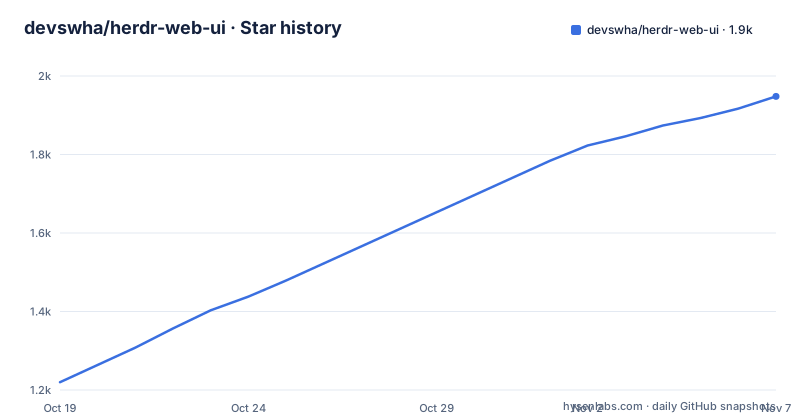
- devswha/herdr-web-ui1,948 ★ · +728
| Repository | 2026-10-19 | 2026-11-07 |
|---|---|---|
| devswha/herdr-web-ui | 1.2k | 1.9k |
728 Stars in the last 19 days, measured from the daily GitHub snapshot. Compare with other projects
Editorial analysis
A terminal multiplexer, viewed from somewhere else
herdr runs agents in workspaces, tabs and split panes, and this project is its browser and phone client. The framing in the description is chat and a live terminal for every agent pane, remote PCs over SSH, and web push alerts, and the badge in the README states the requirement, herdr 0.9.0 or newer. The concrete scenario the README records is one Claude Code session appearing in three places, in herdr's own terminal, then in the browser's Terminal and Chat views, then on the phone, where a new worktree starts beside it. That scenario explains why this is not a web terminal emulator. The sessions are not recreated in the browser. They are the same sessions, running on your computer, and the client is a second way to see and drive them. The audience is a developer running Claude Code or Codex under herdr who needs to check on an agent, answer a question, or start something new from a phone, and who does not want to sit at the machine where the agents run.
Two views of the same pane, chat and terminal
The interface offers two ways to work with a pane and the README treats the switch as a single click. The chat view is the agent conversation, where you read what the agent said and type a reply. The terminal view is the pane's real terminal, so the recorded demo shows the browser's terminal running the same pane as Claude Code's own terminal while its edit adds a test to src/server.test.ts. On the phone, the terminal view keeps a key bar where the up arrow brings back a previous command and the Enter key runs it beside the terminal, which is the detail that makes a phone usable for this. The terminal itself is xterm, with the fit, unicode graphemes and web links addons, and the server side uses node-pty to attach to the pane. There is also a file viewer, since a path in the agent's answer or in the terminal can be opened directly, and the phone opens the same path full screen. The practical difference between the two views is that chat is for talking to the agent and terminal is for watching or doing work yourself in the same pane.
The layout model is workspaces, tabs and split panes
The browser mirrors herdr's layout rather than inventing its own, and the README's second recording is a tour of it. The sidebar lists workspaces, and in the example there are four, checkout-api, web-dashboard, infra and release. Each row ends in its agent's state, a green dot on checkout-api whose Claude has finished, a turning arc on web-dashboard whose Codex is working, and nothing on the other two. A workspace holds tabs, checkout-api has payments and dev, and a tab can be a split with several panes, where the dev tab holds tests and git, and the pane menu lists both. Clicking a tab shows its first pane, and clicking a pane in the menu shows that pane. The phone opens the same four workspaces with the same states, and a tap on a workspace opens the agent's chat. The state indicators are the part that earns the screen space, because the usual problem with several agents is not reading a reply but knowing which one is waiting for you.
Web push alerts, and a phone that can start a new worktree
The alert mechanism is what makes the client useful away from the desk. In the recorded demo, Claude is working on checkout-api in the browser while the phone shows another workspace's terminal, and when Claude asks which rate limit to use, an alert reading checkout-api Needs input drops in on the phone. One tap opens the question as a card, and in the browser the same workspace's row and its row under Agents show a red question mark while the card waits in the chat. The implementation is the web-push package, and the phone is an installable PWA, which is what lets a notification reach a home screen app rather than a browser tab. The phone can also do things, not just watch. A plus button in an empty chat attaches a screenshot of a receipt, uploads it into the pane's folder and inserts its path into the message, so the agent reads the image. And the pane menu offers New worktree, which opens a form with a branch name already filled in, lets you pick Claude Code or another agent, and starts a second agent beside the first.
Installing it as a plugin, with a hosted demo to try first
The repository is structured for installation rather than for reading. There is an install.sh and an install.ps1 at the root, an INSTALL.md, and a herdr-plugin.toml manifest, which is how the client registers itself with herdr. The project also points at a hosted demo so you can look before you install, and at a quick start in the guide under docs/. The client is a Bun and React application, and the scripts in package.json show the whole development surface:
bun --bun vite
bun --bun vite build
bun test
Beyond that there are typed test tiers, test:unit and test:integration, both routed through scripts/ci-tests.ts, a test:ui script that runs three separate regression suites after a build, including one for sticky modifiers, which tells you that keyboard modifier handling on mobile is a known source of regressions, and a test:ssh script for SSH integration. There is a typecheck script that runs tsc twice, once for the main project and once for the tools project, a generate:types script that produces protocol types, and separate build:remote and build:site scripts. The repository is carefully organised for automated work, with AGENTS.md, a DESIGN.md, a.coderabbit.yaml and a telemetry/ directory, and the interface itself is translated, since the README is offered in English, Simplified Chinese, Japanese and Korean.
Remote machines over SSH, and the protocol behind it
The remote side is part of the product rather than an extra. The description lists remote PCs over SSH, and the repository has a build:remote script for a remote bundle, a test:ssh script for SSH integration, and a separate release tag, remote-v29, published alongside the v0.4.10 and v0.4.9 web ui releases. The architecture follows from the dependency set. The client does not embed a browser terminal emulator that talks to a local shell. It attaches to panes through node-pty, which is the same mechanism a terminal multiplexer uses, and the presence of a protocol type generator, scripts/generate-protocol-types.ts, and a shared/ directory tells you there is a typed message protocol between the server and the browser. That matters for the remote case, because the browser is a client of the server rather than the server itself being a terminal, so the same interface can sit in front of a machine reached over SSH. The rest of the dependency set is a normal modern front end, React 19, lucide-react for icons, mermaid for diagrams, katex for maths, @tanstack/highlight for syntax highlighting, and a list rendering library.
Fast releases, a telemetry directory, and a security surface to read
The project moves quickly. v0.4.9 and v0.4.10 were both published on 2026-10-15, and the last push was on 2026-10-19, with the version in package.json at 0.4.10 and the package marked private, since it is an application rather than a published library. The licence is MIT, with a LICENSE file, a THIRD_PARTY_NOTICES.md, a SECURITY.md, a CODE_OF_CONDUCT.md and a CONTRIBUTING.md, and the changelog is split between a CHANGELOG.md and a changelog.d/ directory, which is the convention for accumulating unreleased entries. The two things a careful adopter should look at are the telemetry/ directory, because a client that runs on your machine and reports usage is a decision you should make deliberately, and the security surface itself. This application attaches to live terminal panes and can run commands in them, from a phone, over a network. That is the feature, and it is also the reason to read the security documentation, put it behind authentication, and understand exactly which machine the server runs on before you point a phone at it.
Editorial conclusion
herdr web ui is worth adopting for the specific problem of an agent session that asks you a question while you are away from the machine, because the chat view, the live terminal view and the web push alert together turn a blocked session into an answered one from a phone. It is the wrong tool if you do not already run herdr, if you want to drive the agents from a browser with no herdr installation at all, or if you cannot accept that this client has full terminal access to your machine, since it is a client with terminal access to your machine exposed over the network. Before adopting it, read the security notes in the repository, check the telemetry settings, and try the hosted demo first to see whether the chat and terminal views fit the way you work before you install it on the machine that runs your agents.
Frequently asked questions
What does herdr web ui need in order to run?
It is a client for herdr and requires herdr 0.9.0 or newer, according to the badge in the README. The repository includes install.sh and install.ps1 scripts, an INSTALL.md file and a herdr-plugin.toml manifest, and a hosted demo is linked for trying it before installing.
Can I use herdr web ui from my phone?
Yes, it is an installable PWA. The phone shows the same workspaces and agent states, opens an agent's chat, includes a key bar for the terminal view, can attach a screenshot that is uploaded into the pane's folder, and can start a new worktree with a chosen agent.
How do I know when an agent needs my input?
Web push notifications drop in on the phone when an agent asks a question, one tap opens the question as a card, and in the browser the workspace row and its row under Agents show a red question mark while the same card waits in the chat.
How is the project developed and tested?
It is a Bun, React and Vite application. The scripts include the dev, build and test scripts, plus separate unit, integration and UI regression suites, an SSH integration script, and a typecheck that runs tsc over both the main and tools projects.
Official sources
Add this badge to your README
If you maintain this project, the badge below links readers to this analysis and shows its maintenance status from the daily GitHub snapshot. Paste the markdown into your README; add ?metric=license or ?metric=stars to the image URL for a different field.

[](https://hysenlabs.com/projects/devswha-herdr-web-ui)Star history chart for your README
[](https://hysenlabs.com/projects/devswha-herdr-web-ui)Was this useful?