SwiftList indexes the NTFS USN Journal from a SYSTEM service, and only the installer ships that service
A modern, high-performance local file search and productivity tool for Windows. A sleek, customizable alternative to Everything and Listary built with C# WPF and NT Services, featuring instant NTFS MFT parsing, real-time USN monitoring, and plugin support.
At a glance
- What is it?
- SwiftList is a Windows file search launcher in C# with WPF on .NET 10 that reads the NTFS USN Journal and MFT instead of walking directories, kept in sync by a SYSTEM-level service separated from the per-user UI. The four download artifacts differ in exactly the way that matters, and three scripts in the repository root are never mentioned.
- Who is it for?
- SwiftList is a good fit for a Windows workstation on NTFS volumes where you want filename search without an index build step, and the split between the installer and the portable zip is the decision that matters: the background service is the mechanism the whole design rests on, and it is only stated as supported for the installer.
- Can I use it commercially?
- Yes. MIT is a permissive licence: you can use, modify and sell software built on it, as long as you keep its copyright and licence notices.
- Is it still maintained?
- Yes. The repository last received commits 102 days ago.
- What is it written in?
- Mainly C#, according to GitHub's language statistics.
Answers come from the project's GitHub data, last synced on November 14, 2026, and from our analysis. They are not legal advice.
Star history
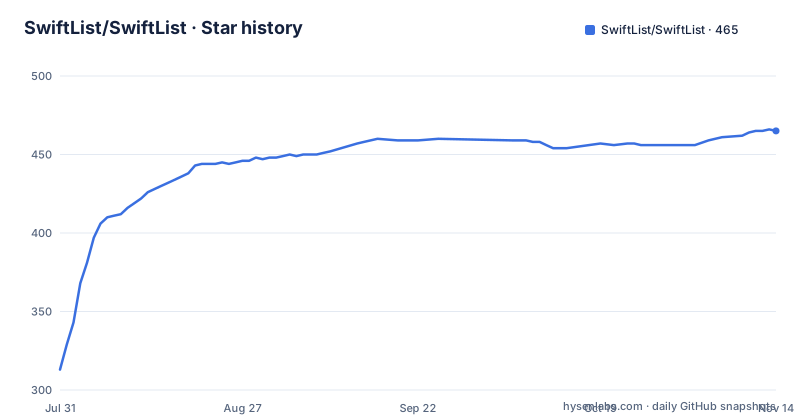
- SwiftList/SwiftList465 ★ · +152
| Repository | 2026-07-31 | 2026-11-14 |
|---|---|---|
| SwiftList/SwiftList | 313 | 465 |
152 Stars in the last 106 days, measured from the daily GitHub snapshot. Compare with other projects
Editorial analysis
Three patch releases in one afternoon, and nothing committed since 2026-08-05
The three most recent tags all carry the same date. v4.2.0 was published at 01:06 on 2026-08-05, v4.2.1 at 03:39 the same day, and v4.2.2 at 06:07, five hours and one minute from first to last. The last commit in the default branch landed at 06:05 that afternoon, about two minutes before the final tag went out, so the last push and the last release are effectively the same moment.
Each release is titled with nothing but its own version string: v4.2.0, v4.2.1, v4.2.2. No product name in the title, no summary line, nothing to compare the three against each other. For a project at patch version 4.2.2, the change history between those five hours is not recoverable from the tags.
Measured against today, the repository has been quiet for close to two months and is not archived. That is a normal gap rather than a signal, but it is the number to plan around if you need new NTFS behaviour for a newer Windows build.
The portable zip drops the background service the design depends on
Four artifacts are offered, two per architecture. On x64 the installer SwiftList-Setup.exe is marked recommended and carries the note that it supports the background service, while SwiftList-Portable.zip is described only as no install, unzip and run. On ARM64 the pair repeats: SwiftList-Setup_arm64.exe for Snapdragon and Windows on ARM, and SwiftList-Portable_arm64.zip as the native portable build.
The background service is not an accessory. One highlight is process isolation, described as a SYSTEM-level indexing service kept separate from the per-user app UI, and another is the claim that a low-footprint background service keeps the index in sync in real time. Take the service away and the index stops tracking changes, which is the whole reason to read the USN Journal instead of walking directories.
So the portable build is not the installer without the installer. Confirm on your own volumes whether real-time sync survives in the portable mode before choosing it for a machine you depend on. One thing the download section does get right: every link points at releases/latest/download/, so the URLs follow the newest tag rather than a pinned version.
Three root scripts do work the download section never mentions
Five batch and registry files sit at the repository root. Two are described. build_and_run.bat rebuilds App, Core, Service and the plugins, then relaunches everything locally. make.bat produces Release builds for both x64 and ARM64 into a dist/ directory.
The other three get no coverage at all. install-dotnet-runtime.bat has no description anywhere on the page, and its name implies the shipped application expects a .NET runtime already present on the machine. The requirements line under building from source names the .NET 10 SDK, which is a build-time dependency, not a runtime requirement, and the download section says nothing about what a user machine needs. portable-updater.bat is likewise undocumented, and so is portable-cleanup-registry.reg.
That last file is the informative one. A registry cleanup script implies the portable mode writes keys somewhere and needs a separate wipe to remove them, which is a cost the no install description does not mention. Check whether the installer bundles its runtime before rolling this out to a locked-down machine with no package manager.
Two solution files, and a Cli/ directory with no documented role
The root carries SwiftList.slnx and SwiftList.Plugins.slnx, two separate solutions in the newer format. Directories at the same level are App/, Cli/, Core/, Installer/, PluginSdk/, Plugins/, Readmes/, Service/, Site/, and Tests/, plus an AGENTS.md, an .editorconfig, and a LICENSE.
The one build script that describes its scope names four of those: App, Core, Service and the plugins. Cli/, Tests/, Site/, Installer/ and Readmes/ appear in no script description and no section of the page. Cli/ in particular has a directory and no explanation, and with a separate plugins solution it is plausible that a command line entry point exists that the launcher story never mentions. Nothing in the tree states which projects belong to which solution.
The plugin surface is described in one sentence instead: search providers, aliases, context-menu actions, result columns, previews, and themes. Six extension points, each with its own contract, and the reference for all of them is the developer manual on the documentation site rather than anything in the repository.
Both indexing structures are NTFS, and no other volume type is mentioned
The speed claim has one mechanism behind it. Millisecond indexing reads the NTFS USN Journal and the MFT directly rather than walking directories, and the background service keeps that index current. The USN Journal is a change log of filesystem operations and the MFT is the metadata table, and both are NTFS structures.
The page calls the tool a global search over local drives and never names a volume type other than NTFS. ReFS, exFAT, FAT32, network shares and BitLocker-protected volumes are not mentioned, and neither is the case where the USN Journal has been trimmed to its minimum size or disabled by policy or by a cleanup utility. On those volumes the fallback is undefined, so the cost of a wrong assumption is that the search silently covers less than you expect.
Search itself is delegated in the same way. Fuzzy matching is described as multi-keyword with prefix, suffix, exact and exclude operators, plus pinyin aliasing for Chinese filenames, and the syntax detail sits on the user manual page. The aliasing feature is why the Traditional Chinese and Japanese pages are not a translation afterthought.
Seven translated pages, and every actual detail behind two links
The header offers English plus six translations: Simplified Chinese, Traditional Chinese for Hong Kong, Traditional Chinese for Taiwan, Japanese, Korean, and Spanish. Three separate Traditional variants, which tells you the project expects readers across several markets rather than one.
What the page itself provides is an index. The user manual is pointed at for search syntax, every hotkey, and every settings option. The developer manual is pointed at for architecture and the plugin SDK reference. The highlights section, six bullets long, is the whole of the feature description.
Both destinations are sub-pages of swiftlist.github.io, which is also the repository homepage, and the tree contains a Site/ directory. The documentation therefore appears to be built from this repository and published to the same host, which has two consequences worth planning for. Changes to the manual ride along with releases rather than landing independently, and none of the manual exists in the repository as text you can read offline or grep. Anyone writing a plugin will be reading a web page for the contract while the code sits next to them.
The support link is a single TRC20 wallet address
The support section asks readers to consider a donation and then offers one thing: a USDT address on the TRC20 network. There is no hosted donation page, no GitHub Sponsors entry, no link to an issue tracker and no discussion board anywhere on the page.
That is a small thing and a defensible choice for a solo maintainer, especially under the MIT License, which puts no condition on use at all. It is still the only support channel named, so a bug has nowhere to go on the page itself, and the project has 19 open issues against 460 stars, which is the ratio where a tracker link starts to matter.
Two practical notes if you send anything. A payment address has no built-in verification and no way to reverse a transfer, so confirm it from a second source before transferring rather than trusting a copy from a page you found through a search. And whatever you send, the licensing terms stay exactly as they are: MIT, with no obligation attached.
Editorial conclusion
SwiftList is a good fit for a Windows workstation on NTFS volumes where you want filename search without an index build step, and the split between the installer and the portable zip is the decision that matters: the background service is the mechanism the whole design rests on, and it is only stated as supported for the installer. Before deploying it, check whether your volumes are NTFS at all, whether the USN Journal is available on them, and whether the binary you grabbed bundles the .NET runtime or expects one already on the machine. If you are reading this because you want the plugin SDK, budget a trip to the developer manual, since the repository itself documents two of its five scripts and none of the extension points in detail.
Frequently asked questions
Which SwiftList build includes the background indexing service?
The installer, SwiftList-Setup.exe on x64 and SwiftList-Setup_arm64.exe on ARM64, is the one marked as supporting the background service. The portable zips are described only as no install, unzip and run.
What filesystem structures does SwiftList read for its index?
It reads the NTFS USN Journal and the MFT directly instead of walking directories, with a SYSTEM-level background service keeping the index in sync in real time. No other volume type is named on the project page.
Does SwiftList run on Apple Silicon or Linux?
It is a Windows launcher built on .NET 10 with WPF, and the published artifacts cover Windows on x64 and native ARM64 for Snapdragon and Windows on ARM. Building from source asks for Windows 10 or 11.
What can a SwiftList plugin add?
Search providers, aliases, context-menu actions, result columns, previews, and themes. The reference for those extension points is the developer manual, not a file in the repository.
How do I build SwiftList from source?
You need Windows 10 or 11, the .NET 10 SDK, Visual Studio 2022 or JetBrains Rider, plus Inno Setup for the installer. build_and_run.bat rebuilds App, Core, Service and the plugins locally, and make.bat produces Release builds for x64 and ARM64 in dist/.
Which languages does the SwiftList project publish?
Seven: English, Simplified Chinese, Traditional Chinese for Hong Kong, Traditional Chinese for Taiwan, Japanese, Korean, and Spanish. Search also supports pinyin aliasing for Chinese filenames.
Official sources
Add this badge to your README
If you maintain this project, the badge below links readers to this analysis and shows its maintenance status from the daily GitHub snapshot. Paste the markdown into your README; add ?metric=license or ?metric=stars to the image URL for a different field.

[](https://hysenlabs.com/projects/swiftlist-swiftlist)Star history chart for your README
[](https://hysenlabs.com/projects/swiftlist-swiftlist)Was this useful?