cass-memory: Turning Agent Session Logs into a Shared Playbook
Procedural memory for AI coding agents: transforms scattered session history into persistent, cross-agent memory so every agent learns from every other
At a glance
- What is it?
- cass-memory is a TypeScript and Bun CLI that consolidates session history from multiple AI coding agents into a confidence-tracked rule set. The design is worth understanding, but it is labelled alpha, the licence metadata is unresolved, and it only pays off if you already have session logs worth mining.
- Who is it for?
- Adopt cass-memory if you run several coding agents on overlapping work and already archive their session logs, because the three-layer pipeline only produces useful rules when there is raw material to search. Do not adopt it if you use a single agent, keep no session history, or need a stable interface today: the project labels itself alpha and the repository metadata reports NOASSERTION for the licence even though the README badge says MIT.
- Can I use it commercially?
- Check first. The repository uses a licence we do not classify automatically, so read its LICENSE file before any commercial use.
- Is it still maintained?
- Yes. The repository last received commits 9 days ago.
- What is it written in?
- Mainly TypeScript, according to GitHub's language statistics.
Answers come from the project's GitHub data, last synced on November 14, 2026, and from our analysis. They are not legal advice.
Star history
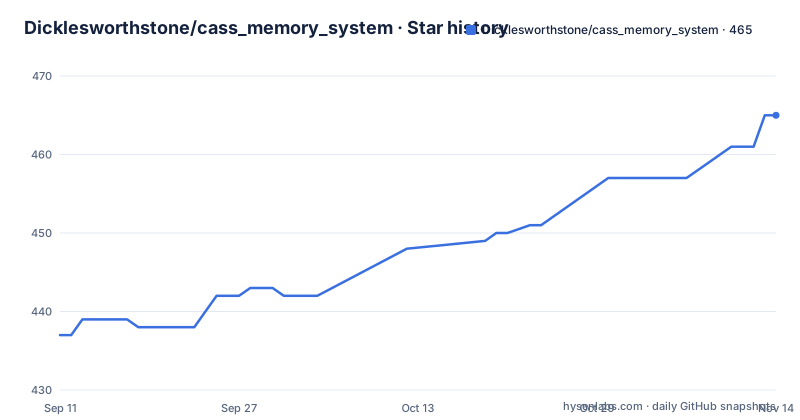
- Dicklesworthstone/cass_memory_system465 ★ · +28
| Repository | 2026-09-11 | 2026-11-14 |
|---|---|---|
| Dicklesworthstone/cass_memory_system | 437 | 465 |
28 Stars in the last 64 days, measured from the daily GitHub snapshot. Compare with other projects
Editorial analysis
The problem cass-memory claims: knowledge trapped inside single sessions
The README opens with a concrete complaint. Coding agents accumulate debugging strategies, code patterns and project-specific insights during sessions, and that knowledge is lost when the session ends. Its framing is blunt: you may have solved the same authentication bug three times this month across different agents, starting from scratch each time. The second half of the problem is structural rather than accidental. Claude Code does not know what Cursor learned yesterday, and raw conversation logs are not directly usable as guidance. A third failure mode is named as well: naive summarisation loses nuance, so the project treats summarisation as a lossy step to be managed rather than a solution. The intended audience is developers and teams running more than one agent against a shared codebase, plus agents themselves, which are expected to query memory before starting a task. If you run exactly one agent and never revisit its transcripts, the cross-agent premise does not apply to you.
Three layers, three storage shapes: cass, diaries, playbook bullets
The architecture is a pipeline with three named layers. Episodic memory is the raw ground truth: session logs from Claude Code, Codex, Cursor, Aider, PI, Gemini, ChatGPT and others, queried through something called the cass search engine. Working memory is a set of diary entries with a fixed shape: accomplishments, decisions, challenges and outcomes. Procedural memory is the playbook, a list of rules carrying confidence values, anti-patterns and feedback. Data flows downward. cass search retrieves relevant episodes, a reflect and curate step condenses them into diary entries, and those entries become playbook bullets. Retrieval flows the other way: an agent calls cm context with a task description and receives rules plus historical context before it starts. The README describes this as mirroring how human expertise develops, which is a framing device rather than a mechanism. The load-bearing claim is that every agent's sessions feed one shared store, so a pattern found in one tool is available to the others without manual transfer.
Confidence decay and anti-pattern inversion are the two mechanisms that matter
Rules do not persist unchanged. The README states a 90-day half-life: confidence halves every 90 days without revalidation. A harmful mark counts four times as heavily as a helpful one, so a rule with several failures loses standing quickly. Rules progress through maturity states named candidate, established and proven. The stated purpose is to stop stale guidance from accumulating, and the asymmetry is deliberate: the system is built to distrust rules faster than it trusts them. The second mechanism is inversion. When a rule collects multiple harmful marks, it is not deleted. The README gives the example of caching auth tokens for performance being rewritten into a pitfall warning against caching auth tokens without expiry validation. That is a genuine design choice with a cost: the playbook grows rather than shrinks, and an agent reading context receives warnings alongside positive rules. Whether the four-times multiplier and the 90-day half-life are well calibrated is not something the README justifies with data.
Getting it running: install paths and the agent-facing CLI surface
The README lists three install routes. On Linux and macOS there is a piped install script: curl -fsSL "https://raw.githubusercontent.com/Dicklesworthstone/cass_memory_system/main/install.sh?$(date +%s)" | bash -s -- --easy-mode --verify. Homebrew users can run brew install dicklesworthstone/tap/cm. Windows users add a Scoop bucket with scoop bucket add dicklesworthstone https://github.com/Dicklesworthstone/scoop-bucket and then scoop install dicklesworthstone/cm. Note that piping a remote script into bash executes whatever the server returns at that moment; the URL includes a date-based query parameter, which defeats caching but also means the fetched content is not pinned to a version. The CLI binary is cm. For agent use the README is explicit: always pass --json, because stdout carries data, stderr carries diagnostics, and exit code 0 signals success. The onboarding sequence is cm onboard status --json, then cm onboard sample --fill-gaps --json, then cm onboard read /path/to/session.jsonl --template --json, then cm onboard mark-done /path/to/session.jsonl. Task-time retrieval is cm context "implement auth rate limiting" --json. The README also documents an MCP server and a configuration section.
The onboarding commands reveal the real prerequisite: you need the logs first
The onboard subcommands are the most informative part of the README. cm onboard status reports progress, cm onboard sample --fill-gaps selects sessions to work through, cm onboard read takes a path to a specific session.jsonl file, and cm onboard mark-done closes it out. The workflow is manual and file-by-file, which tells you something the marketing framing does not: cass-memory does not conjure memory from nothing. It needs session logs on disk, in JSONL form, and it needs someone or something to walk through them. The --fill-gaps flag implies the tool can identify which sessions have not yet been processed, which is useful, but the reading step still takes an explicit path. If your agents do not write session transcripts you can point at, the pipeline has no input. That is the adoption gate, and it sits before any question about rule quality. The README's own quickstart section calls this the minimum viable workflow, which is an honest description of a bootstrapping chore rather than a one-command setup.
Where it is the wrong tool, and what it does not do
The repository describes itself as alpha, and that label should be taken literally: interfaces can move between releases, and the release cadence (v0.2.12 in June 2026, v0.2.13 in July, v0.2.14 in August) suggests active iteration rather than stabilisation. The licence situation is unresolved. The README badge says MIT, but the repository metadata reports NOASSERTION, meaning no machine-readable licence was detected. Those two signals conflict, and until you check the LICENSE file yourself you do not know what terms apply. A second limitation is scope. Because procedural memory is built from session history, cass-memory is close to useless on a fresh machine or a new project with no accumulated transcripts. A third is the confidence model itself: decay and the four-times harmful multiplier are heuristics, and the README does not present evidence that they match how a given team's rules actually age. Teams that need deterministic, hand-curated coding standards may find a versioned style guide or linter configuration easier to reason about than a decaying rule set with maturity states.
How it differs from a plain retrieval index over your transcripts
The obvious alternative is to keep the raw sessions and query them directly with a search tool or a vector index, skipping the distillation step. That approach has real advantages: nothing is lost to summarisation, there is no decay model to tune, and the retrieval surface is the transcript itself rather than a derived artefact. cass-memory takes the opposite position. It treats raw logs as episodic input and deliberately compresses them twice, first into structured diary entries and then into rules with confidence values. The bet is that an agent starting a task benefits more from a short list of tracked rules than from retrieved passages of past conversation, and that the tracking (decay, harmful marks, inversion into anti-patterns) is what keeps that short list honest. The trade-off is legibility: with a raw index you can always read the original session, whereas with a playbook you are trusting the curation step. The README does not document how to audit a rule back to the sessions that produced it, which is the question I would want answered before relying on the distilled layer alone.
Maintenance cost and the licence question you have to resolve yourself
Three releases in roughly three months, all in the 0.2.x line, indicate a project that is still finding its shape. Budget for reading release notes before upgrading, and expect the playbook format and CLI flags to change. The install script fetches from the main branch with a cache-busting timestamp rather than pinning a tag, so a piped install is not reproducible; Homebrew and Scoop are the safer routes if you want a versioned artefact. On licence, the conflict between the MIT badge and the NOASSERTION metadata is the first thing to settle, because it determines whether you can vendor the code, ship it internally, or wrap it in a product. I am not giving legal advice here: read the LICENSE file in the repository and, if the terms matter commercially, have someone qualified confirm them. That gap is itself a reason to read the full README before committing a team to it.
Editorial conclusion
Adopt cass-memory if you run several coding agents on overlapping work and already archive their session logs, because the three-layer pipeline only produces useful rules when there is raw material to search. Do not adopt it if you use a single agent, keep no session history, or need a stable interface today: the project labels itself alpha and the repository metadata reports NOASSERTION for the licence even though the README badge says MIT. Before installing, verify which licence actually governs the code, confirm the cass search engine is present and indexed, and run cm onboard status --json to see how much session data the tool can reach.
Frequently asked questions
How does cass-memory turn agent sessions into reusable knowledge?
It uses a three-layer design: episodic memory holds raw session logs from all agents through the cass search engine, working memory holds structured session summaries as diary entries, and procedural memory holds distilled rules as playbook bullets with confidence tracking. Agents including Claude Code, Codex, Cursor, Aider, PI, Gemini and ChatGPT feed the shared episodic layer.
What happens to a cass-memory rule that turns out to be wrong?
After three harmful marks it is inverted into a PITFALL statement rather than deleted, so a rule like caching auth tokens becomes a warning not to cache them without expiry validation. Confidence also halves every 90 days without revalidation, and one harmful mark counts four times a success.
How do I install cass-memory, and what is the command called?
The npm package is named cass-memory, but both the Homebrew formula and the Scoop package are named cm, and the bin entries install as cass-memory and cm. The Linux and macOS one-liner fetches install.sh with a timestamp query parameter and runs bash -s -- --easy-mode --verify.
Can cass-memory be used as a Node library?
Not through the manifest as written. package.json sets main to ./dist/cass-memory, which is the output of a Bun compile step and a standalone executable rather than a module, and there is no exports map, so importing the package resolves to that binary. It is built to be run as a CLI.
What platforms does cass-memory build for?
Five build targets: Linux x64 baseline and Linux arm64, macOS arm64 and macOS x64 baseline, and Windows x64 baseline. There is no Windows arm64 target and no musl Linux target. The lint script is an alias for typecheck, and the repository carries both bun.lock and package-lock.json.
Official sources
Add this badge to your README
If you maintain this project, the badge below links readers to this analysis and shows its maintenance status from the daily GitHub snapshot. Paste the markdown into your README; add ?metric=license or ?metric=stars to the image URL for a different field.

[](https://hysenlabs.com/projects/dicklesworthstone-cass-memory-system)Star history chart for your README
[](https://hysenlabs.com/projects/dicklesworthstone-cass-memory-system)Was this useful?