OpenClaude: One Terminal for Cloud and Local Coding Models
runs anywhere. uses anything
At a glance
- What is it?
- OpenClaude is a TypeScript coding-agent CLI that routes prompts, tools and MCP through a single terminal workflow across OpenAI-compatible APIs, Gemini, Ollama and other backends. The pitch is provider portability; the cost is that portability is exactly where the sharp edges live.
- Who is it for?
- Adopt OpenClaude if you already juggle several model backends and want one terminal surface for bash, file tools, grep, glob, agents, tasks, MCP and web tools instead of a separate harness per provider. Do not adopt it if you need a settled licence position today, or if your work depends on a single vendor's proprietary agent features that a compatibility layer cannot reproduce.
- Can I use it commercially?
- Check first. The repository uses a licence we do not classify automatically, so read its LICENSE file before any commercial use.
- Is it still maintained?
- Yes. The repository last received commits 2 days ago.
- What is it written in?
- Mainly TypeScript, according to GitHub's language statistics.
Answers come from the project's GitHub data, last synced on November 12, 2026, and from our analysis. They are not legal advice.
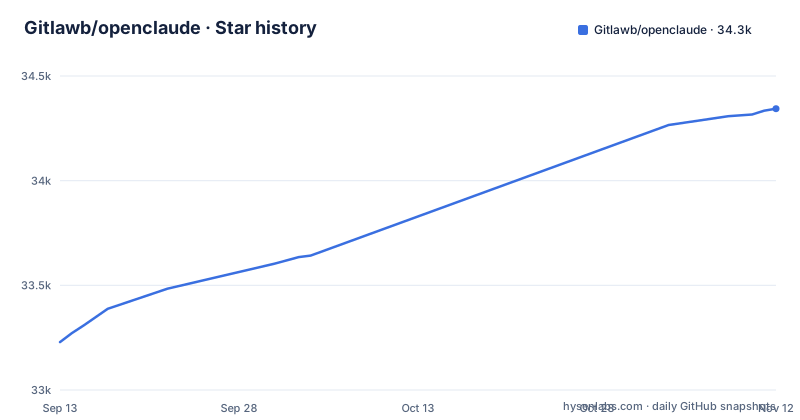
Star history
- Gitlawb/openclaude34,344 ★ · +1,115
| Repository | 2026-09-13 | 2026-11-12 |
|---|---|---|
| Gitlawb/openclaude | 33.2k | 34.3k |
1,115 Stars in the last 60 days, measured from the daily GitHub snapshot. Compare with other projects
Editorial analysis
The problem OpenClaude targets: provider lock-in in the terminal
Most coding agents are welded to one vendor. You pick a model provider, and the terminal harness, the tool definitions, the slash commands and the streaming output all come as a package with it. Switch providers and you rebuild your habits. OpenClaude's README frames the project as an answer to that: an open-source coding-agent CLI for cloud and local model providers, with one terminal-first workflow covering prompts, tools, agents, MCP, slash commands and streaming output. The intended user is an engineer who already has access to more than one backend, whether through an OpenAI-compatible endpoint, a Gemini key, GitHub Models, Codex OAuth, Ollama on their own machine, or Atomic Chat, and who does not want a different tool per endpoint. The secondary audience is people running local models who still want the agent affordances (bash, file tools, grep, glob, agents, tasks, web tools) that cloud CLIs assume. If you only ever talk to one provider and that provider's own CLI already fits, OpenClaude solves a problem you do not have.
What the repository actually shows about the architecture
The primary language is TypeScript, and the README lists a bundled VS Code extension for launch integration and theme support. The feature list is a flat enumeration: bash, file tools, grep, glob, agents, tasks, MCP and web tools. MCP support means the tool set is extensible beyond what ships in the box. The provider layer is described as accepting OpenAI-compatible APIs, Gemini, GitHub Models, Codex OAuth, Codex, Ollama and Atomic Chat.
Install and first run: the commands the README gives
The README states that OpenClaude requires Node.js `>=24.22.1` for npm installs and runtime (Node 26 recommended), and that Bun is only needed for source builds. The npm package is `@twigpine/openclaude`, so the install line is `npm install -g @twigpine/openclaude@latest`; the README says the package moved from the `@gitlawb` scope, which is no longer updated. Provider configuration is handled through a slash command: `/provider` is described as guided provider setup with saved profiles. That is the key operational detail. Profiles mean you configure a backend once and switch between saved configurations rather than re-entering endpoints and keys per session. The VS Code extension is bundled, and the README points to a section titled Meet your buddy, which describes a pixel-art hero companion that fires an arrow every time you press Enter. The README lists it among the project's features.
Where the single-CLI promise breaks down
Provider portability is a compatibility claim, and compatibility claims are where coding agents fail quietly. An OpenAI-compatible API is compatible at the request shape, not at the model behaviour. Tool-calling fidelity, parallel tool calls, streaming deltas and context limits all vary by backend, and a CLI that presents them as one workflow has to either normalise aggressively (losing provider-specific features) or pass through (leaking provider quirks into your prompts). The practical consequence is that a prompt tuned against one backend may behave differently against another with the same flags, and the failure will look like the model being bad rather than the adapter being lossy. The second limitation is the release cadence. Recent releases are v0.32.0 on 2026-10-12, v0.33.0 on 2026-10-15 and v0.34.0 on 2026-11-02, roughly three weeks in total. That is fast enough that pinning a version matters if you script the CLI in CI. The third is the licence, covered below. None of these are disqualifying, but the first one is the reason to test your actual backend before trusting the abstraction.
Licence status: the badge and the metadata disagree
The README carries a licence badge linking to a LICENSE file. GitHub's repository metadata classifies the licence as NOASSERTION, which is what GitHub reports when it cannot map the LICENSE file to a known licence. The practical reading: read the LICENSE file itself before you depend on MIT terms, especially if you plan to redistribute the CLI inside a product or vendor it into an internal platform. This is a description of what the metadata shows, not legal advice, and the only reliable source is the file in the repository. Check it before you build on it, not after.
How it compares with Aider and with a vendor CLI
Aider is the closest well-known alternative in the open-source terminal agent space, and the difference is in the centre of gravity. Aider's design centres on git: it edits files and commits changes, and its model support is broad but the workflow is built around repository diffs. OpenClaude's README centres on the provider layer and the tool registry instead, listing bash, file tools, grep, glob, agents, tasks, MCP and web tools as the workflow, with a VS Code extension alongside. If your work is mostly multi-file edits you want reviewed as commits, Aider's model fits more directly. If your work is closer to an agent that runs commands, searches a tree, calls MCP servers and streams output while you sit in a terminal, OpenClaude's shape is the more natural one, and its provider list explicitly includes local backends such as Ollama and Atomic Chat. Against a vendor CLI, the trade is the reverse: you give up features the vendor only exposes to its own harness in exchange for not being tied to that vendor. Whether that trade is worth it depends entirely on whether you actually switch backends. If you do not, the vendor CLI is likely better tuned to its own model.
Maintenance cost and what to verify before adopting
The upgrade cost is dominated by the release cadence and the provider surface. With releases on 2026-10-12, 2026-10-15 and 2026-11-02, a global npm install will drift, and a pinned version in a script will need periodic attention as provider APIs change underneath it. Saved profiles under `/provider` are the thing most likely to need editing when a backend changes its auth or endpoint shape, so keep a note of which profile maps to which backend. Before adopting, verify four things in the repository rather than in the README: the actual contents of LICENSE, the adapter code for the one backend you intend to use, whether tool-calling is normalised or passed through, and whether the Node.js `>=24.22.1` floor is enforced at runtime or only documented. Then run one real task end to end against your backend with `/provider` configured, and repeat it against a second backend if portability is the reason you are here. If the same prompt produces materially different tool behaviour across the two, you have your answer about how much the abstraction is doing for you.
Editorial conclusion
Adopt OpenClaude if you already juggle several model backends and want one terminal surface for bash, file tools, grep, glob, agents, tasks, MCP and web tools instead of a separate harness per provider. Do not adopt it if you need a settled licence position today, or if your work depends on a single vendor's proprietary agent features that a compatibility layer cannot reproduce. Before committing, run `node --version` and confirm it reports 24.22.1 or higher, then install with `npm install -g @twigpine/openclaude@latest`, run `/provider` to see which backends the guided setup actually offers you, and read LICENSE in the repository rather than assuming MIT terms, because the repository metadata classifies the licence as NOASSERTION.
Frequently asked questions
What is openclaude?
OpenClaude is an open-source coding agent command line interface for cloud and local model providers. It works with OpenAI-compatible APIs, Gemini, GitHub Models, Codex OAuth, Codex, Ollama, Atomic Chat and other backends, keeping one terminal-first workflow of prompts, tools, agents, MCP, slash commands and streaming output.
how to install openclaude
With `npm install -g @twigpine/openclaude@latest`, which needs Node.js 24.22.1 or newer; Bun is only needed for source builds and local development. Arch Linux users can install the community-maintained AUR package instead. If the install reports that ripgrep is not found, install ripgrep system-wide and confirm it in the same terminal first.
how to set up open claude
Start the tool and run the provider command for guided setup, which offers guided setup with saved provider profiles. OpenClaude deliberately does not load project .env files automatically, to protect against accidental key exposure in untrusted repositories, so export variables yourself or pass a file with the provider environment file flag.
Is OpenClaude free to use?
The tool is installed from the public package registry and has no licence fee listed in the README, though GitHub reports its licence as NOASSERTION, so read the LICENSE file for the actual terms. Running it costs whatever your chosen model provider charges, and the project lists cloud and local backends including Ollama, so the cost depends on which provider you point it at rather than on the tool.
Official sources
Add this badge to your README
If you maintain this project, the badge below links readers to this analysis and shows its maintenance status from the daily GitHub snapshot. Paste the markdown into your README; add ?metric=license or ?metric=stars to the image URL for a different field.

[](https://hysenlabs.com/projects/gitlawb-openclaude)Star history chart for your README
[](https://hysenlabs.com/projects/gitlawb-openclaude)Was this useful?