potencializando-estudos-carreira-com-ia: a DIO course that walks you from chatbot to agent
Curso "Potencializando Seus Estudos e Carreira com IA: De Chatbots a Agentes"
At a glance
- What is it?
- The digitalinnovationone repository is a Portuguese-language course that builds one study plan three times, once with a chatbot, once with a copilot and once with an agent. It is a curriculum, not a library, and the README is the whole product.
- Who is it for?
- Adopt this if you are in career transition, have roughly an hour a day, and want to feel the difference between asking a chatbot, working beside a copilot and delegating to an agent before you pick any paid tool. Skip it if you want source code, a runnable install, or an English-language text: the repository holds a single README.md and no licence file.
- Can I use it commercially?
- Not without permission. GitHub finds no licence file in the repository, and without a licence all rights are reserved by default: you may read the code but not reuse it. Check the README, or ask the authors, before using it.
- Is it still maintained?
- Activity is slowing. The repository last received commits 6 months ago.
- What is it written in?
- GitHub does not report a main language for this repository.
Answers come from the project's GitHub data, last synced on November 15, 2026, and from our analysis. They are not legal advice.
Star history
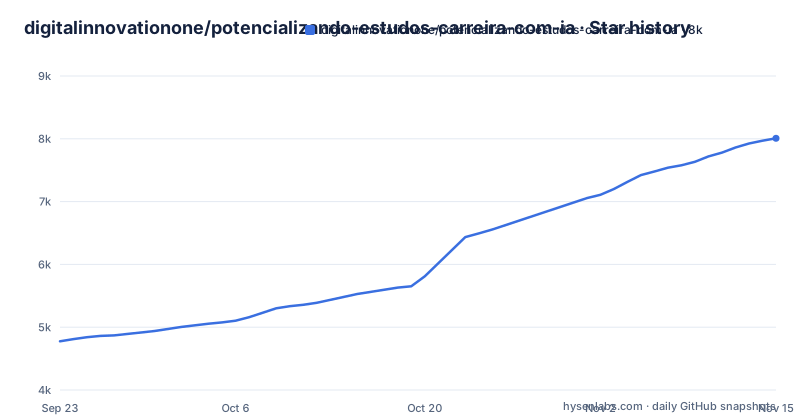
- digitalinnovationone/potencializando-estudos-carreira-com-ia8,008 ★ · +3,232
| Repository | 2026-09-23 | 2026-11-15 |
|---|---|---|
| digitalinnovationone/potencializando-estudos-carreira-com-ia | 4.8k | 8k |
3,232 Stars in the last 53 days, measured from the daily GitHub snapshot. Compare with other projects
Editorial analysis
What the DIO course actually ships
The repository contains one file: README.md. There is no application, no package manifest, no build step and no test suite. The primary language field is unrecorded, and so is the licence. What the README does contain is a three-stage curriculum titled "Potencializando Seus Estudos e Carreira com IA: De Chatbots a Agentes", written in Portuguese for people entering technology, including career changers, with no prior AI experience assumed.
The stated audience is narrow and honest about it. Each lesson starts from zero on its topic, and the README says explicitly that you do not need AI experience to follow along. The deliverable is not software. It is a personal study plan, produced three times through three different modes of interaction, each mode handing its output to the next.
The last push to the default branch was on 2026-05-05. That is just under six months before today, close enough to the edge of a six-month window that the repository should be treated as lightly maintained rather than continuously updated. The README promises periodic updates with new practical suggestions, and it asks readers to follow the repository for that reason. The promise is in the text, not in a release history: the repository has no published releases.
Chatbot, copilot, agent: the three-level ladder and why it is the real content
The course's organising idea is a progression in how much autonomy you hand over. A chatbot is described as a consultant you consult: you describe a doubt, it answers from what it already knows, and the README is blunt that answer quality tracks question quality. A copilot is a colleague beside you: it sees the artifact you are working on and suggests improvements without being asked. An agent is a delegate: you explain what you need, it decides how to get there and executes, and you review the result rather than every step.
The README adds one distinction that the rest of the course leans on. A chatbot only knows what you type into the conversation. A copilot can reach into the context of the tool it is embedded in. The example given is Gemini inside Google Docs, which the README says can use your Drive files and even your Gmail as reference material. That is the mechanism that makes stage two different from stage one, and it is also the mechanism that creates the privacy question the course raises but does not fully resolve.
The three stages share a single artifact. Stage one produces an area of technology and five starter topics. Stage two turns those into a 30-day plan inside a document. Stage three turns the document into a folder of files on your machine. Nothing is thrown away, which is why the sequence holds together as a lesson rather than three disconnected demos.
Running the chatbot stage: one prompt, one notepad file
There is nothing to install. The README points at ChatGPT and says any other chatbot is fine. The first exercise is a prompt you paste into the chat window, with one bracketed slot for your background.
Quero entrar na área de tecnologia, estou em transição de carreira e tenho 1h por dia para estudar.
Meu background é em [sua área de origem, ex.: Psicologia].

Me ajude a decidir por onde começar. Responda assim:

1. Três áreas que combinam com meu perfil, em ordem de afinidade
2. Uma sugestão final de qual escolher e o porquê
3. Cinco tópicos iniciais para estudar nessa área

Use linguagem simples, como se fosse uma conversa com um amigo.
The prompt fixes the output shape: three candidate areas ranked by fit, one recommendation with a reason, and five topics. The instruction to answer in plain language is doing real work, because the default register of most chatbots is denser than a beginner needs. What you should see is a short ranked list and a recommendation. The README tells you to copy the result into a notepad file, since the chosen area and the five topics are the input to the next stage.
Stage two and three: the copilot prompt and the agent workspace
Stage two happens in a blank Google Docs document with the integrated copilot open. The prompt takes the area and topics from stage one and asks for a 30-day plan, then adds a line asking the copilot to consider content already in your emails or Drive, with a parenthetical asking it not to expose sensitive data.
Crie um plano de estudos de 30 dias para mim.

Área escolhida: [cole a área da prática anterior]
Tópicos iniciais: [cole os cinco tópicos da prática anterior]

Estruture com:
- Meu objetivo
- Cronograma semanal (semanas 1 a 4) distribuindo os tópicos
- Materiais e referências por semana

Considere conteúdos sobre essa área que estejam nos meus emails ou no meu Drive.
Sugerindo assim, materiais que já fazem parte do meu contexto (sem expor dados sensíveis).
That parenthetical is the weakest link in the course. Asking a model not to expose sensitive data is a request, not a control. The README frames the Drive and Gmail access as the clearest demonstration that a copilot knows you and a chatbot does not, which is true, but it treats the privacy caveat as a clause rather than a decision the learner should make deliberately.
Stage three is the only step that touches your filesystem. The README instructs you to create an empty folder, open Google Antigravity pointed at that folder, and paste the document from stage two into a prompt that asks the agent to explain its intended structure before executing.
Segue o plano de estudos que escrevi com a ajuda de um copiloto:

---
[cole o conteúdo do documento da prática anterior]
---

Materialize esse plano nesta pasta criando:

1. README.md com o resumo do plano
2. cronograma.md com o roteiro semanal (semanas 1 a 4)
3. uma pasta "anotacoes" com um modelo "semana-01.md" para eu duplicar
4. recursos.md com os materiais separados por semana

Antes de criar, me explique brevemente sua estrutura. Depois execute.
The output is four named artifacts: a README summary, a weekly schedule file, a notes folder with a week-one template to duplicate, and a resources file grouped by week. The final instruction is the pedagogically interesting part. Forcing the agent to state its plan before acting is the cheap way to keep a human in the loop, and the README follows it with a review step where it says most of the learning happens.
Where this course breaks down
The course is coupled to specific products. Stage two assumes a copilot embedded in a document editor with access to your Drive and Gmail. Stage three assumes Google Antigravity. The README's own warning that tools appear and disappear is therefore a warning about its own instructions, not just about the field.
The agent stage also fails quietly in a way the course does not address. If the pasted plan is vague, the agent will still produce a folder of files, and the files will look finished. Nothing in the workflow checks whether the 30-day schedule is realistic for someone studying one hour a day. The review step is described as where learning happens, but it is left entirely to the learner's judgement, with no checklist and no example of a good review.
The agent section also gives no rollback guidance: it does not say what to do if the agent writes files you did not want, overwrites something, or places the workspace in the wrong directory. Pointing an agent at a folder on your desktop is a low-stakes way to learn that lesson, which is presumably the intent, but the text never says so.
Finally, the language barrier is real. The entire course, including all prompts, is in Portuguese. The prompts are the product. Translating them changes the output you get, and a learner who cannot read Portuguese is better served by a course written for them.
Alternatives, and what they ask of you instead
The clearest alternative is DeepLearning.AI's short courses on prompt engineering and on building agentic workflows. The difference is one of framing rather than topic. Those courses teach the mechanics of a model and let you choose your own project; this DIO course fixes the project (a personal study plan) and varies the tool. If your goal is to understand why an agent needs a plan-before-execute step, the mechanics-first approach gets there faster. If your goal is to feel the difference between asking and delegating, the fixed project is the better teacher, because you see the same artifact travel through all three stages.
A second alternative is simply using one chatbot for all three stages and noticing what it cannot do. That is free and needs no enrolment, but it removes the copilot's context access and the agent's file writing, which are the two mechanisms the course exists to demonstrate. The comparison is not about which tool is better. It is about which one can see your document and which one can create your files.
For the agent stage specifically, any coding agent that can be pointed at a working directory would substitute for Antigravity. Substituting a different agent means the folder structure and the review step are the only parts of stage three that survive.
Maintenance, licence and what you are actually adopting
The last push was on 2026-05-05, so the repository has not been touched in roughly six months. The README says it will be updated periodically as the tooling changes, and asks readers to follow it. Treat that as an intention, not a schedule.
No licence file is present in the repository. The top-level entries list only README.md, and the licence field is unrecorded. That matters more than it would for a code project, because the README contains prompts you might want to reuse, adapt into your own teaching material, or translate. Without a licence, the default position is that no permission has been granted, and anyone planning to republish the prompts or fold them into a paid course should confirm terms with the author rather than assume. This is a description of the repository's state, not legal advice.
Upgrade cost is close to zero in the technical sense and non-zero in the practical sense. There is nothing to upgrade. The cost is that when Antigravity or the Docs copilot changes, the instructions stop matching reality, and the README advises focusing on the concepts first. That is decent advice delivered as a disclaimer.
Editorial conclusion
Adopt this if you are in career transition, have roughly an hour a day, and want to feel the difference between asking a chatbot, working beside a copilot and delegating to an agent before you pick any paid tool. Skip it if you want source code, a runnable install, or an English-language text: the repository holds a single README.md and no licence file. Before you start, verify three things: that Google Antigravity is still available to you, that you are willing to paste a personal study plan into a copilot that can read your Drive and Gmail, and that you accept the README's own warning that tools in this space appear and disappear quickly. The course will not age well as a tool list. It will age fine as a sequence of three prompts you can retarget at whatever replaces them.
Frequently asked questions
Is there anything to install for potencializando-estudos-carreira-com-ia?
No. The repository contains only a README.md, and the exercises run inside existing tools: a chatbot such as ChatGPT, a copilot inside Google Docs, and Google Antigravity for the agent stage. There is no package, build step or command to run.
What is the difference between the chatbot, copilot and agent stages in this course?
The README frames a chatbot as a consultant you ask, a copilot as a colleague who sees the document you are editing and suggests improvements, and an agent as a delegate that decides how to complete a task and executes it. The copilot stage adds access to your Drive and Gmail, and the agent stage is the only one that writes files to your computer.
What does the agent stage of potencializando-estudos-carreira-com-ia actually produce?
According to the README, it creates a README.md with the plan summary, a cronograma.md with the four-week schedule, an anotacoes folder containing a semana-01.md template to duplicate, and a recursos.md listing materials by week. The prompt asks the agent to explain its structure before creating anything.
Does the repository have a licence?
No licence file is present. The repository's top-level entries list only README.md and the licence is unrecorded, so anyone intending to reuse or republish the prompts should confirm terms with the author first.
Official sources
Add this badge to your README
If you maintain this project, the badge below links readers to this analysis and shows its maintenance status from the daily GitHub snapshot. Paste the markdown into your README; add ?metric=license or ?metric=stars to the image URL for a different field.

[](https://hysenlabs.com/projects/digitalinnovationone-potencializando-estudos-carreira-com-ia)Star history chart for your README
[](https://hysenlabs.com/projects/digitalinnovationone-potencializando-estudos-carreira-com-ia)Was this useful?