OmniCloud: a self-hosted aggregation layer for Google Drive, OneDrive, Dropbox, MEGA, pCloud, Yandex and S3
OmniCloud is a full-stack cloud drive aggregation platform that presents multiple storage providers through a single, consistent workspace.
At a glance
- What is it?
- OmniCloud is an MIT-licensed Node and Vue application that normalises seven storage backends behind one Express API and one file workspace. It is a metadata mirror plus adapter registry, not a sync client, and that distinction decides who should run it.
- Who is it for?
- Adopt OmniCloud if you already hold accounts on several providers and want one browsable workspace without moving bytes between them, and if you are comfortable running an Express API with a SQLite mirror yourself. Do not adopt it if you need file content synchronised to local disk, if you need a provider outside the seven listed, or if you expect a supported release channel: there are no releases, the test script exits with an error, and the last push was on 2026-06-13.
- Can I use it commercially?
- Yes. MIT is a permissive licence: you can use, modify and sell software built on it, as long as you keep its copyright and licence notices.
- Is it still maintained?
- Yes. The repository last received commits 165 days ago.
- What is it written in?
- Mainly JavaScript, according to GitHub's language statistics.
Answers come from the project's GitHub data, last synced on November 25, 2026, and from our analysis. They are not legal advice.
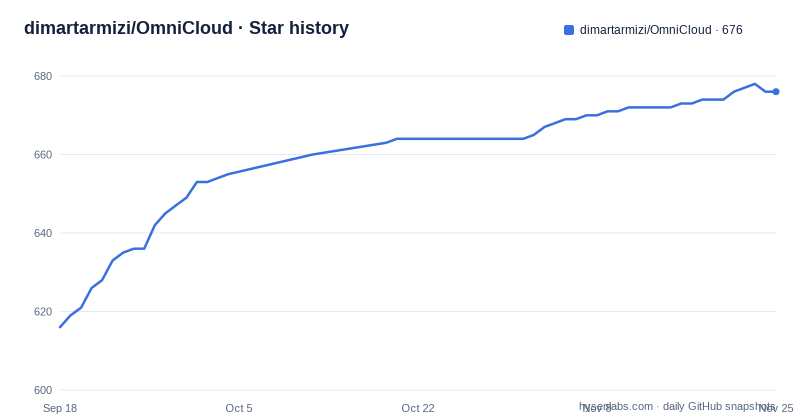
Star history
- dimartarmizi/OmniCloud676 ★ · +60
| Repository | 2026-09-18 | 2026-11-25 |
|---|---|---|
| dimartarmizi/OmniCloud | 616 | 676 |
60 Stars in the last 68 days, measured from the daily GitHub snapshot. Compare with other projects
Editorial analysis
The problem OmniCloud addresses: seven provider APIs, one file list
Anyone with a personal Google account, a work Microsoft 365 tenant and a cheap S3 bucket knows the shape of the problem. Each provider has its own concept of a folder, its own pagination, its own permission model, and its own idea of what a file identifier looks like. OmniCloud's answer is an adapter registry. The README lists seven adapters by their internal names: google_drive, onedrive, dropbox, mega, pcloud, yandex and s3. The backend picks the right one per request, then normalises the response into what the README calls the OmniCloud data model. Everything above that layer, the file explorer, the quota view, the allocation settings, sees one shape.
The intended user is someone self-hosting, not a team buying storage. The README describes two app modes: local for personal or simple self-hosted usage, and hosted for multi-user deployments with session-cookie register, login and logout. In hosted mode, account data, file mirrors, allocation config and settings are scoped per user. That is a meaningful distinction. A single-user deployment can treat the SQLite file as disposable. A multi-user deployment cannot, because the mirror is the only place the mapping between a user and their provider accounts lives.
The provider mix is unusual in one respect. Five of the seven connect over OAuth (Google Drive, OneDrive, Dropbox, Yandex Disk), two connect with an email and password account (MEGA, pCloud), and S3 connects with an access key, a secret key and an endpoint. That third model is the one that makes OmniCloud useful outside consumer storage: any S3-compatible endpoint qualifies, so MinIO or a Backblaze-style bucket can sit alongside a personal Drive account in the same file list.
How the adapter registry, SQLite mirror and WebSocket hub fit together
The architecture diagram in the README is worth reading carefully, because it shows a design that is deliberately not a sync client. The frontend is a Vue 3 app built with Vite, using Pinia, Vue Router and i18n. It talks to the Express backend over REST for auth, accounts, files, uploads, settings and allocation. The backend talks to providers through the adapter registry and writes normalised metadata into SQLite. That SQLite database is a mirror, not a cache of file contents.
Two background services run alongside the request path. The sync service is driven by node-cron on a schedule, and the README also says the API exposes a manual sync trigger, with delta sync reports available through the health/sync layer. The allocation service decides which connected account receives an upload, using one of five strategies: round_robin, weighted_round_robin, least_used, most_free and manual. For manual, an account priority order can be configured. This is the part of the project with the clearest opinion: spreading uploads across accounts is treated as a first-class concern rather than something the user does by hand.
Upload progress travels over a separate channel. The backend pushes progress to the client through a WebSocket hub, which is why the docker-compose frontend build passes VITE_WS_BASE_URL: /ws/uploads as a build argument. The frontend views map onto routes the README enumerates: / for the dashboard, /my-drive for the explorer, /shared-with-me, /recent, /starred, /quota for quota, account management and allocation settings, plus /login and /register in hosted mode. File operations listed include create folder, rename, delete including bulk delete, download, preview for supported types, and star or unstar on providers that support it.
The honest reading of this layout is that OmniCloud is a metadata and navigation layer with an upload path attached. Browsing is fast because it hits SQLite. Freshness depends entirely on how often the cron sync runs and whether the manual trigger has been fired. The README does not state the default schedule, which is the first thing to check in the backend configuration.
Installing OmniCloud and connecting a first account
The README's requirements section is short: Node.js 20 or later, npm, and provider credentials for whichever services you intend to connect. It recommends a current compatible Node.js LTS release. The repository is a workspace, with backend and frontend declared under the root workspaces field, so dependency installation happens once from the repository root.
npm install
npm run dev
The dev script uses npm-run-all to start both sides in parallel: dev:api runs the backend dev script and dev:web runs the frontend Vite dev server with the --host flag. For a production-style start, the root start script delegates to the backend.
npm run build
npm start
The build script only builds the web app, via npm --prefix frontend run build. There is no separate backend build step in the root package.json. Before either path works you need a backend/.env file, because docker-compose.yml declares env_file: backend/.env and the compose environment block fills in the rest.
PORT: 8787
DATABASE_PATH: /app/data/omnicloud.db
CORS_ORIGIN: http://localhost:8080
FRONTEND_URL: http://localhost:8080
GOOGLE_REDIRECT_URI: http://localhost:8080/api/accounts/google/callback
Those values come from the api service in docker-compose.yml, and the same file carries equivalent redirect URIs for OneDrive, Dropbox and Yandex. The web service builds the frontend with VITE_API_BASE_URL set to /api and VITE_WS_BASE_URL set to /ws/uploads, publishes port 8080 to port 80 in the container, and depends on the api service. A named volume, omnicloud_api_data, holds the SQLite file at /app/data. Both services use restart: unless-stopped.
docker compose up -dAfter that, the first real use is connecting an account and confirming that the mirror populates. Detailed credential setup lives in docs/provider-setup.md, which the README points to and which is not reproduced here. For OAuth providers you register the redirect URI with the provider; for MEGA and pCloud you supply an email and password; for S3 you supply an access key, a secret key and an endpoint. Once an account is connected, trigger the manual sync through the API and then open /my-drive. If files appear there but not in /quota, the account sync succeeded and the quota fetch did not, which points at the provider adapter rather than the mirror.
Where OmniCloud breaks down: credentials, providers and the mirror
The largest limitation is stated by the README rather than hidden in code: MEGA and pCloud connect with an email and password. Those credentials are handled by the OmniCloud backend, not by an OAuth consent screen you can revoke from the provider's own settings. If you are not comfortable with that, the two account-based adapters are off the table and you are working with five providers instead of seven. There is no way to convert them to token-based auth, because the providers do not offer it in this integration model.
The second limitation is that the SQLite mirror can drift. Sync runs on a node-cron schedule, and the README does not document the default interval. Anything you change directly in the provider's own web interface will not appear until the next sync or a manual trigger. For a user who treats OmniCloud as their only interface this is invisible. For a user who also works in drive.google.com, it produces a stale file list, and the failure mode is confusing rather than loud: the file simply is not there.
Third, this is not a sync client. Nothing in the README describes downloading file contents to local disk for offline access, reconciling conflicting edits, or versioning. Uploads go from browser to provider through the API. Downloads come back the same way. If what you actually want is a folder on your laptop that mirrors a cloud drive, OmniCloud is the wrong tool and no configuration will make it the right one.
There is also a maintenance signal worth naming plainly. The root package.json defines test as echo "Error: no test specified" && exit 1, so there is no test suite to run. The repository has no published GitHub releases. The last push was on 2026-06-13. That is a snapshot of a working project, not a project with a release cadence, and it should shape how you plan upgrades.
OmniCloud compared with rclone: aggregation versus synchronisation
The obvious comparison is rclone, and the difference is architectural rather than feature-level. rclone is a command-line sync and transfer tool. It moves bytes between a local filesystem and roughly any remote you can name, with checksums, dry runs, filters and bandwidth limits. It has no web interface in its core form and no concept of a user account on top of it.
OmniCloud inverts that. It has a Vue workspace and an Express API, and it stores metadata in SQLite so that browsing is instant. It does not present itself as a bulk transfer engine, and the README documents no checksum verification, no bandwidth limiting and no dry-run mode. What it offers instead is a consistent browsing surface across providers that rclone does not attempt, plus multi-user scoping in hosted mode and an allocation service that decides which account an upload lands on.
If your task is moving 400 GB from Dropbox to S3 once, rclone is the correct instrument and OmniCloud is not. If your task is giving a handful of users one place to browse their own scattered accounts, with uploads spread across them by policy, rclone gives you nothing and OmniCloud is aimed exactly at that. The two are not substitutes, and running both against the same accounts is a reasonable arrangement: rclone for bulk movement, OmniCloud for daily navigation.
Licence, upgrade cost and what the repository actually commits to
The repository carries an MIT licence at the root, and the root package.json declares "license": "ISC", which is a mismatch worth noting before you rely on either. MIT and ISC are both permissive and both permit commercial use, modification and redistribution with the licence text retained. The practical difference here is small, but if you are vendoring the code into a product, read the LICENSE file at the root rather than the package.json field, since that is the file that actually ships. This is a description of what the files say, not legal advice.
Upgrade cost is low in the ordinary case and slightly awkward in the unusual one. Dependencies install from a single root package-lock.json across both workspaces, and the root package.json is marked private, so the project is not published to npm and you will be tracking the main branch rather than a version. There are no releases to pin to. That means an upgrade is a git pull plus npm install, with the risk concentrated in the frontend build and the SQLite schema. The README does not document migrations or a rollback path for schema changes, so back up the volume holding /app/data/omnicloud.db before pulling.
The docker-compose stack is the part that ages best. The api service reads backend/.env and takes its runtime configuration from environment variables, so provider credentials and redirect URIs can be changed without touching code. The frontend is different: VITE_API_BASE_URL and VITE_WS_BASE_URL are build arguments, not runtime variables, so changing the API path or the WebSocket path requires rebuilding the web image. Plan your hostname and path layout before the first build.
Editorial conclusion
Adopt OmniCloud if you already hold accounts on several providers and want one browsable workspace without moving bytes between them, and if you are comfortable running an Express API with a SQLite mirror yourself. Do not adopt it if you need file content synchronised to local disk, if you need a provider outside the seven listed, or if you expect a supported release channel: there are no releases, the test script exits with an error, and the last push was on 2026-06-13. Before deploying, read docs/provider-setup.md, confirm which OAuth redirect URIs your provider consoles accept, and check whether the docker-compose environment block already matches the hostnames you will serve the app from.
Frequently asked questions
What is OmniCloud?
It is a full-stack cloud drive aggregation platform that presents multiple storage providers through a single workspace. The README describes a Vue 3 client, an Express API with a provider adapter layer, and a SQLite metadata mirror, covering Google Drive, OneDrive, Dropbox, Yandex Disk, MEGA, pCloud and S3-compatible storage.
What is omnicloud?
The same project under a different capitalisation. The repository is dimartarmizi/OmniCloud, written in JavaScript, licensed MIT, and structured as an npm workspace with backend and frontend packages plus a docker-compose.yml at the root.
Does OmniCloud need Node.js to run?
Yes. The requirements section lists Node.js 20 or later, npm, and provider credentials for the services you want to connect, and recommends a current compatible Node.js LTS release. The Docker Compose path builds the backend from backend/Dockerfile, so Node is not required on the host in that case.
Which storage providers does OmniCloud support?
The README table lists Google Drive, OneDrive, Dropbox and Yandex Disk as OAuth integrations, MEGA and pCloud as email and password account connections, and S3-compatible storage via access key, secret key and endpoint. Detailed credential setup is in docs/provider-setup.md.
How does OmniCloud decide which account an upload goes to?
Through the allocation service, which supports round_robin, weighted_round_robin, least_used, most_free and manual strategies. For the manual strategy, an account priority order can be configured in the settings.
Official sources
Add this badge to your README
If you maintain this project, the badge below links readers to this analysis and shows its maintenance status from the daily GitHub snapshot. Paste the markdown into your README; add ?metric=license or ?metric=stars to the image URL for a different field.

[](https://hysenlabs.com/projects/dimartarmizi-omnicloud)Star history chart for your README
[](https://hysenlabs.com/projects/dimartarmizi-omnicloud)Was this useful?