zjstatus gives zellij a template-driven statusbar and a second binary for frames
A configurable statusbar plugin for zellij
At a glance
- What is it?
- zjstatus is a zellij plugin that renders a statusbar from a KDL configuration of format strings, widgets and shell commands, and it ships a second binary, zjframes, that toggles pane frames on conditions without needing the statusbar at all. It fits a zellij user who wants the tmux-style bar, and it does not fit someone who wants a statusbar the terminal multiplexer owns.
- Who is it for?
- zjstatus fits a zellij user who wants the tmux-style statusbar with the session, tabs, git branch and clock in a single row, and it does not fit a setup that relies on zellij's own layout switching without extra configuration, since the plugin overrides the default layout.
- Can I use it commercially?
- Yes. MIT is a permissive licence: you can use, modify and sell software built on it, as long as you keep its copyright and licence notices.
- Is it still maintained?
- Yes. The repository last received commits 34 days ago.
- What is it written in?
- Mainly Rust, according to GitHub's language statistics.
Answers come from the project's GitHub data, last synced on November 7, 2026, and from our analysis. They are not legal advice.
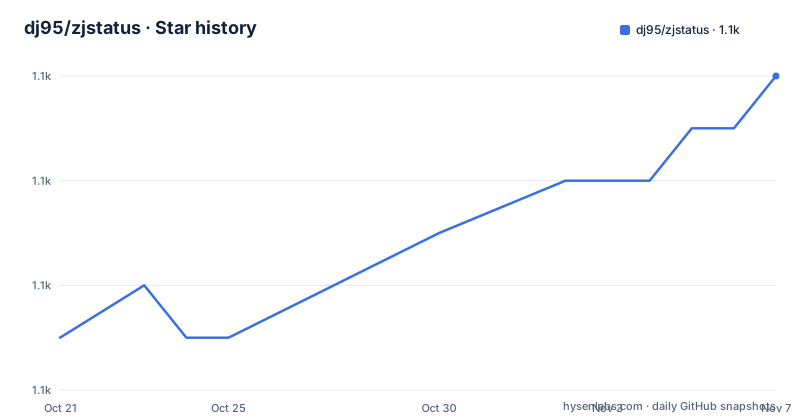
Star history
- dj95/zjstatus1,074 ★ · +5
| Repository | 2026-10-21 | 2026-11-07 |
|---|---|---|
| dj95/zjstatus | 1.1k | 1.1k |
5 Stars in the last 17 days, measured from the daily GitHub snapshot. Compare with other projects
Editorial analysis
The statusbar is a config file, not a set of hardcoded widgets
zjstatus is a configurable and themable statusbar for zellij, written in Rust, and its goal is a highly customizable and extensible statusbar where single modules can be formatted separately. The mechanism is a widget structure, and the README states that due to the widget structure new modules can be created with ease.
Everything you see in the bar is defined by format strings in the plugin's configuration. A format string names a widget, in braces, and the widget supplies the value. So {mode} is the current mode, {tabs} is the tab list, {datetime} is the clock, and {command_git_branch} is a widget that runs a shell command and formats its output.
The quick start configuration shows the whole design in one block. It is placed in the default layout file, at ~/.config/zellij/layouts/default.kdl, and it declares a pane of size 1 that is borderless and holds the plugin:
layout {
    default_tab_template {
        children
        pane size=1 borderless=true {
            plugin location="https://github.com/dj95/zjstatus/releases/latest/download/zjstatus.wasm" {
                format_left   "{mode} #[fg=#89B4FA,bold]{session}"
                format_center "{tabs}"
                format_right  "{command_git_branch} {datetime}"
                format_space  ""
            }
        }
    }
}
Three positions, format_left, format_center and format_right, and a format_space for the filler. Colours are inline ANSI-style escape sequences with fg and bg attributes, so the bar is themed entirely in the same file that describes the layout.
Shell command widgets turn the bar into a dashboard
The git branch widget is the clearest example of the extension mechanism, and it is a group of four settings rather than a single string. The configuration in the README sets command_git_branch_command to git rev-parse --abbrev-ref HEAD, command_git_branch_format to a coloured stdout placeholder, command_git_branch_interval to 10 for the refresh interval in seconds, and command_git_branch_rendermode to static.
The rendermode value is the interesting one. Static means the widget renders once and does not repaint, while a dynamic mode would update in place. That choice matters for a statusbar: a widget that re-executes a shell command every few seconds and redraws the whole bar is the kind of thing that flickers, and static rendering avoids that at the cost of a stale value.
The cwd option decides where the command runs, and the example sets command_git_branch_cwd to {focused_pane_cwd}. That means the branch shown is the branch of the currently focused pane, not the branch of whatever directory the bar itself happens to sit in. It is a small configuration line that changes what the widget means.
The other widgets follow the same pattern. mode_normal and mode_tmux set the background colour for the current mode, tab_normal and tab_active style the tab list, border_enabled, border_char, border_format and border_position control the frame drawn above the bar, and hide_frame_for_single_pane toggles the frame away when only one pane is open. The datetime widget has a companion datetime_format, and the example uses a strftime-style pattern.
zjframes does the frame job without the statusbar
The repository contains two binaries from one codebase. The Cargo.toml declares zjstatus and zjframes as separate [[bin]] targets, both with bench = false, and the justfile's run recipe switches between them with a case statement that starts zellij against either the zjframes or the zjstatus test config and layout.
zjframes can be used to toggle pane frames based on different conditions even without loading zjstatus, for example when using the default status bars. That is the useful separation. A lot of zellij users do not want to replace the statusbar at all, and the frame-toggling behaviour is a small part of what zjstatus does. zjframes gives you that part alone.
The README is explicit about the loading difference. In contrast to zjstatus, zjframes should only be used in the load_plugins option of zellij's config.kdl, since it should only be loaded in the background. zjstatus, by contrast, has to be referenced in a layout file, for example the default layout one, or the config file, because it occupies a pane.
One configuration trap is called out with emphasis: if you want to hide borders, remove the hide_frame_for_single_pane option or set it to false. Otherwise zjstatus will toggle frame borders even if they are hidden in zellij's own config. Two separate settings for the same visual property, and the plugin one wins.
Permissions, caches and the cost of overriding your layout
Using zjstatus as a plugin has three operational consequences that the README spells out.
First, permissions. Right after starting zellij, it will prompt for permissions, which need to be granted in order for zjstatus to work. You navigate to the pane or click on it and press y. This has to be repeated on updates. The README links to a wiki page on permissions for the details.
Second, the cache. In case of any crashes or issues, the first step is to clear the cache, at $HOME/.cache/zellij/ on Linux and $HOME/Library/Caches/org.Zellij-Contributors.Zellij/ on macOS. The reason is caching issues, which can arise especially when updating plugins. The warning that follows is worth noting: clearing the cache also clears the cache for running sessions and revokes granted permissions for plugins.
Third, and this is the structural one, using zjstatus involves creating new layouts and overriding the default one, and that will lead to swap layouts not working when they are not configured correctly. There is a dedicated documentation section for getting swap layouts working again, and the examples directory carries a swap-layouts.kdl configuration with a screenshot as a worked reference.
The README also recommends downloading zjstatus as a file and using file:~/path/to/zjstatus.wasm, even though the quick start shows the https location. Fetching the binary from a release URL on every start is a moving target, and pinning to a local file is the more predictable setup.
A nix flake overlay is the cleanest install path
Beyond the manual download of the release binary, the project ships a nix flake, and the README documents the overlay. You add the repository to your inputs, then define an overlay that exposes the package as pkgs.zjstatus:
  inputs = {
    zjstatus = {
      url = "github:dj95/zjstatus";
    };
  };

  outputs = { self, nixpkgs, zjstatus, ... }@inputs:
  let
    inherit (inputs.nixpkgs.lib) attrValues;

    overlays = with inputs; [
      (final: prev: {
        zjstatus = zjstatus.packages.${prev.system}.default;
      })
    ];
The detail that makes this useful is the templating path. When you template your config file, you can use ${pkgs.zjstatus}/bin/zjstatus.wasm as the path, and ${pkgs.zjstatus}/bin/zjframes.wasm is also available if you only want zjframes. Because the path is derived from the flake rather than hardcoded, the configuration resolves correctly on every machine and the binary version is pinned by the flake lock.
The repository root supports this with flake.nix, flake.lock, shell.nix, a .envrc for direnv, and a rust-toolchain.toml. The release recipe in the justfile shows the project's own toolchain expectations: it derives the version with git cliff --bumped-version, applies it with cargo set-version, builds with cargo build --release inside direnv, then commits, tags and pushes.
zjstatus is a plugin, so it tracks zellij's own release cycle
The dependency on zellij-tile at 0.45.0 is the key constraint, because that crate is the interface between a plugin and the host terminal multiplexer. A plugin compiled against a particular zellij-tile version has to match the zellij it runs inside, so the plugin and the multiplexer move in step.
The release history shows that step: v0.23.0 on 2026-04-18, v0.24.0 on 2026-07-15 and v0.25.0 on 2026-08-27, with the last push on 2026-10-05. That is a release roughly every two to four months, which reads as a compatibility-driven cadence rather than a feature-driven one.
The rest of the dependency list explains the feature set. kdl 6.7.1 with the v1 and v1-fallback features is the configuration parser, anstyle handles the ANSI styling in the format strings, regex 1.13.1 handles the placeholder matching, chrono with the clock feature and chrono-tz 0.10.4 provide the datetime widget including time zones, uuid with v4 generates the identifiers, lazy_static and cached hold global state, console provides terminal handling, and tracing with tracing-subscriber is behind the optional tracing feature. anyhow is the error handling. rstest is the test framework and itertools the combinatorics helper.
The build profile is tuned for size and speed of loading rather than for debuggability: lto is set to fat, codegen-units to 1, and panic to abort. That makes sense for a WebAssembly module that zellij loads at startup.
The project is MIT licensed, authored by Daniel Jankowski, and carries a justfile for the common tasks, a criterion-based benchmark setup behind a bench feature, a cliff.toml for changelog generation, and a community showcase discussion for shared configurations.
Editorial conclusion
zjstatus fits a zellij user who wants the tmux-style statusbar with the session, tabs, git branch and clock in a single row, and it does not fit a setup that relies on zellij's own layout switching without extra configuration, since the plugin overrides the default layout. Before installing, read the permissions note, because zellij prompts for plugin permissions on start and the grant has to be repeated after each update, and clear the cache directory if the plugin crashes, since the README attributes most post-update failures to a stale cache.
Frequently asked questions
How do I install zjstatus for zellij?
Download the latest binary from the GitHub releases, place it somewhere zellij can reach, and reference it from a layout file such as ~/.config/zellij/layouts/default.kdl. A nix flake is also supported, where the overlay exposes pkgs.zjstatus and the config can point at ${pkgs.zjstatus}/bin/zjstatus.wasm.
What is zjframes and how does it differ from zjstatus?
zjframes is a second binary in the same repository that toggles pane frames based on conditions, and it can be used without loading zjstatus, for example when using the default status bars. The README states that zjframes should only be used in the load_plugins option of zellij's config.kdl, since it should only be loaded in the background.
Why does zjstatus need permissions and when do I have to grant them again?
Zellij prompts for plugin permissions when zjstatus starts, and you approve it by navigating to the pane and pressing y. The README states that this has to be repeated on updates, and that clearing the zellij cache also revokes granted plugin permissions.
How do I add a git branch to the zjstatus bar?
Use the command_git_branch widget group: command_git_branch_command is the shell command, command_git_branch_format is the format string, command_git_branch_interval is the refresh interval in seconds, and command_git_branch_cwd can be set to {focused_pane_cwd} so the branch follows the focused pane. The example uses git rev-parse --abbrev-ref HEAD.
Official sources
Add this badge to your README
If you maintain this project, the badge below links readers to this analysis and shows its maintenance status from the daily GitHub snapshot. Paste the markdown into your README; add ?metric=license or ?metric=stars to the image URL for a different field.

[](https://hysenlabs.com/projects/dj95-zjstatus)Star history chart for your README
[](https://hysenlabs.com/projects/dj95-zjstatus)Was this useful?