Varlock puts a schema on your .env so AI agents never see the secrets
AI-safe .env files: Schemas for agents, Secrets for humans.
At a glance
- What is it?
- Varlock is a TypeScript CLI and plugin system that turns .env files into validated, schema-driven config with secret redaction and backend loading. The core idea is sound, but the real cost is in adoption and plugin maintenance.
- Who is it for?
- Adopt Varlock if you manage multiple environments, need to share config context with AI agents without leaking secrets, and already rely on a supported secret backend. Skip it if your team cannot commit to writing and maintaining .env.schema files, or if you need a solution that works outside Node and the listed plugins.
- Can I use it commercially?
- Yes. MIT is a permissive licence: you can use, modify and sell software built on it, as long as you keep its copyright and licence notices.
- Is it still maintained?
- Yes. The repository received new commits within the last day.
- What is it written in?
- Mainly TypeScript, according to GitHub's language statistics.
Answers come from the project's GitHub data, last synced on October 22, 2026, and from our analysis. They are not legal advice.
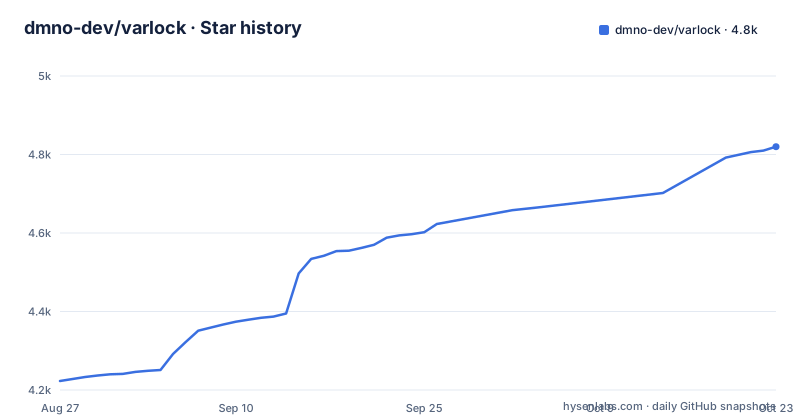
Star history
- dmno-dev/varlock4,810 ★ · +587
| Repository | 2026-08-27 | 2026-10-22 |
|---|---|---|
| dmno-dev/varlock | 4.2k | 4.8k |
587 Stars in the last 56 days, measured from the daily GitHub snapshot. Compare with other projects
Editorial analysis
The problem: .env files are a contract nobody enforces
Every JavaScript project ships a .env.example, and within weeks it drifts from the real .env. A new developer copies the example, guesses at types, and puts a production key in a development file. AI coding agents make this worse: they read the .env to understand the app, and then the secret values end up in generated code or in a chat log. Varlock targets that exact failure. It replaces the passive .env.example with a .env.schema file that defines types, defaults, required flags, and sensitivity markers. The README states that the schema is a single source of truth that will never be out of sync. That is a strong claim, and it only holds if the team actually runs the validation commands. The intended user is a team that already uses dotenv or process.env and wants guardrails without abandoning the .env format.
How the schema language works: JSDoc comments on steroids
The schema is not a separate JSON file. It lives inside the .env file itself as comments. The @env-spec DSL attaches meaning to each line. You write @type=enum(development, preview, production, test) above APP_ENV, or @type=port for a numeric port, or @type=string(startsWith=sk-) for an API key. The @sensitive flag marks a value as secret, and @required forces presence. Defaults sit inline after a #. Variable expansion is supported, as in API_URL=http://localhost:${API_PORT}. That means the schema parser has to resolve references in order, which is a real constraint: if a referenced variable is defined later, the parser must handle forward references or fail. The README does not specify the resolution order, so you would need to check the parser docs. The design keeps the schema close to the values, which is convenient but also means the .env file itself becomes a code artifact that needs review.
Running Varlock: init, load, and run
Installation is straightforward. The README shows npx varlock init to run a wizard that installs the CLI as a dependency in a JavaScript project. There is also a Homebrew tap, a curl installer, and a Docker image. After installation, the primary command is varlock load, which validates the schema and prints the resolved environment variables. To pass the resolved values to another process, you use varlock run -- python script.py. That is the same pattern as dotenv-cli or env-cmd. The CLI also includes varlock scan for proactive leak scanning, and the README mentions git hooks as part of the workflow. For framework users, there are drop-in integrations for Next.js, Vite, Astro, Nuxt, Expo, and Cloudflare. Those integrations add log redaction and leak prevention on top of the basic loading. The exact config keys for the framework plugins are not in the README, so you would need the integration docs to wire them.
The plugin system: secrets from 1Password, AWS, and more
A plain .env file stores secrets in plaintext, which is fine for local dev but poor for production. Varlock's plugin system lets you replace a secret value with a reference expression. For example, DB_PASS=op(op://my-vault/database-password/password) pulls from 1Password. The plugin decorates the schema with @plugin(@varlock/1password-plugin) and @initOp(token=$OP_TOKEN, allowAppAuth=forEnv(dev), account=acmeco). The README lists plugins for 1Password, AWS Secrets Manager, Azure Key Vault, Bitwarden, Dashlane, Doppler, Google Secret Manager, HashiCorp Vault, Infisical, KeePass, Kubernetes, pass, Passbolt, and Proton Pass. That is a broad set. The trade-off is that each plugin is a separate package with its own reference syntax and initialization options. If your backend is not on the list, you are out of luck unless you write your own plugin. The README says the plugin system adds decorators, functions, and types, but it does not document the plugin API in the excerpt. That is a gap for anyone considering a custom backend.
AI-safe config: what it actually protects and what it does not
The tagline is "AI-safe .env files: Schemas for agents, Secrets for humans." The mechanism is that the schema file contains types, descriptions, and validation rules, but no secret values. An AI agent can read the schema to understand the config surface, while the actual secrets stay in the .env or in a backend reference. The README pairs this with varlock scan, which detects leaked secrets in AI-generated code. That is a sensible workflow: give the agent the schema, not the .env. But the protection only works if the agent is pointed at the schema and not at the .env file. If a developer pastes the whole .env into a prompt, no tool can prevent that. Also, the schema itself can contain sensitive metadata, like an account name or a vault path. The README does not claim to redact those. So the AI-safe guarantee is narrower than the marketing suggests: it reduces accidental exposure, it does not stop a deliberate leak.
Limitations and when Varlock is the wrong tool
The biggest limitation is that the .env.schema is a new file format that your team must learn. The JSDoc-style comments are readable, but the parser is strict about decorators and syntax. A typo in @type=string(startsWith=sk-) could fail validation, and the error messages are not shown in the README. Another limitation is the Node dependency. The CLI is a Node package, and the integrations are JavaScript frameworks. If your project is Python or Go, you can still use the CLI to load env vars into a subprocess, but you lose the framework-level redaction. The plugin system also introduces a runtime dependency on external services. If 1Password is down, varlock run may fail unless the plugin caches values. The README does not mention caching behavior. For a simple project with two env vars, Varlock is overkill. dotenv plus a linter would do the job with less complexity. The wrong tool is when you have no secrets, no multi-environment needs, and no AI agents reading your code.
Alternatives: dotenvx and direnv take different routes
The closest alternative is dotenvx, which also extends the .env format with encryption and runtime protection. dotenvx encrypts secret values directly in the .env file, so there is no separate schema. The difference is fundamental: dotenvx keeps secrets in the file, encrypted, while Varlock keeps secrets out of the file entirely, either in plaintext .env or in a backend reference. If you want a schema with types and validation, Varlock is closer to what you need. If you just want to stop committing secrets, dotenvx is simpler. Another alternative is direnv, which loads environment variables per directory but has no schema and no secret backend integration. direnv is lighter and works with any language, but it does not validate types or redact logs. The choice depends on whether you want the schema discipline or just the secret handling. Varlock's schema is the differentiator, and it is also the main cost.
Maintenance and license: what you are signing up for
The project is MIT licensed, which means you can fork it and modify it without restrictions beyond preserving the license notice. The repository shows recent releases across multiple packages, including varlock 1.17.1 and env-spec-language 0.3.3, so the project is actively maintained as of the last push in August 2026. That is a positive sign, but it also means the API may change between minor versions. The schema DSL is a separate package (@env-spec), which is good for stability, but the plugins are independent packages with their own release cycles. You will need to track updates to the CLI, the parser, and every plugin you use. The VSCode extension is published on the Marketplace and Open VSX, which suggests editor support is a priority. The upgrade cost is moderate: the CLI and plugins are npm packages, so updating is a routine npm install. The real maintenance cost is keeping the .env.schema in sync with the actual environment variables, which is a human process that no tool can automate fully.
Editorial conclusion
Adopt Varlock if you manage multiple environments, need to share config context with AI agents without leaking secrets, and already rely on a supported secret backend. Skip it if your team cannot commit to writing and maintaining .env.schema files, or if you need a solution that works outside Node and the listed plugins. Before adopting, verify that the plugin for your secret manager handles the exact reference syntax you use, and check whether the VSCode extension covers your editor. The project is MIT licensed and actively released, but the value depends entirely on whether the schema discipline sticks.
Frequently asked questions
How do I install varlock?
`npx varlock init` runs the installation wizard and installs it as a dependency in a JavaScript project. The README also gives a standalone binary through `brew install dmno-dev/tap/varlock` or `curl -sSfL https://varlock.dev/install.sh | sh -s`, and an official image with `docker pull ghcr.io/dmno-dev/varlock:latest`.
What does a varlock .env.schema file contain?
JSDoc style comment decorators above each variable, under a line of file wide defaults and a `# ---` separator. The example sets `@defaultSensitive=false @defaultRequired=infer @currentEnv=$APP_ENV`, then gives `APP_ENV` an `@type=enum(...)`, `API_PORT` an `@type=port`, `API_URL` an `@type=url`, and `OPENAI_API_KEY` `@required @sensitive @type=string(startsWith=sk-)`.
How does varlock resolve secrets without storing them?
Through plugins that add decorators, functions and types, so a value can be an expression. With `@plugin(@varlock/1password-plugin)` the schema writes `DB_PASS=op(op://my-vault/database-password/password)` and `API_KEY=op(op://api-vault/stripe/api-key)`, and the reference is resolved when the environment variables are loaded.
Can varlock be used with Python?
Yes, through the run command: `varlock run -- python script.py` passes the resolved environment variables into another process. On its own, `varlock load` validates the schema and pretty prints the environment variables, and published framework integrations for Astro, Cloudflare, Expo, Next.js and Nuxt add log redaction and leak prevention.
How does varlock keep secrets away from AI coding agents?
The .env.schema gives an agent the variable names, types, validation rules and descriptions without the secret values, and `varlock scan` with git hooks scans for leaked secrets, including in AI-generated code. The catch is the file header: `@defaultSensitive=false` means a variable is non-sensitive unless it opts in with `@sensitive`.
Official sources
Add this badge to your README
If you maintain this project, the badge below links readers to this analysis and shows its maintenance status from the daily GitHub snapshot. Paste the markdown into your README; add ?metric=license or ?metric=stars to the image URL for a different field.

[](https://hysenlabs.com/projects/dmno-dev-varlock)Star history chart for your README
[](https://hysenlabs.com/projects/dmno-dev-varlock)