Glance.nvim, a peek preview window for LSP locations in Neovim
Peek preview window for LSP locations in Neovim
At a glance
- What is it?
- Glance.nvim opens definitions, references, type definitions and implementations in a floating preview and list window pair instead of jumping away from the file you are editing. It targets Neovim 0.9 and up, and it edits the code you are previewing.
- Who is it for?
- Glance.nvim fits Neovim users on 0.9 or later who want to inspect and edit LSP results without losing their place, and it does not fit editors that do not have a working LSP client or teams that want a preview with no configuration surface at all.
- Can I use it commercially?
- Yes. MIT is a permissive licence: you can use, modify and sell software built on it, as long as you keep its copyright and licence notices.
- Is it still maintained?
- Yes. The repository last received commits 66 days ago.
- What is it written in?
- Mainly Lua, according to GitHub's language statistics.
Answers come from the project's GitHub data, last synced on November 7, 2026, and from our analysis. They are not legal advice.
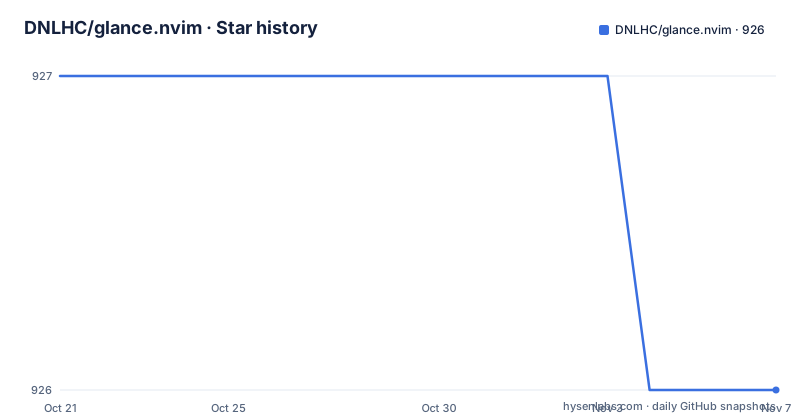
Star history
- DNLHC/glance.nvim926 ★ · -1
| Repository | 2026-10-21 | 2026-11-07 |
|---|---|---|
| DNLHC/glance.nvim | 927 | 926 |
-1 Stars in the last 17 days, measured from the daily GitHub snapshot. Compare with other projects
Editorial analysis
Peeking at LSP results instead of jumping away from the code
Glance is a plugin for Neovim that gives you VSCode-like peek preview functionality for LSP locations. The description is precise about what it does: you can preview, navigate and edit code locations that the language server provided, without leaving your current context. The problem it solves is a small but irritating one. Every LSP jump, whether it is a definition, a reference list, a type definition or an implementation, replaces the buffer you were reading. You lose your place, and to see the surrounding code of the target you often have to jump back and forth manually.
Glance turns that jump into a window. The results appear in a list beside a preview window, the preview stays editable, and the whole thing closes with a single key. That puts it in a specific category of Neovim plugins, the ones that reorganise how you read code rather than what you can write. The audience is people who already run a properly configured LSP client, because Glance does not talk to a language server itself. Its own requirements list a properly configured LSP client and Neovim 0.9.0 or newer, and nothing else.
Two windows, a list and a preview
The interface is built from two coupled windows. There is a list window that shows the locations, and there is a preview window that shows the code at the current location. By default the list sits on the right and takes up a third of the available width, and the preview fills the rest. The two are navigable independently: the list has its own keymap table and the preview has a smaller one, so you can scroll the list, scroll the preview, and switch focus between them.
The list is grouped, and the navigation keys reflect that. Moving between items with the j and k keys steps through the list entries, while the Tab and Shift-Tab keys move between locations, skipping groups and cycling around. That distinction matters in practice, because a reference list can hold dozens of entries and the useful behaviour is usually to jump from one location to the next rather than to read the list top to bottom.
The preview window is a real buffer, not a rendered image. Mappings such as jump_vsplit, jump_split and jump_tab take the selected location and open it in a vertical split, a horizontal split or a new tab, and a plain jump action moves the cursor to the location in place. You can also send every location to the quickfix list with the Ctrl-q action, which gives you a second way out of the preview when a location is worth keeping. In short the preview is a staging area, not a dead end.
Installing through lazy.nvim, mini.deps or packer.nvim
Three plugin managers are documented, and the lazy.nvim recipe is the shortest. Glance is a command-style plugin, so the declaration binds the Glance command rather than loading the module at startup:
{
    'dnlhc/glance.nvim',
    cmd = 'Glance'
}
The lazy key of dnlhc/glance.nvim is the repository name, and cmd = 'Glance' tells lazy to wait until you actually invoke the command before loading the plugin. With mini.deps the same thing is expressed as a source entry:
MiniDeps.add({
  source = 'dnlhc/glance.nvim',
})
And with packer.nvim:
use({
  'dnlhc/glance.nvim',
  cmd = 'Glance'
})
Nothing needs to be compiled, and there is no binary to fetch. The plugin is written in Lua, so installation is a matter of pointing your manager at the repository and reloading. The lazy-style declaration also implies the plugin does not do anything until you ask for it, which is the behaviour you want from a plugin that opens windows.
Four commands and the mappings that trigger them
The plugin exposes five commands. Four of them query the language server for the word under the cursor: references, definitions, type_definitions and implementations. The fifth, resume, reopens the most recently closed Glance session. That last one is the small feature people tend to notice after a few days of use, since closing a preview with the wrong key and getting it back takes a single command.
The mappings are meant to mirror the familiar g-prefix conventions. The Lua form is:
vim.keymap.set('n', 'gD', '<CMD>Glance definitions<CR>')
vim.keymap.set('n', 'gR', '<CMD>Glance references<CR>')
vim.keymap.set('n', 'gY', '<CMD>Glance type_definitions<CR>')
vim.keymap.set('n', 'gM', '<CMD>Glance implementations<CR>')
And the Vimscript equivalent is:
nnoremap gD <CMD>Glance definitions<CR>
nnoremap gR <CMD>Glance references<CR>
nnoremap gY <CMD>Glance type_definitions<CR>
nnoremap gM <CMD>Glance implementations<CR>
The four queries cover the LSP requests that a jump-oriented plugin is expected to cover, which is the extent of Glance's LSP surface. There is no hover preview, no diagnostic list and no workspace symbol search in the documented command set, so if you are looking for a full LSP dashboard this is not the plugin for that job.
Reading the default configuration as a set of design decisions
The plugin ships a single setup call, and the defaults are opinionated enough to be worth reading before you change anything. The window height is 18 lines and the zindex is 45, which places the floating windows above ordinary splits. The preview window enables the cursorline, line numbers and wrapping by default. The list window takes its position from the list table, where the default is a right-hand position with a width expressed as a fraction of the available space:
list = {
  position = 'right', -- Position of the list window 'left'|'right'
  width = 0.33, -- Width as percentage (0.1 to 0.5)
},
Widths are documented as running from 0.1 to 0.5, so a list that swallows half the screen is outside the intended range.
Colours are generated from the current colourscheme rather than hardcoded, with a theme mode of 'brighten', 'darken' or 'auto', where auto picks based on the brightness of the active colourscheme. That is what the description means by UI highlighting that adapts to your colourscheme, and it is the reason the plugin does not need a colour table in your configuration.
Indentation guides are on by default, folds are automatic and closed at startup, and the preview has a winbar. The quickfix action opens the built-in list by default, and a single option, use_trouble_qf, switches it to open trouble.nvim instead, which is a small signal about how the author expects the plugin to sit alongside other tools.
Detached previews, narrow windows and the Neovim 0.10 requirement
Two settings decide how the preview behaves in awkward layouts. The first is detached, which controls whether the preview is embedded in the parent window or floats above all windows. Its default is a function rather than a boolean, so the behaviour depends on the width of the parent window at the moment you open Glance:
detached = function(winid)
  -- Automatically detach when parent window width < 100 columns
  return vim.api.nvim_win_get_width(winid) < 100
end,
In other words, a wide parent gets an embedded preview, and a narrow one gets a floating preview that does not fight with the narrow layout. The commented alternative in the same table shows the fixed form, detached = true, if you would rather have one behaviour everywhere.
The second is preserve_win_context, which adds virtual lines behind the preview window to keep the surrounding context visible in the parent window, and it is on by default. It requires Neovim 0.10.0 or newer, while the plugin as a whole needs 0.9.0. That gap is the one version detail to watch: on 0.9 the option cannot do what it promises. The rest of the documented defaults, the window borders limited to horizontal characters, the fold and indent options, are cosmetic choices you can override in the same table.
Where Glance stops and plain LSP jumps take over
The honest limitation is that Glance is a viewer for results the language server already produced, and it inherits every property of those results. A reference list that is stale or incomplete is stale or incomplete inside the preview too, and the plugin has no way to widen what the server searched. It also does not replace the ordinary jump. If your workflow is to move to a definition and stay there, the default LSP jump is one keypress and the preview is one keypress more with an extra window to close.
The alternative approach is the plain one: use the language server's own definition and reference commands and jump directly into the buffer. The difference in approach is that a direct jump discards the list of alternatives, while Glance keeps every candidate visible and lets you edit the target before you commit to it, which is why it earns its place in an editing workflow rather than a browsing one.
There is a cost to that, and it is in configuration rather than in speed. Glance arrives with a mappings table of several dozen entries, its own list and preview modes, and the option to feed results into another plugin's quickfix interface. People who want one window and four keys will find it heavy. The project is also at an early stage of its own history: the last push was on 2026-09-03, the repository has no published GitHub releases, and the licence field on the repository says MIT, which is permissive for a plugin you vendor into your own configuration.
Editorial conclusion
Glance.nvim fits Neovim users on 0.9 or later who want to inspect and edit LSP results without losing their place, and it does not fit editors that do not have a working LSP client or teams that want a preview with no configuration surface at all. Before adopting it, verify your Neovim version, since the preserve_win_context option needs 0.10.0 while the plugin itself starts at 0.9.0, and read the default configuration in your own colours, because the window height, list width and detached behaviour are what decide whether the preview feels like a peek or like a second editor.
Frequently asked questions
What does Glance.nvim do in Neovim?
Glance.nvim opens a preview and list window for LSP locations so you can preview, navigate and edit definitions, references, type definitions and implementations without leaving your current context.
How do I install Glance.nvim with lazy.nvim?
Add the plugin with the dnlhc/glance.nvim repository and the cmd key set to Glance, so it loads only when the command is used. The same repository works with mini.deps through MiniDeps.add and with packer.nvim through use.
Which Neovim version does Glance.nvim need?
The plugin requires Neovim 0.9.0 or newer and a properly configured LSP client. The preserve_win_context option, which adds virtual lines behind the preview to keep the parent window context, requires Neovim 0.10.0 or newer.
Which keymaps does Glance.nvim use inside the preview window?
The default list mappings include j and k for next and previous item, Tab and Shift-Tab for next and previous location, v for a vertical split, s for a horizontal split, t for a new tab, o and Enter to jump, q to close, and Ctrl-q to send all locations to the quickfix list. The preview window has its own smaller table with Q to close and leader plus l to focus the list window.
Official sources
Add this badge to your README
If you maintain this project, the badge below links readers to this analysis and shows its maintenance status from the daily GitHub snapshot. Paste the markdown into your README; add ?metric=license or ?metric=stars to the image URL for a different field.

[](https://hysenlabs.com/projects/dnlhc-glance-nvim)Star history chart for your README
[](https://hysenlabs.com/projects/dnlhc-glance-nvim)Was this useful?