FlowZ puts a GUI and a privileged helper around sing-box 1.14
简洁现代的跨平台代理客户端,基于 sing-box 核心。
At a glance
- What is it?
- FlowZ is a cross-platform desktop proxy client built on the sing-box core, packaged as an Electron app with a macOS root daemon and a Windows system service. Its distinguishing promise is that rule edits hot reload while structural changes restart the kernel, and it is honest about which is which.
- Who is it for?
- Adopt FlowZ if you want sing-box behaviour with a graphical interface, subscription management and a one-time elevated helper, and stay on a hand written sing-box configuration if you need every core setting exposed or a stable config format across upgrades.
- Can I use it commercially?
- Yes. MIT is a permissive licence: you can use, modify and sell software built on it, as long as you keep its copyright and licence notices.
- Is it still maintained?
- Yes. The repository last received commits 31 days ago.
- What is it written in?
- Mainly TypeScript, according to GitHub's language statistics.
Answers come from the project's GitHub data, last synced on November 7, 2026, and from our analysis. They are not legal advice.
Star history
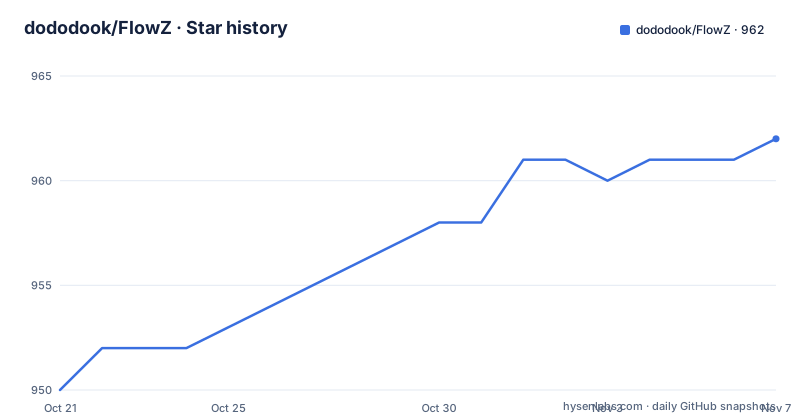
- dododook/FlowZ962 ★ · +12
| Repository | 2026-10-21 | 2026-11-07 |
|---|---|---|
| dododook/FlowZ | 950 | 962 |
12 Stars in the last 17 days, measured from the daily GitHub snapshot. Compare with other projects
Editorial analysis
A desktop shell for the sing-box core
sing-box is a network core with a configuration file at its centre, and that is exactly where friction appears for people who do not want to edit JSON by hand. FlowZ is a cross-platform desktop client built on top of it, written in TypeScript as an Electron application.
The scope is broad and the documentation is explicit about it. The supported protocol list covers VLESS, VMess, Trojan, Shadowsocks, Snell, Hysteria2, TUIC, AnyTLS, NaiveProxy, SOCKS, HTTP and SSH, plus networking nodes built on WireGuard, Cloudflare WARP and Tailscale. Routing rules can combine fifteen condition types, including domain, IP, port, process, geosite, geoip and rule sets, with OR and AND logic.
What makes it more than a config editor is the privilege story. On macOS a root daemon and on Windows a LocalSystem service are installed once, communicating over a named pipe or socket with token authentication. After that single authorisation, starting and stopping TUN mode, switching nodes and quitting all happen without another prompt. That is the difference between a tool you can use daily and one that nags you.
The interface itself is described as a design system called Conduit, token driven with light and dark themes, shipped in five languages including Russian and Persian with right-to-left layout support.
The kernel decides what is allowed, not the UI
The central design rule is that the running kernel is the authority. When you paste a sing-box outbound JSON block, FlowZ probes the current kernel for compatibility as you save, and tells you at that moment whether the protocol will actually work.
That matters because the bundled kernel is sing-box 1.14, shipped inside the package for Windows, macOS on both arm64 and x64, and Linux. A protocol the official core does not support cannot be added to the official core. The documented path is to switch to a third-party fork kernel that does support it, and FlowZ detects a fork and disables online updates so the update path cannot overwrite the core you deliberately chose.
This is a real trade-off rather than a free win. A forked core means you have taken responsibility for tracking that fork yourself, and the automatic update that protects everyone else is the thing switched off. The same model appears in the diagnostics side of the tool: status, connections, groups and node hot switching all go through the native gRPC management API of sing-box 1.14, which the project says replaces the older clash_api approach.
An opt-in escape hatch also exists. The official sing-box dashboard can be enabled, in which case the core serves it at /dashboard/ for users who want the full core interface.
Why some rule edits restart the kernel and others do not
This is the section most worth reading before you adopt the client, because the difference in behaviour is caused by a hard limit in the core, not by a FlowZ preference.
The underlying sing-box kernel has no API to add or remove outbounds at runtime, and no API to reload an entire configuration. Its Clash compatible API can only switch between already loaded nodes, and PUT /configs is a no-op. Everything else follows from that.
So FlowZ splits changes into two classes. Live with zero interruption are selector node switching, and editing the match values of an already enabled rule, for example adding one more domain to a domain list, which goes through a local rule-set hot reload. The other class triggers a kernel restart of roughly one second, with edits debounced so that several changes in a row collapse into a single restart: adding, deleting or reordering rules, changing a rule's action or target, switching the routing mode between global, smart and direct, changing local ports or TUN and inbound settings, and editing a node that is currently in use or receiving a newly referenced node from a subscription update.
Connections recover on their own after that restart. The project is unusually clear that the short interruption is by design and not a defect, which is honest but also means the promise of a connection that never drops only holds for value-level edits.
TUN mode is where DNS and QUIC are actually controlled
The client offers TUN transparent proxy, system proxy mode, and a local-only proxy mode, and the differences between them are not cosmetic.
The documentation states plainly that system proxy mode cannot fully control DNS and cannot block QUIC leakage. Only TUN mode takes over system DNS, and only TUN mode can reject traffic towards QUIC. If you care about DNS or QUIC leaks, TUN is the only option that covers them.
The QUIC handling is narrow in an instructive way. Block QUIC rejects proxy-bound UDP on port 443, which pushes browsers back to TCP and fixes the sluggish page loads that come from a node whose UDP relay does not work. It does not affect nodes that themselves dial over QUIC, such as hysteria2, tuic and naive, because the rejection is applied to traffic going to the proxy.
Around this sit a few more targeted controls. FakeIP is available for speed, with per-region routing options. DoH upstreams are supported, along with anti-leak protection for the node domain and interception of privacy leaking DoH. WebRTC leak handling has three positions, off, routed through the proxy, or blocked, and the documentation notes it applies only in TUN mode.
Installing FlowZ and the first four steps
Installations come from the Releases page, with a platform specific artefact for each target. Windows gets an .exe installer or a portable.exe for use without installation, on macOS you open a .dmg and drag the app into Applications with both arm64 and Intel builds published, and Linux is served as an AppImage that runs directly or as a .deb package.
Unsigned macOS builds trigger the quarantine prompt, and the documented fix is to strip the quarantine attribute:
xattr -cr /Applications/FlowZ.appSystem requirements are narrow and worth checking before anything else. Windows needs Windows 10 (1809 or newer) or Windows 11 on x64, macOS needs macOS 11 (Big Sur) or newer on Apple Silicon or Intel, and Linux needs x86_64 with TUN mode requiring a one-time pkexec authorisation to set capabilities.
The quick start then takes four steps: add nodes on the servers page, choosing a protocol or importing in bulk from a file or pasted text in sing-box, Xray, Clash, Base64 or share link formats, or importing a subscription link; pick a routing mode, with smart automatic routing as the default and system proxy mode available in settings if you do not want TUN; enable the proxy from the home page; and optionally add routing rules and per application rules.
Building from source follows the standard Electron layout, with separate main and renderer processes:
git clone https://github.com/dododook/FlowZ.git
cd FlowZ
The npm scripts in package.json show the shape of the build, where the renderer is bundled by Vite and the main process is compiled with tsc, and where the privileged helper is built separately:
    "build": "npm run build:main && npm run build:renderer",
    "build:main": "node scripts/gen-build-info.js && tsc -p tsconfig.main.json",
    "build:renderer": "vite build",
    "build:helper": "bash scripts/build-helper.sh",
    "package": "npm run fetch:core && npm run test:core-gate && npm run fetch:dashboard && npm run build && electron-builder",
Packaging also fetches the core, the dashboard and, for Windows and Linux, the Cronet library, and runs a core gate test before the build. The helper directories helper/, helper-win/ and helper-linux/ are where the privileged components live.
Edge cases the project documents as designed behaviour
The known limitations section is unusually candid, and each entry is worth reading before you file anything.
Tailscale supports one node per device. All Tailscale accounts share 100.64.0.0/10, so several of them will overwrite each other, which is a constraint of the addressing rather than of the client.
NaiveProxy depends on the Cronet library, which is pulled at packaging time for Linux and Windows. When it is missing, naive nodes are skipped automatically and the other protocols are unaffected, and if the selected node happens to be a naive one you get an explicit prompt rather than a silent failure.
System proxy mode has the DNS and QUIC limits already described. And the short kernel restart described earlier is listed under the same heading of designed behaviour rather than bugs.
For comparison, the alternative is to run sing-box directly with a configuration file you maintain. That gives you the whole core surface, including every outbound protocol and every inbound option, with no UI to fight and no helper to install, but it also means subscriptions, rule sets, node switching and system integration are all yours to build. FlowZ buys convenience and system integration with the price of a restart on structural edits and a UI that only exposes what the project has implemented.
Releases, licence and what an upgrade involves
FlowZ ships under the MIT licence, with the licence text in LICENSE.txt in the repository root. There is no homepage beyond the repository itself, and the project notes the original open source address at github.com/zhangjh/FlowZ.
The release history shows a steady recent cadence in the 4.3 line: 4.3.1 on 2026-08-05, 4.3.2 on 2026-08-13 and 4.3.3 on 2026-08-26. The last push was on 2026-10-08, and the repository is not archived, so development is continuing on the 4.3 branch line.
Automatic updates are described as having integrity verification, a startup pre-check, automatic rollback on failure, and skipping of problem versions. That is the part of the upgrade story that matters most for a client holding a privileged helper and a core binary, because a failed update can leave a machine with a broken system service or a stale core. The helper directories are platform specific, and the core is bundled per platform, so an update is not just a JavaScript file swap.
The privacy protection mode is worth knowing about if you share machines: it is a password lock using a scrypt hash stored in a separate file, outside the configuration.
Editorial conclusion
Adopt FlowZ if you want sing-box behaviour with a graphical interface, subscription management and a one-time elevated helper, and stay on a hand written sing-box configuration if you need every core setting exposed or a stable config format across upgrades. Verify first that the sing-box fork you depend on is recognised, since FlowZ disables online updates when it detects a fork, and check the platform requirements, Windows 10 1809 or newer, macOS 11 or newer, and x86_64 Linux with pkexec for TUN.
Frequently asked questions
What are the system requirements for FlowZ?
Windows needs Windows 10 (1809 or newer) or Windows 11 on x64, macOS needs macOS 11 (Big Sur) or newer on Apple Silicon or Intel, and Linux needs x86_64, served as an AppImage or a .deb, with TUN mode needing a one-time pkexec authorisation to set capabilities.
Does FlowZ support protocols that the official sing-box core does not?
Not with the official core. The project states that the running kernel is the authority, and a protocol it does not support has to be run on a third-party fork kernel that does support it. FlowZ detects a fork and disables online updates so the fork is not overwritten.
Why does my connection drop for about a second after I change a routing rule?
Adding, deleting or reordering rules, changing a rule action or target, switching routing mode and changing ports or TUN settings all cause a kernel restart of roughly one second, because the core has no API to add or remove outbounds or reload the full configuration at runtime. Edits to the match values of an already enabled rule apply through a local rule-set hot reload with no interruption.
Does FlowZ need administrator rights every time I turn on the proxy?
No. On macOS a root daemon and on Windows a LocalSystem service are installed once, and after that TUN start and stop, node switching and quitting need no further authorisation. Linux needs a one-time pkexec authorisation to set capabilities for TUN mode.
How do I install FlowZ on macOS when it reports the app is damaged?
That message comes from the quarantine attribute on unsigned builds. The documented fix is to remove it with xattr -cr /Applications/FlowZ.app, and macOS builds are published for both arm64 and Intel.
Official sources
Add this badge to your README
If you maintain this project, the badge below links readers to this analysis and shows its maintenance status from the daily GitHub snapshot. Paste the markdown into your README; add ?metric=license or ?metric=stars to the image URL for a different field.

[](https://hysenlabs.com/projects/dododook-flowz)Star history chart for your README
[](https://hysenlabs.com/projects/dododook-flowz)Was this useful?