Kaishi 1.5k: A Modular Japanese Vocabulary Deck for Anki
Kaishi 1.5k is a modern, modular Japanese Anki deck made for beginners who want to learn basic vocabulary.
At a glance
- What is it?
- Kaishi 1.5k is an Anki deck for beginners learning basic Japanese vocabulary through words, example sentences, furigana, meanings, audio, pictures, and optional pitch accent. Its main strength is card-template control, although the repository does not document every packaging, licensing, or import detail a new user might need.
- Who is it for?
- Beginner Anki users who want editable vocabulary, sentence, audio, and pitch-accent cards should adopt Kaishi 1.5k. Learners needing a complete grammar syllabus, a documented kanji progression, or a confirmed redistribution licence should look elsewhere.
- Can I use it commercially?
- Not without permission. GitHub finds no licence file in the repository, and without a licence all rights are reserved by default: you may read the code but not reuse it. Check the README, or ask the authors, before using it.
- Is it still maintained?
- Yes. The repository last received commits 38 days ago.
- What is it written in?
- GitHub does not report a main language for this repository.
Answers come from the project's GitHub data, last synced on October 23, 2026, and from our analysis. They are not legal advice.
Star history
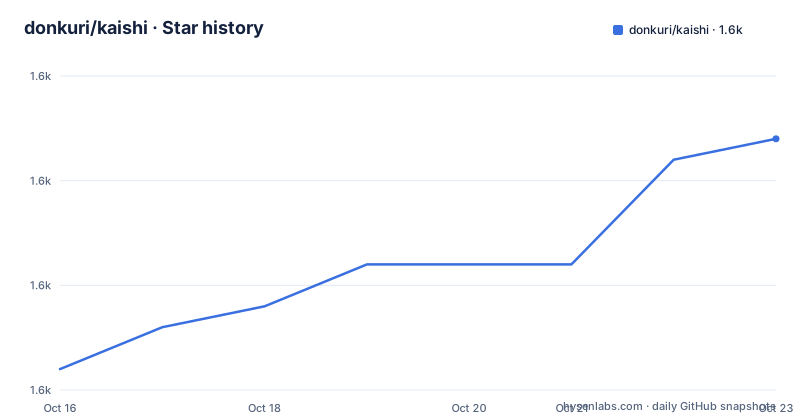
- donkuri/kaishi1,562 ★ · +11
| Repository | 2026-10-16 | 2026-10-23 |
|---|---|---|
| donkuri/kaishi | 1.6k | 1.6k |
11 Stars in the last 7 days, measured from the daily GitHub snapshot. Compare with other projects
Editorial analysis
Why Kaishi 1.5k Targets First-Year Japanese Vocabulary
Kaishi 1.5k addresses a specific early-stage problem: helping Japanese beginners learn basic vocabulary while still seeing each word in a sentence. The front of a card presents the target word and an example sentence, with the word highlighted inside that sentence. This gives the learner immediate context instead of presenting an isolated translation. It also supports the opposite learning direction, because once the word is familiar, the sentence can function as a cue for recognition and reading practice.
The repository describes the deck as modular because its cards are built from editable Anki fields and templates rather than one fixed presentation. The default back combines furigana for the reading of the word, the word meaning, the sentence with furigana, the sentence meaning, audio for both the word and sentence, and an optional picture. Conditional card content also includes notes and pitch-accent notes. This design is aimed at learners who want vocabulary exposure through several representations without replacing Anki's scheduling system.
It is not presented as a general Japanese course. The README does not document grammar lessons, a complete kanji progression, reading exercises, or a learner sequence beyond basic vocabulary. The linked guide may place Kaishi within a broader learning approach, but the repository does not reproduce that guide. Based on the visible card design, Kaishi is the vocabulary layer rather than a complete syllabus. Learners who need explicit coverage of those other areas must verify them elsewhere before assuming this deck is sufficient.
Kaishi Card Fields and Review Flow
The default front is deliberately sparse. It contains `{{Word}}` followed by the example `{{Sentence}}`, which means the learner sees the vocabulary item and its context without the answer fields on the same side. The README explains the rationale directly: highlighting the word in the sentence makes the important item easier to isolate, while showing the word first supports faster review after it becomes familiar.
The back template adds the answer information in a reading-oriented sequence. `{{furigana:Word Furigana}}` provides the reading associated with the word. `{{Word Meaning}}` supplies the meaning, while `{{furigana:Sentence Furigana}}` and `{{Sentence Meaning}}` present the example text and its translation. `{{Word Audio}}` and `{{Sentence Audio}}` expose separate pronunciation recordings. `{{Picture}}` adds visual context, and the `{{Notes}}` section appears only when a note exists. The audio fields are especially relevant for a language deck because the repository presents pronunciation and meaning as distinct pieces of information.
Pitch accent is stored but hidden by default. The back template wraps `{{Pitch Accent}}` and `{{Pitch Accent Notes}}` in HTML comments. This lets one deck serve learners who want ordinary vocabulary study and learners who also want pitch-accent information. It is not a second deck or a separate add-on. The choice is made in the Anki card template.
Anki remains responsible for presenting, reviewing, and scheduling these cards. Kaishi defines the note fields, templates, media references, and conditional sections. That division makes the deck editable, but it also means template changes become part of the learner's configuration. There is no indication in the repository layout that Kaishi supplies its own scheduling algorithm or desktop application.
Downloading Kaishi and Completing the First Review
The README directs users to the GitHub releases page or the listed AnkiWeb page. It warns that the AnkiWeb copy may be unavailable while the deck is under review. The documented compatibility floor is Anki 2.1.50+, so the first prerequisite is an Anki version at or above that release. The README does not publish installation commands for a package manager, and this is not a conventional application with a server to start.
The first real use is therefore deck acquisition and inspection. Download the release file or obtain the deck from AnkiWeb if it is available, then import it into Anki. The README does not provide the exact import-menu sequence, filename, or account workflow, so those steps should be taken from the current Anki interface and deck listing rather than invented here.
After importing, open the Kaishi deck in Anki and study normally. A first card should show a word and an example sentence on the front. Revealing the answer should expose the reading, meaning, translated sentence, audio, and picture when those fields contain content. Pitch accent should remain absent unless the user edits the template as described later. Before adding hundreds of reviews, inspect several cards because the README says pictures, notes, pitch accent, and audio are controlled by fields that may not be present for every entry.
If a card looks incomplete, check whether the expected field is populated rather than assuming Anki failed to render it. The project uses conditional sections for optional notes and pitch-accent content. The repository does not document a diagnostic command or automated card-validation procedure.
Editing Kaishi's Back Template for Pitch Accent
Pitch accent is optional, but enabling it requires editing the Back Template rather than changing a deck-wide preference. In Anki, the README instructs users to select the Kaishi deck, open `Browse`, choose a card, and click `Cards...` at the top right. The pitch-accent option appears in the `Back Template`, reached through the small dot above the `Search` bar.
The default template keeps both pitch-accent blocks inside HTML comments. The active result is HTML that shows the furigana, meanings, sentence, audio, picture, and notes. This is the useful default for learners who do not yet want pitch-accent notation.
To include pitch accent directly after the word furigana, remove the surrounding comment markers from the `{{#Pitch Accent}}` block. The documented enabled section is:
{{#Pitch Accent}}
	<br><div style='font-size: 24px'>{{Pitch Accent}}</div>
{{/Pitch Accent}}
Pitch-accent notes are controlled separately. Removing the comments around the following block exposes a collapsed `details` element labeled `Pitch Accent Notes`:
{{#Pitch Accent Notes}}
<div style="font-size: 20px; width: fit-content; max-width:40vw; margin: auto">
	<details><summary>Pitch Accent Notes</summary>
		<br>{{Pitch Accent Notes}}
	</details>
</div>
{{/Pitch Accent Notes}}
These conditional blocks mean empty fields should not produce pitch-accent output. The README links an issue for an explanation of pitch-accent notation, but the repository does not reproduce that explanation. A learner unfamiliar with the notation should not treat the template edit as instruction in the notation itself.
Converting Kaishi Cards to Word, Sentence, or Audio Drills
Kaishi's templates let the user change the review task without changing the underlying vocabulary notes. The documented `Front Template` initially includes only the word and sentence. This exact snippet can be pasted into the selected deck's template:
<div lang="ja">
{{Word}}
<div style='font-size: 20px;'>{{Sentence}}</div>
</div>
For word-focused cards, remove the sentence `div`. For sentence cards, remove `{{Word}}` and place `{{Sentence}}` in its position. The README also suggests removing the existing content and adding `{{Word Audio}}`, `{{Sentence Audio}}`, or both for audio recognition. These changes alter what is presented on the front, while the answer template still determines which feedback appears on the back.
The `Back Template` can also be reduced. Removing the `furigana:` parts from `{{furigana:Word Furigana}}` and `{{furigana:Sentence Furigana}}` suppresses furigana rendering without deleting the stored fields. That is a display change, not a documented content migration.
This flexibility is useful for learners who know the deck contains more than they currently need. It also creates a maintenance responsibility. An Anki collection usually contains a user's scheduling history and template changes, but the README does not document how Kaishi expects users to synchronize, merge, or roll back those changes. Users who want multiple study modes should decide which template they need before beginning daily reviews, rather than treating the deck as configuration-free.
Kaishi's Scope, Alternatives, and Maintenance Boundaries
The clearest related alternative in the README is a radicals deck made by ねむい. That deck is based on Kaishi 1.5k, connects each kanji radical to the first Kaishi word containing that radical, and adds some radicals not found in Kaishi proper. Its approach differs at the learning target: Kaishi organizes cards around basic vocabulary, while the radicals deck introduces kanji components and connects them to words already encountered in Kaishi. The README presents the decks as complementary for learners who struggle with kanji.
Kaishi is also the wrong tool for a learner who expects the deck alone to teach Japanese reading, grammar, or writing. Its visible mechanism centers on word recognition, sentence context, meaning, furigana, audio, and optional pitch accent. The repository does not claim that completing it guarantees a particular proficiency level. For learners who cannot yet interpret basic Japanese sentences, a companion grammar or reading resource would have to fill a gap that this repository does not document.
The repository is not archived. Its last push was on 2026-09-15, shortly before releases `v2.4.3` and the earlier `v2.4.2` and `v2.4.1`. This supports a judgment that the project was receiving recent repository changes and releases, but the README does not publish a support policy, migration policy, or compatibility statement for every old collection.
The supplied repository metadata does not identify a licence. The visible top-level entries are limited to `README.md` and `pics/`, so the repository excerpt also does not show a licence file. Users who need to redistribute modified deck files should verify the applicable terms in the full release package and repository before publishing their version. The README's statement that unaffiliated decks and modifications are not affiliated does not itself state the deck's licence.
Editorial conclusion
Beginner Anki users who want editable vocabulary, sentence, audio, and pitch-accent cards should adopt Kaishi 1.5k. Learners needing a complete grammar syllabus, a documented kanji progression, or a confirmed redistribution licence should look elsewhere. Before importing the `.apkg` file, verify that the release is not under review, confirm Anki 2.1.50 or later is available, and inspect the Back Template for the fields you intend to study.
Frequently asked questions
Where can I download Kaishi 1.5k?
The README directs users to the project's GitHub releases page or its AnkiWeb listing. The AnkiWeb copy may be unavailable while the deck is under review.
What Anki version does Kaishi 1.5k support?
The README states that the deck is supported on Anki 2.1.50 and later.
How do I enable pitch accent in Kaishi 1.5k?
Open the deck's `Back Template` through `Browse`, select a card, and click `Cards...`. Remove the HTML comment markers around the `Pitch Accent` and `Pitch Accent Notes` blocks.
Can Kaishi cards be changed into word, sentence, or audio cards?
Yes. The README says to edit the `Front Template`, removing or adding `{{Word}}`, `{{Sentence}}`, `{{Word Audio}}`, and `{{Sentence Audio}}` as needed.
Does Kaishi 1.5k include a kanji radicals course?
Kaishi is described as a basic vocabulary deck. A separate radicals deck based on Kaishi links radicals to the first word featuring each radical and includes additional radicals.
Official sources
Add this badge to your README
If you maintain this project, the badge below links readers to this analysis and shows its maintenance status from the daily GitHub snapshot. Paste the markdown into your README; add ?metric=license or ?metric=stars to the image URL for a different field.

[](https://hysenlabs.com/projects/donkuri-kaishi)Star history chart for your README
[](https://hysenlabs.com/projects/donkuri-kaishi)Was this useful?