The .NET Project System: the layer between a csproj file and Visual Studio
The .NET Project System for Visual Studio
At a glance
- What is it?
- dotnet/project-system is the Managed Extensibility Framework based project system that gives Visual Studio its handling of SDK-style .NET projects, sitting between the project file on disk and Solution Explorer, designers, the debugger and the build. This looks at what it replaced, what it is built from, and what building it requires.
- Who is it for?
- dotnet/project-system fits a team writing Visual Studio extensions that need to work with .NET projects, and a maintainer who wants to understand or change how Visual Studio loads, models and builds a csproj.
- Can I use it commercially?
- Yes. MIT is a permissive licence: you can use, modify and sell software built on it, as long as you keep its copyright and licence notices.
- Is it still maintained?
- Yes. The repository last received commits 16 days ago.
- What is it written in?
- Mainly C#, according to GitHub's language statistics.
Answers come from the project's GitHub data, last synced on November 7, 2026, and from our analysis. They are not legal advice.
Star history
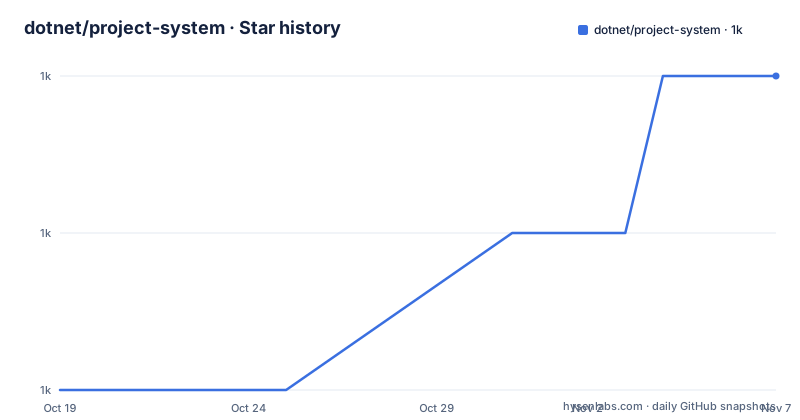
- dotnet/project-system1,022 ★ · +2
| Repository | 2026-10-19 | 2026-11-07 |
|---|---|---|
| dotnet/project-system | 1k | 1k |
2 Stars in the last 19 days, measured from the daily GitHub snapshot. Compare with other projects
Editorial analysis
The layer almost nobody sees between the file and the IDE
A project system sits between a project file on disk, for example a `.csproj` or `.vbproj`, and the various Visual Studio features that include, but are not limited to, Solution Explorer, designers, the debugger, language services, build and deployment. The project documentation makes the consequence explicit: almost all interaction that occurs with files contained in a project file happens through the project system.
That is a larger responsibility than it sounds. When you add a file to a project in Visual Studio, when the debugger shows the right symbols, when the build knows what to compile, and when an extension contributes an item to a project, all of it passes through this layer. A project system is the model of a project that the IDE itself edits, and it is the place where a third party extension can hook in.
The repository is the .NET Project System for Visual Studio, written on top of the Common Project System, or CPS, framework, and it covers SDK-style .NET projects in C#, F# and Visual Basic, plus Shared Projects in C# and Visual Basic. A document in the repository lists the feature differences between the project systems, which is worth reading before you rely on a specific capability.
The audience is Visual Studio extension authors and the engineers who work on the IDE itself. The code is C# and the licence is MIT, with the licence text in `LICENSE.txt` at the repository root.
The 2002 COM project systems and why they were replaced
The repository documentation is unusually direct about the history, which is the clearest way to understand the current design.
The legacy C# and Visual Basic project systems, `csproj.dll` and `msvbprj.dll`, first shipped with Visual Studio .NET in 2002. The documentation says they served well but lists four problems. They are native and COM-based. They are single threaded and bound to the UI thread. They are hard to extend outside of aggregation via `<ProjectTypeGuids>` and subtypes, also called flavors. And they are separate implementations for C# and Visual Basic projects.
Each of those four points maps directly onto a property of the current system. The current .NET Project System is managed and managed-interface based, which is what makes it composable. It is multi-threaded, scalable and responsive, which is what makes it viable when the IDE is busy. It is easy to extend and compose via the Managed Extensibility Framework, so that many parties, including third parties, can contribute to a single project system. And it is a single implementation for C#, F# and Visual Basic projects, which removes the duplication that the legacy pair carried.
The MEF point deserves emphasis. MEF is a composition model where parts are published and consumed rather than wired up by hand, and it is the reason the documentation can claim that many parties contribute to one project system. For an extension author, that is the whole pitch: you are not replacing the project system, you are adding a part to it.
MSBuild, the SDK, CPS, Roslyn and the F# tools
The project system is not a self contained thing, and the documentation lists the technologies that come together to make it, with a clear division of labour.
MSBuild provides the build engine and the file format. The .NET SDK provides the command line interface for building, running and interacting with .NET projects, along with the necessary MSBuild tasks and targets. The Common Project System provides the base building blocks for the project system, including the project tree, build and debugger coordination, and Visual Studio integration. Roslyn provides C# and Visual Basic language support, including compilers, IntelliSense, refactorings, analyzers and code fixes. The Visual F# tools provide F# language support.
Read as a pipeline, the chain is: the SDK and MSBuild know how to build, CPS knows how to model a project inside Visual Studio, and Roslyn and the F# tools supply the language intelligence. The project system is the part that reconciles them, and the CPS dependency is why the repository does not contain a project tree implementation of its own.
That composition has a practical consequence for anyone reading the code or contributing to it. The behaviour you are looking for may live in MSBuild, in CPS, or in Roslyn, and the project system is where they are wired together. The `src/`, `tests/`, `setup/` and `eng/` directories at the repository root follow that structure, with `setup/` holding the Visual Studio extension packaging and `eng/` the engineering infrastructure.
Building it means installing Visual Studio and running build.cmd
The build requirements are specific, and they are the first thing to check before planning any contribution.
The repository is built on.NET Framework and requires the.NET Framework version of MSBuild to build successfully. There is also a dependency on the Visual Studio SDK, because the.NET Project System is bundled as a Visual Studio Extension for deployment into Visual Studio. The documentation says to install the latest Visual Studio and select the.NET desktop build tools workload and the Visual Studio extension development workload.
Once those are installed, the build is a single batch file at the root of the repository:
build.cmdThat command builds, tests and bundles the repository. All command line arguments given to `build.cmd` are forwarded to MSBuild, and the repository has set up some special properties on top of it. For projects there are three switches: `/p:SrcProjects` includes the projects within the `src` directory and defaults to true, `/p:TestProjects` does the same for the `tests` directory, and `/p:SetupProjects` for the `setup` directory. For targets there are five: `/p:Restore` runs the Restore target to acquire project dependencies and defaults to true, `/p:Build` runs the Build target to compile the projects into assemblies and defaults to true, `/p:Rebuild` runs the Rebuild target which cleans and builds and defaults to false, `/p:Test` runs the Test target to execute the xUnit test projects and defaults to true, and `/p:Pack` runs the Pack target to bundle the projects into NuGet packages and defaults to true.
So a full local build is a Visual Studio install plus a batch file, and a test-only iteration adds `/p:Build=false` and `/p:Pack=false`.
Where the .NET Project System is the wrong tool
There is a confusion worth clearing up first, and it is the most common one. The .NET Project System is not how .NET projects are built on a build server. Building a .NET project in CI goes through the `dotnet` CLI and the SDK, and MSBuild evaluates the project file. This repository is about the Visual Studio side of that, the interactive model of a project inside the IDE.
Given that, the limits are clear. It is Windows only in practice, because building it requires the .NET Framework version of MSBuild and the Visual Studio SDK, and the Visual Studio extension development workload is a Windows install. There is no path to building this repository on Linux or macOS.
The second limit is the surface it covers. It supports SDK-style .NET projects in C#, F# and Visual Basic, and Shared Projects in C# and Visual Basic, so F# Shared Projects are outside what it handles. And a project type that is not one of those is handled by a different system entirely, which is why the feature comparison document exists.
The third limit is the release history, and it needs reading carefully. The tags show 16.0.x, 15.9.x and 15.0.x, all dated 2021-09-03, while the last push to the repository was on 2026-10-15. The project is being worked on in the default branch and released as part of Visual Studio itself rather than as standalone tags, so a version number from this repository's tag list tells you very little about what is shipping in a given Visual Studio release. Anyone pinning behaviour should test against the Visual Studio version they actually target, using the feature comparison document to check what is supported.
MIT terms, trademark rules, and a telemetry disclosure
The licence is MIT, which for a project of this size and this position is notable, and it applies to the source in this repository. What the licence does not cover is the surrounding Microsoft intellectual property, and the project documentation has a section on trademarks that says so explicitly: the project may contain trademarks or logos for projects, products or services, authorised use of Microsoft trademarks is subject to Microsoft's Trademark and Brand Guidelines, and use of those marks in modified versions must not cause confusion or imply Microsoft sponsorship.
For a team that vendors this code into a commercial product, that paragraph is the part to read, because the source is permissively licensed while the names and logos around it are not.
The data collection section is also worth noting, and it is more candid than most. The software may collect information about you and your use of it and send it to Microsoft, Microsoft may use that information to provide services and improve its products, and the telemetry can be turned off as described in the Visual Studio Customer Experience Improvement Program documentation.
The rest of the project housekeeping is conventional: a contribution guide, a code of conduct adapted from the Contributor Covenant, a security file, an `Editors.slnf` solution filter for working on just the editor projects, a `spelling.dic` dictionary for the build's spell check, and a `Directory.Packages.props` file for central package version management.
Editorial conclusion
dotnet/project-system fits a team writing Visual Studio extensions that need to work with .NET projects, and a maintainer who wants to understand or change how Visual Studio loads, models and builds a csproj. It does not fit a team that just wants to build .NET code, since the `dotnet` CLI path goes through the SDK and MSBuild rather than this repository, and it cannot be built outside Windows, because it requires the .NET Framework version of MSBuild and the Visual Studio SDK. Before you try to build it, install Visual Studio with the .NET desktop build tools and the Visual Studio extension development workloads, and note that the newest release tags in the repository are from 2021 even though the last push was on 2026-10-15.
Frequently asked questions
What is a project system in Visual Studio?
It sits between a project file on disk, such as a .csproj or .vbproj, and Visual Studio features including Solution Explorer, designers, the debugger, language services, build and deployment. Almost all interaction with files in a project file happens through it.
Why did the legacy C# and Visual Basic project systems get replaced?
The project documentation says the legacy csproj.dll and msvbprj.dll systems, which first shipped with Visual Studio .NET in 2002, were native and COM-based, single threaded and bound to the UI thread, hard to extend outside of aggregation, and separate implementations for C# and Visual Basic.
How do I build the .NET Project System repository?
Install the latest Visual Studio with the .NET desktop build tools and Visual Studio extension development workloads, then run `build.cmd` from the root of the repository. The repository is built on .NET Framework and needs the .NET Framework version of MSBuild and the Visual Studio SDK.
Which project types does the .NET Project System support?
It is used for SDK-style .NET projects in C#, F# and Visual Basic, and for Shared Projects in C# and Visual Basic. The repository includes a feature comparison document listing the differences between the project systems.
What licence does the .NET Project System use?
MIT, with the licence text in LICENSE.txt at the repository root. The project documentation also carries a trademark section, because the source licence does not cover the Microsoft trademarks and logos that the project may contain.
Official sources
Add this badge to your README
If you maintain this project, the badge below links readers to this analysis and shows its maintenance status from the daily GitHub snapshot. Paste the markdown into your README; add ?metric=license or ?metric=stars to the image URL for a different field.

[](https://hysenlabs.com/projects/dotnet-project-system)Star history chart for your README
[](https://hysenlabs.com/projects/dotnet-project-system)Was this useful?