Surreal Engine re-implements Unreal Engine 1 to run Gold and UT99
Unreal Engine 1 Reimplementation
At a glance
- What is it?
- Surreal Engine is a C++ reimplementation of the Unreal Engine 1 runtime, currently aimed at making Unreal Gold and Unreal Tournament playable on modern systems with Vulkan, OpenGL or Direct3D 11. It suits collectors of the original games, and it needs your own copies of the game data.
- Who is it for?
- Adopt Surreal Engine if you own original copies of Unreal Gold or Unreal Tournament and want them running on a current operating system with a modern renderer, and you are willing to build from source or accept a nightly build. Do not adopt it as a general game engine, because it reimplements a 1999 runtime rather than providing tooling for new projects, and it will not run games it has not been taught to read.
- Can I use it commercially?
- Check first. The repository uses a licence we do not classify automatically, so read its LICENSE file before any commercial use.
- Is it still maintained?
- Yes. The repository last received commits 4 days ago.
- What is it written in?
- Mainly C++, according to GitHub's language statistics.
Answers come from the project's GitHub data, last synced on November 7, 2026, and from our analysis. They are not legal advice.
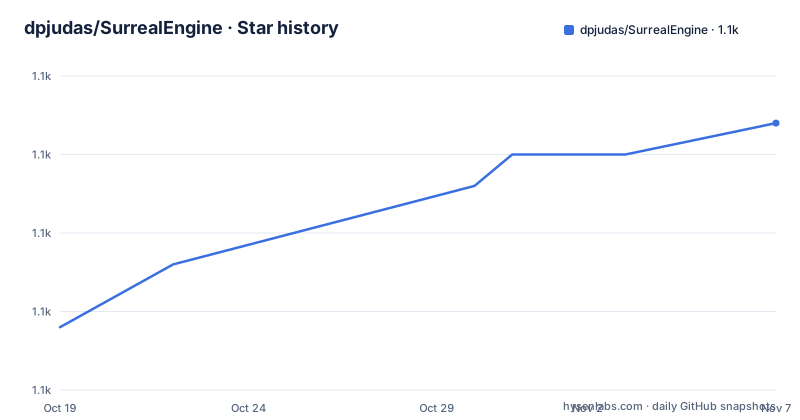
Star history
- dpjudas/SurrealEngine1,132 ★ · +13
| Repository | 2026-10-19 | 2026-11-07 |
|---|---|---|
| dpjudas/SurrealEngine | 1.1k | 1.1k |
13 Stars in the last 19 days, measured from the daily GitHub snapshot. Compare with other projects
Editorial analysis
The scope is two games, and the README says so
Surreal Engine is a project that aims to reimplement Unreal Engine 1, and the README is precise about where it currently stands: it is focused on making Unreal (Gold) and Unreal Tournament (UT99) playable. The scope might expand to cover more UE1 games in the future.
That narrowness is a strength for anyone evaluating it. A general purpose reimplementation of a 1999 engine would be a multi-year project with an uncertain finish line. A project that names two games has a definition of done, and the status of that work is tracked in a document at Docs/Status.md, which the README asks you to consult for the current status.
The engineering problem underneath is specific. UE1 ran on Direct3D and OpenGL as they existed in 1999, and its renderer, its networking, its input handling and its package format all assume that era. Running it on a current machine means reimplementing the engine rather than emulating the hardware, so the code is a fresh C++ implementation that reads the original game data and speaks modern rendering APIs.
The reimplementation is the reason the game data still matters. You need original copies of the UE1 games you want to run, and the engine reads them. It is not a standalone game distribution.
The repository is written in C++ and the default branch is master. The last push was on 2026-10-19, and the repository is not archived, so the work is ongoing.
Three rendering backends, and macOS needs a Metal 2 GPU
The system requirements are short and specific. You need original copies of the UE1 games you want to run, and the operating system has to be Windows 10 or newer, macOS 15 or newer, or a modern Linux distribution.
The graphics requirement is the interesting line. You need a Direct3D 11, OpenGL 3.2 or Vulkan capable graphics card, and on macOS that means a Metal 2 or newer GPU. So the engine is not tied to one API; it presents the choice of three, with a fourth path on Apple hardware.
That matters because the original engine's renderer was fixed to what 1999 offered. Reimplementing it for modern backends means the porting effort went into the renderer rather than into an emulator, and supporting three backends means you can run the same game on a Windows box with a D3D 11 card, a Linux box with a Vulkan driver, and a Mac.
The repository layout shows the split into components. There are SurrealEngine/ for the engine itself, SurrealGPU/ for the GPU and rendering layer, SurrealVideo/ for video playback, and SurrealWidgets/ for the user interface widgets, plus Assets/, Resources/, Thirdparty/ for vendored dependencies, Tools/, Win32Resources/, and a Configure.js at the root.
There are also two Windows batch files, UpdateSurrealGPU.bat and UpdateSurrealWidgets.bat, which tells you that the GPU and widgets components are developed as separate pieces that get updated independently, rather than as one monolithic tree.
Building goes through CMake and a JavaScript configure script
The build instructions live in a separate document, Docs/Building.md, which the README points to rather than inlining. What the repository root shows is the shape of the build system.
There is a CMakeLists.txt at the top level and a Configure.js beside it. A JavaScript configuration script next to a CMake build is an unusual pairing, and it suggests the project keeps a configuration step in a scripting language while the compilation itself is handled by CMake. The Tools/ directory is present as well.
The PKGBUILD file at the root is for Arch Linux, and it tells you the packaging story. The README lists the Linux distributions where Surreal Engine is available: Arch through the AUR with the surrealengine-git package, and Nix through a package search and a quickstart link. Those are git-tracking packages, which is the normal arrangement for a project without tagged releases.
Windows has its own resources in Win32Resources/ and its own update batch files, so the Windows build path is a first-class citizen rather than an afterthought.
The repository also contains a file named NO-AI Code Rule.md, which is a contribution policy rather than a build artefact. Its presence tells you the project has a rule about AI-generated contributions, and a project that documents that explicitly is making a deliberate choice about how contributions are reviewed.
Nightly builds are the only tagged release
There is no conventional release history. The single release entry is a nightly tag described as the latest successful build, dated 2025-08-14. The README says nightly builds are available in the Releases section, under the nightly tag.
That is a deliberate model for a game engine that is still being extended. The engine is expected to change every day, and the Windows distribution workflow is separate anyway, with the executable distributed through the project's own download rather than through a package manager. A versioned tarball would imply a stability guarantee the project is not making.
The practical consequence for a user is that there is no supported version to pin to and no changelog of compatibility for the game data. You take the current build, and if a map stops working after an update, that is the state of the project. The Status.md document is therefore the closest thing to a release note, and reading it is part of using the engine.
The licence is the other thing to read before downloading. The licence is a custom one that GitHub cannot classify, with a pointer to the LICENSE file, and the licence file itself is LICENSE.md at the root. For a project that reads proprietary game data and reimplements a commercial engine, a custom licence is not surprising, but the terms are the terms and they are not an OSI-approved licence, so anyone planning to redistribute builds or derive work should read LICENSE.md carefully rather than assume a permissive default.
Four steps to a running game, and a small CLI surface
The how-to-play section is four instructions long. Run the SurrealEngine executable, add the UE1 games you want in the Folders tab, select the game you want to play in the Games tab, and click Play.
So the interface is a launcher application rather than a command line tool, with a Folders tab for pointing at game installations and a Games tab for picking what to run. That is the shape a reimplementation needs, because the game data lives in directories the user owns and the engine has to discover them.
The command line parameters are a small secondary surface: the executable accepts an optional URL argument for the map name, an optional engineversion argument, and an optional path to a game folder.
There is a useful piece of Windows-specific behaviour here. If no game folder is specified, and the executable is not in a System folder, the engine will search the registry, on Windows only, for the registry keys Epic originally set. That means an existing Unreal Gold or UT99 installation is usually found automatically on Windows, which removes the most tedious part of the setup.
If no URL is specified, the engine uses the default URL in the ini file, which per default is the intro map. And the --engineversion argument overrides the internal version detected by the engine, which the README says should only be used for debugging purposes. That last flag is a hint about how the engine handles the version differences between UE1 releases, since the detected version apparently selects behaviour and can be forced.
The community is on Discord, and the README links the server.
The alternative is keeping the original stack alive, and it is worse
The honest comparison here is with the other option for playing a 1999 game: keep the period-correct environment running.
For Unreal Tournament that means a copy of the original Windows 9x era build, an old Direct3D driver, and either a real Windows installation, a virtual machine, or Wine. The result is a stack that is hard to reproduce, hard to secure, and increasingly awkward as the host operating system moves on. Running an unpatched 1999 binary on a current network is also a risk in itself, since these are binaries that predate a great deal of current exploit mitigation.
A reimplementation in C++ reading the original data solves the platform problem in a different way. The engine is current code, built for current compilers and current graphics APIs, and the only legacy input is the game data you already own. The trade is that you need the original data and that the reimplementation is only as complete as its Status document says.
The other category of alternative is a general purpose reimplementation of the same era of game, of the kind that exists for other 1990s engines. Those follow the same approach and face the same trade: modern code, original data, and a feature list that grows in proportion to the work available. Surreal Engine's distinguishing feature is not a different approach but a specific target, Unreal Gold and UT99, which is also why its Status document is a meaningful artefact.
For anything other than replaying or modding the original games, none of this applies, because Surreal Engine is not a general engine for new projects.
Editorial conclusion
Adopt Surreal Engine if you own original copies of Unreal Gold or Unreal Tournament and want them running on a current operating system with a modern renderer, and you are willing to build from source or accept a nightly build. Do not adopt it as a general game engine, because it reimplements a 1999 runtime rather than providing tooling for new projects, and it will not run games it has not been taught to read. Before you start, check that you have the original game data, since the engine needs it, and read the Status document in Docs to see which maps and features currently work.
Frequently asked questions
What is Surreal Engine and which games does it run?
It is a C++ reimplementation of Unreal Engine 1, currently focused on making Unreal (Gold) and Unreal Tournament (UT99) playable. The README says the scope might expand to cover more UE1 games in the future, and the current status is tracked in Docs/Status.md.
Do I need the original game files to use Surreal Engine?
Yes. The system requirements list original copies of the UE1 games you want to run, since the engine reads the original game data rather than shipping it. On Windows the engine can find an existing installation by searching the registry for the keys Epic originally set.
What graphics APIs does Surreal Engine support?
The README states you need a Direct3D 11, OpenGL 3.2 or Vulkan capable graphics card, and on macOS a Metal 2 or newer GPU. The operating system must be Windows 10 or newer, macOS 15 or newer, or a modern Linux distribution.
How do I get a build of Surreal Engine?
Nightly builds are available in the Releases section under the nightly tag, and there is no versioned release series. The README also lists Arch through the AUR and Nix through nixpkgs, and building from source is covered in Docs/Building.md using the CMakeLists.txt and Configure.js in the repository root.
What licence does Surreal Engine use?
A custom licence that GitHub cannot classify, with the terms in the LICENSE.md file in the repository root. Because it is not an OSI-approved licence, anyone planning to redistribute builds or derive work should read that file rather than assume a permissive default.
Official sources
Add this badge to your README
If you maintain this project, the badge below links readers to this analysis and shows its maintenance status from the daily GitHub snapshot. Paste the markdown into your README; add ?metric=license or ?metric=stars to the image URL for a different field.

[](https://hysenlabs.com/projects/dpjudas-surrealengine)Star history chart for your README
[](https://hysenlabs.com/projects/dpjudas-surrealengine)Was this useful?