TurboFieldfare: Running Gemma 4 26B-A4B on an 8 GB Mac via SSD Streaming
Gemma 4 26B-A4B inference in ~2 GB of RAM on any M-series MacBook
At a glance
- What is it?
- TurboFieldfare is a Swift and Metal inference runtime that fits a 26B-parameter model into about 2 GB of RAM by streaming experts from SSD. It targets Apple Silicon Macs with 8 GB, but its model-specific design and macOS 26 requirement narrow its audience.
- Who is it for?
- Adopt TurboFieldfare if you have an Apple Silicon Mac with 8 GB of RAM, want to run Gemma 4 26B-A4B locally, and can accept macOS 26 and a one-time 15 GB download. Avoid it if you need a general-purpose LLM runtime that supports many models, or if you must run on Intel or older macOS.
- Can I use it commercially?
- Yes. Apache-2.0 is a permissive licence: you can use, modify and sell software built on it, as long as you keep its copyright and licence notices.
- Is it still maintained?
- Yes. The repository received new commits within the last day.
- What is it written in?
- Mainly Swift, according to GitHub's language statistics.
Answers come from the project's GitHub data, last synced on November 14, 2026, and from our analysis. They are not legal advice.
Star history
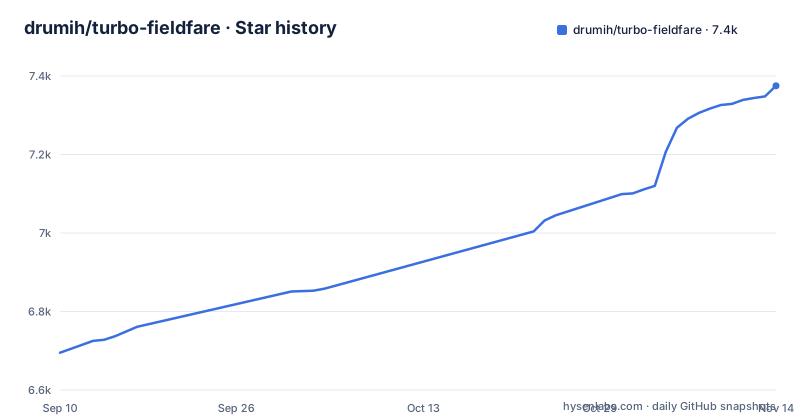
- drumih/turbo-fieldfare7,375 ★ · +680
| Repository | 2026-09-10 | 2026-11-14 |
|---|---|---|
| drumih/turbo-fieldfare | 6.7k | 7.4k |
680 Stars in the last 65 days, measured from the daily GitHub snapshot. Compare with other projects
Editorial analysis
The memory problem it solves
Gemma 4 26B-A4B is a 26-billion-parameter model, but only about 3.88B parameters are active per token. The full model occupies roughly 14.3 GB on disk. TurboFieldfare takes a different path: it keeps a shared 1.35 GB core and the FP16 KV cache in memory, then streams only the experts needed for each token from SSD. The result is a runtime that claims to run the model in about 2 GB of RAM, opening the door for base-model MacBook Airs. The project's stated target is an 8 GB M2 MacBook Air. That is a specific, narrow goal, and the design reflects it.
A model-specific runtime, not a wrapper
TurboFieldfare is written in Swift and Metal, and it is model-specific. It is not a wrapper around MLX or llama.cpp, which are general-purpose stacks that support many architectures. Instead, the repository contains custom Metal kernels and a runtime tuned for Gemma 4's mixture-of-experts layout. The README notes that the project includes a curated experiment record summarizing 103 measured results across kernels, caching, I/O, prefill, and decode. That level of specialization has a cost: you cannot point this runtime at a different model. If you want to run Llama or Mistral on the same hardware, you need a separate tool. The trade-off is that the runtime can exploit the model's structure, such as the 4-bit affine quantization and the 8-bit router, to hit its memory target.
How SSD streaming and caching work
The core mechanism is expert streaming. In a mixture-of-experts model, only a subset of experts is active for each token. TurboFieldfare keeps the shared layers and the KV cache resident, then reads the needed expert weights from SSD on demand. The README does say that page-cache state affects throughput. That implies the operating system's file cache plays a role in performance. The KV cache is FP16, which is a deliberate choice to balance memory and precision. The weights are quantized to MLX affine 4-bit with group size 64, and the router is 8-bit. This hybrid approach is what fits the model into the stated 2 GB budget. The system design document linked from the README covers how it works.
Getting it running on macOS 26
The quick start is straightforward. Clone the repository, run `swift build -c release`, then launch `.build/release/TurboFieldfareMac`. The first build downloads Swift packages for the tokenizer. On first launch, you choose Download to fetch and repack the pinned model, which is about 15 GB. After that, Load Model and Generate. The package exposes six products: the core library, a Mac app, a one-shot decode service, a CLI, an OpenAI-compatible server, and a repack tool. The README warns that only one model-owning product should run at a time. That is a real operational constraint: you cannot run the server and the Mac app simultaneously against the same `.gturbo` directory.
Measured performance and its caveats
The README reports measured decode speeds of 5.1 to 6.3 tokens per second on an 8 GB M2 MacBook Air, and 31 to 35 tokens per second on a 24 GB M5 Pro. Those figures come from the project's own benchmarks, not from an independent test. The README is careful to call them a reference point, not a ceiling. Prompt length, generated length, page-cache state, and hardware all affect throughput. The range on M2 is slow for interactive chat but usable for batch or background generation. The M5 numbers are more comfortable. The project also hosts a community benchmark page where other users can contribute results, which suggests the maintainers want broader validation. The at-a-glance table gives only the M2 and M5 measurements.
Limitations: vision, tools, and hardware floor
Several limitations are explicit. The image tower requires an M2 or newer Mac; text-only inference works on M1. Audio and video are not supported. The app and CLI do not expose or execute tools, though the loopback server accepts function-tool declarations and returns model-produced tool calls for the client to execute. That is an experimental feature. The runtime is arm64-only and requires macOS 26 with Metal 4, which means anyone on an older macOS is locked out. The README also warns that the model can repeat itself or give incorrect answers, so important results need checking. For an 8 GB machine, the SSD streaming approach means the drive is constantly read during generation.
Alternatives: MLX and llama.cpp take a generalist route
The obvious alternatives are MLX and llama.cpp, both named in the README as things TurboFieldfare is not. MLX is Apple's array framework for machine learning on Apple Silicon. llama.cpp is a C++ inference engine that supports many model architectures and quantization schemes. The difference is scope: MLX and llama.cpp are general-purpose, so they can run many models. TurboFieldfare makes that single-model trade-off to hit its memory target. If you need flexibility, choose the generalist. If you need this specific model on low-RAM hardware, TurboFieldfare is the only one of the three designed for it.
Maintenance, upgrade cost, and license
The project is active, with release 0.9.4 dated 2026-10-26 and earlier 0.9.x releases in October 2026. The version number below 1.0 signals that the API and file format may change. The `.gturbo` model directory format is specific to this project, so an upgrade might require re-downloading or repacking the model if the format changes. The license is Apache-2.0, which permits commercial use, modification, and distribution, provided you preserve copyright notices. The model itself, Gemma 4, has its own license terms that you must check separately; the README links to the model card. The project's documentation includes a system design and an optimization journey, which suggests the maintainer is transparent about internals. That helps if you need to debug or fork the runtime, but it does not reduce the ongoing cost of tracking a fast-moving pre-1.0 project.
Editorial conclusion
Adopt TurboFieldfare if you have an Apple Silicon Mac with 8 GB of RAM, want to run Gemma 4 26B-A4B locally, and can accept macOS 26 and a one-time 15 GB download. Avoid it if you need a general-purpose LLM runtime that supports many models, or if you must run on Intel or older macOS. Before adopting, verify the model license for your use case, check the exact storage requirements, and confirm that the experimental server's tool-call loop fits your workflow.
Frequently asked questions
What is turbo-fieldfare?
TurboFieldfare is a Swift and Metal runtime that runs the instruction-tuned Gemma 4 26B-A4B on an Apple Silicon Mac with about 2 GB of weights in memory, instead of loading the whole 14.3 GB model. It keeps a 1.35 GB shared core and its KV cache resident and streams the needed experts from SSD, and it is model-specific rather than a wrapper around MLX or llama.cpp.
What are the system requirements for TurboFieldfare?
An Apple Silicon Mac running macOS 26 with Metal 4, Apple Command Line Tools or Xcode with Swift 6.2+ and the macOS 26 SDK or newer, about 14.3 GB of free storage for the model and an internet connection for the first install. The validated target is an 8 GB M2 MacBook Air, and the package is arm64-only, so older macOS and Metal versions are not supported.
Does TurboFieldfare execute tools or support audio and video?
The Mac app and the CLI do not expose or execute tools, only user and model messages plus optional system guidance. The loopback OpenAI-compatible server does accept function tool declarations and returns model-produced tool calls for the client to authorize and execute, and audio and video are not supported.
Can TurboFieldfare accept image input on any Apple Silicon Mac?
Images go through a vision tower that installs as a companion pack of about 1.1 GB beside the 14.3 GB text model, and without it the app, CLI and server report image support as unavailable. The tower requires an M2 or newer Mac, while text-only inference remains available on M1.
Official sources
Add this badge to your README
If you maintain this project, the badge below links readers to this analysis and shows its maintenance status from the daily GitHub snapshot. Paste the markdown into your README; add ?metric=license or ?metric=stars to the image URL for a different field.

[](https://hysenlabs.com/projects/drumih-turbo-fieldfare)Star history chart for your README
[](https://hysenlabs.com/projects/drumih-turbo-fieldfare)Was this useful?