DSH Plugin Hub: A Curated Plugin Market Embedded in DeepSeek Harness
DeepSeek Harness's community-built-in plugin marketplace (dsh-plugin): search, download and install 4000+ hand-curated community plugins, updated daily and completely free. Built into Harness's Settings > Plugin Center so you can browse, search and install AI plugins without leaving the app.
At a glance
- What is it?
- DSH Plugin Hub is a community-built plugin market for DeepSeek Harness, listing over 8,000 plugins with manual verification. It installs as a plugin itself and provides a visual interface for browsing, installing, and managing plugins without leaving the app.
- Who is it for?
- Adopt DSH Plugin Hub if you use DeepSeek Harness and want a visual, curated way to discover and install community plugins without touching the command line. It is a good fit for users who value manual verification and source traceability.
- Can I use it commercially?
- Yes. MIT is a permissive licence: you can use, modify and sell software built on it, as long as you keep its copyright and licence notices.
- Is it still maintained?
- Yes. The repository last received commits 2 days ago.
- What is it written in?
- Mainly TypeScript, according to GitHub's language statistics.
Answers come from the project's GitHub data, last synced on October 22, 2026, and from our analysis. They are not legal advice.
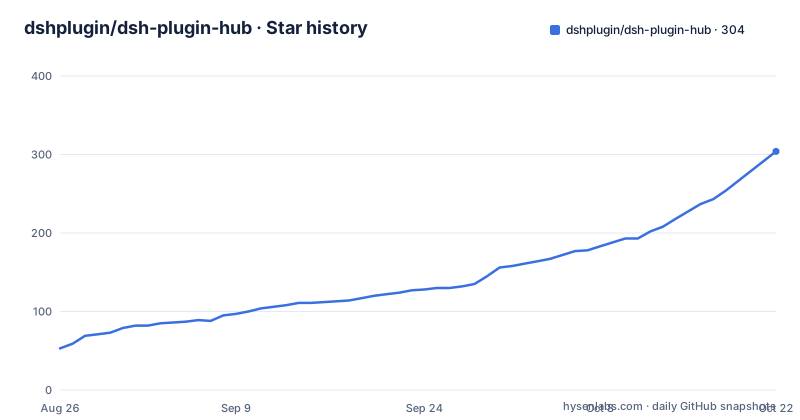
Star history
- dshplugin/dsh-plugin-hub304 ★ · +251
| Repository | 2026-08-26 | 2026-10-22 |
|---|---|---|
| dshplugin/dsh-plugin-hub | 53 | 304 |
251 Stars in the last 57 days, measured from the daily GitHub snapshot. Compare with other projects
Editorial analysis
What Problem It Solves and Who It Is For
DeepSeek Harness users face a discovery problem: plugins are scattered across GitHub repositories, npm packages, and command-line tools. DSH Plugin Hub solves this by providing a single, searchable catalog of 8,197 community plugins, of which 4,585 are manually verified. The target user is a Harness user who wants to find and install plugins without leaving the application. Instead of reading README files and running `dsh plugin add` commands manually, you open Settings, go to Plugin Center, and browse categories like interface, conversation, memory, and tool capabilities. The project is explicitly a community effort, not affiliated with DeepSeek Harness official, so it fills a gap that the official tooling does not address. For users who prefer a visual interface over the CLI, this plugin turns plugin management into a point-and-click task.
How the Plugin Works: Data Flow and Architecture
The plugin is itself a DeepSeek Harness plugin, installed via the `dsh plugin` command. Once installed, it injects a browser-side bundle into the Harness web interface. The README states that it has no host service dependency, no telemetry, and no privacy collection. The data flow is straightforward: the plugin fetches its catalog from dsh-plugin.org, which is the same source as the official website. The website is updated daily with new plugins, and the plugin center automatically retrieves the latest catalog after installation, so there is no manual update for the data itself. When you click install, the plugin queues the task serially in the background, shows progress in a popup, and allows cancellation. After installation, a page refresh activates the plugin, no restart of the Harness service is needed. Uninstall and upgrade follow the same visual pattern, with progress and history recorded in a notification center. The architecture is deliberately lightweight: everything runs in the browser, and the plugin acts as a front-end to the remote catalog.
Getting It Running: Commands and Configuration
Installation is a single command from npm, as the README recommends: `dsh plugin --profile web add dsh-plugin`. Alternatively, you can install from GitHub with `dsh plugin --profile web add git+https://github.com/dshplugin/dsh-plugin-hub.git`. The GitHub route requires no build or authentication because the plugin ships with a prebuilt browser bundle. After installation, restart `dsh web` and open Settings, then Plugin Center. Updates are handled through the same CLI: `dsh plugin --profile web update dsh-plugin` for a normal update, `dsh plugin --profile web add dsh-plugin@latest` to force a reinstall if the old version has update defects, and `dsh plugin --profile web remove dsh-plugin` followed by `dsh plugin --profile web add dsh-plugin` as the most reliable path to the latest version. The README notes that `add` does not overwrite an existing instance, so uninstall first if you want a clean install. Configuration options exist in the Settings area for update checks, npm mirror sources, proxy channels, security trust, and log storage locations. These are not detailed in the README, but the presence of these settings indicates a degree of control over how the plugin fetches and installs packages.
Manual Verification and Its Limits
The core selling point is human curation. The README claims that each plugin is manually checked by a technical team, with installation commands, compatibility status (verified or unconfirmed), and the target DeepSeek Harness version (dshTarget) verified. This is a real differentiator from automated scrapers, but it also introduces a bottleneck. With 8,197 plugins listed and 4,585 verified, nearly half remain unconfirmed. That means a user browsing the catalog will encounter plugins that have not been manually reviewed. The verification process is not transparent: the README does not explain the criteria, the frequency of re-checks, or how a plugin gets from unconfirmed to verified. The daily update claim also raises a question: with thousands of plugins, can a small team genuinely re-verify every changed plugin daily? The README says the team follows the ecosystem, but it does not specify how many people are involved. A practical limitation is that verification is a snapshot in time. A plugin can be verified today, but a later update to its installation script could break it, and the catalog might not reflect that until the next review cycle.
Failure Modes and Wrong-Tool Cases
The README hints at several failure modes. One is the update defect scenario: an old version of the plugin may fail to fetch the latest catalog, which is why the README provides a forced upgrade path. This implies that the plugin's own update mechanism can break, and users must fall back to the CLI. Another failure mode is environment-level install failures. Recent releases focus on 'precise environment diagnostics for install failures' and 'sharper error guidance for environment-level install failures', which suggests that installation can fail due to host environment issues, not just plugin bugs. The plugin shows confirmation dialogs before install and uninstall, which helps prevent mistakes, but it does not eliminate the risk of a malicious or broken plugin from the community catalog. The README does not mention any sandboxing or security review beyond manual verification, so installing an unconfirmed plugin carries unknown risk. This is the wrong tool if you need to manage plugins outside the Harness web interface, for example in a headless server or a CI pipeline, because the visual interface requires a browser. It is also not suitable for users who want a fully automated plugin discovery process with no human intervention; the manual curation model is inherently slower and less exhaustive than an automated index.
Comparison with a Direct CLI Approach
The natural alternative is to skip the plugin market and use the DeepSeek Harness CLI directly. The README shows that `dsh plugin --profile web add` can install any npm package or GitHub repository, so a user can manually search npm or GitHub for plugins and install them with a command. The difference is in approach: the CLI is a raw interface that gives you full control but requires you to know what to install and where to find it. DSH Plugin Hub adds a discovery layer on top of that CLI, with categories, search, and ratings. The trade-off is that the CLI is always up to date with the latest plugin versions, while the catalog depends on the manual review cycle. Also, the CLI does not require trust in a third-party catalog; you are directly specifying the source. For a user who knows exactly which plugin they need, the CLI is faster and more direct. For a user exploring what is available, the plugin market is more convenient. Another alternative is the official DeepSeek Harness repository itself, which may have its own plugin documentation, but the README does not describe any official market, so the community plugin is filling that void.
Maintenance, Upgrade Cost, and License
The project is under active development, with releases as recent as v1.3.11 on 2026-08-28. The release notes focus on error handling for install failures, which suggests that the maintainers are iterating on reliability. The upgrade process is designed to be low-friction: the plugin detects new versions and prompts a one-click update, and the CLI provides fallback methods. However, the cost is that you must occasionally restart `dsh web` after updates, and if an update breaks the plugin's ability to fetch the catalog, you need to use the CLI to force a reinstall. The project is MIT licensed, which allows free use, modification, and redistribution, with the caveat that it is provided as-is without warranty. The README does not mention any commercial support or SLA. For an engineering team, the maintenance cost is moderate: you need to track updates, verify that the plugin works with your Harness version, and be prepared to use the CLI as a fallback. The dependency on a third-party website for data means that if dsh-plugin.org goes down or changes its API, the plugin center might break. The README does not specify any offline mode or fallback data source, so the plugin is dependent on that remote service.
Editorial conclusion
Adopt DSH Plugin Hub if you use DeepSeek Harness and want a visual, curated way to discover and install community plugins without touching the command line. It is a good fit for users who value manual verification and source traceability. Do not use it if you need a plugin manager that works outside the Harness ecosystem, or if you require a fully automated pipeline with no human review. Before installing, verify the plugin's compatibility with your Harness version, check the dshTarget field for each plugin, and confirm the npm package name `dsh-plugin` matches your registry. Also, note that the project is independent from the official DeepSeek Harness team, so treat its listings as community-vetted, not vendor-supported.
Frequently asked questions
What does the dsh-plugin marketplace do?
It adds a plugin marketplace inside DeepSeek Harness, so community plugins can be browsed, searched and installed without leaving the app. After installing it, the marketplace appears under the settings section of the harness.
How do I install dsh-plugin?
From the package registry with dsh plugin --profile web add dsh-plugin, which needs no build step. Or straight from the source repository with dsh plugin --profile web add git+https://github.com/dshplugin/dsh-plugin-hub.git, then restart dsh web. A browser-side bundle is included so the GitHub route needs no build or authorization.
How do I update dsh-plugin when it will not fetch the latest version?
Three routes are documented. Run the update command directly, force a specific version by adding the package with a latest tag, or remove the plugin and add it again, since add does not overwrite an already installed version so a clean reinstall is guaranteed to fetch the newest one.
What happens before dsh-plugin installs a plugin?
A confirmation dialog shows the plugin name, its source repository, and the command that will be executed, and the install only begins after you confirm. Uninstalls show what is about to be removed first, and an overwrite upgrade pops a confirmation before installing in place.
How do I get my plugin listed in dsh-plugin?
Publish it to GitHub and add the dsh-plugin topic, and the directory discovers it automatically. The site carries the listing requirements and the submission process on its submit page.
Does dsh-plugin collect any data?
The project states it injects only on the browser side, depends on no host service, and collects no telemetry and no user data. The catalogue data is served from the public site and the two stay in sync, so the plugin is a view over a static directory rather than a proxy to a backend.
Official sources
Add this badge to your README
If you maintain this project, the badge below links readers to this analysis and shows its maintenance status from the daily GitHub snapshot. Paste the markdown into your README; add ?metric=license or ?metric=stars to the image URL for a different field.

[](https://hysenlabs.com/projects/dshplugin-dsh-plugin-hub)Star history chart for your README
[](https://hysenlabs.com/projects/dshplugin-dsh-plugin-hub)