eCAL: brokerless publish-subscribe middleware that picks its own transport
📦 eCAL - enhanced Communication Abstraction Layer. A high performance publish-subscribe, client-server cross-plattform middleware.
At a glance
- What is it?
- eCAL is an Eclipse Foundation middleware for interprocess communication that offers both publish-subscribe and server-client patterns, routes each link over shared memory, UDP or TCP automatically, and stays agnostic to the message format you serialise. It is stable on Windows and Linux, experimental on macOS, QNX and FreeBSD, and is Apache-2.0 licensed.
- Who is it for?
- eCAL fits a robotics, autonomous driving or simulation team that needs several processes on one machine, or several machines on a network, exchanging typed messages without standing up a broker, and that already works in C++ and wants recordings in a format they can analyse later.
- Can I use it commercially?
- Yes. Apache-2.0 is a permissive licence: you can use, modify and sell software built on it, as long as you keep its copyright and licence notices.
- Is it still maintained?
- Yes. The repository last received commits 4 days ago.
- What is it written in?
- Mainly C++, according to GitHub's language statistics.
Answers come from the project's GitHub data, last synced on November 7, 2026, and from our analysis. They are not legal advice.
Star history
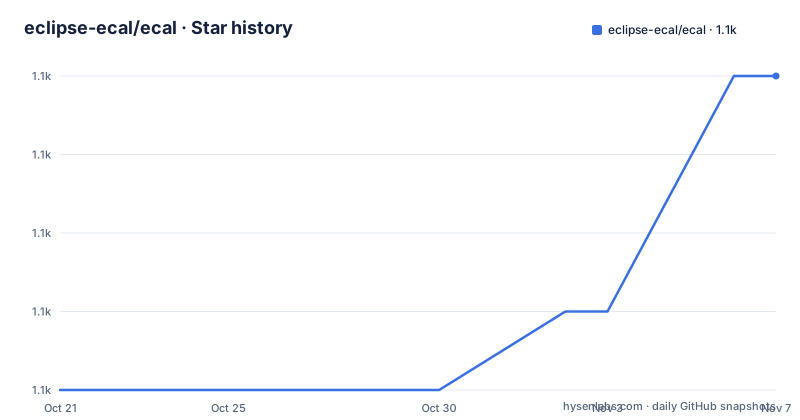
- eclipse-ecal/ecal1,059 ★ · +4
| Repository | 2026-10-21 | 2026-11-07 |
|---|---|---|
| eclipse-ecal/ecal | 1.1k | 1.1k |
4 Stars in the last 17 days, measured from the daily GitHub snapshot. Compare with other projects
Editorial analysis
A middleware that configures itself out of the way
eCAL stands for enhanced Communication Abstraction Layer, and it is described as a middleware that enables scalable, high performance interprocess communication on a single computer node or between different nodes in a computer network. The description of the design goal is telling: eCAL provides publish-subscribe and server-client patterns to connect different nodes in the network with almost no configuration required.
The claim to check is the transport selection. The README states that eCAL automatically chooses the best available data transport mechanism for each link, supporting shared memory for local communication and UDP and TCP for network communication. Shared memory is called out as incredibly fast in the README's own emphasis, and that is the case where two processes on one machine pass large payloads through the memory system rather than through a socket.
Two design commitments follow from the name. First, it is brokerless, which the README lists as a fact. There is no routing daemon to install, configure and keep alive, and a node that joins the network is discoverable without a central registry. Second, it is message protocol agnostic, meaning you choose the format, with Google Protobuf, CapnProto and Flatbuffers given as the named examples.
That combination is aimed at teams who have been burned by broker dependencies or by a middleware that dictates their data model. The cost is that a brokerless design pushes discovery and configuration problems into the library, and it means you do not get the central topics-and-QoS administration a message broker gives you.
The upstream is the Eclipse Foundation, and the repository sits under the eclipse-ecal organisation.
Two patterns, one API, and the C interface for other languages
The API surface is small enough to learn in an afternoon, which is the main practical argument for the library.
The example in the README is a publisher. It initialises eCAL with the process name, creates a string publisher on a topic, sends in a loop, and calls Finalize at the end.
#include <ecal/ecal.h>
#include <ecal/msg/string/publisher.h>

#include <thread>

int main(int argc, char** argv)
{
  // Initialize eCAL. The name of our process will be "Hello World Publisher"
  eCAL::Initialize(argc, argv, "Hello World Publisher");

  // Create a String Publisher that publishes on the topic "hello_world_topic"
  eCAL::string::CPublisher publisher("hello_world_topic");

  // Infinite loop
  while (eCAL::Ok())
  {
    // Publish a "Hello World" message
    publisher.Send("Hello World");

    std::this_thread::sleep_for(std::chrono::milliseconds(500));
  }

  // finalize eCAL API
  eCAL::Finalize();
}
Two details in that snippet carry more weight than they look. The initialisation takes the process name, which is how subscribers find a publisher by name rather than by an address they had to be told. And the loop condition is eCAL::Ok(), so the lifetime of the middleware is bound to the application rather than to a global singleton you have to remember to shut down.
The language story is the other significant decision. The README states that eCAL provides a C++ and C interface for easy integration into other languages such as Python, C# or Rust, and links a Rust implementation. The pyproject.toml confirms the Python side is a real package published as eclipse-ecal, built with hatchling, hatch-vcs and scikit-build-core, requiring Python 3.8 or newer, and depending on protobuf above 3.8 and below 7, and on packaging. The version comes from the latest git tag through setuptools-scm, so the Python package version tracks the C++ releases rather than being maintained separately.
Installing on Ubuntu via a rolling PPA, and on Windows via a wizard
Binary installers are provided for Windows and Ubuntu, and further setup help is in the documentation.
For Ubuntu the install is three commands against the project's own PPA.
sudo add-apt-repository ppa:ecal/ecal-latest
sudo apt-get update
sudo apt-get install ecal
The README is direct about what that PPA means: it will always upgrade you to the latest eCAL Release, described as a rolling release PPA. If you intend to stay on a specific release, other PPAs exist and the README links them in the setup documentation. That is a genuine decision point rather than a footnote, since a rolling PPA means an apt upgrade can change your middleware version out from under a running vehicle or a test rig.
Supported Ubuntu versions at the time of writing are 18.04, 20.04, 22.04 and 24.04, for amd64, armhf and arm64, and the README says non-LTS versions are usually supported too.
Windows is an installer wizard, and the constraint is stated plainly: only 64bit Windows 10 and 11 are supported.
The README does not give install commands for macOS, QNX or FreeBSD, which is consistent with those platforms being listed as experimental rather than stable. If you are on one of those, the documentation and the build instructions in the repository are the route, not a package manager.
Recording, replay and monitoring as first class features
The tools are where a middleware either proves itself or stays a library. eCAL ships four, and the README lists them with both command line and GUI versions available.
The eCAL Monitor visualises the data flow and inspects messages sent between publishers and subscribers, which makes it the debugging tool for a system where the traffic is spread across machines. The eCAL Recorder records the data sent between your eCAL nodes, and the eCAL Player replays those recordings later. eCAL Sys is for defining your system configuration and monitoring your applications.
The recorder and player pair is the one that changes how a team works. The README describes these as powerful tools for recording, replay and monitoring all your data flows, decentralized, and the recording format is the standardised HDF5. A recording is therefore not an opaque proprietary blob, it is a file that an existing analysis stack can open. For a robotics team that needs to understand why a manoeuvre went wrong three weeks later, that is the difference between a usable system and a debugging session you have to reproduce live.
The playback direction matters just as much. Being able to replay a recorded run against a changed algorithm is how you compare versions without re-running the vehicle, and it is a capability that comes from the format being standardised rather than invented.
The repository also contains samples/ with a CMakeLists.txt, cpp subdirectory and data directory, and the app/ directory holds the application sources for the tools.
Protocol neutrality and the serialization split in the tree
Choosing your own message format is a real architectural commitment, and eCAL's implementation of it is visible in the repository layout rather than only in the README.
The pyproject.toml sdist configuration lists the serialization directories explicitly: serialization/protobuf/, serialization/string/ and serialization/common/. The string serializer is what the Hello World example uses, and protobuf is the option the Python bindings depend on. The repository also has a thirdparty/ directory containing protobuf, nanobind and ecaludp, which is the vendored dependency set, and a separate serialization layer means adding a format is a matter of implementing the interface rather than changing the transport.
The message format is the one thing eCAL deliberately does not decide for you, and that cuts both ways. It means you can use whatever your team already knows and can generate language bindings for, and it means a subscriber and a publisher must agree on the format out of band, because the middleware will happily deliver bytes that the other side cannot interpret.
The performance claim in the README is 1 to 20 GB/s depending on payload size, with a link to the measured performance page and a badge pointing at a Bencher benchmark project with per-plot tracking. The README describes the range as depending on payload size rather than a single number, which is the honest way to state a throughput figure for a shared memory transport. The number to trust is the one on the benchmark page for your payload size, not the range in the README.
Ecosystem, platform status and the Apache-2.0 licence
eCAL is a platform, not just a library, and the surrounding projects show where it is used.
For ROS2 there is rmw_ecal, an eCAL / ROS2 middleware layer, plus rosidl_typesupport_protobuf for Protobuf based rosidl typesupport, so the integration is at the middleware abstraction level rather than a bridge. For Matlab Simulink there is an eCAL Simulink Toolbox hosted on Mathworks File Exchange, and a separate ecal-toolbox repository. For visualisation there is an eCAL Foxglove bridge to visualise eCAL messages in Foxglove Studio, plus ecal-mcap-tools for interoperability between eCAL HDF5 and the MCAP measurement format, and ecal-mongraph for simple graph visualisation. Other related projects listed are an eCAL gpsd client, fineftp-server for collecting distributed measurement artifacts over the network, and tcp_pubsub, an additional TCP transport layer for higher reliability.
The platform status is stated as a list rather than a claim. Windows and Linux are marked stable. QNX, MacOS and FreeBSD are marked experimental, and the README says eCAL supports Intel and arm platforms. If you are targeting an experimental platform, the middleware being source-available and buildable is the important part, not the support label.
The licence is Apache-2.0, with LICENSE.txt at the root plus a LICENSES/ directory, NOTICE.md and NOTICE.txt, and the Python package declares the same licence with a license-files list pointing at LICENSE.txt, NOTICE.md and the LICENSES_python_bindings subtree. A NOTICE file alongside an Apache licence is what a foundation project carries when third-party code is vendored, and this repository does vendor some.
The last push was on 2026-10-15, and the recent tags are v6.1.1 and v6.0.2 from April 2026 and v6.1.0 from February 2026.
Editorial conclusion
eCAL fits a robotics, autonomous driving or simulation team that needs several processes on one machine, or several machines on a network, exchanging typed messages without standing up a broker, and that already works in C++ and wants recordings in a format they can analyse later. It is the wrong tool if your application is written in a managed language with no eCAL bindings, if you need a broker-backed system with central routing and per-topic QoS, or if your target platform is macOS, QNX or FreeBSD and you cannot absorb experimental support. Before you commit, read the setup documentation for your platform, check that the transport you need is the one eCAL selects for your topology, and note that the Python bindings are published under the separate name eclipse-ecal on PyPI with protobuf and packaging as dependencies.
Frequently asked questions
How do I install eCAL on Ubuntu?
Add the project PPA with sudo add-apt-repository ppa:ecal/ecal-latest, run sudo apt-get update, then sudo apt-get install ecal. The README warns that this PPA always upgrades you to the latest release, and points to other PPAs if you want to stay on a fixed version.
Which message formats does eCAL support?
eCAL is message protocol agnostic and you choose the format, with Google Protobuf, CapnProto and Flatbuffers named in the README. The repository has separate serialization/protobuf, serialization/string and serialization/common directories.
Does eCAL require a broker or a central server?
No. The README lists eCAL as brokerless, and it provides both publish-subscribe and server-client patterns with almost no configuration required.
Which operating systems does eCAL support?
The README marks Windows and Linux as stable, and QNX, MacOS and FreeBSD as experimental. For Windows only 64bit Windows 10 and 11 are supported.
What format does the eCAL Recorder write?
The eCAL Recorder records the data sent between eCAL nodes using the standardised HDF5 format, and the eCAL Player replays those recordings later.
Official sources
Add this badge to your README
If you maintain this project, the badge below links readers to this analysis and shows its maintenance status from the daily GitHub snapshot. Paste the markdown into your README; add ?metric=license or ?metric=stars to the image URL for a different field.

[](https://hysenlabs.com/projects/eclipse-ecal-ecal)Star history chart for your README
[](https://hysenlabs.com/projects/eclipse-ecal-ecal)Was this useful?