MyGo compiles Go desktop apps with native GPU UI or an embedded webview
Develop desktop apps with native UI or web frontend in Go
At a glance
- What is it?
- MyGo is a Go framework for building desktop applications with either a native UI drawn on the GPU or a web frontend in the OS webview, shipped as a single pure-Go binary with no cgo. It suits a Go team that wants a small, typed desktop app, and it does not suit anyone who needs Electron-level frontend ecosystem breadth or an ecosystem of Go GUI libraries to draw on.
- Who is it for?
- Adopt MyGo when your team writes Go, your desktop app is small enough that a few megabytes matters, and you would rather have one typed language across the UI than a web frontend with a bridge to a backend. Do not adopt it if you need a large existing frontend dependency tree.
- Can I use it commercially?
- Yes. MIT is a permissive licence: you can use, modify and sell software built on it, as long as you keep its copyright and licence notices.
- Is it still maintained?
- Yes. The repository last received commits 1 day ago.
- What is it written in?
- Mainly Go, according to GitHub's language statistics.
Answers come from the project's GitHub data, last synced on October 22, 2026, and from our analysis. They are not legal advice.
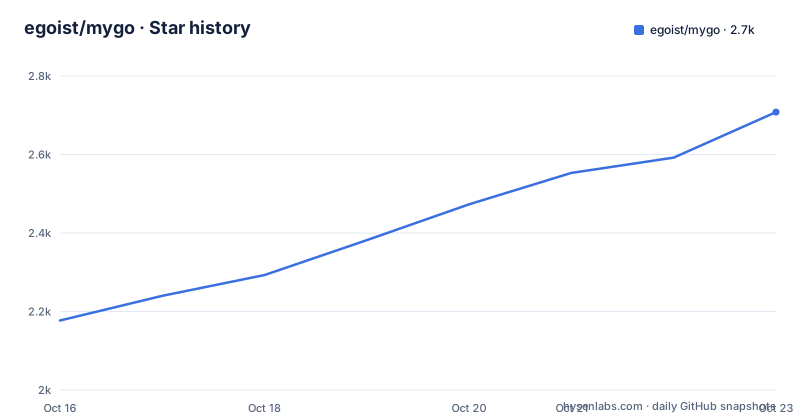
Star history
- egoist/mygo2,592 ★ · +415
| Repository | 2026-10-16 | 2026-10-22 |
|---|---|---|
| egoist/mygo | 2.2k | 2.6k |
415 Stars in the last 6 days, measured from the daily GitHub snapshot. Compare with other projects
Editorial analysis
Two kinds of window, and one app can mix them
MyGo's central idea is that a window shows one of two kinds of interface, and that a single app, or a single window, can mix them.
The first kind is a web page, rendered in the webview the operating system already has: WKWebView on macOS, WebKitGTK on Linux, WebView2 on Windows. The frontend is built with any web tools you like, and it calls your Go code through a TypeScript client that MyGo generates from your Go code.
The second kind is native UI, written in Go alone with the `ui` package and drawn by MyGo itself on the GPU. No HTML, no JavaScript and no webview, which the README says means the window opens at once and takes little memory.
The mix is the part that distinguishes it. The README lists web pages inside native UI, under the menus and dialogs it shows over them, so you can put a web surface in a native chrome.
In both cases the output is the same shape of artefact: a single Go binary of a few megabytes, focused on low memory and CPU use. And it is pure Go with no cgo, so the README states you can build for every platform from any machine. That last property is the one that changes release engineering, because there is no cross-compiler toolchain to install per target.
Typed IPC, and what the generated TypeScript client looks like
The web path's contract is described as typed IPC for pages. You bind Go services, stream values through channels and send typed events, and the TypeScript client is generated from your Go code.
The Go side is a plain struct with ordinary exported methods. This is the whole service:
type Greeter struct{}

// Greet returns a greeting.
func (Greeter) Greet(name string) string { return "Hello, " + name }

func main() {
	mygo.Bind(Greeter{})
	mygo.App.WhenReady(func() {
		mygo.NewWindow(mygo.WindowOptions{Title: "Hello", URL: "/"})
	})
	if err := mygo.App.Run(); err != nil {
		log.Fatal(err)
	}
}
And the generated TypeScript mirrors it, so the call from a page is a typed function rather than a stringly-typed message:
import { Greeter } from "./mygo"; // generated

document.body.textContent = await Greeter.greet("Ada");
Two details are worth noting. The method `Greet` becomes `greet`, so the client follows JavaScript naming rather than Go naming. And the doc comment on `Greet` is presumably what populates the type declarations, which means comments in your Go service are user-facing documentation for the frontend.
The `mygo.App.WhenReady` pattern is what makes both examples read the same way: you register a callback, create windows inside it, then call `Run` and handle its error. That ordering is consistent across both interface kinds.
Native UI is a Go function of app state, not a widget tree
The native side has no HTML and no object tree to keep in sync. The README describes it as a Go UI toolkit where a view is a Go function of the app's state, and the counter example shows the shape:
type counter struct{ n int }

func (s *counter) view(c *ui.Context) {
	ui.Column(c).Fill().Center().Gap(12).Children(func() {
		ui.Text(c, fmt.Sprint(s.n)).FontSize(40).Bold()
		if ui.PrimaryButton(c, "Increment").Clicked() {
			s.n++
		}
	})
}

func main() {
	s := &counter{}
	mygo.App.WhenReady(func() {
		mygo.NewWindow(mygo.WindowOptions{
			Title:   "Counter",
			Content: ui.View(s.view),
		})
	})
	if err := mygo.App.Run(); err != nil {
		log.Fatal(err)
	}
}
Read it as an immediate-mode interface. The view function runs each frame, reads `s.n` to produce the text, and returns the current value of `ui.PrimaryButton(c, "Increment").Clicked()` as the condition for incrementing. There is no retained widget tree and no reconciler.
The layout vocabulary is CSS-shaped rather than constraint-based: `Column`, `Fill`, `Center`, `Gap`, `Children`. That is flexbox and grid, which the README lists explicitly.
The toolkit scope, as listed: flexbox and grid layout, widgets, text editing with input methods, virtualized lists, SVG icons, animations, screen reader support, and views you can test without a window. That last item matters more than it sounds, because a view function is an ordinary Go function taking a `*ui.Context`, so a test can drive it headlessly.
Styling goes further than most: the README claims Liquid Glass on every platform with the glass plugin, and web pages inside native UI rendered under the menus and dialogs shown over them.
Getting started: two init paths and two toolchains
An app with a web frontend needs Go 1.27 or newer plus Bun, and is scaffolded with the CLI:
bunx mygo-cli init my-app      # or: npx mygo-cli init my-app
cd my-app
bun run dev
An app of native UI needs Go alone, with no JavaScript toolchain at all:
go run github.com/egoist/mygo/cmd/mygo@latest init -template native my-app
cd my-app
go tool mygo dev
That second form is worth reading closely. `go run` fetches and runs the CLI without installing it, `@latest` pins nothing, and the native template is selected with `-template native`. The dev loop is then `go tool mygo dev`, which uses Go's tool directive rather than a package manager script.
So the two paths have genuinely different setup costs, and that difference is the first thing to decide. Web frontend means Node tooling, a package manager and a build step for the page. Native UI means Go and nothing else.
For completeness, the module requires `go 1.27.1`. Documentation lives in `docs/README.md` in the repository and on the project site.
Desktop capabilities are the reason this is a framework and not a canvas
Drawing pixels is easy. Everything a desktop application is expected to do is the actual work, and the README's list is long enough to be read as a feature checklist against the platform APIs you would otherwise call yourself.
For both interface kinds: windows, menus, tray, dialogs, notifications, global shortcuts, deep links, file associations, recent documents, the system accent color and accessibility settings, and watching files.
Shipping is treated as a first-class concern too: app bundles and disk images, Windows installers, Debian packages and a Linux install script, code signing, notarization, and signed auto-updates with delta updates and an update window in the manner of Sparkle. The README describes the update window as being in the manner of Sparkle.
The repository layout backs this up. Files at the top level map almost one to one onto the list: `clipboard.go`, `dialog.go`, `deeplink.go`, `drag.go`, `downloads.go`, `document.go`, `flyout.go`, `content.go`, `find.go`, `color.go`, `events.go`, `frontend.go`, `ipc.go`, `channel.go`, `bridge.go`, plus a `document_watch.go` for file watching and a `document_recovery.go` that presumably handles unsaved work. There are per-platform backends (`backend_darwin.go`, `backend_linux.go`, `backend_windows.go`, `backend_other.go`), an `audio/` directory, an `i18n/` directory, and a `cmd/` directory.
The `document_windows.go` and `document_unix.go` pairing is a useful hint: some capabilities genuinely do not exist on every platform, and the framework is explicit about which file implements which.
Dependencies, versions, and what to check before adopting
The dependency list in `go.mod` is short and tells you what this is built from. The module requires `go 1.27.1`.
Two entries stand out.
The rest are conventional: `golang.org/x/image` for image decoding, `golang.org/x/net` and `golang.org/x/text` for network and Unicode, plus two audio libraries, `github.com/hajimehoshi/go-mp3` and `github.com/jfreymuth/oggvorbis` with `jfreymuth/vorbis` indirect.
`bench_test.go` at the repository root is worth noting, since a framework making claims about memory and CPU has at least a benchmark file to point at.
On versions, the cadence is fast and worth planning around: v0.4.8 on 2026-10-12, v0.5.0 on 2026-10-14, and v0.5.1 later the same day, with the last push on 2026-10-16. A minor version and a patch within two days of each other is a young project shipping quickly.
The repository also has a `package.json` for the JavaScript side, naming itself `mygo-dev` as private with workspaces covering `packages/*`, `packages/cli/npm/*`, `plugins/*`, `examples/*` and `website`, and a `bun.lock`. So the webview client, the CLI's npm package, the plugins and the documentation site are all managed from one Bun workspace alongside the Go module.
Licence is MIT. The examples directory, with twenty-four entries including a code editor, a terminal, a piano, drag-drop, flyouts, a launcher and a markdown chat, is also the fastest way to see what the toolkit can actually do.
Editorial conclusion
Adopt MyGo when your team writes Go, your desktop app is small enough that a few megabytes matters, and you would rather have one typed language across the UI than a web frontend with a bridge to a backend. Do not adopt it if you need a large existing frontend dependency tree. Before committing, run the native template init on a scratch directory, because the web path additionally needs Bun or npx to run `mygo-cli`, and releases are moving fast enough that you should pin a version rather than tracking main.
Frequently asked questions
What is MyGo?
MyGo is a Go framework for building desktop apps with either native UI drawn on the GPU using the `ui` package, or a web frontend in the OS webview. A single app or window can mix both kinds of interface.
Does MyGo need cgo?
No. The README states it is pure Go with no cgo, so you can build for every platform from any machine, and the output is a single Go binary of a few megabytes.
How do I create a new MyGo app with native UI?
With Go 1.27 or newer, run `go run github.com/egoist/mygo/cmd/mygo@latest init -template native my-app`, then `cd my-app` and `go tool mygo dev`. Native UI needs no JavaScript toolchain.
How does a web frontend call Go code in MyGo?
You bind a Go service with `mygo.Bind`, and a TypeScript client is generated from your Go code. The page then imports the generated client and calls the method as an async function.
Which webview does MyGo use on each platform?
WKWebView on macOS, WebKitGTK on Linux and WebView2 on Windows. The README states each window shows a web page in the webview the operating system already has.
Does MyGo handle app updates and packaging?
Yes. The README lists app bundles and disk images, Windows installers, Debian packages and a Linux install script, code signing, notarization, and signed auto-updates with delta updates and an update window in the manner of Sparkle.
Official sources
Add this badge to your README
If you maintain this project, the badge below links readers to this analysis and shows its maintenance status from the daily GitHub snapshot. Paste the markdown into your README; add ?metric=license or ?metric=stars to the image URL for a different field.

[](https://hysenlabs.com/projects/egoist-mygo)Star history chart for your README
[](https://hysenlabs.com/projects/egoist-mygo)Was this useful?