paopao-ce: one repository, four run paths, and alpha tags only
A scalable social community platform powered by Gin backend and modern TypeScript/Vue frontend architecture
At a glance
- What is it?
- A Go and Vue micro-community platform where the backend, the web client, and an optional Tauri desktop app ship together, configured through a Features suite list and a YAML overlay. What you adopt is a codebase with an alpha tag line, not a packaged product.
- Who is it for?
- paopao-ce fits a team that wants a working community product to start from and is prepared to own the deployment: the backend, the Vue client, the SQL bootstrap, and the operational docs are all in the repository, and the admin UI moves most settings out of the config file.
- Can I use it commercially?
- Yes. MIT is a permissive licence: you can use, modify and sell software built on it, as long as you keep its copyright and licence notices.
- Is it still maintained?
- Yes. The repository last received commits 104 days ago.
- What is it written in?
- Mainly Go, according to GitHub's language statistics.
Answers come from the project's GitHub data, last synced on November 15, 2026, and from our analysis. They are not legal advice.
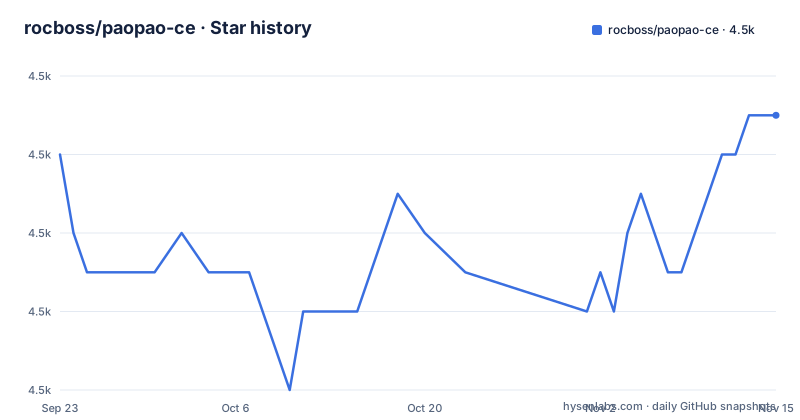
Star history
- rocboss/paopao-ce4,505 ★ · +1
| Repository | 2026-09-23 | 2026-11-15 |
|---|---|---|
| rocboss/paopao-ce | 4.5k | 4.5k |
1 Stars in the last 53 days, measured from the daily GitHub snapshot. Compare with other projects
Editorial analysis
Four run paths, and the desktop client adds Rust
PaoPao is a micro-community platform where the pieces you would normally install separately live in one repository: a Gin backend, a Vue 3 web client, and a Tauri desktop client that is optional. The architecture table puts Go, Gin, Cobra, GORM, and Mir on the backend, Vue 3, Vite, and Naive UI on the web side, Meilisearch under search, Redis under cache, and Tauri under desktop. Object storage is a row of choices rather than one: Local OSS, MinIO, AliOSS, COS, Huawei OBS, and S3-compatible endpoints. Observability is OpenTelemetry, Sentry, Pyroscope, and Pprof.
The paths to a running instance follow that shape. You can run from source, bring up a local evaluation with Docker Compose, or build a release binary with make build. Alongside Dockerfile there is Dockerfile.allinone, plus build-allinone.sh, build-image.sh, and build-release.sh for image and release assembly.
The docs split the same way: INSTALL.md for installation, Docker usage, and desktop build instructions, INSTALL_ZH.md as the Chinese version, docs/deploy/ for deployment, docs/openapi/ for exported API documentation, docs/proposal/ for design notes, and deployed-sites.md for known public instances. Building the desktop app from the web directory adds a Rust and Tauri toolchain to whatever the backend already needed.
docker compose up -d publishes three ports and a default search key
Local evaluation is three commands:
git clone https://github.com/rocboss/paopao-ce.git
cd paopao-ce
docker compose up -d
What comes up is more than the application. The docs point at http://localhost:8008 for PaoPao, http://localhost:7700 for Meilisearch, and http://localhost:8001 for RedisInsight, and the compose file matches. The db service runs mysql:${MYSQL_TAG:-8.0} with MYSQL_DATABASE, MYSQL_USER, and MYSQL_PASSWORD all set to paopao, MYSQL_RANDOM_ROOT_PASSWORD set to yes, host port 3306 published, and ./scripts/paopao-mysql.sql mounted into /docker-entrypoint-initdb.d/paopao.sql so the schema loads on first boot. The meili service runs getmeili/meilisearch:${MEILI_TAG:-v1.7} with MEILI_MASTER_KEY=paopao-meilisearch, and the redis service is redis/redis-stack:${REDIS_STACK_TAG:-7.2.0-v6} with REDISEARCH_ARGS set to "MAXSEARCHRESULTS 5".
Three details deserve attention before this file reaches a server. The database password and the Meilisearch master key are the literal word paopao and paopao-meilisearch in the shipped file. RedisInsight is published to the host on 8001, so a development stack exposes an admin interface on every interface. And MAXSEARCHRESULTS 5 caps what the Redis Stack search module returns, which is a small ceiling to raise before you rely on search.
Your config.yaml is an overlay on an embedded default
config.yaml.sample is described as a minimal bootstrap template, and the runtime order is what makes that workable. PaoPao loads the embedded default config first, then overlays ./custom/config.yaml or ./config.yaml if one is present, preferring the first file it finds. Your file is therefore a patch, not the whole configuration.
The split between file and admin UI is explicit. Keep in YAML: ports, feature selection, database, Redis, JWT, and AdminSettings.EncryptionKey. Prefer the admin UI at /#/admin/settings for the site profile, app behavior limits, search provider settings, object-storage settings, and SMS and payment settings, along with the other operational knobs the registry supports. Watch the apply mode too, because some settings are live while others are marked restart-required in the admin page.
Two consequences follow. AdminSettings.EncryptionKey is file-only, so a secret ends up in the same file as your ports, which makes that one file worth keeping out of version control and worth backing up separately from the data volumes. And a setting you change in the admin page that is flagged restart-required will look like it did nothing at all until the process restarts.
Feature suites are a YAML map that the serve flags also read
The Features section decides which capability bundles are enabled, and it is a plain map of suite name to member list:
Features:
  Default: ["Base", "MySQL", "Option", "LocalOSS", "LoggerFile"]
  Develop: ["Base", "MySQL", "Option", "Sms", "AliOSS", "LoggerOtlp"]
  Demo: ["Base", "MySQL", "Option", "Sms", "MinIO", "LoggerOtlp"]
  Slim: ["Base", "Sqlite3", "LocalOSS", "LoggerFile"]
  Base: ["Zinc", "Redis", "Alipay"]
  Option: ["SimpleCacheIndex"]
  Sms: "SmsJuhe"
So Default reaches Zinc, Redis, Alipay, and SimpleCacheIndex through Base and Option, while Slim swaps MySQL for Sqlite3 and Develop trades LocalOSS and file logging for Sms, AliOSS, and OTLP logging. The same names are accepted by the serve command:
# Use the default suite
release/paopao serve

# Use only the declared develop suite
release/paopao serve --no-default-features --features develop

# Add sms on top of the default suite
release/paopao serve --features sms

# Enable features explicitly
release/paopao serve --no-default-features --features sqlite3,localoss,loggerfile,redis
Note the casing. The YAML keys are capitalized, Develop, Sms, Sqlite3, LocalOSS, LoggerFile, while every flag example passes them in lower case, so what you type is not character for character what the map declares. --no-default-features is the flag that separates a suite you declared from Default, and leaving it out turns --features into an addition rather than a replacement. features-status.md tracks the current implementation status of each feature.
make build stamps the version and forces cgo on
The Makefile holds the Go specifics. PROJECT is paopao-ce and TARGET is paopao, with .exe appended when OS is Windows_NT. CGO_ENABLED is set to 1 when it arrives empty, so a shell with no CGO_ENABLED in it still compiles with cgo and therefore still needs a C toolchain on the machine.
Version data is injected at link time rather than read at runtime. BUILD_VERSION comes from git describe --tags --always, BUILD_DATE from the date command, SHA_SHORT from git rev-parse --short HEAD, and those values are written into pkg/version through -ldflags -X. Both the build and the run target use the same shape:
go build -pgo=auto -trimpath -tags '$(TAGS)' -ldflags '$(LDFLAGS)' -o $(RELEASE_ROOT)/$(TARGET)
go run -pgo=auto -trimpath -gcflags "all=-N -l" -tags '$(TAGS)' -ldflags '$(LDFLAGS)' . serve
Three things in those lines matter. -pgo=auto picks up default.pgo from the repository root, so profile guided optimization is on unless you turn it off. -trimpath removes local filesystem paths, which is what makes the stamped version comparable across machines. And the run target adds -gcflags "all=-N -l", which disables optimization and inlining on purpose: go run is for development. The release target copies LICENSE, README.md, CHANGELOG.md, config.yaml.sample, docker-compose.yaml, scripts, and docs next to the per-platform binaries for linux-amd64, darwin-amd64, darwin-arm64, and windows-x64.
The image build leans on two bitbus images and goproxy.cn
The Dockerfile is a multi-stage build and two of its stages depend on images this repository does not build. The frontend stage is node:19-alpine, and it writes the API host into the web bundle by creating .env.local with VITE_HOST taken from the API_HOST build argument, gated on the EMBED_UI and USE_API_HOST arguments. The module cache stage is FROM bitbus/paopao-ce-backend-builder:latest and sets GOPROXY=https://goproxy.cn,direct before running go mod download. The final stage is bitbus/paopao-ce-backend-runner:latest, with TZ=Asia/Shanghai, the binary copied to /app/paopao-ce/paopao, EXPOSE 8008, a VOLUME declared for /app/paopao-ce/custom, and CMD ["serve"].
Three practical notes. The frontend stage pins Node 19 while the source build requirements ask for Node 20.19+ or 22.12+, so the image and your local toolchain are not the same version. The Go module cache is primed through a proxy hosted in China, which is the short path there and a slow one from elsewhere. And both bitbus images are pinned by the latest tag rather than by digest, so the build environment under your image can change without a commit on your side.
The health check is blunt in the same spirit. It runs every five seconds with a three second timeout and three retries, and its command is a ps -ef pipeline that greps for the word paopao, so it reports healthy whenever a process with that name exists in the container.
Makefile, magefile, and buf in the same root
Three build systems share the repository root. There is the Makefile with all, build, buildx, build-web, run, and release targets, a magefile.go that pulls in github.com/livekit/mageutil as its helper library, and a protobuf setup with buf.work.yaml and buf.gen.yaml next to proto/ and mirc/. Linting is configured in .golangci.yml, editor settings sit in .vscode/, and the test libraries in go.mod are ginkgo and gomega. go.mod itself declares module github.com/rocboss/paopao-ce at go 1.24.0.
The dependency list is the clearest picture of what the program touches at runtime. Beyond gin, cobra, and viper you find golang-migrate for schema movement, meilisearch-go for search, minio-go for MinIO storage, the Aliyun, Tencent COS, and Huawei OBS SDKs for the rest, smartwalle/alipay and afocus/captcha for payments and verification, golang-jwt for tokens, robfig/cron for scheduled work, and rueidis for Redis. On the instrumentation side there are prometheus/client_golang, the OpenTelemetry packages with an otellogrus bridge, sentry-go with gin and logrus integrations, and grafana/pyroscope-go. Reading go.mod is the fastest way to see which of the architecture table's rows you actually inherit.
Every published tag is an alpha, the newest from April 2025
Three releases exist and all three are alphas of the same line: v0.6.0-alpha.1 on 2024-03-01, v0.6.0-alpha.2 on 2024-08-23, and v0.6.0-alpha.3 on 2025-04-15. The last push to main is dated 2026-08-03, so the branch has moved a long way past the newest tag without a release catching up. CHANGELOG.md and ROADMAP.md sit in the root for history and plans.
Development is staged across a fixed set of branches: main is the stable production branch and bug-fix oriented, beta is for public testing, alpha is for internal testing, dev is the main development branch for new work, and feature/* is for focused branches.
For a self-hosted deployment that split has a concrete consequence. There is no stable tag to pin, so your upgrade path is either main or a commit you pick yourself. The project's own framing is that it suits teams or individuals who want to run a community product, evaluate an extensible social platform, or build on an existing codebase instead of starting from scratch. On an alpha tag line that last clause is the accurate one: what you pick up is a codebase to own, not a product to install.
Editorial conclusion
paopao-ce fits a team that wants a working community product to start from and is prepared to own the deployment: the backend, the Vue client, the SQL bootstrap, and the operational docs are all in the repository, and the admin UI moves most settings out of the config file. It does not fit a team that wants a versioned dependency to install, because every published tag is an alpha and the newest one, v0.6.0-alpha.3, dates from 2025-04-15 while the last push to main is dated 2026-08-03. Before you commit, read features-status.md for the members that are actually implemented, replace the paopao database password and the paopao-meilisearch master key that ship in the compose file, and decide whether your build can reach the bitbus base images and the goproxy.cn module proxy that the Dockerfile depends on.
Frequently asked questions
What do I need to run paopao-ce from source?
Go 1.24+, Node.js 20.19+ or 22.12+, MySQL 5.7+, Redis, and Meilisearch, plus the Rust and Tauri prerequisites if you also build the desktop app. Before starting the backend, import scripts/paopao-mysql.sql into MySQL and copy config.yaml.sample to config.yaml.
How do I bring up paopao-ce with Docker Compose?
Run git clone, cd paopao-ce, and docker compose up -d. The stack then exposes PaoPao on http://localhost:8008, Meilisearch on http://localhost:7700, and RedisInsight on http://localhost:8001, with data kept under ./custom/data.
Which paopao-ce settings belong in YAML and which belong in the admin UI?
Keep ports, feature selection, database, Redis, JWT, and AdminSettings.EncryptionKey in YAML, since the file is overlaid on the embedded default config. Site profile, app behavior limits, search provider, object storage, and SMS or payment settings are managed in the admin UI at /#/admin/settings, where some of them take effect live and others need a restart.
How do I choose a feature suite when serving paopao-ce?
Declare suites such as Default, Develop, Demo, Slim, Base, Option, and Sms under Features in the config, then pass them to the binary: release/paopao serve --no-default-features --features develop replaces the default suite, while release/paopao serve --features sms adds to it. features-status.md holds the current implementation status of each feature.
How do I serve the web UI from the paopao-ce Go binary?
Build the web assets first and then run with the embed tag: make build-web followed by make run TAGS='embed'.
Official sources
Add this badge to your README
If you maintain this project, the badge below links readers to this analysis and shows its maintenance status from the daily GitHub snapshot. Paste the markdown into your README; add ?metric=license or ?metric=stars to the image URL for a different field.

[](https://hysenlabs.com/projects/rocboss-paopao-ce)Star history chart for your README
[](https://hysenlabs.com/projects/rocboss-paopao-ce)Was this useful?