create-your-own-lang-with-rust: four staged languages from arithmetic to LLVM JIT
Create your own programming language with Rust
At a glance
- What is it?
- ehsanmok/create-your-own-lang-with-rust teaches language implementation by building four separate interpreters and compilers in Rust, ending with a statically typed, object oriented language that emits LLVM IR through a JIT. It is teaching material with a non-commercial licence, not a language you would ship.
- Who is it for?
- Use this repository if you are learning how interpreters and compilers are built, or if you want a working reference for a Rust plus LLVM pipeline. Do not adopt it as a production language runtime or as a base for commercial tooling: the README badge points to CC BY-NC-SA 4.0, GitHub records the licence as a custom one, and there are no tagged releases.
- Can I use it commercially?
- Check first. The repository uses a licence we do not classify automatically, so read its LICENSE file before any commercial use.
- Is it still maintained?
- Yes. The repository last received commits 35 days ago.
- What is it written in?
- Mainly Rust, according to GitHub's language statistics.
Answers come from the project's GitHub data, last synced on November 7, 2026, and from our analysis. They are not legal advice.
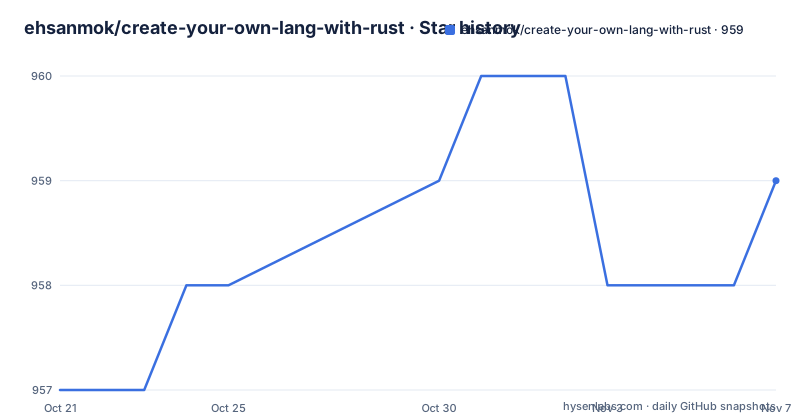
Star history
- ehsanmok/create-your-own-lang-with-rust959 ★ · +2
| Repository | 2026-10-21 | 2026-11-07 |
|---|---|---|
| ehsanmok/create-your-own-lang-with-rust | 957 | 959 |
2 Stars in the last 17 days, measured from the daily GitHub snapshot. Compare with other projects
Editorial analysis
Four languages instead of one growing interpreter
The premise is unusual and worth stating before the details. Most compiler tutorials start with one language and keep adding features to it until the reader drowns. This repository does the opposite. It ships four independent implementations, each in its own directory, each solving a different problem, and it arranges them so that every step adds one large idea rather than ten small ones.
The progression is visible in the language table. Calculator has no type system and exists to cover arithmetic expressions, and it runs on an interpreter, a VM or a JIT depending on which Cargo features you enable. Firstlang introduces dynamic typing, variables, functions and recursion, and it runs on a stable Rust toolchain. Secondlang switches to static typing with type inference and compiles through LLVM. Thirdlang adds classes, methods and object oriented programming on top of the same LLVM path.
The target reader is explicit. The README says the book arose from frustration with the lack of modern, clear and concise teaching materials for beginners who want to learn how to create their own programming language. That is a different goal from shipping a language, and it explains both the strengths here (the code is broken into small, legible stages) and the gaps (there is no package manager, no error recovery strategy, no library ecosystem and no production performance work).
Calculator toggles between three backends with Cargo features
The Calculator project is the entry point because it is the only one that keeps three execution strategies alive in a single codebase. The README shows the three invocations side by side:
cd calculator
cargo run --bin main examples/simple.calc                                            # Interpreter
cargo run --bin main --no-default-features --features vm examples/simple.calc        # VM
rustup run nightly cargo run --bin main --no-default-features --features jit examples/simple.calc  # JIT
The mechanism is Cargo feature flags, not a runtime switch. The default feature set builds the interpreter, the vm feature swaps in a stack based virtual machine, and the jit feature swaps in LLVM backed code generation. The `--no-default-features` flag is what makes the swap meaningful, because it removes the interpreter before the alternative is enabled.
The JIT variant needs the nightly toolchain, which is why that third line is wrapped in `rustup run nightly` while the first two are not. That single difference is the clearest signal of where the difficulty lies in this project. A tree walking interpreter over arithmetic expressions is approachable with a stable compiler. Moving the same expressions into LLVM requires a nightly toolchain, an LLVM installation and a binding layer that has to track the LLVM major version.
The repository root also contains a fifth workspace member, `calculator/examples/llvm`, listed alongside the four language directories in Cargo.toml. That separate example exists because linking a JIT into the main crate is awkward, so the work is split rather than tangled into the interpreter path.
Firstlang stays on stable Rust while Secondlang needs nightly
The first stable-toolchain language is Firstlang, a dynamic language with variables, functions and recursion. Running a file or starting an interactive session takes two commands:
cd firstlang
cargo run -- examples/fibonacci.fl    # Run a program
cargo run                              # Start REPL
Secondlang is where the toolchain requirement changes. It is statically typed, has type inference, and compiles through LLVM, so every invocation goes through the nightly toolchain:
cd secondlang
rustup run nightly cargo run -- examples/fibonacci.sl
rustup run nightly cargo run -- --ir examples/fibonacci.sl   # View LLVM IR
That `--ir` flag is the most instructive detail in the whole repository. It gives you a way to see the intermediate representation the compiler produces, without having to read the code generator and infer what it does. For someone learning compilation, that single switch turns an opaque pipeline into a visible one, and it also gives you the fastest way to debug a type inference bug.
Thirdlang follows the same pattern with the added complexity of classes and methods:
cd thirdlang
rustup run nightly cargo run --bin thirdlang -- examples/point.tl
rustup run nightly cargo run --bin thirdlang -- examples/counter.tl
Note the explicit `--bin thirdlang`. The calculator commands name a binary too, but the firstlang and secondlang commands do not, so the naming is not uniform across the four projects. Anything you script around this repository has to respect that inconsistency.
The workspace layout that makes four languages one checkout
Cargo.toml at the root defines a workspace with resolver 2 and five members: firstlang, secondlang, thirdlang, calculator and calculator/examples/llvm. That single declaration is what lets one command run the whole test suite:
cargo test -p calculator -p firstlang
rustup run nightly cargo test -p secondlang -p thirdlang
Two commands, because the split is by toolchain rather than by topic. The stable toolchain covers the projects that need no LLVM, and the nightly toolchain covers the ones that do. This is a more useful arrangement than a single test command that would fail to build for half the workspace.
The directory tree in the README lays out the rest:
create-your-own-lang-with-rust/
├── calculator/     # Simple arithmetic (interpreter, VM, JIT backends)
├── firstlang/      # Interpreted language with recursion
├── secondlang/     # Compiled language with type inference
├── thirdlang/      # Object-oriented with classes and methods
└── book/           # mdbook source for createlang.rs
Alongside the code, the root holds rustfmt.toml, clippy.toml, pixi.toml, pixi.lock and a .github directory. The two tool config files mean style and lint expectations are pinned for contributors, and the Pixi files point at a reproducible environment definition for the workspace, which is a reasonable way to handle the mixed stable and nightly toolchain requirement. Each language directory has its own README with detailed instructions, so the book and the per project notes are not the same document.
Matching your LLVM install to the inkwell feature flag
The most common way to lose an afternoon with this repository is a version mismatch between your LLVM and the binding library the project uses. The README handles it with a table rather than a warning, and it tells you what to do with the result: check your LLVM version and update Cargo.toml accordingly.
| LLVM Version | inkwell feature |
|--------------|-----------------|
| 20.x | `llvm20-1` |
| 19.x | `llvm19-1` |
| 18.x | `llvm18-1` |
The feature names are suffixed with the major version, so the mapping is mechanical once you know your version. Getting the toolchain in place first looks like this:
rustup toolchain install nightly

# Install LLVM
# macOS:
brew install llvm

# Debian/Ubuntu:
# See https://apt.llvm.org/
Two things stand out. The macOS path installs Homebrew LLVM, which is not the same as the Apple LLVM that ships with the system toolchain, and that distinction is exactly where the version confusion starts. The Debian and Ubuntu path does not prescribe a version at all, it points at apt.llvm.org and leaves the choice to you. There is also no pinned nightly date anywhere in the documentation, so nightly drifts and the risk of a fresh build failing on a compiler change is real.
There is a matching failure mode on the stable side. The README documents a single curl command for installing Rust, which is the standard rustup bootstrap and nothing more:
curl --proto '=https' --tlsv1.2 -sSf https://sh.rustup.rs | shThe stable path is therefore the smooth one, and the nightly plus LLVM path is where the setup work sits.
The book source and the code live side by side, but not merged
The book/ directory holds the mdbook source for createlang.rs, the site linked from the README badge. It is built and previewed with mdbook:
cd book
mdbook serve    # Local preview at http://localhost:3000
mdbook build    # Build static site
The structure is a deliberate separation of concerns that is also a limitation. The prose and the implementation are two parallel artefacts. Each language directory has its own README with detailed instructions, and the book explains the ideas, but the repository does not document how the two are kept in step. When a chapter describes an implementation detail, there is no machine checked link tying that paragraph to the function it describes.
There are CI badges for a ci workflow and a GitHub Pages workflow, so the examples in the book are at least built somewhere automatically, and the site deployment is automated as well. But the CI badge tells you that a workflow ran, not that the book text matches the code, and no test count, coverage figure or exercise set is claimed anywhere in the README.
The edition is presented as complete: Edition 1.0 Complete, covering interpretation, compilation, type systems and object oriented programming, with LLVM code generation, JIT compilation, type inference and memory management called out as covered topics. Judge it as a finished first edition rather than a growing curriculum, and expect that later editions would land in the book directory and possibly in the language directories without any release to signal the change.
A non-commercial licence and no release tags
Licensing needs a second look because the repository does not use a standard open source licence. GitHub classifies it as Other, a custom licence that GitHub cannot classify, and the README badge refers to the book as CC BY-NC-SA 4.0. The NC component is the part that matters for anyone planning to reuse the text or the code commercially: attribution, non commercial use and share alike, with the exact terms living in the LICENSE file rather than in the README text you have read.
Practically, this makes the project a good fit for learning, teaching, self study and conference or company training material, and a poor fit for anything that ends up inside a product, a paid course you sell, or a commercial compiler toolchain. Read LICENSE before you copy a chapter or lift the interpreter code into your own project. No legal advice is implied here; the point is simply that the terms are not the usual permissive ones, and the README badge is not the authoritative document.
Maintenance is active but unversioned. The repository is not archived and the last push was on 2026-10-03. It publishes no GitHub releases, so there is no tag to pin and no changelog to read. Upgrading means pulling the default branch, which is master, and dealing with whatever changed in the book source, the language directories and the Cargo.toml feature flags at once.
Editorial conclusion
Use this repository if you are learning how interpreters and compilers are built, or if you want a working reference for a Rust plus LLVM pipeline. Do not adopt it as a production language runtime or as a base for commercial tooling: the README badge points to CC BY-NC-SA 4.0, GitHub records the licence as a custom one, and there are no tagged releases. The last push was on 2026-10-03, so before you start, read the LICENSE file and confirm that your LLVM version matches the inkwell feature in Cargo.toml.
Frequently asked questions
Do I need nightly Rust and LLVM to use create-your-own-lang-with-rust?
Not for every project. Calculator in interpreter and VM mode and Firstlang run on stable Rust, while the Calculator JIT backend, Secondlang and Thirdlang require nightly Rust with LLVM installed.
How do I see the LLVM IR that create-your-own-lang-with-rust generates?
Secondlang accepts an --ir flag, so running the nightly build with --ir on an example file prints the LLVM IR instead of executing it.
What licence does create-your-own-lang-with-rust use?
The README badge points to CC BY-NC-SA 4.0 and GitHub records the repository as a custom licence it cannot classify, so the LICENSE file holds the authoritative terms and the non commercial clause is the point to check before reuse.
Can I build and preview the book for create-your-own-lang-with-rust locally?
Yes. The book directory holds the mdbook source for createlang.rs, and mdbook serve gives a local preview at http://localhost:3000 while mdbook build produces a static site.
Official sources
Add this badge to your README
If you maintain this project, the badge below links readers to this analysis and shows its maintenance status from the daily GitHub snapshot. Paste the markdown into your README; add ?metric=license or ?metric=stars to the image URL for a different field.

[](https://hysenlabs.com/projects/ehsanmok-create-your-own-lang-with-rust)Star history chart for your README
[](https://hysenlabs.com/projects/ehsanmok-create-your-own-lang-with-rust)Was this useful?