OpenHuman: a Rust agent harness shipped as a desktop app, a GPL library and a hardened Docker core
Your Personal AI super intelligence. A brain that builds a local-first memory of your life, a fantastic orchestrator of agent fleets and workflows, and a deep researcher.
At a glance
- What is it?
- tinyhumansai/openhuman packages one Rust core three ways: desktop installers for people, crates for developers and a headless JSON-RPC server for self-hosting. Its speed and cost figures come from the project's own benchmarks, and it still calls itself an early beta.
- Who is it for?
- OpenHuman suits developers who want to run many agents on small servers and are comfortable with early beta software and a GPL-3.0-only license on the library they embed. It does not suit anyone who needs a settled release or plans to link it into closed-source code.
- Can I use it commercially?
- Yes, with conditions. GPL-3.0 is a copyleft licence: if you distribute software that includes it, you must release that software's source code under the same licence. Running it internally without distributing it does not trigger that obligation.
- Is it still maintained?
- Yes. The repository last received commits 1 day ago.
- What is it written in?
- Mainly Rust, according to GitHub's language statistics.
Answers come from the project's GitHub data, last synced on November 13, 2026, and from our analysis. They are not legal advice.
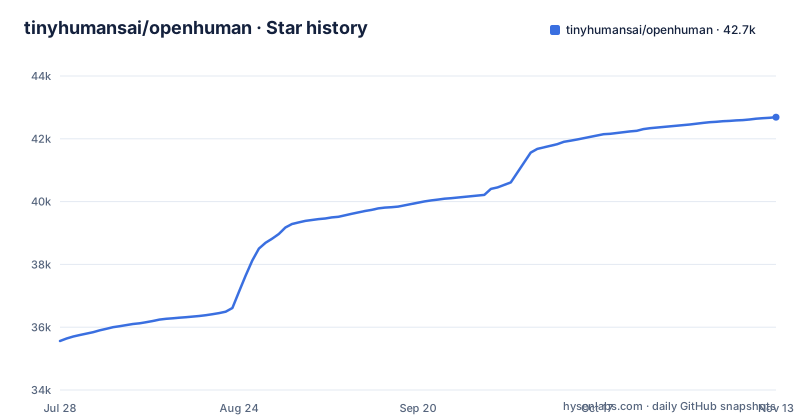
Star history
- tinyhumansai/openhuman42,689 ★ · +7,127
| Repository | 2026-07-28 | 2026-11-13 |
|---|---|---|
| tinyhumansai/openhuman | 35.6k | 42.7k |
7,127 Stars in the last 108 days, measured from the daily GitHub snapshot. Compare with other projects
Editorial analysis
Desktop installers first, a checksum-verified script second
Most people get OpenHuman as a desktop app from tinyhumans.ai/openhuman or the latest GitHub release: a `.dmg` for macOS, an `.msi` or `.exe` for Windows, and a `.deb` or `.AppImage` for Linux. From a terminal, an install script picks the package for your system, verifies its checksum and installs it:
# macOS and Linux
curl -fsSL https://raw.githubusercontent.com/tinyhumansai/openhuman/main/scripts/install.sh | bash# Windows (PowerShell)
irm https://raw.githubusercontent.com/tinyhumansai/openhuman/main/scripts/install.ps1 | iexBoth scripts are fetched from the `main` branch, so they install whatever that branch currently points to. On macOS and Linux you can end the command with `bash -s -- --dry-run` instead of `bash` to preview what the script would do before letting it change anything. INSTALL.md in the repository holds the remaining options and troubleshooting.
Early beta with a version number that moves weekly
The project labels itself an early beta under active development and tells users to expect rough edges. The release history backs that up: v0.64.10 shipped on 2026-09-30, v0.64.14 on 2026-10-08 and v0.64.15 on 2026-10-09, while the Cargo workspace already declares version 0.64.20 and the last push landed on 2026-11-02. In practice the code on `main` runs ahead of the newest tagged desktop build, and the install scripts above pull from `main`.
For anyone building on top of it, that pace means pinning a specific release tag and reading changes before upgrading. A pre-1.0 version line with frequent patch releases gives no promise that interfaces stay put between them.
The speed and cost numbers are the project's own measurements
OpenHuman's headline claims are specific. It says it finishes coding tasks in about 20 seconds, the fastest of seven agent tools the team tested, starts in a tenth of a second, uses 2.6x fewer tokens and about 8x less memory and CPU than the typical agent tool, and fits more than 500 agents on a $10 server. A side-by-side example reports OpenHuman finishing a prompt in 20 seconds with 15k tokens for $0.0054, against 9 minutes 40 seconds, 37k tokens and $0.0082 for Hermes.
All of these come from the separate tinyhumansai/openhuman-benchmarks repository, with results under `results/swe-x86-1/summary.md` and a methodology page for the library benchmarks. They are vendor-run comparisons. If token cost or fleet density is the reason you are choosing OpenHuman, the methodology is published, so reproduce the run on your own model and workload rather than budgeting from the headline figures.
RLM compression and Jev change what the model reads
Two mechanisms carry most of the claimed savings. RLM token compression builds on the Recursive Language Models paper (arXiv 2512.24601): large tool results are compressed before the model reads them, and for very large results the model receives a handle it can search instead of the full text. The project states that nothing is thrown away, but the model no longer sees the raw output by default, which matters when you debug why an agent missed a detail.
Jev is a small model that picks the right tool from a catalog of 1,215. By the project's measurement the correct tool appears in Jev's top picks 86.8% of the time, compared with 70.5% for keyword search. The flip side of that figure is that in the remaining cases the right tool is not among the candidates Jev offers, so agents with large tool catalogs can still select the wrong one.
Embedding the Rust library brings GPL-3.0-only with it
OpenHuman is also a Rust library: you can call an agent like a function or run a fleet from one server, with examples under `crates/openhuman-embed/examples`. The Cargo workspace spells out the crate chain: `openhuman-core` (package `openhuman`), then `openhuman-embed` as the library facade, then `openhuman-tinyhumans` for backend transport and login ownership, then `openhuman-rpc` with JSON-RPC envelopes and the on-disk session store, and finally the app, CLI and TUI. Host applications are expected to depend on `openhuman-rpc` only, a rule enforced by `scripts/ci/check-crate-chain.mjs`.
The desktop app in `crates/openhuman-app` is deliberately excluded from the workspace with its own lockfile and target directory, so root-level Cargo commands do not resolve GTK, WebKit or Tauri. The workspace license is `GPL-3.0-only`. Linking these crates into your own program puts it under GPL-3.0 obligations, which rules the library out for closed-source products.
The self-hosted core drops all capabilities except three
For servers, the repository ships a Docker Compose file that runs the headless `openhuman-core` JSON-RPC server on port 7788, persists the workspace to a named volume and reads configuration from `.env`:
cp .env.example .env
docker compose up -d
curl http://localhost:7788/health
At minimum set `BACKEND_URL` and `OPENHUMAN_CORE_TOKEN`; the token is required for any client calling `/rpc`. The container runs `read_only: true` with `no-new-privileges`, a tmpfs `/tmp` and `cap_drop: ALL`, then adds back `CHOWN`, `SETUID` and `SETGID`. Those exist because the entrypoint starts as root to repair a volume Docker created as `root:root`, then drops to the `openhuman` user through gosu. Without SETUID and SETGID the container crash-loops before the core starts. If you want zero capabilities, pin `user: "10001:10001"`; the entrypoint then runs the binary directly, but it can no longer repair a root-owned volume.
A headless build still needs audio and X11 headers
The Dockerfile is a multi-stage build on `rust:1.99.1-bookworm`, matching `rust-toolchain.toml`. It can also be built and run without Compose:
docker build -t openhuman-core .
docker run -p 7788:7788 --env-file .env openhuman-core
Even for a server with no screen or microphone, the builder installs ALSA, X11, xdo, xtst and evdev development headers. The reason is that `cpal`, `enigo`, `arboard` and `rdev` are unconditional dependencies of the core crate for voice, autocomplete and clipboard, and they link against those system libraries even when the features are off at runtime.
To keep builds survivable on small VPS and CI machines, the default `CARGO_PROFILE` is `ci`, which keeps peak rustc memory below the `release` profile, and `CARGO_BUILD_JOBS` defaults to 1. That trades build time for memory. Pass `--build-arg CARGO_PROFILE=release` when runtime optimization matters more than build cost.
Editorial conclusion
OpenHuman suits developers who want to run many agents on small servers and are comfortable with early beta software and a GPL-3.0-only license on the library they embed. It does not suit anyone who needs a settled release or plans to link it into closed-source code. Before relying on its token and memory savings, rerun the published openhuman-benchmarks setup on your own tasks, and before self-hosting, set OPENHUMAN_CORE_TOKEN and decide whether you need the CHOWN, SETUID and SETGID grants.
Frequently asked questions
Is OpenHuman free to use?
OpenHuman's source code is released under GPL-3.0, and the desktop installers are published on the GitHub releases page and at tinyhumans.ai/openhuman.
What is OpenHuman AI?
OpenHuman is an open-source agent harness written in Rust by tinyhumansai. It ships as a desktop app for people, a Rust library for developers and a headless JSON-RPC core that can be self-hosted with Docker.
How do you install OpenHuman?
Download the desktop app (.dmg, .msi or .exe, .deb or .AppImage) from the latest release, or run the install script: curl piped to bash on macOS and Linux, or irm piped to iex in Windows PowerShell. The script checks the package checksum before installing.
What is Tiny Humans AI in relation to OpenHuman?
tinyhumansai is the GitHub organization that publishes OpenHuman, with tinyhumans.ai/openhuman as the project homepage. The README credits @senamakel as the creator.
Official sources
Add this badge to your README
If you maintain this project, the badge below links readers to this analysis and shows its maintenance status from the daily GitHub snapshot. Paste the markdown into your README; add ?metric=license or ?metric=stars to the image URL for a different field.

[](https://hysenlabs.com/projects/tinyhumansai-openhuman)Star history chart for your README
[](https://hysenlabs.com/projects/tinyhumansai-openhuman)Was this useful?