FFmpeg Batch AV Converter: a GUI for people who already know the ffmpeg flags
FFmpeg Batch AV Converter
At a glance
- What is it?
- A C# front end for ffmpeg with batch queues, a wizard, stream mapping and folder monitoring, usable on Windows natively and on Linux through Wine-Mono. Suited to large or repetitive encoding jobs, and a poor fit for a one-off clip where typing the command would be faster.
- Who is it for?
- Adopt FFmpeg Batch AV Converter if you run repeated batch encodes where queueing, resume, shutdown behaviour and stream mapping matter more than typing commands, and you are on Windows or willing to run Wine-Mono on Linux. Do not adopt it for a single quick conversion, because its value is in the job list rather than the encode dialog.
- Can I use it commercially?
- Yes, with conditions. LGPL-2.1 is a weak copyleft licence: you can use it inside commercial and closed-source software, but if you distribute changes to its own files, you must publish those changes under the same licence.
- Is it still maintained?
- Yes. The repository last received commits 122 days ago.
- What is it written in?
- Mainly C#, according to GitHub's language statistics.
Answers come from the project's GitHub data, last synced on November 7, 2026, and from our analysis. They are not legal advice.
Star history
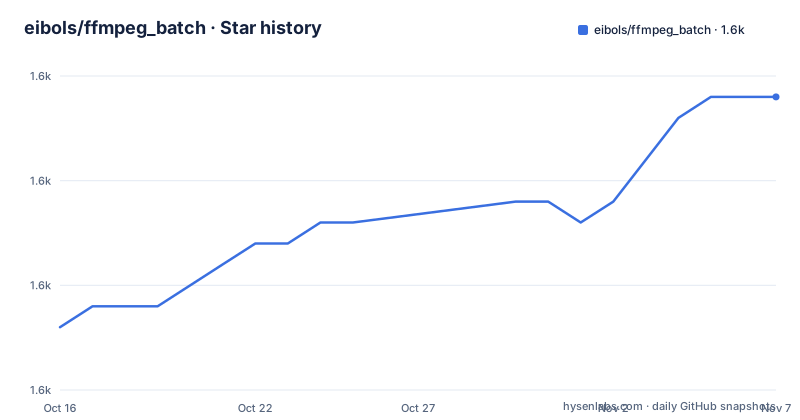
- eibols/ffmpeg_batch1,594 ★ · +11
| Repository | 2026-10-16 | 2026-11-07 |
|---|---|---|
| eibols/ffmpeg_batch | 1.6k | 1.6k |
11 Stars in the last 22 days, measured from the daily GitHub snapshot. Compare with other projects
Editorial analysis
What the application wraps, and what it adds
FFmpeg Batch AV Converter is a GUI front end for ffmpeg, available for Windows and for Linux through Wine-Mono. The stated goal is to reach the full potential of the ffmpeg command line with a few mouse clicks, and the README is candid that it serves both seasoned ffmpeg users and beginners.
What it adds over a shell is job management rather than encoding capability. You can drag and drop files, watch progress, set encoding priority, pause and resume, and configure an automatic shutdown once the queue finishes, optionally running post-encoding executables. There is unlimited single or multi-file batch encoding, multi-file simultaneous encoding, and automatic folder monitoring.
That combination is the actual product. A single conversion is something ffmpeg already does better from a terminal. A large queue that runs at low priority and shuts the machine down afterwards is where a front end earns its keep.
The feature list is really a task list
Reading the features in groups shows what people actually use it for.
Video encoding covers AV1, H264, H265, NVENC, QuickSync, ProRes and VP9, plus any other video format ffmpeg supports. Audio encoding covers MP3, AAC, AC3, FLAC, WAV, Opus and Vorbis, with the same escape clause. Hardware encoding appears as NVENC and QuickSync entries rather than as a separate feature, which suggests they are selected through the same parameters rather than through a different pipeline.
Then there is a large group of batch operations that are not encoding at all: trim and concatenate files, batch image thumbnail extraction, batch image to video creation, batch audio silence detection, batch file split and chapters creation, batch trailer or sample video extraction, batch mux and demux, and batch subtitles both as a track and hardcoded.
Two pass encoding and a fixed output target size are listed separately, which tells you target size is a first class option rather than something you compute yourself. Dynamic variables for ffmpeg parameters let one saved preset vary per file, and a file filter lets you select input by criteria rather than by hand.
Five tabs, and the streams tab is where the real work is
The screenshot table in the README names five main tabs: Main, Wizard, Streams, Subtitles and URLs.
The Wizard is described as an encoding wizard for saving favourite custom ffmpeg parameters by hand, which is the beginner path. The Main tab covers the batch queue and the standard parameters.
The Streams tab is the one that makes this more than a converter. Stream mapping and multiplex with a jobs manager means you can compose an output from several inputs, which is how track selection, remuxing and multi-source jobs are done. Combined with batch mux and demux, that covers the case where nothing needs re-encoding and you only want to rearrange.
The URLs tab handles capture of M3u8 and YouTube URLs, batch downloading of YouTube videos and live YouTube events, and the README describes the project as a youtube-dl or yt-dlp frontend GUI for any supported URL. Subtitles has its own tab for batch track and hardcoded subtitle work.
The information view is also worth noting: file multimedia information with up to 12 property columns, which is a quick way to compare a batch before encoding it.
Building it means Visual Studio, a NuGet dependency and a signing key
The compilation notes are the least polished part of the README and the most likely to cost you an afternoon.
The application uses the Aerowizard NuGet package as mandatory, and the README says you can find it through the NuGet package manager inside Visual Studio. The repository also ships AeroWizardTemplates.vsix at the root and a packages/ directory, so parts of the dependency handling are in tree.
Then there is signing. You need to create your own code key for encryption at Project, then Properties of FFBatch_Converter, then Signature, or disable manifest signing. Either way you are doing something a normal build does not do, and the README warns you may have to run Visual Studio with admin rights at least once after key generation.
The solution is FFBatch_main.sln with the code in FFBatch/. The instruction is simply to download all files to any folder, which is accurate but implies no build automation beyond the IDE.
Linux support means Wine and Mono, not a native port
The Linux story is a separate document, README_Linux_wine.md, and the summary in the main README is that Linux users run it through Wine-Mono.
That has consequences worth being explicit about. There is no native Linux build, so the application depends on a compatibility layer behaving correctly for a .NET desktop application with heavy file dialogs, drag and drop, and process control of ffmpeg. Hardware encoding paths such as NVENC and QuickSync depend on the driver stack visible through that layer.
For a batch tool this is more tolerable than for an interactive editor, since the work is queued and unattended. But it does mean the Linux experience is a compatibility target rather than a first class one, and if you are choosing a Linux media tool on support grounds alone, that is the fact to weigh.
The project has been developed as a free and open source application since 2017, and is licensed LGPL-2.1.
Where this is the wrong tool
The clearest wrong case is one file, one command. The application cannot encode faster than ffmpeg, and setting up the parameters takes longer than typing the command for anyone who already works in ffmpeg. The README says it is good for seasoned users and beginners, and for a seasoned user the honest reading is that the batch features are the reason to use it.
The second is automation. This is a desktop GUI with a job list. It is not a scriptable tool with a documented command line, so anything scheduled or unattended at scale is better done by writing the ffmpeg invocations yourself, with ffmpeg handling the queue.
The third is scope creep in both directions. The feature list includes YouTube downloading and screen recording, which are features with their own legal and platform considerations, and the yt-dlp frontend depends on an external tool being present. If your requirement is a media converter rather than a media workstation, the download and capture features are surface area you did not ask for.
For the record on maintenance: the last push was on 2026-07-09 and the visible releases are 3.2.7 on 2026-01-13, 3.2.8 on 2026-03-19 and 3.2.9 on 2026-05-27, so the project is being maintained.
Editorial conclusion
Adopt FFmpeg Batch AV Converter if you run repeated batch encodes where queueing, resume, shutdown behaviour and stream mapping matter more than typing commands, and you are on Windows or willing to run Wine-Mono on Linux. Do not adopt it for a single quick conversion, because its value is in the job list rather than the encode dialog. Verify first which ffmpeg features your workflow needs beyond the documented set, since the feature list covers specific codecs and tasks and does not enumerate everything, and read current_ffb.txt and presets.md at the repository root for the current version state and saved parameter presets.
Frequently asked questions
What is FFmpeg Batch AV Converter?
It is a GUI front end for ffmpeg written in C#, described as reaching the full potential of the ffmpeg command line with a few mouse clicks. It provides unlimited single or multi-file batch encoding and runs on Windows, with Linux support through Wine-Mono.
Can FFmpeg Batch AV Converter run on Linux?
Yes, through Wine-Mono. The details are in README_Linux_wine.md in the repository, and there is no native Linux build described.
Which encoders does FFmpeg Batch AV Converter support?
Video encoding covers AV1, H264, H265, NVENC, QuickSync, ProRes and VP9, and audio encoding covers MP3, AAC, AC3, FLAC, WAV, Opus and Vorbis, with any other format ffmpeg supports also possible.
What do I need to build the project from source?
Visual Studio, the mandatory Aerowizard NuGet package, and either your own code signing key created under Project, Properties of FFBatch_Converter, Signature, or manifest signing disabled. You may need to run Visual Studio with admin rights once after generating the key.
What licence is FFmpeg Batch AV Converter released under?
It is licensed under LGPL-2.1, with the licence text in LICENSE.md at the root of the repository.
Official sources
Add this badge to your README
If you maintain this project, the badge below links readers to this analysis and shows its maintenance status from the daily GitHub snapshot. Paste the markdown into your README; add ?metric=license or ?metric=stars to the image URL for a different field.

[](https://hysenlabs.com/projects/eibols-ffmpeg-batch)Star history chart for your README
[](https://hysenlabs.com/projects/eibols-ffmpeg-batch)Was this useful?