kuboard-press: the VitePress source of the Kuboard v4 docs, not the Kubernetes console itself
Kuboard is a Kubernetes-based microservices management UI. Also offers free Chinese-language Kubernetes tutorials, a getting-started guide, an install manual for Kubernetes v1.23.4, and ongoing online Q&A support.
At a glance
- What is it?
- eip-work/kuboard-press holds the bilingual documentation site for Kuboard v4, a multi-cluster Kubernetes management UI that is free for individuals and small and medium businesses. It is useful for reading and contributing to the docs; it does not contain the Kuboard software or a license file for it.
- Who is it for?
- kuboard-press is the right repository if you want to read, build or correct the Kuboard v4 documentation, in Chinese or English, from source. It is the wrong place to look for the Kuboard platform's code, a license you can rely on, or versioned releases.
- Can I use it commercially?
- Not without permission. GitHub finds no licence file in the repository, and without a licence all rights are reserved by default: you may read the code but not reuse it. Check the README, or ask the authors, before using it.
- Is it still maintained?
- Yes. The repository received new commits within the last day.
- What is it written in?
- Mainly HTML, according to GitHub's language statistics.
Answers come from the project's GitHub data, last synced on November 14, 2026, and from our analysis. They are not legal advice.
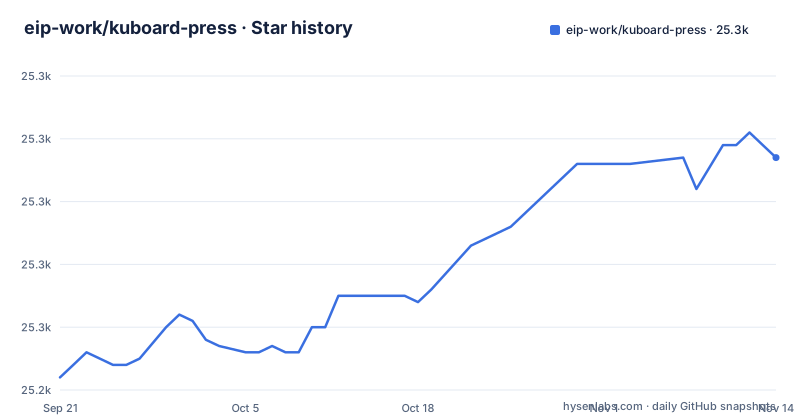
Star history
- eip-work/kuboard-press25,277 ★ · +35
| Repository | 2026-09-21 | 2026-11-14 |
|---|---|---|
| eip-work/kuboard-press | 25.2k | 25.3k |
35 Stars in the last 54 days, measured from the daily GitHub snapshot. Compare with other projects
Editorial analysis
This repository builds the Kuboard v4 documentation site, not Kuboard itself
The name is the first clue: kuboard-press is the source of the official Kuboard v4 documentation site, built with VitePress and published at kuboard.cn, with documentation in both Chinese and English. Kuboard is a Kubernetes-based multi-cluster container management platform, presented as a microservices management UI, aimed at making Kubernetes rollout and day-to-day operations simpler. The software is free for individuals and small and medium businesses. The consequence for anyone arriving from a search for Kuboard on GitHub is straightforward: cloning this repository gives you Markdown pages and a static site generator, not a container image, a Helm chart or the Kuboard server. You cannot audit Kuboard's code or build the platform from here. What you can do is run the documentation locally, read it offline, and see how pages change from commit to commit. The default branch is master and the last push landed on 2026-11-01.
Three pnpm scripts run and build the documentation site
The development workflow is the standard VitePress one wrapped in pnpm scripts. Install dependencies, then either start a local development server or produce the static site:
pnpm install
pnpm docs:dev       # 本地开发
pnpm docs:build     # 构建站点
The comment on docs:dev marks it as local development, and docs:build builds the site. You need pnpm rather than npm or yarn for these scripts as written. There is no separate deploy script shown, so publishing the built output is up to whoever hosts it; for most readers the hosted copy at kuboard.cn is what matters, and a local build is for contributors who want to preview edits before sending them. Because the repository is mostly HTML and site content, a local build is also a way to keep an offline copy of the Kuboard v4 manual on a machine that cannot reach the public site, for example inside a restricted network where the cluster itself lives.
No license file, and the free-use terms live on kuboard.cn
GitHub does not detect a license for kuboard-press. The only statement on rights is that Kuboard is free software, with the specific terms of use published on the official site at kuboard.cn. Two consequences follow. First, the documentation text in this repository has no stated license, so copying large parts of it into internal wikis or derivative guides is not clearly permitted; ask the maintainers or check kuboard.cn before doing so. Second, free in this case is scoped: Kuboard is described as completely free for individuals and small and medium businesses. A larger organisation cannot assume the same terms apply and should read the conditions on kuboard.cn before rolling Kuboard out across production clusters. Neither question can be settled from the repository contents, which is a real gap for anyone doing a procurement or open-source compliance review.
The GitHub description still points to a Kubernetes v1.23.4 install manual
There is a mismatch between the repository's GitHub description and its README. The description talks about free Chinese-language Kubernetes tutorials, a getting-started guide, an install manual for Kubernetes v1.23.4 and ongoing online Q&A support. The README, by contrast, says this is the Kuboard v4 documentation site in Chinese and English, and that Kuboard manages clusters from Kubernetes 1.15 through 1.34. A reader landing from the description may expect a v1.23.4 installation tutorial and find v4 product documentation instead. The repository has no GitHub releases either, so there is no tagged snapshot of the older tutorial content or of any given state of the v4 docs. If you need the docs as they stood for a particular Kuboard version, the only handle is a commit hash on master, and you will have to find the right one yourself.
One console for clusters from Kubernetes 1.15 to 1.34
The platform the docs describe connects several Kubernetes clusters into one interface, supporting versions 1.15 to 1.34, and lets you query and act across clusters without switching kubectl contexts machine by machine. Workloads are managed visually: Deployment, StatefulSet, DaemonSet, Job, CronJob, Pod and HPA. Configuration and storage cover ConfigMap, Secret, PVC, PV and StorageClass. Services and networking cover Service, Ingress, NetworkPolicy and Gateway API, alongside other cluster resources. Common Kubernetes objects are cached locally, and the project claims millisecond responses for fuzzy search as a result. Security is handled through an authorization model, operation auditing and MFA, with key operations traceable. Clusters outside the 1.15 to 1.34 range are not covered by that statement, so anyone still running an older cluster, or planning to upgrade past 1.34, should check the version notes on kuboard.cn first.
NodeShell, Debug Container and KuboardProxy for troubleshooting without SSH
Kuboard bundles operational tools that would otherwise need separate access paths. There is an in-browser terminal, a log viewer and a file browser. NodeShell opens a shell on a node without SSH. Debug Container injects a troubleshooting container next to a workload without modifying its image, which helps with minimal images that ship no shell or debugging tools. KuboardProxy gives temporary access to services running inside the cluster. The trade-off is that these features move node and workload access into the Kuboard web interface. Whoever holds the right Kuboard role can reach a node shell from a browser, so the authorization model, MFA and audit log become the controls that matter. Setting those up carefully is part of deploying Kuboard, not an optional extra, especially when the console is reachable from outside the cluster network.
Kuboard MCP lets AI agents act on clusters, but every write waits for approval
Kuboard v4 includes a built-in MCP server, branded Kuboard MCP, so AI agents can interact with clusters directly to carry out operations. The safeguard is that every write operation requires human approval. Read operations can flow straight through to the agent, while anything that changes cluster state stops until a person approves it. That makes the feature usable for investigation and suggested fixes, but it rules out fully unattended remediation: an agent cannot scale, restart or patch a workload at night on its own. Teams expecting an autonomous operator need to plan for someone to be available to approve, or keep agents to read-only work. For readers of this repository, the MCP pages in the v4 docs are where the setup steps live, since the server itself ships with Kuboard and not with kuboard-press.
A one-command docker compose install, an HA layout, and a read-only demo
Kuboard installs with a single docker compose command, in three steps, according to the project. For production there is a multi-node high-availability deployment built from a load balancer, a highly available database and Redis. The compose command and the HA topology are covered in the v4 documentation that this repository builds, so the place to read the exact steps is kuboard.cn or a local build of the site. Before installing anything, you can look around a read-only demo environment at demo.kuboard.cn with user demo and password demo123. Because the demo is read-only, it shows navigation, resource views and the general layout, but not write paths such as approving an MCP action or editing a workload. Those still need a trial install on a test cluster you control.
Editorial conclusion
kuboard-press is the right repository if you want to read, build or correct the Kuboard v4 documentation, in Chinese or English, from source. It is the wrong place to look for the Kuboard platform's code, a license you can rely on, or versioned releases. Before adopting Kuboard itself, confirm on kuboard.cn that your organisation falls under the free terms for individuals and small and medium businesses, and check your Kubernetes version against the 1.15 to 1.34 range.
Frequently asked questions
Does the kuboard-press repository contain the Kuboard software?
No. kuboard-press is the VitePress source of the Kuboard v4 documentation site at kuboard.cn, in Chinese and English. The Kuboard platform itself is installed separately, with a docker compose command described in those docs.
Is Kuboard free to use?
Kuboard is free software and is described as completely free for individuals and small and medium businesses. The specific terms of use are published on kuboard.cn, and the kuboard-press repository has no detected license.
Which Kubernetes versions does Kuboard v4 support?
Kuboard v4 manages multiple clusters running Kubernetes 1.15 through 1.34 from one interface. A read-only demo is available at demo.kuboard.cn with user demo and password demo123.
Official sources
Add this badge to your README
If you maintain this project, the badge below links readers to this analysis and shows its maintenance status from the daily GitHub snapshot. Paste the markdown into your README; add ?metric=license or ?metric=stars to the image URL for a different field.

[](https://hysenlabs.com/projects/eip-work-kuboard-press)Star history chart for your README
[](https://hysenlabs.com/projects/eip-work-kuboard-press)Was this useful?