Nikto ships three ways to run, and the database is the part you cannot keep
Nikto web server scanner
At a glance
- What is it?
- sullo/nikto is a Perl web server scanner that you run from a git clone, from a Docker image on Docker Hub or ghcr.io, or by building its Dockerfile yourself. The code is GPL, the test database is not, and the update prompt is on by default.
- Who is it for?
- Nikto fits an operator who wants a fast read on what a web server is advertising and who is authorized to probe it. It does not fit an auditor who needs proof, because a finding is a pattern match drawn from a bundled database that you should confirm by hand before reporting.
- Can I use it commercially?
- Check first. The repository uses a licence we do not classify automatically, so read its LICENSE file before any commercial use.
- Is it still maintained?
- Yes. The repository last received commits 1 day ago.
- What is it written in?
- Mainly Perl, according to GitHub's language statistics.
Answers come from the project's GitHub data, last synced on November 14, 2026, and from our analysis. They are not legal advice.
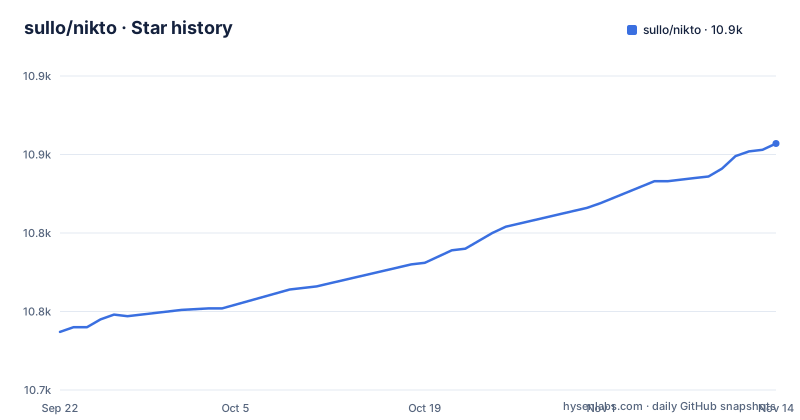
Star history
- sullo/nikto10,857 ★ · +120
| Repository | 2026-09-22 | 2026-11-14 |
|---|---|---|
| sullo/nikto | 10.7k | 10.9k |
120 Stars in the last 53 days, measured from the daily GitHub snapshot. Compare with other projects
Editorial analysis
Three ways to run it, each with a different bill
Nikto offers a native path and two container paths. The native path is a clone plus an interpreter, with the shebang used when the file is executable and perl called directly when you forgot to chmod:
git clone https://github.com/sullo/nikto
# Main script is in program/
cd nikto/program
# Run using the shebang interpreter
./nikto.pl -h http://www.example.com
# Run using perl (if you forget to chmod)
perl nikto.pl -h http://www.example.com
The container paths skip Perl entirely. Two published images exist, one on Docker Hub and one on ghcr.io:
docker pull hackllc/nikto:latestdocker pull ghcr.io/sullo/nikto:latestPinning to :latest rather than a version tag means two machines can be running different code on the same afternoon, which is a poor default for a scanner whose output ends up in a report.
The container drops privileges on Alpine before Nikto ever runs
The Dockerfile is short and every line has a reason to exist. It starts FROM alpine:3.23.3, then installs perl plus perl-net-ssleay, perl-json, perl-io-socket-ssl, perl-xml-writer, perl-mime-base64, and perl-xml-libxml, which tells you immediately that HTTPS targets need the SSL modules or the scan simply fails on encrypted hosts. Then it creates a group and a user, both named nikto, switches to that user with USER nikto, appends /opt/nikto to PATH, copies program/ into /opt/nikto owned by that user, and sets the entrypoint to /opt/nikto/nikto.pl. Two consequences follow: the scanner runs unprivileged rather than as root, and because the entrypoint is fixed, appending your own command to docker run does not do what you would expect without overriding it.
A saved report only survives if you mount /tmp yourself
Writing results to a file is a documented feature, and the container route shows exactly how it works:
git clone https://github.com/sullo/nikto.git
cd nikto
docker build -t hackllc/nikto .
# Call it without arguments to display the full help
docker run --rm hackllc/nikto
# Basic usage
docker run --rm hackllc/nikto -h http://www.example.com
# To save the report in a specific format, mount /tmp as a volume:
docker run --rm -v $(pwd):/tmp hackllc/nikto -h http://www.example.com -o /tmp/out.json
Note what the last line depends on. The output path only reaches your host because of the -v $(pwd):/tmp mount, and --rm deletes the container when it exits, so a JSON report written inside the image without that volume disappears with it. Scan, then forget the mount, and you are re-running to recover the evidence, which on a large host is exactly the run you did not want to repeat.
The database is not GPL and cannot leave the package
The licensing section is the sharpest edge in this project. The code is GPL version 3, Copyright 2001 to 2026 Chris Sullo, and the notice says it applies to Nikto's code only. LibWhisker, the companion library, has its own terms in a separate COPYING.LibWhisker file. Then the database files are carved out: they are NOT licensed under the GPL, and may only be distributed as part of the official Nikto package or installer, for use exclusively with Nikto. Commercial use policies sit at cirt.net/Nikto-Licensing, and the repository's own license field reads NOASSERTION rather than a single SPDX identifier. Practically, the database may only be distributed as part of the official package and for use exclusively with Nikto, so you cannot fork it into your own scanner.
The DSL decides what counts as a finding, and COOKIE: is new
Nikto's test database is not a list of plain strings. It uses a mini-DSL with eight matchers, each of which can be negated with a leading exclamation mark: BODY: and !BODY: for response content, HEADER: and !HEADER: for HTTP headers, COOKIE: and !COOKIE: for HTTP cookies, and CODE: and !CODE: for status codes. Multiple matchers combine with &&, and the shipped example shows all four kinds working together:
BODY:login&&!BODY:logout&&HEADER:X-Powered-By&&COOKIE:sessionidThat expression fires when the body contains login, does not contain logout, the headers include X-Powered-By, and a cookie named sessionid is present. COOKIE: is marked as new, so database entries using it will not behave the same against an older build, which matters if you keep a pinned Nikto and compare reports across versions.
-check6 reaches outside your scan to an external host
One option is easy to miss. The -check6 option tests whether IPv6 works by connecting to ipv6.google.com, or to whatever value is set in nikto.conf. That means using -check6 opens a connection to a Google address, unless nikto.conf sets another value, so review it before running Nikto from an isolated assessment environment.
-ask+ decides whether your scan results leave the machine
Three values, and the default matters. The -ask+ option controls whether Nikto asks about submitting updates, with yes meaning ask about each and used by default, no meaning do not ask and do not send, and auto meaning do not ask, just send. Read those words carefully, because auto is a one-word switch from consent to transmission, and yes still prompts. On a client assessment or an internal audit, set no explicitly rather than answering prompts under time pressure, since auto sends without asking.
Two and a half years passed between 2.5.0 and 2.6.0
The release history is uneven and worth reading before you plan around a version. Nikto 2.5.0 shipped on 2023-12-03, then 2.6.0 arrived on 2026-02-11, and 2.6.1 on 2026-07-31. The repository is not archived and its last push is dated 2026-11-01, so work continues, but the cadence is not predictable enough to assume a fix will land when you need it. The Dockerfile carries its own stamp: a LABEL setting version to 2.6.1, plus author names and the build and run commands recorded as labels, so an image you build from a newer checkout still identifies itself as 2.6.1. If you need to prove which scanner produced a finding in a report, record the version yourself rather than trusting the label.
Editorial conclusion
Nikto fits an operator who wants a fast read on what a web server is advertising and who is authorized to probe it. It does not fit an auditor who needs proof, because a finding is a pattern match drawn from a bundled database that you should confirm by hand before reporting. Before you build on it, check three things: how -ask+ is set, since auto sends updates without asking, which copy of the database you are running given that the database files are not GPL, and whether you want -check6, which connects to ipv6.google.com or the value set in nikto.conf.
Frequently asked questions
What is a Nikto scan?
Nikto is a web server scanner. You point it at a host with the -h flag, for example ./nikto.pl -h http://www.example.com, and it runs the entries in its bundled test database against the responses, matching bodies, headers, cookies and status codes through a small DSL. Results can be written out in a chosen format with -o, as in the container example that saves to /tmp/out.json.
how to install nikto
Clone the repository and run nikto.pl from the program directory with either the shebang or perl, or use a container. Two prebuilt images are published, hackllc/nikto:latest on Docker Hub and ghcr.io/sullo/nikto:latest, or you can build your own with docker build -t hackllc/nikto . from the checked out repository.
how to use nikto
Call the script with a target host, either ./nikto.pl -h http://www.example.com if the file is executable or perl nikto.pl -h http://www.example.com if you forgot to chmod. Running the container with no arguments at all, docker run --rm hackllc/nikto, displays the full help, and the wiki linked from the page carries the complete option list.
how to use nikto in windows
The page documents no Windows-specific launcher, no batch file and no compiled executable. The three routes it does describe are a Perl invocation of nikto.pl, a prebuilt Linux container from Docker Hub or ghcr.io, and a local docker build, so a Windows user needs either a working Perl and the SSL modules listed in the Dockerfile or a container runtime.
how to use nikto in termux
The page gives no Termux instructions. The documented native route needs a Perl interpreter, and the container route is built FROM alpine:3.23.3 with perl, perl-net-ssleay, perl-json, perl-io-socket-ssl, perl-xml-writer, perl-mime-base64 and perl-xml-libxml installed through apk, so a Termux environment would have to supply its own Perl and the equivalent modules.
Official sources
Add this badge to your README
If you maintain this project, the badge below links readers to this analysis and shows its maintenance status from the daily GitHub snapshot. Paste the markdown into your README; add ?metric=license or ?metric=stars to the image URL for a different field.

[](https://hysenlabs.com/projects/sullo-nikto)Star history chart for your README
[](https://hysenlabs.com/projects/sullo-nikto)Was this useful?