Element Call: Matrix group calls with a LiveKit SFU behind them
Group calls powered by Matrix
At a glance
- What is it?
- A TypeScript web application that puts encrypted group calls inside Matrix rooms, built on the MatrixRTC specifications and backed by LiveKit for selective forwarding. The interesting decisions are the three packaging options and the discovery of the SFU through a Matrix API endpoint rather than a hard-coded server.
- Who is it for?
- Element Call suits a Matrix operator who wants encrypted group calling that works across federated homeservers, and a web developer who needs to embed a call into an existing Matrix client rather than send users to a separate site. It does not suit a deployment that cannot run a LiveKit server, since each deployment needs a MatrixRTC transport in the form of LiveKit, and it does not suit a team that wants a plain standalone video product with no Matrix identity model.
- Can I use it commercially?
- Yes, with strict conditions. AGPL-3.0 is a network copyleft licence: if people use a modified version over a network, for example as a hosted service, you must offer them its source code under the same licence.
- Is it still maintained?
- Yes. The repository last received commits 1 day ago.
- What is it written in?
- Mainly TypeScript, according to GitHub's language statistics.
Answers come from the project's GitHub data, last synced on November 7, 2026, and from our analysis. They are not legal advice.
Star history
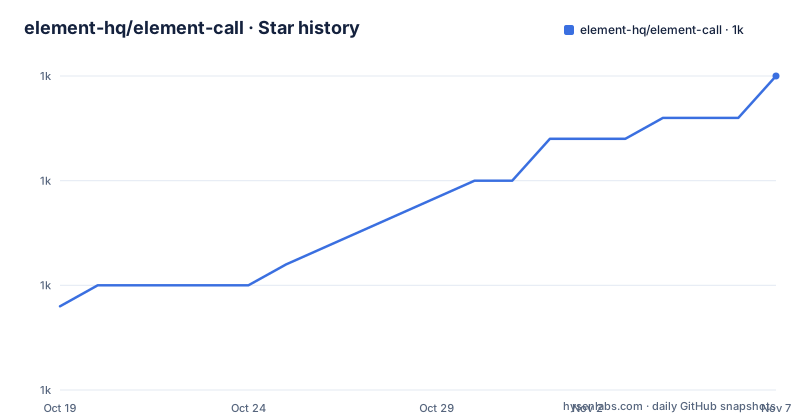
- element-hq/element-call1,025 ★ · +11
| Repository | 2026-10-19 | 2026-11-07 |
|---|---|---|
| element-hq/element-call | 1k | 1k |
11 Stars in the last 19 days, measured from the daily GitHub snapshot. Compare with other projects
Editorial analysis
What Element Call is, and what MatrixRTC changed
Element Call is a native Matrix video conferencing application developed by Element, described as a decentralized and federated video conferencing solution powered by the Matrix protocol, designed for secure, scalable and privacy-respecting calls.
The feature list is short and specific. Decentralized and federated, with no central authority, working across Matrix homeservers. End-to-end encrypted. WebRTC-based, so no additional software is required. Scalable with LiveKit, supporting large meetings through an SFU. Plus raise hand and emoji reactions for the meeting flow.
The architecture rests on two Matrix specification proposals. It is built on MatrixRTC, which is MSC4143, and it uses MSC4195 with LiveKit as the backend.
The change from the earlier architecture is signposted in a note in the README. The previous version of Element Call relied solely on full-mesh logic, and that version is kept on a separate `full-mesh` branch. Full mesh means every participant connects to every other participant, which works for small groups and does not work for large ones. The LiveKit-based approach inserts a selective forwarding unit so that each participant sends its stream once rather than once per peer.
The distinction matters for anyone planning capacity, since a full mesh call with ten participants needs forty-five peer connections, and the SFU model does not. The README notes that the latest development version is continuously deployed to call.element.dev, alongside the live demo at call.element.io.
Three packaging options and a warning about which to pick
Element Call offers three packaging options, and the README is unusually directive about the choice.
The Full Package supports both Standalone and Widget mode. It is hosted as a static web page and can be accessed via a URL when used as a widget.
The Embedded Package is designed specifically for Widget mode only. It is bundled with a messenger app for tighter integration, and the README marks it with an important note: embedded packaging is recommended for Element Call in widget mode.
The Component Package is described as experimental. It is a library build of Element Call as a React component, consumed as a dependency by a host application that already has a Matrix client, for applications that want to render a call inside their own page rather than in an iframe.
The distinction between the Full and Embedded packages is about who owns the surrounding application. In Standalone mode, Element Call is an independent, full-featured video conferencing web application, and users join or host calls without needing a separate Matrix client. As a widget, Element Call is solely responsible for the core calling functionality, while authentication, event handling and room state updates via the Client-Server API are handled by the hosting client, and communication between the two goes through the widget API.
The repository reflects the three-way split. There are separate directories for `embedded/`, `component/` and `sdk/`, a `backend/` directory, and a `sdk-target-based-on-call-view-model/` directory, each with its own Vite configuration file. The `package.json` has matching build scripts, `build:full`, `build:embedded`, `build:component` and `build:sdk`, plus development variants for each. The `docs/embedded_standalone.md` guide covers the difference in more detail.
Transport discovery through a Matrix API endpoint
Each deployment needs a MatrixRTC transport, in the form of a LiveKit server, and the interesting design decision is how clients find it.
Element Call discovers the available MatrixRTC transports, as defined by MSC4519, by hitting a Client-Server API endpoint:
GET /_matrix/client/unstable/org.matrix.msc4143/rtc/transportsThe response looks like this:
{
  "rtc_transports": [
    {
      "type": "livekit",
      "livekit_service_url": "https://matrix-rtc.example.com/livekit/jwt"
    }
  ]
}
So the SFU is not configured in the client. It is advertised by the homeserver, which means a federated deployment with several sites can have each site advertise its own focus, and a client joining from another site discovers the transport rather than needing a shared configuration.
The `livekit_service_url` points at a MatrixRTC Authorization Service, whose repository is `element-hq/lk-jwt-service`, and that is where the authorisation of a participant to join a specific call happens. The discovery response identifies a focus of type `livekit`, and the authorisation service is what issues the token that lets a client join the right room on the SFU.
The backend selection then happens per participant. Each call participant proposes their discovered MatrixRTC transport from `org.matrix.msc4143.rtc_foci` in their `org.matrix.msc3401.call.member` state event, so the transport choice is expressed in the Matrix room state rather than in application configuration. This is the mechanism that makes a call spanning three federated sites work, and the README includes a diagram of exactly that deployment.
Self-hosting means running LiveKit as well
For operating Element Call on your own server, the README points at the Self-Hosting Guide in `docs/self_hosting.md`.
The key operational fact is stated plainly in the MatrixRTC Transports section: for proper operation of Element Call, each deployment needs to set up a MatrixRTC transport in the form of a LiveKit server. The self-hosting guide covers it, and the repository has a `backend/` directory and a `docker-compose-dev.yml` for local development.
That is a meaningful difference from a peer-to-peer tool. The SFU is a stateful server that the whole deployment depends on, and it is the component that scales with meeting size. The end-to-end encryption story is separate from it, since the media flows through the SFU while the key material stays with the clients, but the operational footprint is real.
The configuration surface in `.env.example` shows what has to be set. The LiveKit credentials are there:
LIVEKIT_KEY="devkey"
LIVEKIT_SECRET="secret"
And there is a `VITE_FALLBACK_STUN_ALLOWED` setting, commented out, used for determining the homeserver to use for short urls and similar. The file also documents the theming mechanism, where `VITE_CUSTOM_CSS` injects CSS into the page, with the note that a custom theme generally involves overriding Compound design tokens.
The `Dockerfile` in the repository root is a two-stage build. The builder stage takes the built `dist` directory and gzips the assets, with the comment that this is to work with the nginx-gzip-static-module. The final image is `nginxinc/nginx-unprivileged:alpine-slim`, with the application copied to `/app` and the nginx configuration from `config/nginx.conf`. Serving the static app from an unprivileged nginx image is a small but sensible default.
A TypeScript monorepo with many build targets
The repository is a pnpm workspace with a Vite-based build and a lot of separate entry points.
The `package.json` scripts show the shape. `dev` runs `dev:full`, which is plain `vite`, and there are separate dev configurations for embedded, component and sdk. The full build is a node invocation with an explicit heap size:
"build:full": "node --max-old-space-size=16384 node_modules/vite/bin/vite.js build",Sixteen gigabytes of heap for a production build is a large allocation, and it is a hint about how heavy the dependency graph is. The build then runs through the other targets, with the sdk and component builds additionally emitting TypeScript declarations through `tsc -p sdk/tsconfig.build.json` and `tsc -p component/tsconfig.build.json`.
The tooling is current and mostly non-legacy. Formatting is `oxfmt` with a `format:check` script, and linting is configured through `.oxlintrc.json` and the `eslint/` directory. There is a `knip.ts` file, which is a tool for finding unused files and dependencies, and `renovate.json` for dependency updates. Tests use Vitest with a `vitest.config.ts`, and end-to-end coverage is Playwright, with `playwright.config.ts`, a `playwright/` directory and a `docker-compose-playwright.yml`. There is also a `.storybook/` directory for component development.
Localisation is first class. The `locales/` directory, an `i18next.config.ts`, and a `localazy.json` file point to Localazy as the translation service, and the README header carries a Localazy status badge. A `codecov.yaml` and `codecov.yml` handle coverage reporting, and a `WIDGET_TEST.md` at the root suggests widget-specific test instructions.
Licence, governance and the commercial licence file
The repository carries two licence files, `LICENSE-AGPL-3.0` and `LICENSE-COMMERCIAL`, and the README header links the AGPL-3.0 badge. The primary language in the repository metadata is TypeScript.
The dual file arrangement is worth understanding. AGPL-3.0 is a strong copyleft licence with the network use clause, so a modified Element Call deployed as a service triggers source disclosure obligations for that service. The presence of a separate commercial licence file means the project offers a paid alternative for organisations that need different terms, and the commercial licence text is in the repository to review.
For an organisation evaluating whether to run Element Call unmodified, the AGPL obligations largely attach to modifications and to distribution. Anyone planning to fork it, modify it and run it as a service should read both files before starting, and that reading is the point of having the commercial file alongside the AGPL one.
The project is not archived and the last push was on 2026-10-19, with v0.28.0 released on 2026-10-13 after v0.28.0-rc.1 on 2026-10-06 and v0.26.1 on 2026-09-28. The release cadence is quick, with release candidates preceding a release by about a week, and the version in `package.json` is `0.0.0`, which means the package version is set by the release tooling rather than committed by hand.
The repository also has an `AGENTS.md` and a `CONTRIBUTING.md`, and a `.githooks/` directory for client-side git hooks.
Where Element Call is the wrong choice
The clearest wrong case is a deployment that will not run a LiveKit server. Each deployment needs a MatrixRTC transport in the form of LiveKit, so without a willingness to operate an SFU, with its own availability and scaling, Element Call is not a fit. The old full-mesh version exists on a separate branch, but that is the previous architecture rather than a supported alternative today.
The second wrong case is a product that is not a Matrix product. Authentication, event handling and room state updates are handled through the Matrix Client-Server API, and the whole model is Matrix rooms and Matrix identities. Embedding Element Call in an application that has no Matrix client means you are building that client first, which is why the component package is described as experimental.
The third is a user base that will not accept a web-only client. The feature list says WebRTC-based with no additional software required, which is a genuine advantage, but it also means the call experience is whatever the browser provides, including on the mobile web clients that many Matrix users actually use.
The fourth is a requirement for a single self-contained artefact. The deployment is a static web app behind nginx plus a LiveKit server plus the homeserver, and the build produces several separate packages depending on the mode, so a simple single-binary story does not exist here.
What Element Call does well is the specific thing it is named for. A call in a Matrix room that is federated across homeservers, encrypted, and needs no application installed, with the SFU discovered through the homeserver rather than configured, is not something a conventional video product gives you.
Editorial conclusion
Element Call suits a Matrix operator who wants encrypted group calling that works across federated homeservers, and a web developer who needs to embed a call into an existing Matrix client rather than send users to a separate site. It does not suit a deployment that cannot run a LiveKit server, since each deployment needs a MatrixRTC transport in the form of LiveKit, and it does not suit a team that wants a plain standalone video product with no Matrix identity model. Before deploying it, read `docs/self_hosting.md` for the LiveKit setup, check the `LIVEKIT_KEY` and `LIVEKIT_SECRET` values in `.env.example`, and decide between the full, embedded and component packages, since the README recommends embedded packaging for widget mode.
Frequently asked questions
What does Element Call need in order to run?
Each deployment needs a MatrixRTC transport in the form of a LiveKit server, as described in the self-hosting guide. The LiveKit credentials are configured through the `LIVEKIT_KEY` and `LIVEKIT_SECRET` settings shown in the example environment file.
How do Matrix clients find the LiveKit server for a call?
Element Call queries the `GET /_matrix/client/unstable/org.matrix.msc4143/rtc/transports` endpoint of the Client-Server API, which returns the available transports, including a `livekit` type entry with a `livekit_service_url` pointing at the authorisation service.
Should I use the full package or the embedded package?
The README recommends embedded packaging for Element Call in widget mode. The full package supports both Standalone and Widget mode as a static web page, the embedded package is for widget mode only, and the component package is a React component library described as experimental.
Is Element Call end-to-end encrypted?
The README lists end-to-end encryption as a key feature, alongside decentralized and federated operation across Matrix homeservers and WebRTC-based calling that requires no additional software.
What replaced the full-mesh calling model?
The current version uses LiveKit as an SFU through the MSC4195 proposal, which supports large meetings. The previous full-mesh-only version of Element Call is kept on a separate `full-mesh` branch in the repository.
Official sources
Add this badge to your README
If you maintain this project, the badge below links readers to this analysis and shows its maintenance status from the daily GitHub snapshot. Paste the markdown into your README; add ?metric=license or ?metric=stars to the image URL for a different field.

[](https://hysenlabs.com/projects/element-hq-element-call)Star history chart for your README
[](https://hysenlabs.com/projects/element-hq-element-call)Was this useful?