Standard Notes: the client is buildable, the sync server is elsewhere
Think fearlessly with end-to-end encrypted notes and files. For issues, visit https://standardnotes.com/forum or https://standardnotes.com/help.
At a glance
- What is it?
- Standard Notes publishes an AGPL-3.0 TypeScript monorepo holding its web, desktop, mobile and clipper clients. Documented self-hosting means building a folder of static files and pointing DEFAULT_SYNC_SERVER at a server outside the repository, and the declared Node engine range stops below version 17.
- Who is it for?
- Take the hosted app if you want end-to-end encrypted notes on Mac, Windows, Linux, iOS and Android without running anything. Build from this repository when you need a client pointed at a server you control, and go in knowing you are building clients rather than a server, on a Node range that ends below 17.
- Can I use it commercially?
- Yes, with strict conditions. AGPL-3.0 is a network copyleft licence: if people use a modified version over a network, for example as a hosted service, you must offer them its source code under the same licence.
- Is it still maintained?
- Yes. The repository last received commits 2 days ago.
- What is it written in?
- Mainly TypeScript, according to GitHub's language statistics.
Answers come from the project's GitHub data, last synced on November 15, 2026, and from our analysis. They are not legal advice.
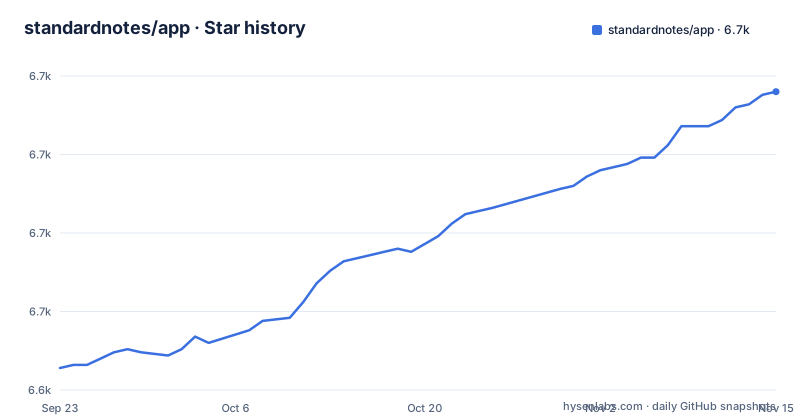
Star history
- standardnotes/app6,720 ★ · +88
| Repository | 2026-09-23 | 2026-11-15 |
|---|---|---|
| standardnotes/app | 6.6k | 6.7k |
88 Stars in the last 53 days, measured from the daily GitHub snapshot. Compare with other projects
Editorial analysis
A web app that compiles to a folder of static files
The client here is not a server application. It compiles into a folder of static HTML, JS and CSS files that you put behind any web server, which is why the self-hosting instructions start with a clone and a build rather than a daemon to configure and a config file to fill in. The audience the project names is digitalists and professionals who want notes and files kept in one place with end-to-end encrypted sync, and the claim attached to that sync is that only you can read your notes. Desktop builds are offered for Mac, Windows and Linux, with iOS and Android builds in the two app stores, and the same account is expected to sync across all of them. The encryption claim is the part to read closely rather than take on trust: nothing here describes key management, what happens to a note if you lose the account, or how a new device gets its keys.
Port 8080 for the built folder, port 3001 for the dev server
Two documented ways to run it, and the port tells you which one you have. The static path builds the web package and serves that folder over http, landing on localhost:8080. The development path swaps the serving command for a start command and lands on localhost:3001, which is the port the repository's own .env.sample declares as PORT. One wrinkle before you follow either list literally: the development-mode list is numbered from 2, so its clone step is implied rather than written. The root package.json also carries a start:web script that runs the same start command inside the web workspace, which lets you stay at the repository root instead of changing directory.
git clone https://github.com/standardnotes/app.git
cd app
yarn install
yarn build:web
cd packages/web
python -m http.server 8080
The development server starts the web workspace instead:
cd packages/web && yarn startDEFAULT_SYNC_SERVER decides which server you log in to
One environment variable does the important work for anyone not using the hosted service. DEFAULT_SYNC_SERVER sets the default server for login and registration, so it is the first value to change when a build should talk to a server you run. The shipped .env.sample leaves it pointing at the hosted API, and the project shows the shape of a replacement value. The same file carries three further addresses under a comment about subscription endpoints: a dashboard URL, a plans URL and a purchase URL, all of them pointing at standardnotes.com. That is the detail to check before you put a copy in front of anyone else, because the build still ships addresses for someone else's billing pages and nothing in the documented setup says how to remove them.
DEFAULT_SYNC_SERVER=https://sync.myserverWhat ships in .env.sample by default:
PORT=3001
DEFAULT_SYNC_SERVER=https://api.standardnotes.com
DASHBOARD_URL=http://standardnotes.com/dashboard
PLANS_URL=https://standardnotes.com/plans
PURCHASE_URL=https://standardnotes.com/purchase
The repository builds clients, and the server lives elsewhere
The monorepo root carries build scripts for web, desktop, mobile, snjs, services and api. Each one rebuilds a single workspace together with the workspaces it depends on, walking the dependency graph in order rather than building one flat package. The documented self-hosting path uses exactly one of those scripts and stops early: build the web package, then serve the resulting static folder with Python's http.server. Standing up your own sync server is treated as a separate concern, and the link offered for it points at a getting started page outside this repository. So the honest scope of a clone is the clients, in as many shapes as you need, plus the code that talks to a server you either run or subscribe to. If you expected this repository to boot a server alongside the app, the build script list is where that expectation gets corrected.
Node 12.19 to 16 is the range the repository declares
The root package.json states its engines as node >=12.19.0 <17.0.0, and an .nvmrc file at the top level pins a runtime for anyone who reads it. That upper bound sits far below the Node releases in circulation now, so a current runtime falls outside the range the project declares for itself, and yarn install is the step where your package manager decides what to do about a mismatch. The install tool is Yarn with its own configuration directory checked in, .yarn next to .yarnrc.yml, and a lockfile committed at the root so installs resolve to the same versions instead of picking up new ones. Two further root files, .ruby-version and constraints.pro, sit alongside them. Neither appears in any documented build step, so what they are doing here is a question for the maintainers rather than something you have to satisfy.
Lerna and commit messages pick the release numbers
Releases are cut by the root script release:prod, which runs lerna version with conventional commits and writes a message reading chore(release): publish. The version number is derived from commit messages rather than typed into package.json by hand, which is also why the root manifest can sit at 0.0.1 and stay private while the real versions live in the workspaces. Three packages were published on the same day, 2026-11-02: mobile and desktop both at 3.203.0, and the package named clipper at 1.1.608. Two of them therefore share a version line while one runs on its own numbering, so a consumer of only the clipper cannot assume it moves in step with the apps. The last push to the main branch is dated 2026-11-02 as well, the same day as those releases.
The e2e path starts a server on port 9001 and drives headless Chrome
End to end testing is two commands. The e2e script starts a test server scoped to the snjs workspace, and e2e:test launches mocha-headless-chrome against a mocha test page served from localhost:9001 with a timeout set to 3600000 milliseconds, which is one hour. That figure is the tell: this is a suite expected to take a long time, and it needs a dev build to exist first. For day to day maintenance there is a reset script that finds every node_modules directory, deletes it along with yarn.lock, and reinstalls, which is the documented way out of a tree that has stopped building. Worth noticing before you reach for it: that script removes the committed lockfile, so it changes what a later install resolves rather than restoring the state you started from. Unit tests and lint both fan out across workspaces, the test script with ten jobs at a time.
Extensions come from outside, and nothing here says how they are vetted
The client is extensible by design. Developers write and publish their own extensions, and the project points new extension authors at a documentation hub under standardnotes.com/help/plugins. What lives in this repository is the application that hosts them, not the extensions themselves. Nothing in the README says how an extension is reviewed before publication, who publishes one, or what an installed extension is able to reach, so anyone treating an encrypted client as a sealed box has to settle that question from outside this code. A SECURITY.md file sits at the repository root, the conventional place for a project's disclosure policy, and that is the file to read before reporting a problem or trusting that a route exists. The licence is AGPL-3.0, and the README carries no licence discussion at all, so the text in LICENSE at the root is what governs a fork or a hosted modification.
Editorial conclusion
Take the hosted app if you want end-to-end encrypted notes on Mac, Windows, Linux, iOS and Android without running anything. Build from this repository when you need a client pointed at a server you control, and go in knowing you are building clients rather than a server, on a Node range that ends below 17. Before relying on either path, confirm which host DEFAULT_SYNC_SERVER resolves to inside your build, read SECURITY.md for how problems get reported, and read LICENSE at the root if a fork is on the table.
Frequently asked questions
Is the Standard Notes app free?
The README describes sync as fast, free and encrypted across unlimited devices, and points self-hosting at the alternative to the hosted service. The .env.sample file also carries dashboard, plans and purchase addresses under a subscription comment, and nothing in the setup instructions says what a paid tier changes.
Is the Standard Notes app safe?
The project states end-to-end encrypted sync and that only you can read your notes, and publishes the client source under AGPL-3.0 so the code can be read and self-hosted. It says nothing about key recovery or about what happens to notes if you lose access to the account.
How do I start using the Standard Notes app?
Open the web app, click Register to create a private notes account, then install the app on your devices from the download page for Mac, Windows or Linux, or from the iOS and Android stores. The same account is expected to sync end to end encrypted across them. Running the web app yourself takes yarn install, yarn build:web and a server on the packages/web folder.
Official sources
Where this project is recommended
Add this badge to your README
If you maintain this project, the badge below links readers to this analysis and shows its maintenance status from the daily GitHub snapshot. Paste the markdown into your README; add ?metric=license or ?metric=stars to the image URL for a different field.

[](https://hysenlabs.com/projects/standardnotes-app)Star history chart for your README
[](https://hysenlabs.com/projects/standardnotes-app)Was this useful?