r-color-palettes is a browsable catalogue, and paletteer is the part you install
Comprehensive list of color palettes available in R ❤️🧡💛💚💙💜
At a glance
- What is it?
- EmilHvitfeldt's r-color-palettes repository is a generated reference site listing colour palettes from R packages with swatches and advice on black-and-white printing and colour blindness, while the paletteer package is the separate artifact you actually put in your project.
- Who is it for?
- Browse this repository when you are choosing a palette for a report, a package or a talk and want to compare what the R ecosystem already ships instead of inventing one. Do not add it to a project as a dependency: it is a documentation site with no code to import, and the README is generated from README.Rmd, so your edits belong in the R Markdown source or they will be overwritten.
- Can I use it commercially?
- Not without permission. GitHub finds no licence file in the repository, and without a licence all rights are reserved by default: you may read the code but not reuse it. Check the README, or ask the authors, before using it.
- Is it still maintained?
- Yes. The repository last received commits 159 days ago.
- What is it written in?
- Mainly R, according to GitHub's language statistics.
Answers come from the project's GitHub data, last synced on November 7, 2026, and from our analysis. They are not legal advice.
Star history
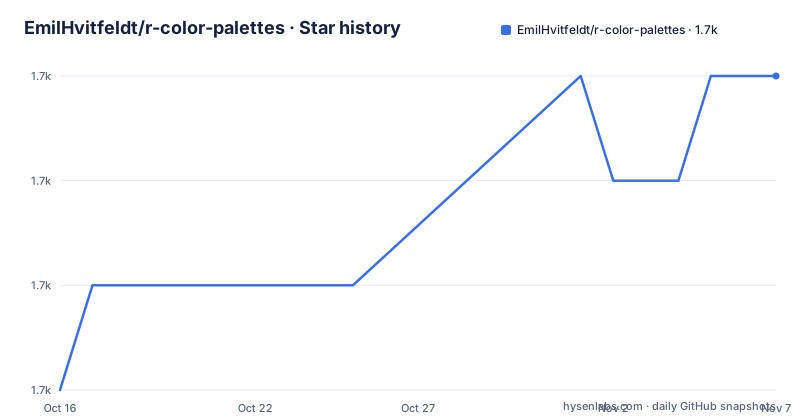
- EmilHvitfeldt/r-color-palettes1,727 ★ · +3
| Repository | 2026-10-16 | 2026-11-07 |
|---|---|---|
| EmilHvitfeldt/r-color-palettes | 1.7k | 1.7k |
3 Stars in the last 22 days, measured from the daily GitHub snapshot. Compare with other projects
Editorial analysis
A website first, a package second
The repository's own comment at the top of the README says README.md is generated from README.Rmd and that the file to edit is that one. Everything else follows from it.
This is a site, not a library. The files at the root describe a static site build: index.qmd, discrete.qmd, type-sorted-palettes.Rmd, non-novelty.Rmd, canva.Rmd, palettetown.Rmd, a gallery.ejs template, styles.scss, a _quarto.yml configuration and a _extensions/ directory. That is a Quarto site with per-type pages, and the generated Markdown sits next to each Rmd file.
Two other files are operational rather than editorial. palette_plotter.R is the helper that draws the palette comparison graphics, and plot_discrete.R with spawn-discrete.R produces the discrete palette gallery, with the discrete/ directory holding the results and palette_images/ holding the rendered images. There is a toc file for the table of contents and NEWS.md for changes.
So if you arrive with a question about a palette, this is a reference to read. If you arrive wanting to add one, you are editing a Quarto project and you need R plus the plotting dependencies the scripts use, which is a different task from contributing a note.
The catalogue is sorted two ways, and the second index is the useful one
The main page lists everything ordered alphabetically by package name. The README notes that this makes the page long and points to a type-sorted list instead, which shortens it.
That type index is organised by palette type, with pages for sequential, diverging and qualitative palettes, plus dedicated pages for non-novelty palettes and two external sources, Canva palettes and Palettetown palettes. Each of those has an Rmd source and a generated Markdown file, and the type index links into them.
The split matters in practice. If you know you need a sequential ramp for a continuous variable, the type index gets you to the candidates in one click; if you already know the package, the alphabetical list is faster. If you are looking for something to draw from Canva or Palettetown, those are separate pages rather than entries in the main list.
The alphabetical page is also the entry point for the rest of the site: blogposts and other resources, generative packages, and honorable mentions are all linked from its table of contents, which is generated and marked as not to be edited by hand.
paletteer is the installable artifact
The README is clear that the palettes displayed on the site have been collected into a single package using a unified framework, and that package is paletteer, in its own repository.
From CRAN:
``` r install.packages("paletteer")
For the development version, the README offers a GitHub install path through pak, with the install line for pak itself left commented out.
r # install.packages("pak") pak::pak("EmilHvitfeldt/paletteer") ```
The separation is the thing to understand. This repository is the catalogue, paletteer is the package, and they move on their own schedules. If you are reading the site to choose a palette and then writing paletteer calls in your analysis, you are using two projects, and a palette that appears on the site may not be in the installed version of paletteer yet.
For a quick visual comparison without installing anything, the README also points at two interactive pickers: the one hosted at emilhvitfeldt.github.io/r-color-palettes and a separate one at r-graph-gallery.com/color-palette-finder.
The desaturate test is the most reusable thing here
The perception section argues that a palette has to survive two conditions, and it shows how to check the first one with code rather than by eye.
The first condition is printing in black and white. The README's argument is that a palette full of colours can still be unusable on paper, and the demonstration uses rainbow from grDevices, which collapses to indistinguishable shades of grey once desaturated.
``` r source("palette_plotter.R")
pal_data <- list( Normal = rainbow(32), Desaturated = colorspace::desaturate(rainbow(32)) )
make_plot(pal_data, "readme-1")
The same treatment is applied to the classic ggplot2 hue palette, which the README notes has constant chroma and luminance and therefore yields the same grey when desaturated, adding that this is no longer the default for continuous variables after ggplot2 3.0.0. The contrast case is inferno from viridis.
r pal_data <- list( Normal = viridis::inferno(256), Desaturated = colorspace::desaturate(viridis::inferno(256)) )
make_plot(pal_data, "readme-3") ```
The instruction at the end is the takeaway: use colorspace::desaturate() to test whether the palette you picked survives a black-and-white render. That one function is worth more to most people than the catalogue itself, and it works on any palette, including ones not listed here.
The second condition is colour blindness. The README points to the work of Masataka Okabe and Kei Ito as a good summary of the approaches available, and stops there in the visible text.
When the catalogue has nothing, the linked tools do
The README is candid that its purpose is to show what already exists in R packages, and that sometimes you have to make a palette yourself. It then lists the packages and websites it points to in that case.
For generation inside R: paletter by AndreaCirilloAC, qualpalr from jolars, randomcoloR by ronammar, hues by johnbaums, plus ColorPalette and oaColors from CRAN, earthtones from CRAN and colourlovers by leeper. For extracting palettes from images or text: quickpalette, by the same author as this repository.
For manipulation once you have colours: farver for fast vectorised colour conversion and comparison, swatches by hrbrmstr for reading and manipulating colour swatch files, and shades by jonclayden.
The websites section lists paletton, a data colour picker from learnui.design, i want hue and the Viz Palette project by Susie Lu.
The blogpost list is the most opinionated part: corporate colour palettes for ggplot2 by drsimonj, paletti by edwinth, a discussion of creating a palette with more than fifteen colours for ggplot2, generating a custom colour palette function, building a palette from an image with k-means, a piece on why colour choice matters beyond aesthetics with a critique of scico, and Viz Palette itself.
Read together, these links are the project's actual editorial position: prefer an existing, tested palette, and only generate one when nothing fits.
Maintenance and the licensing gap
The repository is not archived and the last push was on 2026-06-01, which is a slower cadence than most of the packages it catalogues, and it makes sense that way since the content is other people's packages.
There are no GitHub releases. The change history lives in NEWS.md, linked from the table of contents, which is the file to read to see whether a palette was added or a page restructured.
The licensing position is the one genuine gap. No licence identifier appears in the repository metadata, and the README carries no licence section. For a repository whose entire value is curated content about other people's palettes, that is worth resolving before you mirror its swatches or reuse its rendered images: the palettes themselves come from packages that each carry their own terms, and the catalogue's own use of them is not spelled out.
Contributions go through an issue, a pull request, or an email to the address in the README, which is a low-barrier route typical of a personal-maintained reference site.
Editorial conclusion
Browse this repository when you are choosing a palette for a report, a package or a talk and want to compare what the R ecosystem already ships instead of inventing one. Do not add it to a project as a dependency: it is a documentation site with no code to import, and the README is generated from README.Rmd, so your edits belong in the R Markdown source or they will be overwritten. If you want the palettes in code, install paletteer from CRAN instead, and read the palette_plotter.R helper before judging any palette, since desaturating a palette with colorspace::desaturate() is the check that catches the black-and-white failure the README demonstrates with rainbow. The last push was on 2026-06-01, no GitHub releases exist, and the repository states no licence identifier, so confirm terms before republishing its content.
Frequently asked questions
What is the difference between r-color-palettes and paletteer?
r-color-palettes is a browsable reference site listing colour palettes from R packages with swatches and usage guidance. paletteer is the separate installable package that collects those palettes behind a unified framework, and it is installed with install.packages("paletteer") from CRAN.
How do I check whether a colour palette will work in black and white?
Desaturate it with colorspace::desaturate() and look at the result. The README demonstrates this with rainbow from grDevices, which collapses to the same shade of grey, and shows viridis inferno as a palette that survives the test.
How do I sort R colour palettes by type?
The main page is alphabetical by package name and is long, so the README points to a type-sorted list with pages for sequential, diverging and qualitative palettes, along with separate pages for non-novelty palettes and for Canva and Palettetown palettes.
Which file should I edit if I want to contribute a palette?
Edit README.Rmd rather than README.md, since the README states that README.md is generated from README.Rmd and that the Rmd file is the one to edit. Contributions can go through an issue, a pull request, or email.
Official sources
Add this badge to your README
If you maintain this project, the badge below links readers to this analysis and shows its maintenance status from the daily GitHub snapshot. Paste the markdown into your README; add ?metric=license or ?metric=stars to the image URL for a different field.

[](https://hysenlabs.com/projects/emilhvitfeldt-r-color-palettes)Star history chart for your README
[](https://hysenlabs.com/projects/emilhvitfeldt-r-color-palettes)Was this useful?