cool-retro-term: a QML skin over a port of Konsole's terminal widget
A good looking terminal emulator which mimics the old cathode display...
At a glance
- What is it?
- cool-retro-term imitates a cathode ray tube display by wrapping a QML port of qtermwidget, the widget Konsole was built on. That architecture explains most of what matters here: the platform floor is Qt6 on Linux and macOS, the terminal behaviour comes from a dependency rather than from this repository, and the settings live in a context menu rather than in a file.
- Who is it for?
- cool-retro-term fits someone on Linux or macOS who wants a deliberately retro terminal for demos, screenshots or a personal environment, and who is content to configure it by hand through a context menu. It is a poor fit if you need a documented config file you can commit and share, if you need Windows, or if you require a stable release, since the newest tagged build is 2.0.0-beta2 and a rolling tag ships alongside it.
- Can I use it commercially?
- Not without permission. GitHub finds no licence file in the repository, and without a licence all rights are reserved by default: you may read the code but not reuse it. Check the README, or ask the authors, before using it.
- Is it still maintained?
- Yes. The repository last received commits 168 days ago.
- What is it written in?
- Mainly QML, according to GitHub's language statistics.
Answers come from the project's GitHub data, last synced on November 15, 2026, and from our analysis. They are not legal advice.
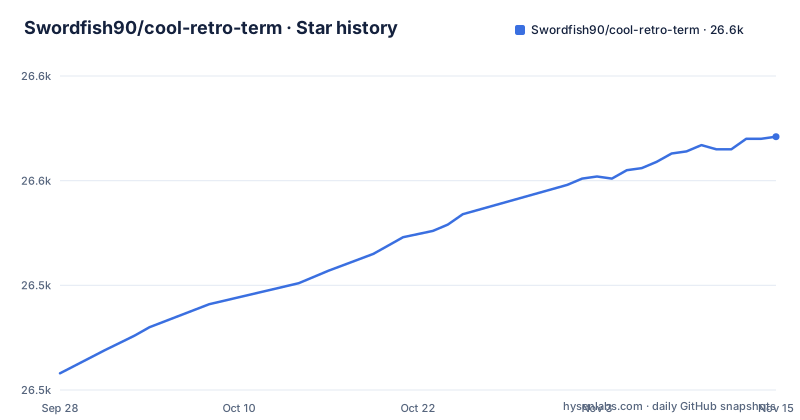
Star history
- Swordfish90/cool-retro-term26,571 ★ · +113
| Repository | 2026-09-28 | 2026-11-15 |
|---|---|---|
| Swordfish90/cool-retro-term | 26.5k | 26.6k |
113 Stars in the last 48 days, measured from the daily GitHub snapshot. Compare with other projects
Editorial analysis
The terminal underneath is a port of qtermwidget
cool-retro-term does not implement terminal emulation itself. The README states that it uses the QML port of qtermwidget, the widget that came out of Konsole, and points at a separate repository for that port. The tree backs this up: `qmltermwidget/` sits at the top level alongside the application directory, and a `.gitmodules` file is present, so the dependency arrives as a submodule rather than as a package.
That single fact explains the rest of the project. The cathode tube look is a presentation layer, and everything about how a terminal actually behaves, what escape sequences work and which shells behave correctly, is inherited from that port. Consequence: when something renders or scrolls incorrectly, the fix usually belongs upstream in qtermwidget rather than here, and a bug report against this repository may be one hop away from the code that needs changing.
It also means the visual layer is separable in principle. The character grid and the effects are different concerns, which is why customization can be described in terms of colors, fonts and effects rather than emulation settings.
Qt6 on Linux and macOS is the whole platform story
The supported platforms are named in one sentence: the terminal works under Linux and macOS and requires Qt6. That is the entire platform claim, and it is worth reading as a boundary rather than an introduction, because the only build artifacts named are an AppImage for Linux and a dmg for macOS, both from the Releases page.
Qt6 is a floor, not a preference.
Windows is absent from that list, and nothing in the project description promises it. That is worth knowing before searching for a build, because the application data is a desktop entry file and a Snap directory rather than anything Windows shaped.
The practical sequence for a new user is short: take the AppImage or dmg matching the platform, or let the distribution package it.
Settings come from a context menu, so there is no config file to commit
Configuration is described in a single sentence: settings such as colors, fonts, and effects can be accessed via the context menu. That is the whole configuration story, and it has a consequence that matters more than it first appears.
There is no documented settings file path, no documented config format and no documented command line switch. Anything you tune is applied to a running instance through a right-click menu. So there is no supported way to keep a tuned appearance in version control, to apply the same look to a second machine automatically, or to reproduce a specific look in a screenshot you took three weeks ago.
The README's screenshot table labels three looks as a quick illustration of the range: Default Amber, IBM DOS and Default Green.
If a shared look across a team matters to you, this is the single strongest reason to look elsewhere.
Two GPL texts sit at the root and the README names no licence
The repository contains both `gpl-2.0.txt` and `gpl-3.0.txt` at the top level, and the README does not state a licence at all. GitHub likewise reports no recognised licence for the repository.
Having two licence texts usually means different components carry different terms, and the obvious candidate here is the vendored terminal dependency, since qtermwidget and the single-instance component in the tree come from elsewhere. That is an inference from the file layout rather than something the documentation asserts, and nothing in the README says which text governs which part.
The consequence is practical for anyone beyond personal use. If you plan to redistribute the binary, bundle it in an image, or contribute patches, the licence terms are not settled by the project's own documentation, and the two files do not tell you which applies to the application as opposed to its dependencies. Check the headers in the files you are actually shipping, or ask upstream, before treating this as free of conditions.
For a look-and-feel tool used locally this rarely matters. It starts to matter the moment it lands in an image you distribute.
A qmake project file, a vendored single-instance library, and Snap packaging
The build system is visible in the file names. `cool-retro-term.pro` is a qmake project file, so the build goes through qmake rather than CMake, and the application code sits in `app/`. There is a `KDSingleApplication` directory, which is a single-instance guard component kept in the tree, and a `cool-retro-term.desktop` file for the freedesktop entry.
Packaging is represented too, with a `packaging/` directory and a `snap/` directory, which is the Snapcraft route for Linux distributions that support it. A `scripts/` directory sits alongside for whatever the build and release automation needs.
The README does not contain a single build command. It says to check the wiki and follow the instructions for Linux or macOS, with separate pages for each. That is a reasonable division for a project whose build depends on a submodule and a specific Qt6 major version, both of which differ per platform.
Consequence for contributors: expect to follow a wiki page rather than a checked-in script, and expect to need the qmltermwidget submodule.
A rolling tag ships alongside 2.0.0 betas
The release history has two shapes, and the naming is the interesting part. There are versioned prereleases, `2.0.0-beta1` and then `2.0.0-beta2`, and there is a separate release called `rolling` that is labelled a rolling release. Two channels, no stated policy about which one to track.
`2.0.0-beta1` and the rolling release are both dated 2026-01-22, while `2.0.0-beta2` is dated 2026-05-31, and that second date is also the last push to the master branch. In other words the newest tagged build and the last commit are the same moment, and the version two has never left beta.
For a pinned environment this matters. If you take the AppImage from the rolling channel you get whatever was current when you downloaded it, with no version string to record. If you take `2.0.0-beta2` you have a named artifact that you can write into a build manifest, on the understanding that it is still labelled beta.
Either way, the useful discipline is to record which channel and which tag a machine came from, because the rolling tag gives you nothing to record.
Distribution packages are the calmer path but not the newest one
Beyond the Releases page, the README notes that most distributions such as Ubuntu, Fedora or Arch already package cool-retro-term in their official repositories. That is the low-friction route: no AppImage to mark executable, no dmg to mount, and updates arrive through whatever mechanism the distribution already uses.
The cost is version control over what you get. A distribution package tracks that distribution's own cycle, so it may not carry the newest tagged build.
The releases and the distribution packages are therefore answering different questions. Reach for the AppImage or dmg when you want the newest build and accept that you are managing the artifact yourself. Reach for the distribution package when you want the terminal to behave like part of the system and accept an older build.
Neither route requires building from source, which is the main reason this project is approachable despite having no commands in its README.
Editorial conclusion
cool-retro-term fits someone on Linux or macOS who wants a deliberately retro terminal for demos, screenshots or a personal environment, and who is content to configure it by hand through a context menu. It is a poor fit if you need a documented config file you can commit and share, if you need Windows, or if you require a stable release, since the newest tagged build is 2.0.0-beta2 and a rolling tag ships alongside it. Before installing, check two things: which channel you want to track, the rolling tag or a distro package, and whether your system meets the Qt6 requirement.
Frequently asked questions
What is cool-retro-term?
cool-retro-term is a terminal emulator that mimics the look and feel of old cathode tube screens, described as designed to be eye-candy, customizable and reasonably lightweight. It uses the QML port of qtermwidget, the widget from Konsole, and works under Linux and macOS with Qt6 required.
how to install cool retro term
Go to the Releases page and take the latest AppImage for Linux or the dmg for macOS. Alternatively, most distributions such as Ubuntu, Fedora or Arch already package cool-retro-term in their official repositories, which avoids managing the artifact yourself but tracks that distribution's version rather than the newest tagged build.
how to customize cool retro term
Settings such as colors, fonts and effects are accessed via the context menu, and the README's screenshot table shows looks labelled Default Amber, IBM DOS and Default Green. No config file path or configuration format is documented, so customizations are applied to a running instance rather than stored in a shareable file.
install cool retro term ubuntu
Ubuntu already packages cool-retro-term in its official repositories, so it comes from the distribution rather than from the Releases page. The binary alternative is the AppImage from the Releases page. The README names no install commands for either route.
Official sources
Add this badge to your README
If you maintain this project, the badge below links readers to this analysis and shows its maintenance status from the daily GitHub snapshot. Paste the markdown into your README; add ?metric=license or ?metric=stars to the image URL for a different field.

[](https://hysenlabs.com/projects/swordfish90-cool-retro-term)Star history chart for your README
[](https://hysenlabs.com/projects/swordfish90-cool-retro-term)Was this useful?