Gitako: a GitHub file tree extension for Chrome, Firefox and Edge
🐙 File tree extension for GitHub on Chrome & Firefox & Edge
At a glance
- What is it?
- Gitako adds a browsable file tree to GitHub repository and pull request pages. It is a browser extension written in TypeScript under the MIT licence, and the README is candid about one thing: the Edge store lags behind.
- Who is it for?
- Adopt Gitako if you spend your day reading repositories in a browser and want a persistent tree next to the code, and if you are comfortable installing a browser extension that requests access to repository pages. Do not adopt it if you need a Gitee or Gitea experience that the wiki does not cover, or if you cannot accept the Edge store's slow review cadence; install from the Chrome store instead, as the README itself recommends.
- Can I use it commercially?
- Yes. MIT is a permissive licence: you can use, modify and sell software built on it, as long as you keep its copyright and licence notices.
- Is it still maintained?
- Yes. The repository last received commits 3 days ago.
- What is it written in?
- Mainly TypeScript, according to GitHub's language statistics.
Answers come from the project's GitHub data, last synced on October 22, 2026, and from our analysis. They are not legal advice.
Star history
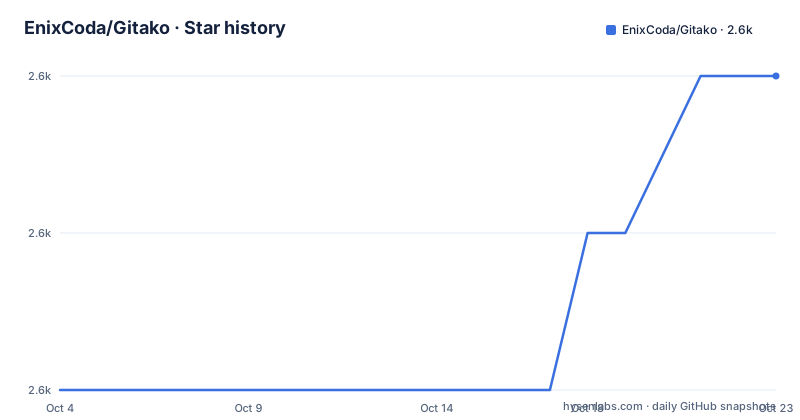
- EnixCoda/Gitako2,606 ★ · +2
| Repository | 2026-10-04 | 2026-10-22 |
|---|---|---|
| EnixCoda/Gitako | 2.6k | 2.6k |
2 Stars in the last 18 days, measured from the daily GitHub snapshot. Compare with other projects
Editorial analysis
The problem Gitako solves for people who read code on GitHub
GitHub's web interface shows one directory at a time. To move between files you click into a folder, then back out, then into another. On a large repository that is a lot of page loads, and you lose your place each time. Gitako puts a file tree beside the repository view so the whole structure is visible at once. The README describes it as a free file tree extension for GitHub, available on Chrome, Firefox and Edge, with a file tree for both repositories and pull requests. That pull request support matters more than it sounds: reviewing a diff usually means checking files that are not in the diff, and a tree makes that cheap. The audience is anyone who reads code in a browser rather than a local clone. Reviewers, maintainers triaging issues, and people evaluating a dependency before installing it. The README also lists instant file search, private repository support, git submodule support, and folding of source code.
How the extension hooks into GitHub pages
Gitako is a WebExtension built with React. The package.json lists react, react-dom, styled-components and @primer/react, which is GitHub's own design system, so the injected UI is meant to look like part of the page rather than a floating panel. Two dependencies reveal the integration strategy: pjax-api and webext-dynamic-content-scripts. GitHub navigates with pjax-style partial page updates, so a content script that only runs on initial load would go stale after the first click. pjax-api lets the extension react to those transitions. The dynamic content scripts package handles registering content scripts at runtime, which is how an extension can attach to hosts it was not granted at install time. react-window is in the dependency list, which points to virtualised list rendering for the tree itself; that is the mechanism behind the README's claim that it stays performant in gigantic projects. File icons come from a separate pipeline: the Makefile clones vscode-icons and runs two Node scripts, resolve-languages-map and generate-icon-index, to build an icon index. Sentry is wired in through @sentry/browser and a release step that uploads source maps, so crashes in the wild are reported.
Installing Gitako and opening a repository tree
Gitako installs from a browser store, not from npm. The README links three: the Chrome Web Store, the Microsoft Edge Addons store, and Mozilla Addons for Firefox. The README adds a specific recommendation: Edge users should install from the Chrome store instead, because the Edge review process is slow and updates may be delayed by weeks. Once installed, the extension activates on GitHub repository pages. The README's own debug script opens a concrete example, which is a useful way to confirm the tree appears:
yarn debug-firefoxThat command runs web-ext against the dist-firefox directory and starts at https://github.com/EnixCoda/Gitako, so the tree should render on the left of that repository page. Building the extension yourself is a different path and requires Node 18 or newer, per the engines field:
yarn install
yarn build
The build script sets VERSION and NODE_ENV=production and runs webpack. There is also a build:all target that clears GITAKO_TARGET to build every target at once. To produce store-ready archives, the Makefile has a release target that builds all targets, runs tests, uploads source maps to Sentry, and zips dist and dist-firefox. Contributing code requires the OAuth and Sentry values in .env.example to be filled in, since the release step reads them.
Where Gitako gets in the way
The largest limitation is not technical, it is distribution. The README states plainly that Edge store updates may lag by weeks because of the review process, and the workaround is to install the Chrome build on Edge. That is a real operational cost if your organisation manages extensions through the Edge store. The second limitation is site coverage. The README links a wiki page for GitHub Enterprise and other sites, and an issue for additional hosts, which means support for Gitea, Gitee and enterprise instances is documented outside the README rather than shipped as a first-class guarantee. If your company runs a self-hosted forge, read that wiki page before assuming it works. Third, the extension needs access to repository pages to do its job, including private repositories, so it inherits whatever review and permission policy your browser or IT department applies to extensions. Fourth, this is a browser tool. If you already work in a terminal or an editor with a repository browser, adding a second tree in a third place is duplication, not an improvement. The README says nothing about a CLI, a desktop app, or an Android client, so the search interest in those directions has no product behind it.
Gitako compared with Octotree and the other browser trees
Octotree is the obvious alternative and the one people search for alongside Gitako. Both inject a tree into GitHub pages. The difference visible in the repository is the stack and the styling: Gitako is React with @primer/react and @primer/css, GitHub's own components, so the tree inherits the page's theme rather than approximating it. The README lists official themes support among the features, which is a direct consequence of that choice. Gitako also lists pull request trees and git submodule support in its feature list, and it ships a Sentry pipeline in the Makefile for release tracking. Octotree's feature set is not described in this material, so a fair comparison on capability is not possible from what is here. What can be said is that the two projects solve the same problem with different UI foundations, and that Gitako's MIT licence and public source make it auditable if your security team asks what a browser extension is doing on repository pages.
Maintenance, licence and the cost of keeping up
The repository is not archived and the last push was on 2026-09-10. Recent releases are v3.16.0 on 2026-08-31, v3.15.4 on 2026-01-18 and v3.15.3 on 2026-01-16, so there was a long gap through most of 2026 before the August release. Treat that cadence as the real upgrade cost: you are not pulling frequent changes, but you also should not expect fast fixes. For self-builders the cost is concrete. Node 18 or newer is required, the build runs webpack through yarn, and a release runs Playwright tests plus a Sentry source map upload, so the release path depends on Sentry credentials. The icon pipeline clones vscode-icons at build time, which means an offline build needs that step pre-populated. On licensing, Gitako is MIT, which permits commercial use and modification with the licence and copyright notice retained. That is a statement about the licence text, not legal advice; if you redistribute a modified build inside a company, have someone check the notice requirements against your own policy. The extension is private in package.json, so it is not published to npm as a library.
Editorial conclusion
Adopt Gitako if you spend your day reading repositories in a browser and want a persistent tree next to the code, and if you are comfortable installing a browser extension that requests access to repository pages. Do not adopt it if you need a Gitee or Gitea experience that the wiki does not cover, or if you cannot accept the Edge store's slow review cadence; install from the Chrome store instead, as the README itself recommends. Before rolling it out across a team, verify three things: that the extension version in your browser matches v3.16.0 or later, that private repository access works under your organization's OAuth policy, and that the GitHub Enterprise setup described in the project wiki matches your hostname.
Frequently asked questions
What is Gitako?
Gitako is a free browser extension that adds a file tree to GitHub repository and pull request pages, with file search, private repository support and git submodule support. It is available on Chrome, Firefox and Edge.
How do I install Gitako?
Install it from the Chrome Web Store, Microsoft Edge Addons, or Mozilla Addons. The README recommends that Edge users install the Chrome store build instead, because the Edge review process can delay updates by weeks.
Can I build Gitako from source?
Yes. The package.json requires Node 18 or newer, and the build runs through yarn with webpack. Filling in .env.example is needed for the OAuth and Sentry values used by the release path.
Official sources
Add this badge to your README
If you maintain this project, the badge below links readers to this analysis and shows its maintenance status from the daily GitHub snapshot. Paste the markdown into your README; add ?metric=license or ?metric=stars to the image URL for a different field.

[](https://hysenlabs.com/projects/enixcoda-gitako)Star history chart for your README
[](https://hysenlabs.com/projects/enixcoda-gitako)Was this useful?