epicweb-dev/react-fundamentals: a workshop repository, not a React tutorial
Material for my React Fundamentals Workshop
At a glance
- What is it?
- The repository is the exercise material for Kent C. Dodds's React Fundamentals workshop, installed through the Epic Workshop CLI. It is a teaching environment with a specific setup path, a GPL-3.0-only licence, and no published releases to upgrade between.
- Who is it for?
- Use it if you want the exercise files and the workshop app that Kent C. Dodds teaches from, and you are comfortable with a GPL-3.0-only licence and a CLI-driven setup. Do not use it as a general React reference: the README points elsewhere for that, and the repository is a course, not a library.
- Can I use it commercially?
- Check first. The repository uses a licence we do not classify automatically, so read its LICENSE file before any commercial use.
- Is it still maintained?
- Yes. The repository last received commits 44 days ago.
- What is it written in?
- Mainly TypeScript, according to GitHub's language statistics.
Answers come from the project's GitHub data, last synced on November 22, 2026, and from our analysis. They are not legal advice.
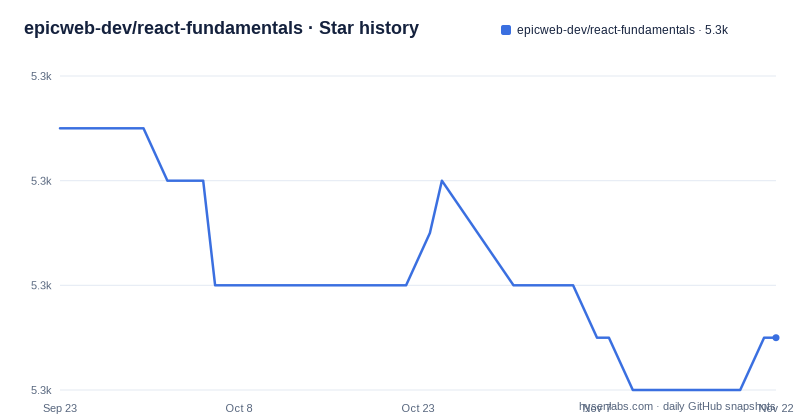
Star history
- epicweb-dev/react-fundamentals5,311 ★ · -4
| Repository | 2026-09-23 | 2026-11-22 |
|---|---|---|
| epicweb-dev/react-fundamentals | 5.3k | 5.3k |
-4 Stars in the last 60 days, measured from the daily GitHub snapshot. Compare with other projects
Editorial analysis
What the EpicReact React Fundamentals repository actually contains
This is not a library you import. It is the material for a workshop, and the README describes it as teaching "the fundamental React features necessary for building applications and libraries." The top level holds exercises/, shared/, public/, an epicshop/ directory and configuration files such as tsconfig.json and eslint.config.js. The package is private and named react-fundamentals, with react and react-dom pinned at 19.2.0 and react-error-boundary at ^6.0.0. So the audience is narrow: someone taking the course, or an instructor who wants to see how the exercises are laid out. If you arrived looking for a React concepts reference to read on its own, the README does not present the repository that way. It links to the deployed version at fundamentals.epicreact.dev and to the Epic Web workshops page, which is where the taught material lives.
How the workshop app, epicshop and the exercises fit together
The package.json reveals the architecture more clearly than the README does. There is an epicshop key holding the workshop title, a subtitle, a StackBlitz configuration with view set to editor, and a product block pointing at www.epicreact.dev with the slug react-fundamentals. The scripts delegate almost everything: postinstall changes into ./epicshop and runs pkgmgr install, while start and dev both run pkgmgrx --prefix ./epicshop epicshop start. In other words, the repository root is a thin wrapper and the real application is the epicshop subdirectory. The exercises themselves are directories under exercises/, and shared/ presumably holds code used across them. That split matters when something breaks: a failure in the root scripts is usually a failure inside epicshop. The onboarding video linked in package.json, described as "Get started with the Epic Workshop App for React," is the project's own explanation of this layout.
Installing react-fundamentals with the Epic Workshop CLI
The README lists prerequisites first: git v2.18 or greater, NodeJS v20 or greater, and npm v8 or greater, all on your PATH. It gives a verification command, and you should run it before anything else.
git --version
node --version
npm --version
If those three print versions at or above the stated minimums, the README says to use the Epic Workshop CLI:
npx --yes epicshop@latest add react-fundamentalsThat command fetches the workshop and sets it up. After it finishes, the README says you start the app with:
npm startWhat you should see is the workshop app running locally, with the exercises available through its interface. If the install step errors, the README directs you to open an issue on the repository with as much detail as you can offer. Note what the README does not document: there is no rollback or uninstall procedure, and no guidance on removing a partially installed workshop.
Where the material runs out: no releases, no versioning to upgrade between
The repository has no published releases. That is not a defect in a workshop, but it changes how you think about updates. There is no changelog to read and no version number to pin, so the practical upgrade path is to re-run the CLI command and take whatever the current material is. The README's own fallback for problems is an issue on GitHub, which puts the maintenance burden on the maintainer rather than on a release process. The last push to the repository was on 2026-10-09, so the code is recent, but recency of pushes is not the same as a support commitment, and nothing in the repository promises one. The licence is another constraint worth reading before you build anything on top. The README badge says GPL 3.0, and package.json declares GPL-3.0-only. The repository metadata reports the licence as NOASSERTION, which is a mismatch you should resolve by reading LICENSE.md yourself rather than trusting either field. A copyleft licence on teaching material is a real consideration if you intend to reuse the exercise code in your own product; that is a question for your own legal review, not something this article can settle.
The wrong tool for learning React without the workshop
The clearest limitation is scope. The README's prerequisites assume basic HTML, CSS, JavaScript and TypeScript, and it recommends installing React DevTools beforehand. It also points at pre-workshop resources, including a separate get-started-with-react repository and the first two workshops of Practical TypeScript, which the README says are free. That is a signal about who this is for: someone already past the basics. If you are starting from zero, the workshop repository is the wrong entry point, and the README says so by routing you to those resources first. The same applies if you want a text you can read linearly. The repository is exercises plus an app, and the README does not claim to be a standalone written course. Finally, the setup is opinionated: it goes through npx and the epicshop CLI, and the README's troubleshooting path is filing an issue rather than a documented manual install. If your environment cannot run the CLI, the README offers no alternative route.
React Fundamentals workshop versus the official React documentation
The obvious alternative is the official React documentation, which the README itself links to for React DevTools. The difference in approach is structural. The React docs are a reference you read and search; this repository is a set of exercises you run, with a workshop app around them and an instructor, Kent C. Dodds, whose avatar and handle appear in the epicshop configuration. This repository is GPL-3.0-only and tied to the EpicReact product, with a Discord channel id in package.json pointing at where the workshop community gathers. Neither is a replacement for the other. If you want to look up how a hook behaves, the docs are faster. If you want guided practice with someone's exercises and a running app, this repository is the thing. The README's own framing, that you will understand how to create components and handle errors by the end, describes a course outcome, not a reference.
Maintenance, licensing and what to check before you commit
The last push was on 2026-10-09, so the code is current. There are no releases, so there is no upgrade path to reason about beyond re-running the CLI. Dependencies are pinned in package.json, with react and react-dom at 19.2.0, which means the workshop tracks a specific React version rather than a range. Read LICENSE.md before copying exercise code into anything you ship. The repository also carries a code of conduct badge linking to kentcdodds.com/conduct, which tells you contributions and issues are governed by that document. None of this is unusual for workshop material, but it is the kind of thing people skip until they are already committed.
Editorial conclusion
Use it if you want the exercise files and the workshop app that Kent C. Dodds teaches from, and you are comfortable with a GPL-3.0-only licence and a CLI-driven setup. Do not use it as a general React reference: the README points elsewhere for that, and the repository is a course, not a library. Before adopting, check that Node is v20 or greater and npm is v8 or greater, then run npx --yes epicshop@latest add react-fundamentals and see whether the epicshop directory installs cleanly on your machine.
Frequently asked questions
How do I install epicweb-dev/react-fundamentals?
The README says to use the Epic Workshop CLI, running the add command for react-fundamentals. It requires git v2.18 or greater, NodeJS v20 or greater and npm v8 or greater on your PATH. After setup, the README says you start the app with npm start.
What are the prerequisites for the react-fundamentals workshop?
The README lists a basic understanding of HTML, CSS, JavaScript and TypeScript, and asks you to install the React DevTools. It also points to pre-workshop resources, including a get-started-with-react repository and the first two Practical TypeScript workshops, which it says are free.
Is react-fundamentals a library I can add to my project?
No. The package is marked private and is named react-fundamentals, and the repository holds exercises, shared code and an epicshop directory rather than a published package. It is workshop material, and the README describes it as teaching fundamental React features.
What licence does epicweb-dev/react-fundamentals use?
The README badge says GPL 3.0 and package.json declares GPL-3.0-only, while the repository metadata reports the licence as NOASSERTION. The README links to LICENSE.md, which is the file to read before reusing any of the exercise code.
Does react-fundamentals have releases I can upgrade between?
The repository has no published GitHub releases, so there is no changelog or version number to pin. The practical update path is to re-run the Epic Workshop CLI command, and the README's fallback for problems is opening an issue on the repository.
Official sources
Add this badge to your README
If you maintain this project, the badge below links readers to this analysis and shows its maintenance status from the daily GitHub snapshot. Paste the markdown into your README; add ?metric=license or ?metric=stars to the image URL for a different field.

[](https://hysenlabs.com/projects/epicweb-dev-react-fundamentals)Star history chart for your README
[](https://hysenlabs.com/projects/epicweb-dev-react-fundamentals)Was this useful?