ESEngine, a TypeScript ECS framework you can bolt onto any game engine
ESEngine - High-performance TypeScript ECS Framework for Game Development
At a glance
- What is it?
- ESEngine is a set of engine-agnostic TypeScript modules built around an ECS core, with behaviour trees, networking, physics and pathfinding available as separate packages. It fits teams already inside Cocos Creator or Laya who want entity-system architecture without writing one.
- Who is it for?
- ESEngine suits TypeScript teams working in Cocos Creator, Laya, Phaser or PixiJS who want ECS architecture and optional modules such as behaviour trees, RPC and world streaming without taking on a full engine. It does not suit a project that needs a complete engine with a renderer, an editor pipeline and asset tooling in one box.
- Can I use it commercially?
- Yes. MIT is a permissive licence: you can use, modify and sell software built on it, as long as you keep its copyright and licence notices.
- Is it still maintained?
- Yes. The repository last received commits 101 days ago.
- What is it written in?
- Mainly TypeScript, according to GitHub's language statistics.
Answers come from the project's GitHub data, last synced on November 6, 2026, and from our analysis. They are not legal advice.
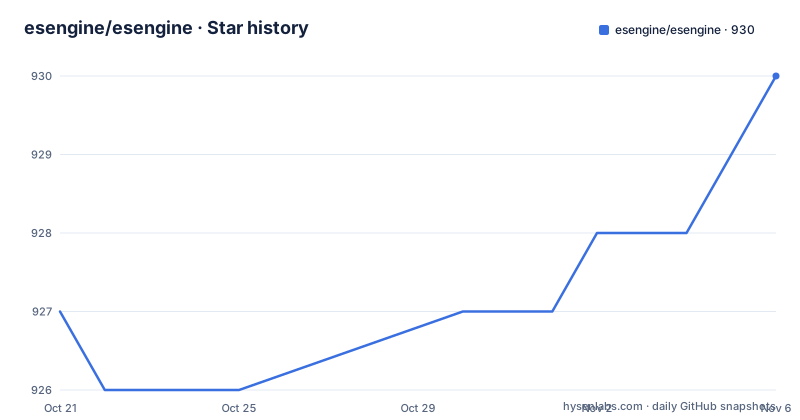
Star history
- esengine/esengine930 ★ · +3
| Repository | 2026-10-21 | 2026-11-06 |
|---|---|---|
| esengine/esengine | 927 | 930 |
3 Stars in the last 16 days, measured from the daily GitHub snapshot. Compare with other projects
Editorial analysis
Modules that assume no renderer at all
ESEngine is described as a collection of engine-agnostic game development modules for TypeScript, usable with Cocos Creator, Laya, Phaser, PixiJS or any JavaScript game engine. The framing matters: this is not a game engine with a rendering layer, it is a set of systems that sit on top of whichever renderer you already use.
The claim in the README is that all packages are engine-agnostic and have zero rendering dependencies, and the package list is a set of npm packages rather than a single bundle. The core is a high-performance ECS framework with reactive queries, and around it sit optional modules for AI, networking, physics and more. The module table lists an ECS core, a behavior tree with visual editor support, a Blueprint visual scripting system, an FSM, timer and cooldown systems, spatial indexing with QuadTree and Grid, A* and navigation mesh pathfinding, procedural generation, an RPC framework, client networking with prediction, area of interest and delta compression, a database with Redis or Memory storage, and world streaming for open world chunk loading.
That list is the project's real proposition. An ECS core alone is a well-trodden idea, but the value for a small team is in the behaviour tree, the FSM and the spatial module being available off the shelf, each still installable on its own.
Components hold data, systems hold the logic
The core programming model is the conventional one, and the README shows it in full. Components are data only and are marked with the ECSComponent decorator, which carries a string name used by the matching layer. Systems are marked with ECSSystem and extend EntitySystem, and they declare what they care about through Matcher.all, so the framework hands the system the entities that currently match its query rather than making the system search for them.
The processing entry point is a protected process method that receives the matched entities. In the movement example the system reads the Position and Velocity components from each entity and advances the position by the velocity scaled by Time.deltaTime, which is where the frame time comes from.
Initialisation is three steps: Core.create() sets up the framework, a Scene is created and given its systems, and Core.setScene(scene) installs that scene as the active one. Entities are then created on the scene and given components. The system list is the reactive part of the design, since queries re-evaluate as entities gain and lose components, so a system that matches Position and Velocity starts receiving an entity the moment the second component is added.
The loop itself is ordinary application code rather than a framework callback:
function gameLoop(currentTime: number) {
    Core.update(currentTime / 1000);
    requestAnimationFrame(gameLoop);
}
requestAnimationFrame(gameLoop);
One Core.update call per frame, with the time in seconds, and Time.deltaTime inside systems does the rest.
The CLI guesses your engine, or you wire it by hand
The documented entry point for an existing project is a command that runs in the project directory:
npx @esengine/cli initThe CLI detects the project type, and the README names what it looks for: Cocos Creator 2.x or 3.x, LayaAir 3.x, or Node.js. On that basis it generates the necessary integration code. That is the whole pitch of the CLI, one command that produces the boilerplate that would otherwise be the first hour of a new integration.
For the core package alone, the dependency is:
npm install @esengine/ecs-frameworkThe rest of the packages follow the same naming pattern, one per module, so npm install @esengine/behavior-tree, @esengine/fsm, @esengine/timer, @esengine/spatial and the others each add a single capability. The README is explicit that the main packages carry zero rendering dependencies, which means adding the behaviour tree does not drag in a renderer.
Manual setup is also documented, and it is only a handful of lines because the framework does not own the game loop. In Laya 3.x, for example, you create the framework in onAwake, add systems to the scene, and call Core.update with the engine's delta divided by 1000 in onUpdate:
import { Core, Scene } from '@esengine/ecs-framework';
import { FSMSystem } from '@esengine/fsm';

const { regClass } = Laya;

@regClass()
export class ECSManager extends Laya.Script {
    private ecsScene = new Scene();

    onAwake(): void {
        Core.create();
        this.ecsScene.addSystem(new FSMSystem());
        Core.setScene(this.ecsScene);
    }
The Cocos Creator example is the same shape, using the engine's _decorator and a start method that builds the scene.
A monorepo with independent version lines per module
The repository is a monorepo built with pnpm and turbo, and the workspace structure is visible in the root package.json. The workspaces cover packages/framework, packages/devtools, packages/tools and docs, and the package manager is pinned at [email protected]. Turbo drives the task graph, so build, test, test:coverage and test:ci are run per package, and there are filtered variants such as build:core for the ECS framework and build:math for the math utilities.
Release handling is done with changesets. The scripts changeset, changeset:version and changeset:publish form the versioning path, and sync:versions runs a script to keep package versions aligned, which is what you need in a monorepo where several packages share a release. Lerna is present in the script list for bootstrap, and the root package.json version is 2.1.29 for the monorepo itself.
The version lines are independent per package, and that is worth noticing. The most recent releases include @esengine/[email protected], @esengine/[email protected] and @esengine/[email protected], all published on 2026-07-30, the same day as the last push. A module can therefore jump major versions on its own schedule, which is convenient but means your lockfile can pull a spatial 15 against a spatial 14 expectation if you are not careful.
The tooling around it is conventional for a published TypeScript monorepo: typedoc.json for the API reference, eslint.config.mjs, a .size-limit.json that tracks bundle size, codecov.yml for coverage reporting, and a .changeset/ directory for pending release notes.
Where the ECS model stops being the right abstraction
The value of an entity component system is that data and behaviour are separated, so the same data can be read by several systems and the same behaviour can be applied to different data. That works well for simulation, for entity-heavy scenes, and for code where behaviour is naturally described as rules over sets of objects.
It stops working well when the game is mostly authored content rather than systems. A level built from hand-placed objects with a bespoke script on each one, or a project where the flow is a linear sequence of cut scenes, gets little from the ECS split and pays the cost of an extra indirection between data and behaviour. For a small puzzle game with a dozen objects, the framework is overhead.
There is also a version mismatch risk that is easy to ignore. The modules ship on separate major version lines, so a project on Laya 3.x with an older Cocos Creator project in the same repository can end up with different module versions on either side, and the CLI only generates code for the project types it detects.
The alternative approach is to write the entity system in the engine's own script model and skip the framework. The difference in approach is that ESEngine gives you the query mechanism, the behaviour tree, the FSM and the spatial index as off-the-shelf packages, while writing it yourself means every system is bespoke and every module is a dependency you maintain.
Editorial conclusion
ESEngine suits TypeScript teams working in Cocos Creator, Laya, Phaser or PixiJS who want ECS architecture and optional modules such as behaviour trees, RPC and world streaming without taking on a full engine. It does not suit a project that needs a complete engine with a renderer, an editor pipeline and asset tooling in one box. Before adopting it, run npx @esengine/cli init in a scratch project to see what the generated integration looks like, check that your engine version is one of the ones the CLI detects, and read the per-package release notes, since the modules ship on separate version lines such as @esengine/spatial at 15.0.1 and @esengine/timer at 11.0.1.
Frequently asked questions
What is ESEngine?
ESEngine is a collection of engine-agnostic game development modules for TypeScript, built around a high-performance ECS framework with reactive queries and accompanied by optional modules for behaviour trees, visual scripting, FSM, timers, spatial indexing, pathfinding, procedural generation, RPC, networking, database storage and world streaming.
How do I add ESEngine to an existing game project?
Run npx @esengine/cli init in the project directory. The CLI detects the project type, Cocos Creator 2.x or 3.x, LayaAir 3.x, or Node.js, and generates the integration code, or you can install @esengine/ecs-framework directly with npm and wire the scene yourself.
Does ESEngine work with engines other than Cocos Creator and Laya?
Yes. The modules are described as engine-agnostic and are said to work with Cocos Creator, Laya, Phaser, PixiJS or any JavaScript game engine, with zero rendering dependencies, so they do not tie you to a specific renderer.
Do I have to install every ESEngine module?
No. Each capability is a separate package, so the core ECS framework, the behaviour tree, the FSM, the timer, the spatial index and the rest are installed individually with npm as needed. The README lists them as separate install lines.
Official sources
Add this badge to your README
If you maintain this project, the badge below links readers to this analysis and shows its maintenance status from the daily GitHub snapshot. Paste the markdown into your README; add ?metric=license or ?metric=stars to the image URL for a different field.

[](https://hysenlabs.com/projects/esengine-esengine)Star history chart for your README
[](https://hysenlabs.com/projects/esengine-esengine)Was this useful?