israeli-bank-scrapers, and the data structure your bank will not give you
Provide scrapers for all major Israeli banks and credit card companies
At a glance
- What is it?
- This package logs into Israeli banks and credit card providers with a headless browser and returns transactions as structured objects. The result shape, the error taxonomy and the browser handling options are the parts worth reading before you wire it into anything.
- Who is it for?
- Adopt israeli-bank-scrapers if you want your own Israeli bank and credit card data in a form you control, for a budgeting tool, a self hosted dashboard or a personal finance script, and you are willing to handle your own credentials and to accept that bank interfaces change. Do not build anything on it that handles credentials for other people, and do not treat a scraper's output as authoritative financial records.
- Can I use it commercially?
- Yes. MIT is a permissive licence: you can use, modify and sell software built on it, as long as you keep its copyright and licence notices.
- Is it still maintained?
- Yes. The repository last received commits 5 days ago.
- What is it written in?
- Mainly TypeScript, according to GitHub's language statistics.
Answers come from the project's GitHub data, last synced on November 7, 2026, and from our analysis. They are not legal advice.
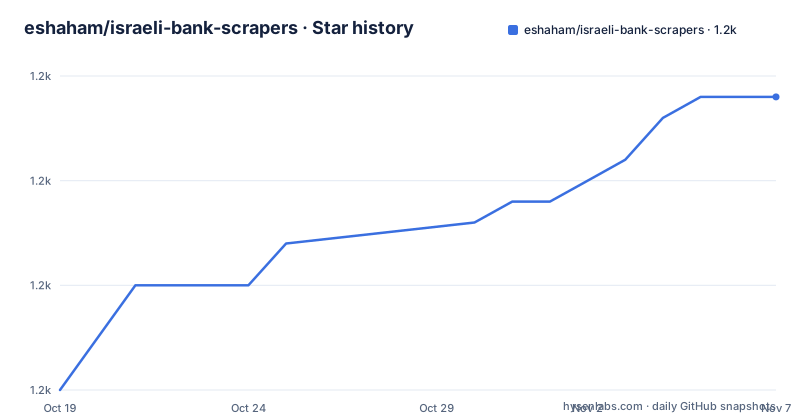
Star history
- eshaham/israeli-bank-scrapers1,164 ★ · +14
| Repository | 2026-10-19 | 2026-11-07 |
|---|---|---|
| eshaham/israeli-bank-scrapers | 1.2k | 1.2k |
14 Stars in the last 19 days, measured from the daily GitHub snapshot. Compare with other projects
Editorial analysis
Getting your own transaction data out of a bank portal
The package provides scrapers for all major Israeli banks and credit card companies. The plan is all of them, the project says, and then it is honest about the current state: only the listed institutions are supported, which runs to Bank Hapoalim, Leumi Bank, Discount Bank, Mercantile Bank, Mizrahi Bank, Otsar Hahayal Bank, Union Bank, Massad, Yahav, Behatsdaa and Beyhad Bishvilha on the banking side, and Visa Cal, Max, Isracard and Amex on the credit card side, with OneZero listed as experimental.
Each entry credits the contributors who wrote that scraper, which is a useful signal about the shape of the project. This is not one generalised browser automation framework with a bank plugin interface. It is a set of institution specific scrapers, each one written by someone who had an account there and knew what the login flow did. The consequence is that support is uneven by nature, and a bank whose portal changed last week has a scraper that no longer works until someone fixes it.
The mechanism is a headless browser. The package drives a browser session, fills in the institution's login form, navigates the statement pages and parses the result, which is why the project depends on puppeteer and why the advanced options section is entirely about browser lifecycle.
The point of the whole thing is stated in the title of the project, get closer to your own data. For a user of a personal finance tool in a market where banks do not offer open banking APIs, this is the pragmatic path, and the licence is MIT, so you may use the result as long as you keep the copyright and licence notice.
The result object is the contract you code against
The documentation is explicit about the structure of the result, and that structure is what your code actually depends on.
{
  success: boolean,
  accounts: [{
    accountNumber: string,
    balance?: number,
    txns: [{
      type: string,
      identifier: int,
      date: string,
      processedDate: string,
      originalAmount: double,
      originalCurrency: string,
      chargedAmount: double,
      description: string,
      memo: string,
      installments: {
        number: int,
        total: int,
      },
      status: string
    }],
  }],
  errorType: "INVALID_PASSWORD"|"CHANGE_PASSWORD"|"ACCOUNT_BLOCKED"|"UNKNOWN_ERROR"|"TIMEOUT"|"GENERIC",
  errorMessage: string,
}
Several details in that shape are worth pausing on. The type field distinguishes a normal transaction from an installments one, and an installments entry carries a number and a total, which is the information you need to compute what is actually paid this month rather than what was charged.
There are two dates, date and processedDate, both ISO date strings. A transaction date alone is not enough to reconcile a statement, because the bank and the merchant disagree about when a transaction happened, and the two dates are the reconciliation.
There are two amounts, originalAmount with originalCurrency and chargedAmount, because a card statement in a foreign currency shows what the merchant charged and what the cardholder was billed, and the difference is the foreign exchange fee.
The balance is optional, and the comment says it is not implemented for all accounts, so any code that reads it has to handle its absence.
The error type is a closed set of six values, including CHANGE_PASSWORD and ACCOUNT_BLOCKED, which are the two you most want to distinguish, because they are not failures but states that need a different response.
createScraper, CompanyTypes and where the credentials come from
The usage path is short enough to read in one go.
import { CompanyTypes, createScraper } from 'israeli-bank-scrapers';

const options = {
  companyId: CompanyTypes.leumi,
  startDate: new Date('2020-05-01'),
  combineInstallments: false,
  showBrowser: true
};

const credentials = {
  username: 'vr29485',
  password: 'sometingsomething'
};

const scraper = createScraper(options);
const scrapeResult = await scraper.scrape(credentials);
The company is chosen by an identifier from the CompanyTypes enumeration, the start date bounds the statement period, combineInstallments controls whether installment transactions are merged, and showBrowser controls whether the browser is visible, which is the setting you want while you are debugging a new institution.
Credentials are not part of the options object. They are passed to the scrape call, separately, and the project points you at the file that lists which credentials each company needs, since a credit card company and a bank do not take the same fields, and some require a second factor in the form of a code sent to a phone.
There is also a SCRAPERS export that gives metadata rather than a scraper, a map from company identifier to the scraper name and the list of login fields that scraper requires. That is the piece a user interface needs, since it can render the right login form for whichever institution the user picked without hardcoding a table of banks.
One operational note sits at the top of the documentation and is easy to skim past. The scrapers are set to use the Asia/Jerusalem timezone, to avoid conflicts if you run them outside Israel, so the dates you get back are Israeli dates regardless of where the process runs.
The browser options are where parallel runs and debugging live
The advanced options are all about the browser, and each solves a specific problem you will hit within a day of using this.
The first is ExternalBrowserOptions, which lets you supply a browser you created yourself, for example one from puppeteer via launch. The note is important: for backwards compatibility, the browser is closed by the library after the scraper finishes, unless skipCloseBrowser is set to true.
import puppeteer from 'puppeteer';
import { CompanyTypes, createScraper } from 'israeli-bank-scrapers';

const browser = await puppeteer.launch();
const options = {
  companyId: CompanyTypes.leumi,
  startDate: new Date('2020-05-01'),
  browser,
  skipCloseBrowser: true,
};
const scraper = createScraper(options);
const scrapeResult = await scraper.scrape({ username: 'vr29485', password: 'sometingsomething' });
await browser.close();
The second is ExternalBrowserContextOptions, where you pass a browser context instead of a browser. The stated use is not sharing cookies with other scrapers, which is what you want when you run multiple parallel scrapes for different users of the same bank, without paying for a new browser process each time.
Both options exist because a shared browser with shared cookies is a real hazard in this domain. A cookie jar from one user's session can leak into another user's scrape, and the person whose transactions end up in the wrong dataset is the person who notices last.
There is also a set of opt-in features, enabled through the optInFeatures option, which the documentation explains are usually used for breaking changes that are not enabled by default. That is a deliberate design for a library where a change in a bank's response format would otherwise break every user at once, and it gives you a switch to flip once you have read what the change does.
Version numbering that does not match the tags, and a manifest that says private
Two things in the package manifest are worth a second look before you rely on this package.
The version field says 1.0.4. The published tags are v6.12.2, v6.12.1 and v6.12.0, dated 2026-09-29, 2026-09-15 and 2026-09-10 respectively, and the manifest also has publishConfig with public access and provenance enabled. The tag history and the manifest version are on different numbering lines, and the documented release process includes a prepare:core script that resets the working tree, runs a utility script and rebuilds, which suggests the published package is assembled from a different tree than the one you see on the branch.
The second is that the manifest is marked private while the publish config sets access to public. A private flag in a published package is contradictory, and it is the kind of contradiction that means you should check what is actually on the registry rather than trusting the manifest to describe it.
Neither of these is a reason to avoid the package, and both are reasons to check the installed version rather than assuming. The recent release cadence is good, with three tagged releases in September 2026, and the last push was on 2026-10-17.
The licence is MIT, the author is Elad Shaham, and the keywords are israel, israeli bank and israeli bank scraper. The engine requirement is Node 22.22.2 or newer, and the entry point for consumers is the published package on npm, not this repository, whose main field points at lib/index.js, the built output.
The build and test setup behind the published package
The repository is a TypeScript project with a conventional toolchain, and looking at it tells you what quality guarantees you are getting.
The build script runs the linter, cleans the output directory, then emits the type declarations and compiles the JavaScript with babel, with inline source maps, and a postbuild step that removes the tests from the published output. The lint script runs ESLint over the source and then checks the formatting, and the format script is Prettier over the source, documentation and configuration files. Type checking is a separate script running tsc with noEmit, and a dev script runs that in watch mode.
Tests run with jest, and there is a separate test:ci script that copies a configuration template into place before running the suite, which is the standard arrangement for keeping credentials and per-environment settings out of the repository.
There is a husky directory and an eslint configuration module at the root, so the formatting and lint rules are enforced at commit time rather than left to a reviewer to notice.
Two directories at the top level are worth knowing about. The utils directory holds the scripts the release process uses, including the one the prepare:core script calls. The src directory holds the library, with the scrapers under src/scrapers, where the options declaration lives, and the per-company credential definitions under src/definitions, which is the file the documentation points you to for what each institution requires.
The tests directory is at the top level as well, and the build deliberately strips it from the package, so a consumer never installs the test fixtures.
Editorial conclusion
Adopt israeli-bank-scrapers if you want your own Israeli bank and credit card data in a form you control, for a budgeting tool, a self hosted dashboard or a personal finance script, and you are willing to handle your own credentials and to accept that bank interfaces change. Do not build anything on it that handles credentials for other people, and do not treat a scraper's output as authoritative financial records. Before you commit, read the result structure in the project documentation and map it to your own model, run one company end to end with showBrowser enabled so you can see the actual login flow, and check the Node version requirement of 22.22.2 or newer against what your project already runs.
Frequently asked questions
How do I install and use israeli-bank-scrapers?
You need Node.js 22.22.2 or newer, then `npm install israeli-bank-scrapers --save`. Import CompanyTypes and createScraper, build an options object with a company identifier and a start date, and pass your credentials to the scrape call.
What does the scrape result contain?
A success flag, a list of accounts with an account number, an optional balance and a list of transactions. A transaction has a type, dates, an original and a charged amount with currencies, a description, a memo, optional installment number and total, and a status of completed or pending. On failure there is an errorType and an errorMessage.
Which Israeli banks and credit card companies are supported?
The listed set covers Bank Hapoalim, Leumi, Discount, Mercantile, Mizrahi, Otsar Hahayal, Union Bank, Massad, Yahav, Behatsdaa and Beyhad Bishvilha, plus Visa Cal, Max, Isracard and Amex, with OneZero marked as experimental.
How do I run several scrapes in parallel without sharing cookies?
Pass a browser context with the ExternalBrowserContextOptions option, created from a browser you launched, so each run gets isolated cookies without creating a new browser process. Passing your own browser with the browser option also works, and skipCloseBrowser stops the library from closing it.
What are the opt-in features for?
Some scrapers support opt-in features, enabled with the optInFeatures option when creating the scraper. They are usually used for breaking changes that are not enabled by default.
Official sources
Add this badge to your README
If you maintain this project, the badge below links readers to this analysis and shows its maintenance status from the daily GitHub snapshot. Paste the markdown into your README; add ?metric=license or ?metric=stars to the image URL for a different field.

[](https://hysenlabs.com/projects/eshaham-israeli-bank-scrapers)Star history chart for your README
[](https://hysenlabs.com/projects/eshaham-israeli-bank-scrapers)Was this useful?