run: one CLI and one REPL across 25 languages, with a WASI runtime still marked experimental
Universal multi-language runner and smart REPL written in Rust.
At a glance
- What is it?
- run is a Rust command runner and smart REPL that executes code in 25 languages behind a single interface, adds per-language session persistence, a blake3 build cache and scriptable JSON output, and ships a separate Run 2.0 line built on WASI 0.2 components that the README still labels experimental.
- Who is it for?
- run fits a developer who switches languages often and wants one command shape and one REPL instead of juggling per-language toolchains, and it is the wrong choice for production workloads that need a pinned, supported runtime, since the published crate is version 0.10.0 and the Run 2.0 WASI path is marked experimental.
- Can I use it commercially?
- Yes. Apache-2.0 is a permissive licence: you can use, modify and sell software built on it, as long as you keep its copyright and licence notices.
- Is it still maintained?
- Yes. The repository last received commits 12 days ago.
- What is it written in?
- Mainly Rust, according to GitHub's language statistics.
Answers come from the project's GitHub data, last synced on November 7, 2026, and from our analysis. They are not legal advice.
Star history
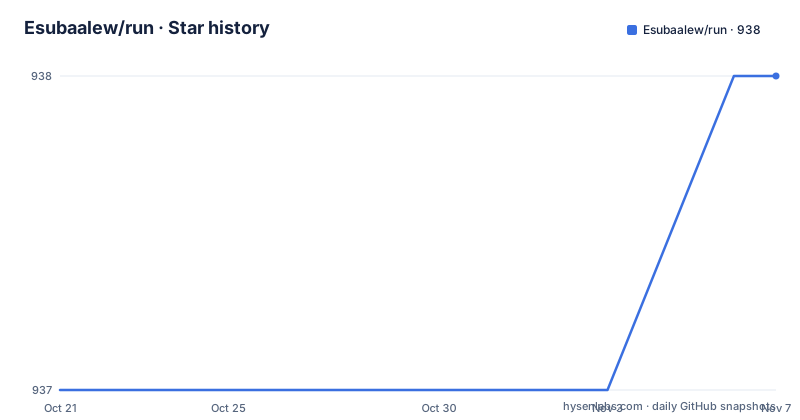
- Esubaalew/run938 ★ · +1
| Repository | 2026-10-21 | 2026-11-07 |
|---|---|---|
| Esubaalew/run | 937 | 938 |
1 Stars in the last 17 days, measured from the daily GitHub snapshot. Compare with other projects
Editorial analysis
The problem is toolchain sprawl, not language choice
The README frames run as a response to setup overhead rather than to any lack of compilers. Traditional workflows need separate tools for each language, and the documentation lists what that costs: time consuming installation of compilers, interpreters and package managers, inconsistent interfaces where every language has its own flags, and the cognitive overhead of remembering each workflow.
The stated audience is broader than professional polyglot developers. Beginners are named first, with the promise of learning without complex setup, then students who want to try snippets across paradigms, then developers prototyping and switching between languages, DevOps engineers writing automation scripts in several languages from one tool, and educators teaching with a consistent interface.
The claim is a unified interface for executing code across 25 programming languages without managing multiple compilers, interpreters or build tools. The wording is slightly optimistic about the second half. run does not ship the toolchains; it drives them. The examples directory lists language folders for bash, c, cpp, crystal, csharp, dart, elixir, go, groovy, haskell, java, javascript, julia, kotlin, lua, nim, perl, php, python, r, ruby, rust, swift and typescript, plus hello-world. So the setup burden of installing those toolchains still exists, but the command interface is uniform.
One inconsistency worth noting before you rely on the docs: the README repeatedly says 25 languages, while the Debian package metadata in Cargo.toml describes support for 20+ languages. The example folders and the 0.10 release notes, which mention extension based detection for all 25 languages including Kotlin, Swift and Dart, point to 25 being the current figure.
A single binary in front of many toolchains, plus a server for the REPL
The crate is published as `run-kit` on crates.io with a binary and a library both named `run`. The dependency list explains the shape of the implementation. Command parsing uses clap with derive features, the interactive line editing comes from rustyline, and syntax highlighting for snippets comes from syntect. Process discovery uses which, temporary file handling uses tempfile, and shell-like word splitting uses shell-words.
Two dependencies point at mechanisms rather than conveniences. `notify-debouncer-mini` handles filesystem watching, which is what makes the watch and format style workflow commands possible. `tiny_http` is an embedded HTTP server, which is how the REPL serves a session over HTTP instead of only over the terminal, and it is why the tool ships with an interactive surface rather than being a plain executor.
Caching is built on blake3, the fast cryptographic hash, used for a toolchain aware build cache stored under the platform cache directory. The choice of blake3 over something like sha2 is deliberate and visible, since the same manifest also lists sha2 for the Run 2.0 registry path, where hash integrity matters more than speed.
The 0.10 release added custom language aliases, with `run alias add` and `run alias remove` persisting into `~/.config/run-kit/aliases.toml`. That file path is the one place the tool writes configuration of its own, and it makes the mapping from a name of your choosing to a real toolchain durable across sessions.
Getting a first run: the v2 entry point and the flags that matter
The repository ships an install.sh at the top level, and the documentation site is the reference for setup details, with the docs source kept in a separate repository named esubaalew/run-docs. The README itself is the source of truth for the command surface, and the 0.10 note says `run --help` now lists all workflow subcommands directly rather than hiding them behind a parent command.
The experimental line has its own entry point, and the README gives exactly one command for it:
run v2 --helpThat help output is where the Run 2.0 surface is described, and the repository holds the related pieces: an examples/v2 directory, a MIGRATION.md, and a registry-server directory.
For the classic path, the workflow commands added in 0.9 give a sense of what the tool does beyond running a file. `run doctor` checks the local setup, `run fmt <file>` formats a file, `run snippet <lang> <name>` pulls a named snippet, `run watch <file>` reacts to changes, and `run share <file>` shares a file. The 0.10 release extended `run fmt` and `run share` so they detect all 25 languages by file extension rather than a subset.
The README also flags the `--lang` option as important enough to have its own section, which tells you the runner relies on the file extension as the default language detector and needs the override when that inference is wrong.
The REPL keeps state per language and can switch between them
The REPL is where run differs from a plain script executor. The documentation describes an interactive mode that accepts input line by line or as a paste, per-language REPL history, and variable persistence with the ability to switch languages without losing what is defined. Version 0.9 also brought safer reset behaviour and a hardened child-process shutdown, which matters when a session has spawned child processes that would otherwise be orphaned.
Per-language history and per-language state are the design decision worth understanding. They imply that each language gets its own session context, so switching from Python to Rust and back returns to the Python variables, not to an empty prompt. That is the behaviour a developer wants when using a REPL as a scratchpad, and it is the reason run is called a smart REPL rather than just an executor.
Stdin piping is documented separately from the interactive mode, which is the split that keeps the tool usable in scripts. When a program reads from stdin, the piped and interactive paths need different handling, and the README treats them as different topics with their own examples rather than one merged behaviour.
The 0.9 release added scriptable execution through `--json` and predictable timeout behaviour through `--timeout <seconds>`, where a timeout exits with code 124. That exit code is the same one GNU timeout uses, so existing shell wrappers that already treat 124 as a timeout keep working.
The build cache knows about toolchains, which fixes a stale compiler problem
The most instructive entry in the 0.9 notes is about C++ precompiled headers. The cache invalidation for precompiled headers now tracks the exact compiler identity, so Clang or Xcode upgrades no longer poison inline, stdin or REPL runs. The phrasing is revealing: before this change, an upgrade of the compiler left the cached precompiled headers in place, and any subsequent run that used them behaved as if the old compiler had produced them. The fix ties cache validity to the compiler itself rather than to file timestamps.
That same toolchain awareness is what the 0.10 release calls a toolchain lockfile. The `run.lock.toml` placeholder hashes were removed, and the documented way to populate the file is `run v2 toolchain sync`. So the repository carries a lockfile concept at two stages: the 1.x era file with placeholders, and the 2.0 era file filled in by a sync command.
Cache management is exposed as commands rather than only as files. `run cache --stats` reports on the cache and `run cache --clear` removes it, with the cache stored under the platform cache directory. The toolchain aware cache is therefore inspectable from the command line, which is what you want when a build behaves differently on two machines and you need to establish whether the difference is a cached artefact.
For the WASI target, the 0.10 notes mention alignment on `wasm32-wasip1` used consistently across build, deploy and registry metadata, plus Run 2.0 CI where v2 feature builds and tests run in GitHub Actions.
Run 2.0 and its WASI components are labelled experimental
Run 2.0 adds WASI 0.2 component support, with three stated goals: cross-language composition, instant startup, and edge deployment. The dependency list backs the component story up. There is wit-parser for WebAssembly interface types, a tokio runtime with the full feature set for async work, reqwest with JSON and multipart support for talking to a registry, sha2 and hex for hashing, urlencoding, cap-std for capability based filesystem access, semver for version handling and indexmap for insertion ordered maps.
The optional flag on several of those dependencies is itself informative. tokio, reqwest, rand_core and futures are marked optional, so the base install stays lean and the network and async parts only appear when a feature needs them.
The wording in the README is the part to take seriously: Run 2.0 is marked experimental, and the section title calls it a WASI component runtime. There is a registry server directory in the repository, and a migration guide at MIGRATION.md for moving between the versions. The capability oriented filesystem handling through cap-std is a meaningful design choice for a runtime meant to reach edge environments, where a sandbox is part of the deployment model rather than an optional extra.
What the documentation does not state is a stability guarantee or a compatibility promise for the v2 surface. For anything other than experiments, that is the reason to stay on the classic runner, which is the version the 0.9 and 0.10 workflow commands belong to.
Licence, packaging and where the project stands
The licence is Apache-2.0, stated in the README badge and in the package metadata. Apache-2.0 carries an explicit patent grant and requires you to preserve notices when redistributing, which for a command line tool that people vendor into images is the practical detail to remember.
Packaging is handled through the metadata block in Cargo.toml, with a Debian package configuration that installs the release binary to `/usr/bin/run` with mode 755, places the README and LICENSE under `/usr/share/doc/run/`, and depends on `libc6 (>= 2.31)`. The repository also carries a packaging directory, a scripts directory and a CHANGELOG.md with a cliff.toml configuration for generating it.
On maintenance, the last push was on 2026-07-09, and the release history shows v0.10.0 on 2026-07-09, v0.9.1 and v0.9.0 both on 2026-05-15. The version is still pre-1.0 at 0.10.0, and the README marks both Run 2.0 and its component model as experimental, so the honest reading is that the classic runner is usable and settled while the 2.0 line is still moving. The documentation source lives in a separate repository, so doc changes land independently of the code releases.
There is also a bench directory alongside benches and benchmarks directories at the repository root, which suggests measurement work exists in the project, though the README does not publish any performance numbers to compare against other runners.
Editorial conclusion
run fits a developer who switches languages often and wants one command shape and one REPL instead of juggling per-language toolchains, and it is the wrong choice for production workloads that need a pinned, supported runtime, since the published crate is version 0.10.0 and the Run 2.0 WASI path is marked experimental. Before depending on it, check three things: that each language you need is present on the machine, because run drives the toolchains rather than bundling them, that `run cache --clear` and a fresh toolchain sync have been run after a compiler upgrade, and that the `--json` and `--timeout` behaviour matches your automation, where a timeout exits with code 124.
Frequently asked questions
What languages does run support?
The README describes run as executing code in 25 programming languages, and the 0.10 notes say `run fmt` and `run share` detect all 25 by file extension. The examples directory includes folders for bash, c, cpp, crystal, csharp, dart, elixir, go, groovy, haskell, java, javascript, julia, kotlin, lua, nim, perl, php, python, r, ruby, rust, swift and typescript.
How do I install run and check my setup?
The repository ships an install.sh script, and the documentation site covers the setup steps. Once installed, `run doctor` checks the local configuration, and `run --help` lists all workflow subcommands directly.
Can run be used in CI or other scripts?
Yes. Version 0.9 added scriptable execution through `--json` and a `--timeout <seconds>` option, where a timeout exits with code 124. There is also `run share <file>` and `run watch <file>` for file oriented work.
Does the run REPL keep variables when I switch languages?
The documentation describes variable persistence with the ability to switch languages, along with per-language REPL history. Version 0.9 also added safer reset behaviour and a hardened child-process shutdown.
Is Run 2.0 ready for production use?
The README labels Run 2.0 as experimental. It adds WASI 0.2 component support for cross-language composition, instant startup and edge deployment, and ships a MIGRATION.md plus a registry-server directory, but no stability guarantee is stated.
What happens to the cache after I upgrade my compiler?
Since version 0.9 the C++ precompiled header cache invalidation tracks the exact compiler identity, so Clang or Xcode upgrades no longer poison inline, stdin or REPL runs. You can inspect the cache with `run cache --stats` and empty it with `run cache --clear`.
Official sources
Add this badge to your README
If you maintain this project, the badge below links readers to this analysis and shows its maintenance status from the daily GitHub snapshot. Paste the markdown into your README; add ?metric=license or ?metric=stars to the image URL for a different field.

[](https://hysenlabs.com/projects/esubaalew-run)Star history chart for your README
[](https://hysenlabs.com/projects/esubaalew-run)Was this useful?