EtchDroid: the Android app that turns your phone into a bootable USB writer
An application to write OS images to USB drives, on Android, no root required.
At a glance
- What is it?
- A GPL 3.0 Kotlin app that writes Linux and Raspberry Pi images to USB drives over Android mass storage, with no root. The README is unusually specific about what it cannot flash.
- Who is it for?
- EtchDroid is built for one situation, and it is good at it: you are holding a dead laptop, a USB stick and an Android phone, and you need an installer that does not require a working computer. Outside that, its scope is narrow by design.
- Can I use it commercially?
- Yes, with conditions. GPL-3.0 is a copyleft licence: if you distribute software that includes it, you must release that software's source code under the same licence. Running it internally without distributing it does not trigger that obligation.
- Is it still maintained?
- Yes. The repository last received commits 13 days ago.
- What is it written in?
- Mainly Kotlin, according to GitHub's language statistics.
Answers come from the project's GitHub data, last synced on October 22, 2026, and from our analysis. They are not legal advice.
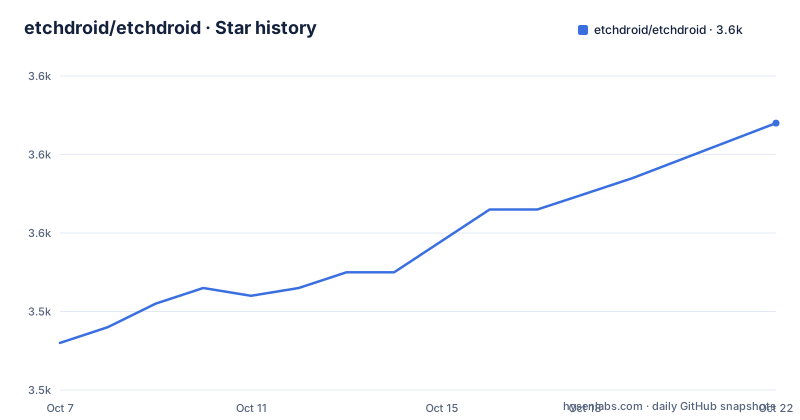
Star history
- etchdroid/etchdroid3,564 ★ · +28
| Repository | 2026-10-07 | 2026-10-22 |
|---|---|---|
| etchdroid/etchdroid | 3.5k | 3.6k |
28 Stars in the last 15 days, measured from the daily GitHub snapshot. Compare with other projects
Editorial analysis
The use case is one sentence long: a dead laptop and a phone
The README puts the whole product in a single line: use EtchDroid to make a bootable operating system USB drive when your laptop is dead. That framing matters more than it looks. The obvious competitor for this job is Rufus or balenaEtcher on a working desktop, and the comparison that follows is that EtchDroid replaces the working desktop with an Android phone.
So the design target is a phone in one hand and a USB drive in the other, with no computer, no root and no bootloader unlocking. The repository description says the same thing: an application to write OS images to USB drives, on Android, no root required. The GitHub description adds mass-storage-device and gnu-linux as topics, along with iso and linux.
The application is Kotlin, and the package ID visible in the download links is `eu.depau.etchdroid`. It ships through three channels, which is worth noting for anyone weighing where to get it: Google Play, GitHub releases, and F-Droid. Those three builds are not identical, and the difference shows up in telemetry, discussed further down.
The supported device list is a short list of refusals
Most README support sections for this kind of tool are vague. EtchDroid's is a checklist with crosses on it, and the crosses are the interesting half.
Supported: USB flash drives and USB SD card adapters. Not supported: USB hard drives and SSDs, USB docks and hubs, the internal SD card slot, optical or floppy disk drives, and Thunderbolt-only devices.
That list encodes a specific technical approach. The app talks to the drive as a USB mass storage device, which is the simplest and most widely supported protocol. Hard drives and SSDs sit behind a different layer, typically a bridge chip with a vendor protocol on top, and docks and hubs change the enumeration behaviour the app depends on. Reading the crosses as a feature rather than a gap, the app is honest about scoping itself to the case that works reliably everywhere.
The SD card adapter line is the one people miss. It means you can flash an SD card for a Raspberry Pi through a USB adapter, which is a genuinely useful path when the internal slot is out of reach, and the internal slot itself being excluded is a direct consequence of the same approach.
Image types: modern Linux yes, official Windows no, DMG never
The image support list follows the same pattern of specific inclusions and refusals.
Modern GNU/Linux images are supported, and the README names them: Arch Linux, Ubuntu, Debian, Fedora, pop!_OS, Linux Mint, FreeBSD, BlissOS and more. Raspberry Pi SD card images are supported with one condition, you have to unzip them first, which makes sense because you select a file on Android and the picker will not see inside a compressed archive.
The refusals are where the care shows. Official Microsoft Windows ISOs from microsoft.com are not supported. Community-built Windows images made for EtchDroid carry a warning: be careful, they may contain viruses. Apple DMG images are not supported at all. And older GNU/Linux images from before 2010, with Damn Small Linux given as the example, are not supported.
The Windows position is the one to sit with. Writing a Windows installer is not technically beyond a mass storage writer, but Microsoft's own ISOs have layouts that are easy to get subtly wrong, and the project chose to decline rather than ship something unreliable. The community image route with an explicit virus warning is a reasonable middle path: it leaves the decision with someone who knows what they are installing.
Telemetry: absent from F-Droid, on elsewhere, and switchable off
EtchDroid collects telemetry, which for an open source Android utility is a decision that deserves reading rather than skimming. The README separates it into build flavours. F-Droid builds do not include telemetry. Google Play and GitHub builds do.
What is collected is narrow and stated plainly: opened image file names and USB device IDs, collected anonymously to help diagnose issues with specific hardware. The README says no personally identifying information is collected, and it adds a candid qualification: unless your image file names or device IDs are highly sensitive, it is safe to share this data.
That last point is worth taking seriously rather than dismissing. Image file names can be revealing. A file called `ubuntu-24.04-workstation-laptop-dell.img` tells you something, and a USB device ID is a hardware fingerprint. Whether that matters depends on what you flash and who else has access to your device.
The opt-out is straightforward: disable telemetry in the app menu, or download the F-Droid version instead. The privacy policy lives at `etchdroid.app/privacy/`, and the project asks contributors to keep telemetry enabled, which is a reasonable ask for a hobby-maintained app but also one you are entitled to decline.
Repository structure, and the gap between v1.9 and v2.1
The tree shows a conventional single-module Android project with a few additions that say something about the maintainer. `app/` is the application, `gradlew` and `gradlew.bat` are the wrapper, and `build.gradle.kts` plus `settings.gradle.kts` mark it as a Kotlin DSL Gradle build. `renovate.json` means dependency updates are automated rather than done by hand.
Two entries stand out. `appium-tests/` means there is end-to-end UI test coverage, which for an app that writes to physical USB hardware is a nontrivial thing to have. `AGENTS.md` at the repository root indicates the project has been set up for AI coding assistants, and `.gitmodules` means at least one dependency is vendored as a submodule rather than fetched from a registry.
The release history needs reading carefully, because it is uneven. v1.9.rc3 and v1.9.rc2 both landed in October 2024, one day apart, and both are release candidates that describe themselves as getting close to version 2.0. Then the next visible release is v2.1 on 2026-06-30. So either 2.0 shipped without a tag visible here or the numbering moved, and either way there is a long quiet stretch between the last release candidate and the first numbered release.
What v2.1 actually changed is a good summary of where the app's weak points were. It fixed several crashes while writing to USB drives, added a clear error message for very large drives that cannot be written, fixed a crash opening images on some Android 13 devices, and corrected telemetry being disabled on microG-based ROMs.
Funding, translation, and who maintains this
EtchDroid is maintained by one person, depau, and the README is straightforward about the ways to support that. Donations come through Patreon, GitHub Sponsors and a one-time option on the website. The wording in the README is careful, donations cover infrastructure costs and help keep the project updated, rather than promising anything about the roadmap.
Translation runs through Weblate, and the README carries a translation status badge. This is not incidental for this app. EtchDroid's whole appeal is being the tool you reach for when things have gone wrong, which is precisely when you do not want to be reading an error message in a language you do not have. Releases v1.9.rc2 and v2.1 both credit translation contributors, and v2.1 added Finnish, Galician, Burmese and Sardi.
The licence is GPL 3.0, which matters more for an Android app than for most utilities. If you fork EtchDroid, modify it and distribute the result, you are distributing GPL software and owe source. For personal use on your own phone there is nothing to think about. For anyone building an installer onto their own branded hardware, the copyleft is the part to read before starting.
The repository is not archived and the last push was on 2026-09-06, roughly two months after v2.1. The official site is `etchdroid.app/`, and the README points to the GitHub releases page for downloads.
Editorial conclusion
EtchDroid is built for one situation, and it is good at it: you are holding a dead laptop, a USB stick and an Android phone, and you need an installer that does not require a working computer. Outside that, its scope is narrow by design. It will not write official Windows ISOs, Apple DMG images or pre-2010 Linux images, and it will not touch USB hard drives, SSDs, docks or Thunderbolt-only devices. Install the F-Droid build if the telemetry question matters to you, since that variant has none, or disable it from the app menu on the Play and GitHub builds. For image sources, `etchdroid.app` and the GitHub releases page are the two places the README points you to. The last push was on 2026-09-06 and v2.1 shipped on 2026-06-30 with fixes for USB write crashes and an error for drives that are too large to write.
Frequently asked questions
What is the best app for creating a bootable USB drive on Android?
EtchDroid is built for that case: it writes modern GNU/Linux images, FreeBSD and Raspberry Pi images to USB flash drives and USB SD card adapters from an Android phone, with no root. It does not support official Windows ISOs from microsoft.com, DMG images, or USB hard drives and SSDs.
Is EtchDroid good?
The README is specific enough to judge it on its own terms. It supports USB flash drives and USB SD card adapters, modern Linux images and unzipped Raspberry Pi images, and it ships through Google Play, GitHub releases and F-Droid. Its limits are equally clear: no Windows ISOs from Microsoft, no DMG, no pre-2010 Linux images, and no hard drives, SSDs, docks or Thunderbolt devices.
Does EtchDroid collect telemetry, and can I turn it off?
Google Play and GitHub builds collect opened image file names and USB device IDs to help diagnose hardware issues, while F-Droid builds include no telemetry at all. You can disable it from the app menu on the other two builds, or install the F-Droid version instead.
Official sources
Add this badge to your README
If you maintain this project, the badge below links readers to this analysis and shows its maintenance status from the daily GitHub snapshot. Paste the markdown into your README; add ?metric=license or ?metric=stars to the image URL for a different field.

[](https://hysenlabs.com/projects/etchdroid-etchdroid)Star history chart for your README
[](https://hysenlabs.com/projects/etchdroid-etchdroid)