gradle-retrolambda: Bringing Java 8 Lambdas to Java 6 and 7 Builds
GitHub describes it as A gradle plugin for getting java lambda support in java 6, 7 and android. The repository metadata lists Java as its primary language. The metadata lists the Apache-2.0 license. This article stays within the project description and details documented in the GitHub repository README.
At a glance
- What is it?
- A Gradle plugin that compiles Java 8 syntax and then backports the bytecode, giving lambda support on older Java versions and Android. It works, but it is a legacy tool with real caveats.
- Who is it for?
- Adopt gradle-retrolambda if you are stuck on Java 6 or 7, or on an Android toolchain that predates native Java 8 support, and you want lambda syntax without waiting for an upgrade. Do not use it for new projects: the last release is from 2017, the plugin is unmaintained, and modern Android Gradle plugins support Java 8 natively.
- Can I use it commercially?
- Yes. Apache-2.0 is a permissive licence: you can use, modify and sell software built on it, as long as you keep its copyright and licence notices.
- Is it still maintained?
- Probably not. The repository last received commits 39 months ago, on July 24, 2023.
- What is it written in?
- Mainly Java, according to GitHub's language statistics.
Answers come from the project's GitHub data, last synced on October 21, 2026, and from our analysis. They are not legal advice.
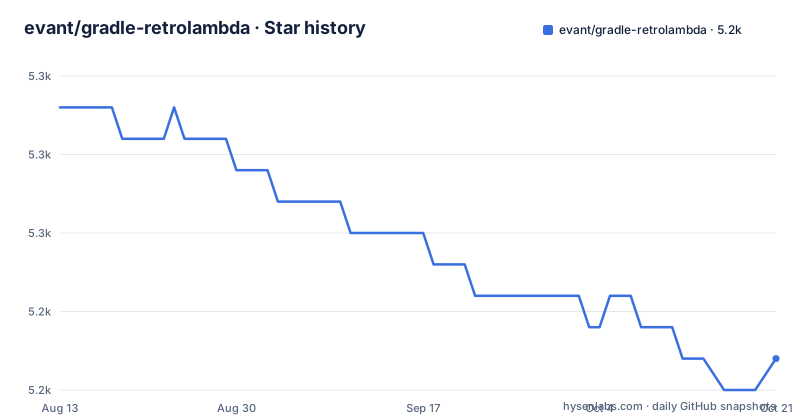
Star history
- evant/gradle-retrolambda5,246 ★ · -8
| Repository | 2026-08-13 | 2026-10-21 |
|---|---|---|
| evant/gradle-retrolambda | 5.3k | 5.2k |
-8 Stars in the last 69 days, measured from the daily GitHub snapshot. Compare with other projects
Editorial analysis
The Problem: Java 8 Syntax on a Java 6 or 7 Toolchain
In 2017, many Android projects and enterprise Java codebases were still pinned to Java 6 or 7. The JVM version dictated the bytecode level, and Android's Dalvik and ART runtimes were slow to accept Java 8 features. Developers wanted lambda expressions, but they could not switch their entire toolchain. gradle-retrolambda solves that specific mismatch. It lets you write Java 8 source code, compile it with a Java 8 compiler, and then run the retrolambda tool to produce class files that target Java 6 or 7. The intended audience is teams who cannot upgrade their Java version or Android build tools but still want the syntactic convenience of lambdas. It is not for you if you can already compile with Java 8 and run on a modern runtime, because you would be adding an unnecessary transformation step.
How It Works: Compile with Java 8, Then Rewrite the Bytecode
The plugin hooks into the Gradle build lifecycle after the Java or Android compilation task. According to the README, it compiles the source code with Java 8 and then replaces the class files with the output of retrolambda. Retrolambda, the underlying tool by Esko Luontola, takes the compiled class files and rewrites the invokedynamic instructions that represent lambdas into anonymous inner classes or other constructs that work on older JVMs. The plugin itself does not do the bytecode rewriting; it orchestrates the retrolambda execution. It also manages incremental builds: by default, only class files that changed are run through retrolambda. This is a significant design choice because retrolambda is not a compiler replacement, it is a post-processor. The build flow is: javac compiles to Java 8 bytecode, retrolambda transforms that bytecode to Java 6 or 7 level, and then the rest of the build proceeds. This means your source code can use lambdas, method references, and other Java 8 language features, but the final output is compatible with older runtimes.
Getting It Running: Three Steps and a Configuration Block
The README promises three steps, and the third is literally 'There is no step three!' The first step is to download JDK 8 and set it as your default JVM. The second is to add the plugin to your build.gradle. You can use the classic buildscript block with classpath 'me.tatarka:gradle-retrolambda:3.7.1', or the newer plugins DSL for Gradle 2.1 and above: plugins { id "me.tatarka.retrolambda" version "3.7.1" }. You also need to add mavenCentral() to your repositories because retrolambda is published there. After applying the plugin, you can configure it with a retrolambda block. The key configuration keys are javaVersion, which defaults to 6 and accepts only 5, 6, or 7; jvmArgs, which passes extra arguments to the retrolambda JVM; defaultMethods, which enables default and static interface methods but forces incremental to false; and incremental, which defaults to true. There is also include and exclude to filter which variants or source sets get processed. For Android, you must also set the compileOptions source and target compatibility to 1.8 so the IDE understands the language level. The plugin expects that your default JDK is Java 8, but if you are running Gradle itself on an older JVM, you can set the JAVA8_HOME environment variable or the jdk property.
Known Failure Modes: Lint, Play Services, and Retrolambda's Own Limits
The README documents several genuine issues. First, lint fails on Java files that contain lambdas if you are using an older Android Gradle plugin. The suggested fix is to update the plugin, or use an experimental fork. Second, Google Play Services version 5.0.77 contains bytecode that is incompatible with retrolambda. The workaround is to use an older Play Services version or add -noverify to the JVM args. That is a brute-force fix that disables bytecode verification, which can hide other problems. Third, enabling defaultMethods forces incremental to false, which means every build runs all class files through retrolambda, slowing down the build. Retrolambda itself has a limitation: it cannot handle all Java 8 features, only lambdas and method references. If you use try-with-resources, default methods, or other Java 8 language features that require runtime support, you will get errors. The plugin does not extend retrolambda's capabilities; it just wraps them. So if you need more than lambdas, this is the wrong tool.
Alternatives: Native Java 8 Support and Other Backporting Tools
The obvious alternative is to upgrade to a Java version that supports lambdas natively. Java 8 introduced lambdas, and Java 9, 10, and later versions all support them. If you are on Android, the modern Android Gradle plugin (3.0.0 and later) supports Java 8 language features natively, including lambdas, without any extra plugin. That is the cleanest path: you write Java 8 source, the build system handles the desugaring automatically, and you do not need a third-party plugin. Another alternative is to use a different backporting tool, such as the desugar_jdk_libs library that Android uses, but that is a library, not a Gradle plugin. The key difference in approach is that gradle-retrolambda runs retrolambda as a separate post-compilation step, while native Java 8 support in modern Android tools does the desugaring during the D8/R8 compilation. The native approach is more integrated and avoids the incremental and compatibility issues that the plugin has. If you are on a plain JVM, the simplest alternative is to just use Java 8 or newer; there is no reason to backport unless you are constrained by an old server environment.
Maintenance and License: An Unmaintained Plugin with a Permissive License
The repository has not seen a push since July 2017, which means the plugin is effectively unmaintained. The last release is v3.7.0 from that date, and the README references version 3.7.1, which suggests a minor update that may not have been tagged in the provided data. This is a red flag for production use: no fixes for newer Gradle versions, no compatibility with newer Android Gradle plugins, and no support for newer JDKs. The plugin is licensed under Apache-2.0, which is permissive and allows you to modify and redistribute it, but you would be on your own for maintenance. The underlying retrolambda tool is also open source, but it too has not seen active development. If you adopt this plugin, you are accepting that any future Gradle or Android plugin update could break it, and you will have to fork it or pin your build tools to old versions. The license does not give you any warranty or support, so you must verify that it works with your exact toolchain before committing.
Editorial conclusion
Adopt gradle-retrolambda if you are stuck on Java 6 or 7, or on an Android toolchain that predates native Java 8 support, and you want lambda syntax without waiting for an upgrade. Do not use it for new projects: the last release is from 2017, the plugin is unmaintained, and modern Android Gradle plugins support Java 8 natively. Before adopting, verify that your exact Android Gradle plugin version is at least 1.5.0, that your ProGuard rules include the two -dontwarn lines, and that you are willing to handle known incompatibilities, such as with old Google Play Services versions. If you can move to Java 8 or higher, skip this plugin entirely.
Frequently asked questions
What does the gradle-retrolambda plugin do?
It builds your Java or Android project with a Java 8 compiler and then replaces the compiled class files with the output of a separate rewriting tool, so lambdas keep working when you target Java 6 or 7. The readme's usage list is three steps, the last of which reads there is no step three.
Which versions of Gradle does gradle-retrolambda support?
The readme states a minimum Gradle plugin version of 2.5 and a minimum Android Gradle plugin version of 1.5.0, and offers the newer plugin declaration syntax for Gradle 2.1 and above. It also asks you to install a Java 8 development kit and make it your default.
How do I choose the Java version gradle-retrolambda targets?
A configuration option sets it, defaulting to 6, and the readme says only 5, 6 or 7 are accepted. If you are on 6 or 7 the readme tells you in its own deprecation section that you should consider updating, and then gives the configuration to use anyway.
gradle-retrolambda is failing, what does the page say?
Two issues are documented. The Android lint task can fail on files containing lambdas, fixed by updating the Android Gradle plugin or by an experimental fork. And one Play Services version ships bytecode the tool rejects, worked around by updating Play Services, pinning an earlier version, or adding a no-verify argument to the tool.
Does gradle-retrolambda handle default methods in interfaces?
There is an option to turn on default and static methods in interfaces, and the readme warns that a limitation in the underlying tool will set the incremental flag to false when you use it. One of the sample projects in the repository is a plain Java project built for exactly that configuration.
Official sources
Add this badge to your README
If you maintain this project, the badge below links readers to this analysis and shows its maintenance status from the daily GitHub snapshot. Paste the markdown into your README; add ?metric=license or ?metric=stars to the image URL for a different field.

[](https://hysenlabs.com/projects/evant-gradle-retrolambda)Star history chart for your README
[](https://hysenlabs.com/projects/evant-gradle-retrolambda)