Pencil 4.0: an Electron wireframing app that now runs an MCP server on 127.0.0.1:1919
The Pencil Project's unique mission is to build a free and opensource tool for making diagrams and GUI prototyping that everyone can use.
At a glance
- What is it?
- evolus/pencil is a GPL-2.0 desktop tool for wireframes, GUI prototypes and diagrams. Version 4.0, released in October 2026 after a gap of almost four years, adds a local Model Context Protocol server so AI clients can draw on the canvas; this analysis covers how that works and where it stops.
- Who is it for?
- Pencil 4.0 fits designers and developers who want an offline, file based wireframing tool and are interested in letting a local AI client such as Claude Desktop, Cursor, Antigravity or VS Code place real vector stencils on the canvas. It does not fit teams that need shared cloud documents or an AI assistant running on a different machine, since everything stays on loopback.
- Can I use it commercially?
- Yes, with conditions. GPL-2.0 is a copyleft licence: if you distribute software that includes it, you must release that software's source code under the same licence. Running it internally without distributing it does not trigger that obligation.
- Is it still maintained?
- Yes. The repository last received commits 2 days ago.
- What is it written in?
- Mainly JavaScript, according to GitHub's language statistics.
Answers come from the project's GitHub data, last synced on November 15, 2026, and from our analysis. They are not legal advice.
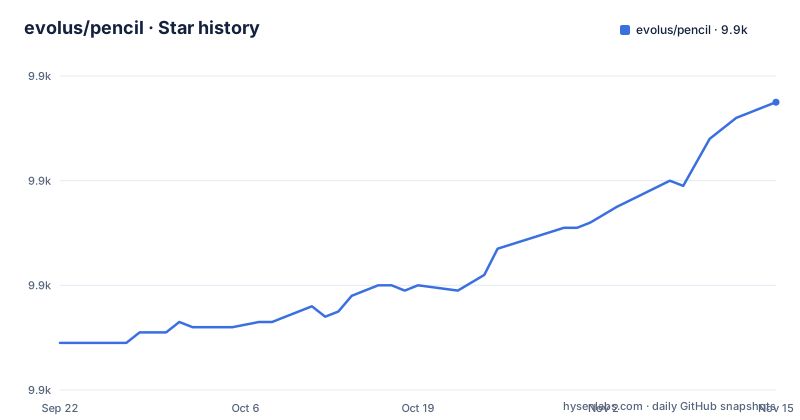
Star history
- evolus/pencil9,915 ★ · +46
| Repository | 2026-09-22 | 2026-11-15 |
|---|---|---|
| evolus/pencil | 9.9k | 9.9k |
46 Stars in the last 54 days, measured from the daily GitHub snapshot. Compare with other projects
Editorial analysis
The MCP server lives inside the app, on loopback port 1919
The headline change in Pencil 4.0 is native support for the Model Context Protocol. Instead of shipping a separate daemon, Pencil runs the server inside the desktop app at http://127.0.0.1:1919/mcp, speaking Streamable HTTP with JSON-RPC 2.0. Server status, the port assignment and restarts are managed from the Settings > MCP pane. To check the endpoint from outside the app:
curl -I http://127.0.0.1:1919/mcpTwo consequences follow from this design. Because the server is part of the app, the AI client can only reach it while Pencil is open. Because it binds to 127.0.0.1, the assistant has to run on the same machine as Pencil; a client on another computer or in the cloud cannot connect to it. If you change the port in the settings pane, every client configuration that hard codes 1919 has to be edited to match.
Claude Desktop goes through an mcp-remote bridge, the others connect directly
Settings > MCP has a tab per assistant with a Copy Configuration button, so most users never write the JSON by hand. The manual configurations differ in one important way. Cursor, Antigravity and VS Code point straight at the URL, using the keys url, serverUrl, and type plus url respectively. Claude Desktop does not; its entry in claude_desktop_config.json launches a bridge through npx:
{
  "mcpServers": {
    "pencil": {
      "command": "npx",
      "args": [
        "-y",
        "mcp-remote",
        "http://127.0.0.1:1919/mcp"
      ]
    }
  }
}
That means a Claude Desktop setup depends on npx being available on the machine, and on the mcp-remote package being fetched, in addition to Pencil itself. The config file lives in ~/Library/Application Support/Claude/ on macOS, %APPDATA%\Claude\ on Windows and ~/.config/Claude/ on Linux. For Cursor the file is .cursor/mcp.json, for VS Code it is .vscode/mcp.json or mcp.servers in user settings, and for Antigravity it is mcp_config.json.
AI edits land as editable stencils, not pasted images
What sets the integration apart is what the assistant actually produces. MCP tools such as insert_shapes and shift_layout turn a prompt into canvas operations, and components are placed with calculated bounds rather than as flat image overlays. Every element the assistant creates is a native vector shape that you can resize, restyle or reorganize later by hand. Built-in container structures manage padding, distribution and offsets, so appending or reordering components does not require pixel arithmetic. A render_preview tool returns a visual snapshot of the canvas, letting the model inspect spacing, alignment and contrast and correct its own layout over several passes. The prompting advice is specific: name the stencil library you want, for example shadcn/ui stencils or an icon from the Lucide collection, otherwise the assistant may fall back to generic raw rectangles instead of reusing design system components.
Stencil libraries decide how good the output can be
Connected assistants can query the installed stencil libraries, which include shadcn/ui, Bootstrap, Material Design, iOS and Flowcharts, and search icon catalogs from Tabler, Lucide and FontAwesome. The example prompts lean on this: a SaaS sign in screen built from shadcn/ui, a Free, Pro and Enterprise pricing table, a mobile analytics dashboard, a settings icon pulled from Tabler, avatar icons from Lucide. The limit is the flip side of that strength. The assistant can only compose what is installed, so a design system that has no Pencil stencil collection will come out as generic shapes. The Stencils and Templates page on pencil.evolus.vn is the place to look before assuming a library is available.
Nothing leaves the machine, including your documents
Pencil describes itself as local first. Documents are stored in the .ep and .epz formats on your disk, MCP requests travel only over the loopback interface, and there is no cloud syncing, no third-party analytics and no telemetry. For people prototyping unreleased products, that is the main reason to pick a desktop tool over a hosted one. The cost is equally concrete. With no cloud syncing, collaborating means passing .ep or .epz files around through whatever version control or file sharing your team already uses. Note that local first applies to Pencil itself; the AI client you connect has its own data handling, and the prompts you type into it are subject to that client's policies, not Pencil's.
A four year release gap and an Electron 16 build config
The release history is uneven. Version 3.1.0 shipped on 2019-10-19, 3.1.1 on 2023-01-01, and 4.0.0 on 2026-10-24, with the last push to master on 2026-10-27. The project is moving again, but anyone who used Pencil years ago should treat 4.0 as a new product rather than a minor update. The build configuration in package.json pins electron at 16.0.0 and electron-builder at 23.3.3, and its copyright strings still read 2008 to 2016. The package targets are deb, rpm and tar.gz on Linux, an NSIS installer on Windows with oneClick off, perMachine on and a choosable install directory, and a dmg on macOS whose arch list contains only arm64. If you are on an Intel Mac, check the Downloads page or GitHub Releases for a matching build before planning around Pencil.
Prebuilt binaries are the supported path for end users
For people who do not need to build from source, the route is to download the latest installer or package from the Pencil Downloads page or from GitHub Releases, open the app, and start drawing with the built-in stencil collections. Connecting an AI client is an optional third step. The repository carries the application code under app/, release material under RELEASE/, a version.json, and continuous integration files for Travis, AppVeyor and GitLab, alongside both package-lock.json and yarn.lock. The project is licensed under GPL-2.0, and the README states its mission as a free and open source tool for diagrams and GUI prototyping that everyone can use.
Editorial conclusion
Pencil 4.0 fits designers and developers who want an offline, file based wireframing tool and are interested in letting a local AI client such as Claude Desktop, Cursor, Antigravity or VS Code place real vector stencils on the canvas. It does not fit teams that need shared cloud documents or an AI assistant running on a different machine, since everything stays on loopback. Before committing, check the Downloads page for a build matching your operating system and CPU, and confirm your AI client can reach a Streamable HTTP MCP endpoint.
Frequently asked questions
How do I use Pencil, the evolus wireframing tool?
Download an installer from pencil.evolus.vn/Downloads.html or GitHub Releases, open Pencil and build wireframes with the built-in stencil collections. For AI assisted editing, open Settings > MCP, pick your assistant tab and click Copy Configuration.
Which AI clients can connect to Pencil 4.0?
Pencil ships configuration snippets for Claude Desktop, Cursor, Antigravity and VS Code, and works with any client that connects to a standard MCP HTTP endpoint at http://127.0.0.1:1919/mcp.
Does Pencil send my wireframes to the cloud?
No. Pencil keeps .ep and .epz documents and MCP requests on the local machine over loopback, with no cloud syncing, third-party analytics or telemetry.
What file formats does Pencil save to?
Pencil documents are stored as .ep and .epz files on your local machine.
Official sources
Where developers are discussing it
Posts on Hacker News, dev.to and Lobsters that link to this repository, found by our scan of those communities. 1 in the last 30 days; newest first.
- Pencil 4.0Hacker News · Oct 24, 2026 · 4 points · 0 comments
Add this badge to your README
If you maintain this project, the badge below links readers to this analysis and shows its maintenance status from the daily GitHub snapshot. Paste the markdown into your README; add ?metric=license or ?metric=stars to the image URL for a different field.

[](https://hysenlabs.com/projects/evolus-pencil)Star history chart for your README
[](https://hysenlabs.com/projects/evolus-pencil)Was this useful?