obs-localvocal: the download tables point at another repository
OBS plugin for local speech recognition and captioning using AI
At a glance
- What is it?
- LocalVocal is a GPL-2.0 OBS plugin that transcribes speech locally with Whisper through whisper.cpp and translates it with CTranslate2. The build itself is straightforward CMake work; the interesting part is that every download link, badge and license link on the page addresses locaal-ai/obs-localvocal rather than the repository the page lives in.
- Who is it for?
- The mechanism is worth understanding before the download: Whisper runs locally through whisper.cpp, any GGML model can be supplied, and captions can stay on screen as OBS text sources or leave as .txt, .srt and RTMP output. Four things decide whether it fits your setup.
- Can I use it commercially?
- Yes, with conditions. GPL-2.0 is a copyleft licence: if you distribute software that includes it, you must release that software's source code under the same licence. Running it internally without distributing it does not trigger that obligation.
- Is it still maintained?
- Yes. The repository last received commits 10 days ago.
- What is it written in?
- Mainly C++, according to GitHub's language statistics.
Answers come from the project's GitHub data, last synced on November 15, 2026, and from our analysis. They are not legal advice.
Star history
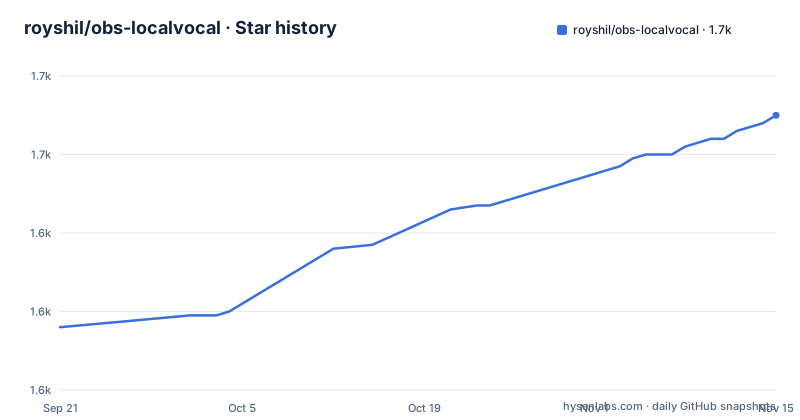
- royshil/obs-localvocal1,670 ★ · +54
| Repository | 2026-09-21 | 2026-11-15 |
|---|---|---|
| royshil/obs-localvocal | 1.6k | 1.7k |
54 Stars in the last 55 days, measured from the daily GitHub snapshot. Compare with other projects
Editorial analysis
Every download link addresses locaal-ai, not this repository
The project is published at `royshil/obs-localvocal` on branch `master`, but nothing on the page links back to it. The badge block, the license badge and every release asset URL address `locaal-ai/obs-localvocal`, and the asset paths run through a `main` branch rather than `master`. The Windows installer links, the Linux .deb links and all ten macOS packages are built the same way:
`https://github.com/locaal-ai/obs-localvocal/releases/download/0.6.2/obs-localvocal-0.6.2-windows-x64-generic-Installer.exe`
So a reader arriving at this repository is sent to a differently named one for anything involving a binary, and the branch names on the two sides do not match either. The homepage recorded for the project is not a repository at all but an OBS forum thread, `https://obsproject.com/forum/resources/localvocal-live-stream-ai-assistant.1769/`. Before the project name appears at all, the file opens with a two-paragraph sponsor block for Recall.ai and a hosted desktop recording API. The license badge points at a LICENSE file in that other repository too, which is worth checking separately against the GPL-2.0 recorded here.
The tables are pinned to 0.6.2 while the branch has moved since April
Three releases are visible: 0.6.0 on 2026-01-05, 0.6.1 on 2026-04-01 and 0.6.2 on 2026-04-21. Every download URL contains the segment `/download/0.6.2/`, and every filename repeats the same number, from `obs-localvocal-0.6.2-windows-x64-nvidia-Installer.exe` to `obs-localvocal-0.6.2-macos-15-arm64.pkg`. The default branch here was last pushed on 2026-09-09, about five months after that release, so the code in this repository is ahead of the binaries the tables hand out. Nothing in the tables says so, and the only line about obtaining a build points readers at the releases page of the other repository for downloads and install instructions.
The macOS table is the widest, with a Generic row plus one row each for 12 Monterey, 13 Ventura, 14 Sonoma and 15 Sequoia, crossed with Intel x86_64 and ARM64 for Apple silicon, which is ten packages for one operating system. Windows and Linux get three rows of content each, split by GPU vendor instead of OS version. So the two platforms are organised along different axes, and a reader has to read the headers rather than assume a single scheme.
No GPU required, and three vendor builds for every platform
The introduction promises no GPU required, no cloud costs, no network and no downtime, with all data staying on your machine. The download tables then offer, for Windows 10/11 and for Ubuntu 22.04, a generic build alongside an NVidia build and an AMD build, described as optimized for those respective GPUs. The acceleration list names CUDA, hipBLAS on AMD ROCm, Apple Arm64, and AVX and SSE support, so the generic build is the one that runs on everything and the other two exist to use hardware that is present.
That is not a contradiction so much as a default plus an optimisation, but the page does not draw the line. The only guidance is a footnote under the macOS table, which says that while variants for specific macOS versions may work better on that version, the Generic variant is likely the best option, and then points at a section on macOS variants that the page does not carry any further. On Windows there is a separate prerequisite: the build asks you to make sure the latest MSVC runtime is installed, with a link to the Microsoft redistributable, so an extra installer sits between the download and a working plugin.
No network is claimed, and cloud translation is a listed feature
Privacy is the first argument the page makes, and the transcription half of the plugin honours it. Speech is processed by Whisper running through whisper.cpp, the C++ implementation, so the model runs on the machine and no audio is uploaded. The features list then widens the promise: captions can be translated in real time to major languages using cloud providers, or using Whisper built-in translation, or using NMT models, with CTranslate2 named as the translation engine. Two of the linked videos are specifically about real-time translation with DeepL and with OpenAI, both hosted services.
So the no network claim and the cloud translation option describe different configurations of the same plugin, and the page never says which setting produces which. A reader who wants transcription only never touches a network; a reader who selects a cloud provider for translation sends caption text out. The privacy sentence sits in the introduction, above the feature list, where it reads as a property of the plugin rather than of a chosen mode.
The usage section is three videos, and the middle one carries two IDs
There is no written walkthrough anywhere on the page. The usage section is a block of three embedded video links, followed by eight more video links for things like real-time translation, translating captions from any application, posting captions to YouTube, local LLM translation and a usage tutorial. Everything a first-time user needs to know about operating the plugin is therefore delegated to video.
The block also has a concrete inconsistency. The middle anchor's target is `https://youtu.be/eTSDcNGsN00`, while the visible link text underneath it reads `https://youtu.be/4llyfNi9FGs`, and that second identifier appears again further down as the real-time translation link. So one of the three usage videos is labelled with an ID that belongs to a different entry, and a reader who copies the printed address gets a different video from the one the page is showing. The first and third anchors are internally consistent.
Nothing in the download tables or the visible version guide names an OBS version either, so what release of OBS this plugin expects to load into is left to the reader.
The version guide stops one link into the AMD entry
The Available Versions section explains the scheme in a line: LocalVocal ships multiple builds for different hardware and operating systems. Each Windows variant then gets one sentence, generic runs on all systems, NVidia is optimized for NVIDIA GPUs, AMD is optimized for AMD GPUs, and each sentence ends with a link to a deeper section.
Those deeper sections are not part of the page. The file ends inside the link on the AMD bullet, so the sections on generic variants, NVidia optimized variants, AMD optimized variants and macOS variants are announced by anchor and never arrive. What survives is the promise of a distinction without the distinction: three builds per platform, and no statement of what any of them actually changes, whether that is which acceleration libraries are linked, which model defaults are compiled in, or what performance difference to expect. On macOS the same pattern holds, since the footnote recommends the Generic package by name and refers the reader onward to a variant section that is not there.
Captions leave the plugin as text sources, files and a stream
Once transcription runs, the output has several exits. Captions can be displayed on screen through OBS text sources, which is the only path that stays inside the scene. They can be sent to a .txt or a .srt file, with and without an aggregation option, for external tools or video playback to read. They can be synced to OBS recording timestamps so a saved recording lines up with the subtitle track. And they can be sent on an RTMP stream, with YouTube and Twitch named as destinations.
The model side is equally open: any GGML Whisper model can be brought instead of a bundled one, and hundreds of fine-tuned models for dozens of languages are said to be available from HuggingFace, with transcription claimed across 100 languages. Two controls shape what the viewer sees, since any part of the produced captions can be filtered out or replaced, and partial transcriptions give a streaming feel rather than waiting for a finished sentence. The trade is that the more of this pipeline you redirect outside OBS, the less the plugin is doing for you.
A CMake tree with a flatpak directory next to a .deb download
The repository is a C++ CMake project: `CMakeLists.txt`, `CMakePresets.json`, `.clang-format`, `.cmake-format.json`, a `src/` directory, a `deps/` directory, `build-aux/`, `data/`, `docs/`, `flatpak/`, `buildspec.json` and a `.github/` directory. So the formatting rules are enforced in tree, dependencies are vendored rather than fetched, and there is a Flatpak manifest directory. No page section gives build instructions, and no test directory appears among the top-level entries.
Packaging is asymmetric with that tree. The Linux download offered is a single .deb built for Ubuntu 22.04, while the repository carries a flatpak directory that no download table mentions. macOS is the opposite extreme, with ten .pkg files, one per OS version and architecture, and Windows three .exe installers that expect the MSVC runtime already present. The practical consequence is that the only install path the page supports is downloading a prebuilt binary for a listed combination, and the three build variants that decide whether you get CUDA, ROCm or neither are described by links that go nowhere.
Editorial conclusion
The mechanism is worth understanding before the download: Whisper runs locally through whisper.cpp, any GGML model can be supplied, and captions can stay on screen as OBS text sources or leave as .txt, .srt and RTMP output. Four things decide whether it fits your setup. First, pick the build deliberately, because generic, NVidia and AMD variants ship for Windows and Linux while macOS is split by OS version instead, and the page recommends the generic package. Second, note that the page simultaneously promises no network use and offers translation through cloud providers, so a strict privacy claim depends on picking the local engines. Third, every download link addresses a repository with a different owner name, so confirm which build you are actually installing before trusting a hash or reporting a bug. Fourth, expect no written usage steps, since the page is a link table and a set of videos. Also check the OBS version yourself: none of the visible material names one.
Frequently asked questions
how to use obs localvocal
There is no written walkthrough on the page: usage is demonstrated in three videos plus eight more links, and the download tables hand out prebuilt installers for Windows, Ubuntu 22.04 and macOS. Captions then appear as OBS text sources, or are written to .txt and .srt files, or pushed to an RTMP stream.
Which obs-localvocal build should I download for an AMD GPU?
Three builds are published for Windows and for Ubuntu 22.04: generic, NVidia and AMD. The AMD one is described as optimized for AMD GPUs, and the page treats the generic variant as the default choice, noting that a variant for a specific macOS version may work better on that version.
Does obs-localvocal send audio or captions to a server?
Transcription runs locally through whisper.cpp and the introduction claims no network use. The feature list also offers translation through cloud providers, alongside Whisper built-in translation and NMT models handled by CTranslate2, and two linked videos cover DeepL and OpenAI translation.
Which OBS version does obs-localvocal load into?
None of the visible download tables or version notes name an OBS version. The Windows builds do ask that the latest MSVC runtime be installed first, with a link to the Microsoft redistributable.
Can obs-localvocal write captions to a file for other tools?
Yes. Captions can be sent to a .txt or .srt file, with and without an aggregation option, synced with OBS recording timestamps, and any part of the produced text can be filtered out or replaced.
Can I supply my own Whisper model to obs-localvocal?
The feature list says any GGML model can be brought, and that hundreds of fine-tuned Whisper models for dozens of languages are available from HuggingFace, on top of transcription claimed in 100 languages.
Official sources
Add this badge to your README
If you maintain this project, the badge below links readers to this analysis and shows its maintenance status from the daily GitHub snapshot. Paste the markdown into your README; add ?metric=license or ?metric=stars to the image URL for a different field.

[](https://hysenlabs.com/projects/royshil-obs-localvocal)Star history chart for your README
[](https://hysenlabs.com/projects/royshil-obs-localvocal)Was this useful?