Company Researcher is a set of parameterised Exa queries with a Next.js front end
Company Researcher tool helps you instantly understand any company inside out.
At a glance
- What is it?
- Company Researcher takes a company URL and assembles a profile of it from website subpages, LinkedIn, funding records, news, social profiles and code hosting, with every data point coming from a documented Exa search API call. It is a useful example of a retrieval pipeline, and it is also a front end that only works while you hold an Exa key and an Anthropic key.
- Who is it for?
- Adopt Company Researcher when you want a working example of an LLM assisted retrieval pipeline that treats an API query as a configurable parameter rather than a hardcoded string, and you are happy to pay for Exa and Anthropic calls per research run. Do not adopt it as a research tool that must run without third party keys, since the environment file requires an Exa key and an Anthropic key before anything works.
- Can I use it commercially?
- Yes. MIT is a permissive licence: you can use, modify and sell software built on it, as long as you keep its copyright and licence notices.
- Is it still maintained?
- Yes. The repository last received commits 41 days ago.
- What is it written in?
- Mainly TypeScript, according to GitHub's language statistics.
Answers come from the project's GitHub data, last synced on November 7, 2026, and from our analysis. They are not legal advice.
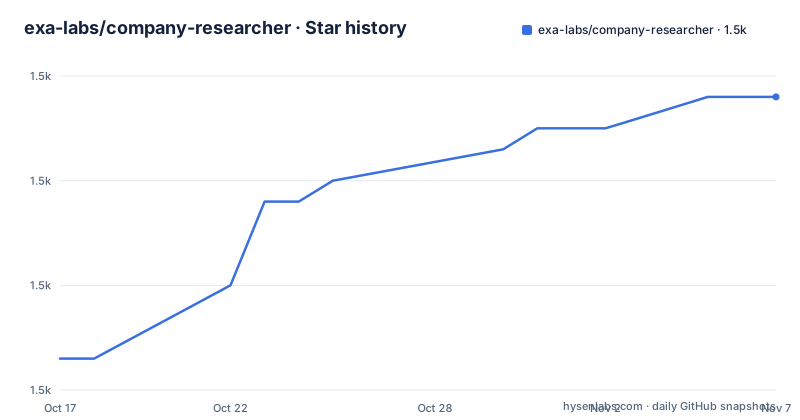
Star history
- exa-labs/company-researcher1,538 ★ · +25
| Repository | 2026-10-17 | 2026-11-07 |
|---|---|---|
| exa-labs/company-researcher | 1.5k | 1.5k |
25 Stars in the last 21 days, measured from the daily GitHub snapshot. Compare with other projects
Editorial analysis
One URL in, a company profile out
Company Researcher is described as a free and open-source tool that helps you instantly understand any company inside out. You input a company's URL and the tool gathers comprehensive information from across the web, then presents detailed insights about the organisation, its products, its funding, its social presence and more.
The important structural fact is in the Data Sources section. All data is fetched using Exa's search API. There is no other data source, no scraping layer of its own and no database of company records. The application is a front end over one API.
That framing matters for how you read the repository. It is not a dataset and not a crawler; it is a set of carefully constructed queries against a search engine that returns page content, wrapped in a Next.js application with an AI layer on top for summarisation.
The documentation also positions the tool as a demonstration of Exa's capabilities rather than as a standalone product. Each section in the readme links to a direct API call in Exa's playground, so you can run the exact query the tool runs, with the company's own domain substituted, and see the raw response before any summarisation happens. That is a genuinely useful property for a tool like this, because it lets you separate what the search returned from what the model said about it.
The query parameters are the actual specification
Each data point in the tool is a parameterised search call, and the readme exposes every parameter. It is the most instructive part of the project.
The search type varies. Some calls use type keyword, which is a literal search, and others use type neural, which is the embedding based mode. The funding query is keyword with a livecrawl of always and a summary object whose query text asks the model to tell everything about the funding and, if available, the valuation of this company in detail, and to say one word, NO, if that information is not present.
That last instruction is the interesting part. A model asked to summarise missing data will usually produce a fluent paragraph about a company whose funding it could not find. Asking for a single word is a cheap way to turn an absence into something a program can branch on.
Other parameters shape the retrieval. includeDomains restricts the search to a site, as with linkedin.com or crunchbase.com, and excludeDomains pushes results away, which the competitor analysis call uses to avoid describing the company being researched. numResults caps the count, from 1 for a single profile to 100 for recent tweets. The summary parameter can be a boolean or an object with a query, and text true asks for the page text to be returned as well.
There are also category shortcuts in the URLs, such as c=company for the subpage search, c=news for coverage and c=tweet for recent posts. And the subpage search is the one that gets a whole site rather than one page, with subpages set to 10 and a subpageTarget list of about, pricing, faq and blog, and livecrawl always so the pages are fetched fresh.
Website and people come first
The first two groups of data are the company's own site and its people.
For the website, there is a call that fetches the content of a specific page by id, and there is a call that searches for the company's subpages. The subpage call uses the neural type, requests text and a summary, asks for ten subpages, and targets the list about, pricing, faq and blog, with the domain restricted so nothing else leaks in.
That list of four is a design decision rather than a default. About, pricing, FAQ and blog are where a company's own description of itself lives, and asking for them explicitly is more predictable than hoping a general search surfaces them.
The LinkedIn group has two calls. The first retrieves the company profile by searching for the company's name with the words company and linkedin profile, restricted to linkedin.com, with a single result and text requested. The second retrieves the founders' profiles, with the search restricted to linkedin.com, five results, and the type keyword rather than neural.
The difference in type between the two is subtle but consistent with the pattern across the whole readme. A profile page is a specific URL that a literal search finds reliably, and a founder's page is named by a person rather than a string the engine can match exactly, so a looser query returns better results there.
Financial data leans on databases and on a filing
The financial group has five calls, and they show two different strategies.
Three of them are profile lookups against commercial databases. Crunchbase, PitchBook and Tracxn are each searched with a keyword query restricted to that site, with includeText pulling the company name into the query so the right entity is matched. These are structured, paywalled databases, and the tool's job is to find the right company page on each of them.
The fourth is the funding query described earlier, the one with the livecrawl and the summary instruction. It is the one that produces prose rather than a record, and it is the one with the explicit instruction to answer with a single word when there is nothing to report.
The fifth is the one that does not rely on a database at all. The 10K financial report call uses a keyword search with livecrawl always, text requested, and a category of financial report, and it is run against a domain name rather than a company name, in the example a large listed company. The annual filing is the primary source, and the search is the way to find the document rather than a link that might change.
So the strategy is layered. Where a database has a page, query the database. Where the primary document exists, crawl for it. Where neither is reliable, ask the model to summarise what it finds and to admit when it finds nothing.
Market intelligence and the social surface
The last two groups cover how a company is talked about and where it is present.
Market intelligence has three calls. News coverage is a keyword search with livecrawl always and a category of news. Competitor analysis is the most interesting of them, because it is a neural search with useAutoprompt enabled and a summary query that asks the model to explain in one or two lines what the company does in simple English, and to avoid difficult words, with excludeDomains keeping the company being researched out of its own competitor search. Wikipedia information is a keyword search restricted to wikipedia.org with the text requested.
The social group has six calls, and the parameters vary with the size of the expected result. A profile lookup on Twitter and X returns a single result with livecrawl, and recent tweets uses a category of tweet with numResults at 100, which is the largest cap anywhere in the file. YouTube uses ten results, TikTok a single result, and GitHub is a single keyword result restricted to github.com.
The readme's instruction for each of them is to try the API call in the playground, which is a good habit for a project where the output quality is entirely determined by the search engine. If a section comes back thin, the first question is whether the query is the problem, and the playground link is where you answer that.
Next.js, Tailwind and the AI SDK
The tech stack section names four things. The search engine is Exa, described as a web search API optimised for AI applications. The front end is Next.js with the App Router, Tailwind CSS and TypeScript. The AI integration is the Vercel AI SDK. The hosting is Vercel.
The package manifest shows the same picture in code. The runtime dependencies include next at 15.3.6 with React 18, exa-js at 1.3.2, the ai package at 4.0.25 with the Anthropic provider at 1.0.0, and zod for schema validation, which is what a pipeline like this needs when model output has to be checked before it is rendered.
"dependencies": {
  "@ai-sdk/anthropic": "^1.0.0",
  "ai": "^4.0.25",
  "exa-js": "^1.3.2",
  "next": "^15.3.6",
  "react": "^18",
  "zod": "^3.22.4"
}
The interface libraries are worth a note, because they tell you what the output looks like. react-tweet renders posts, react-d3-tree draws a tree, and framer-motion and lucide-react and react-icons handle motion and icons. The tree in particular suggests the company structure or an ownership view, which is a different kind of information from a prose summary.
The scripts are the standard Next.js four, next dev, next build, next start and next lint, and the package is marked private with version 0.1.0, which tells you it was never published to a registry.
Three keys, an env file, and a Vercel deployment
The getting started section lists the prerequisites. Node.js, an Exa API key and an Anthropic API key are required, and a YouTube API key and a GitHub token are optional.
The environment file example shows how they are wired.
EXA_API_KEY=your_exa_api_key
ANTHROPIC_API_KEY=your_anthropic_api_key

YOUTUBE_API_KEY=your_youtube_api_key
GITHUB_TOKEN=your_github_token
The comment in that file explains the rest. You create a .env.local in the project folder, and if you deploy on a hosting platform such as Vercel you add the same values to the environment variables in the platform settings. The file also points at where each key comes from, the Exa dashboard for the API key, the Anthropic console, Google Cloud credentials for YouTube and the GitHub settings for the token.
The repository layout matches a standard Next.js application, with app/, components/, lib/ and public/ directories, next.config.mjs, tailwind.config.ts, postcss.config.mjs, tsconfig.json, a .cursorrules file and a .env.example.
The licence is MIT, the repository is not archived, and the last push was on 2026-09-27. There are no GitHub releases, which fits a project that is a demonstration of a hosted product rather than a distributed library. One last note from the readme, and it is a candid one: the repository is out of scope for Exa's vulnerability disclosure programme, and reports made against this codebase are ineligible for bounty rewards.
Editorial conclusion
Adopt Company Researcher when you want a working example of an LLM assisted retrieval pipeline that treats an API query as a configurable parameter rather than a hardcoded string, and you are happy to pay for Exa and Anthropic calls per research run. Do not adopt it as a research tool that must run without third party keys, since the environment file requires an Exa key and an Anthropic key before anything works. Verify first that the Exa plan you hold supports the search filters the queries use, including livecrawl, subpages and includeDomains, and that the summaries you rely on are reproducible, because the funding query asks the model to answer with a single word when it finds nothing.
Frequently asked questions
What does Company Researcher do?
You input a company's URL and it gathers information from across the web, presenting insights about the organisation, its products, its funding, its social presence and more. All of the data is fetched using the Exa search API.
What data sources does Company Researcher use?
Five groups: website information and subpages, LinkedIn company and founder profiles, financial information from Crunchbase, PitchBook, Tracxn and 10-K filings, market intelligence from news, competitor analysis and Wikipedia, and social media presence on X, YouTube, TikTok, Reddit and GitHub.
How do I run Company Researcher locally?
You need Node.js, an Exa API key and an Anthropic API key, plus optionally a YouTube API key and a GitHub token. Create a .env.local in the project folder with those values, using the .env.example file as the template, and then run the dev script.
What is the tech stack of Company Researcher?
Next.js with the App Router, Tailwind CSS and TypeScript for the front end, the Vercel AI SDK with the Anthropic provider for AI integration, the Exa API for search, and Vercel for hosting.
Why does the funding query ask for a single word answer?
The summary instruction for the funding search tells the model to reply with one word, NO, if funding or valuation information is not present. That turns a missing result into something a program can branch on, rather than a fluent paragraph about a company whose funding could not be found.
Can I try the API calls without running the app?
Yes. Every section of the readme links to a direct API call in Exa's playground with the same filters the tool uses, so you can run the query with a different company and inspect the raw response before any summarisation happens.
Official sources
Add this badge to your README
If you maintain this project, the badge below links readers to this analysis and shows its maintenance status from the daily GitHub snapshot. Paste the markdown into your README; add ?metric=license or ?metric=stars to the image URL for a different field.

[](https://hysenlabs.com/projects/exa-labs-company-researcher)Star history chart for your README
[](https://hysenlabs.com/projects/exa-labs-company-researcher)Was this useful?