qm ships a release named after a vendored agent, and its riskiest posture weakens screening
Multiplayer agent harness for work.
At a glance
- What is it?
- QM is a MIT licensed, self-hosted multiplayer agent harness from YC Software that puts an agent in Slack and in a web app on the operator's own cloud with the operator's own models and keys. Three things about it are unusual. Installation is delegated to a coding agent reading a deployment guide. The release list mixes project versions with a tag naming a vendored coding agent. And the three security postures are not equally protective, because the most permissive one caps content screening at observation only.
- Who is it for?
- QM suits a startup that wants a shared organisational agent rather than a personal one, and that is prepared to own the deployment in its own cloud. Two things to settle before anything runs.
- Can I use it commercially?
- Yes. MIT is a permissive licence: you can use, modify and sell software built on it, as long as you keep its copyright and licence notices.
- Is it still maintained?
- Yes. The repository received new commits within the last day.
- What is it written in?
- Mainly TypeScript, according to GitHub's language statistics.
Answers come from the project's GitHub data, last synced on November 13, 2026, and from our analysis. They are not legal advice.
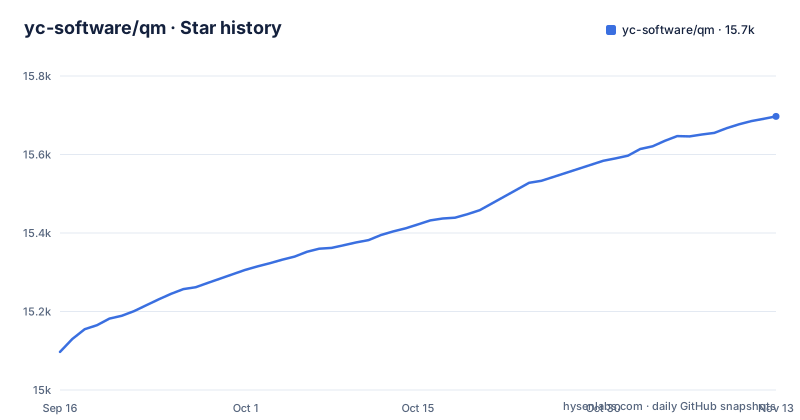
Star history
- yc-software/qm15,697 ★ · +600
| Repository | 2026-09-16 | 2026-11-13 |
|---|---|---|
| yc-software/qm | 15.1k | 15.7k |
600 Stars in the last 58 days, measured from the daily GitHub snapshot. Compare with other projects
Editorial analysis
Installation is delegated to a coding agent
The setup section opens with a single instruction.
Tell your coding agent of choice to deploy the repository at the given URL. From there, it should follow the deployment guide in that repository.
So the documented installation path for the entire product is an agent reading a guide. That is a deliberate choice for a tool whose users are, by definition, people already running coding agents, and the guide is treated as the source of truth rather than a fallback.
The programmatic path exists too, and it is the more concrete one. You create an organisation-owned deployment repository that depends on the published package, then run an init command against a target of either fly or aws:
npm exec --yes --package=@yc-software/qm@latest -- \
  qm init . --org <slug> --target <fly-or-aws>
What that initialisation does is worth noting, because it explains how the agent-driven path and the CLI path connect. Initialisation materialises a deployment skill for an agent, then walks through infrastructure, web sign-in, connector credentials, optional Slack access, deployment and live verification, with no source checkout required. Each deployment runs in the operator's own cloud account.
So the two routes are the same process, one driven by you and one by an agent reading a guide.
The release list contains a tag naming a vendored dependency
Look at the three recent releases and one of them is not a QM version.
There is desktop-v0.1.5, dated 2026-10-26. There is desktop-v0.1.4, dated 2026-10-20. And between them, also dated 2026-10-20, there is a release named Vendored Pi AI 0.82.0 qm.3.
So the release feed for this project carries tags describing two different things: releases of the QM desktop app, and releases of a third-party agent that the harness vendors. The most recent entry is a QM release, but the one before it is not, and there is no naming convention in the list that would let you tell at a glance without reading the tag.
This compounds with a second mismatch. The manifest at the root of the repository is named qm, carries version 0.1.0, and is marked private. The recent desktop releases are at 0.1.4 and 0.1.5, and the package you install is scoped differently.
So there are three different version lines in play for what a reader might reasonably assume is one project. If you pin by release tag, pin one you have read the name of.
The manifest in the repository is not the manifest you install
The root package manifest has three fields worth reading together.
Its name is qm. Its version is 0.1.0. And it is marked private, with the description describing a headless core for a shared organisation agent.
Compare that with the installation command, which fetches a scoped package, @yc-software/qm, at its latest tag.
So the manifest you find by opening the repository is not the manifest of the artefact you deploy. It is private, so it cannot be installed from, it is the root of a workspace rather than a distributable package, and its version number does not correspond to any of the release tags.
The engine requirements in it are the more useful thing to take from it, and they are demanding. Node at 24.22.1 or newer, and npm at 11.10.0 or newer.
Those floors matter because of how the project runs. The start script invokes node directly on a TypeScript source file with an environment file if one exists, after a prestart step that builds the connector SDK. The development script adds a watch flag and a shutdown drain window. There is no compile step for the application itself.
Before planning a deployment against older Node, check that floor, because nothing in the install path will tell you at the wrong moment.
Sessions live in process memory unless you provision Postgres first
There is a durability note sitting underneath the architecture diagram, and it is easy to skim.
Core requires Postgres: set DATABASE_URL.
This is a system whose whole purpose is a persistent organisational memory with per-person and per-room scoping. The feature list includes scoped memory as a core capability, and the architecture diagram puts sessions, memory and a queue in Postgres.
The development scripts for local instances are the documented way to exercise a branch against a real model and a real Postgres.
The example environment file only carries an optional DATABASE_CA_CERT for the Postgres connection. Provision Postgres before the first deploy.
The Dangerous posture removes approval gates and also caps screening
The security model is the most carefully specified part of this document, and it contains one asymmetry worth reading twice.
An organisation picks one posture, and narrower scopes can only tighten it. Strict pauses every harness tool call for human approval, except two no-effect turn enders. Auto is the default and blocks private-network access. Dangerous has no tool approval gates, and content screening only observes.
Content screening is a separate deployment setting with three modes: off, which is the default, observe, which records verdicts in the audit log, and enforce, which quarantines flagged content pending release approval.
Here is the asymmetry. Enforce quarantines flagged content, except under Dangerous, which caps screening at observe.
So the posture that removes every human approval gate is also the posture in which the one mechanism that holds back external content stops being able to hold anything back. It still watches and records, which is worth something, but nothing is withheld on the strength of a verdict.
What does not change is the predeclared command policy, which is described as approval rules and hard denials for things like recursive deletes or destructive SQL, and which applies in every posture, Dangerous included. That is the floor under the whole model, and the place to look first when deciding what the posture actually buys you.
Cost ceilings, rate limits and a 48 hour capability lifetime are all in the example environment
The example environment file is the most concrete operational document in the repository, and it is worth reading as a configuration reference rather than skipping.
Cost control comes in two levels, a per-user budget of 25 US dollars per window and an organisation budget of 100 per window, on a window of 86400000 milliseconds, which is a day. So there is a hard spend ceiling at two levels, and the organisation one is four times the individual one.
Sandbox capabilities have a lifetime, with a TTL measured in hours and defaulting to 48. That is a capability token expiring after two days rather than a sandbox shutting down, and it is the setting most likely to surprise someone running the background work the feature list advertises, since crons, watches and inbound webhooks are supposed to keep working while you are away.
There is also a swarm default, expressed as JSON, with thirty-two agents and a turn budget of six hundred thousand milliseconds, commented as resolvable once per new swarm and overridable at initial spawn.
Together these are the settings that determine whether the harness is affordable and whether it keeps running. Tune them deliberately at deployment.
The agent acts as the person it works for, with their credentials
The stated security approach is the one used by local coding agents, and it is the most consequential design decision in the system.
The agent acts as the person it is working for, with their credentials and their permissions, and everything it does is audited.
There is no separate service account with narrowed rights. The harness operates as the human who is talking to it, which means its reach is exactly that human's reach across every system they can already touch: internal notes, email, documents, databases, the web, and per the capability list, an existing repository where it runs tests, opens pull requests and watches CI.
That design is what makes the tool useful and what makes it dangerous. It is the reason an intern-facing assistant can actually do something useful, and the reason the approval gates in the Strict posture exist at all.
Sharing posture is configured separately from security posture, which is a useful separation. Isolated, the default, keeps resources in their scope unless explicitly shared. Open allows the speaker's opted-in personal files, artefacts, skills and memory to be read in an opted-in shared room, and only on a live authenticated internal human turn.
That last qualifier is doing real work: the personal-data escape hatch in Open mode requires a live authenticated human in the room, which is a narrower condition than a shared channel existing.
Editorial conclusion
QM suits a startup that wants a shared organisational agent rather than a personal one, and that is prepared to own the deployment in its own cloud. Two things to settle before anything runs. Choose a security posture deliberately rather than inheriting the default, and understand that the screening mechanism is weakest exactly where the approval gates are also absent. And provision Postgres before first use, since core requires it. The cost ceilings in the example environment are sensible starting points, but the 48 hour sandbox capability lifetime is what will bite a long-running background job.
Frequently asked questions
What is QM?
QM is described as a multiplayer agent harness for work, running in Slack and on the web, self-hosted in your own cloud with your own models and keys. Unlike an agent built as a personal assistant, it gives each person an isolated workspace and each room its own scoped memory, files, permissions, crons, web apps and durable sandbox, with every turn running through a central headless core.
How do I deploy QM?
Either tell a coding agent to deploy the repository and let it follow the deployment guide, or create an organisation-owned repository that depends on the published package and run the init command with an org slug and a target of fly or aws. Initialisation generates a deployment skill for an agent and walks through infrastructure, sign-in, credentials, optional Slack access, deployment and verification, with no source checkout required.
Which harnesses and models can QM use?
The agent loop runs on Pi, which runs models from many providers, so a deployment is not tied to one vendor. Administrators set organisation-level configuration and choose which models are available, and every substrate including the session store, sandbox and memory sits behind an interface.
What security postures does QM support?
Three, and narrower scopes can only tighten them. Strict pauses every harness tool call for human approval apart from two no-effect turn enders. Auto, the default, blocks private-network access. Dangerous has no approval gates and caps content screening at observe, meaning enforce mode does not apply. A predeclared command policy with hard denials applies under all three, including Dangerous.
Official sources
Add this badge to your README
If you maintain this project, the badge below links readers to this analysis and shows its maintenance status from the daily GitHub snapshot. Paste the markdown into your README; add ?metric=license or ?metric=stars to the image URL for a different field.

[](https://hysenlabs.com/projects/yc-software-qm)Star history chart for your README
[](https://hysenlabs.com/projects/yc-software-qm)Was this useful?