Laravel Docker Setup puts Octane, Horizon and Reverb into one container image
Production-ready Docker setup for Laravel powered web services and microservices. Done right.
At a glance
- What is it?
- Laravel Docker Setup is a repository of Dockerfiles and a full Compose stack for running Laravel on Octane, with Swoole, RoadRunner and FrankenPHP drivers and a single environment variable that switches the container between web, queue, scheduler, worker, WebSocket and SSR roles. It is a starting point you copy files from, not a package you install.
- Who is it for?
- Laravel Docker Setup suits teams already running Laravel on Octane who want a hardened container image and a monitoring stack in one repository instead of writing their own. It does not suit a team that has not yet set up Octane, Horizon and Reverb, since all three are listed as prerequisites, and the Compose file assumes PostgreSQL, Redis, PgBouncer and RustFS.
- Can I use it commercially?
- Yes. MIT is a permissive licence: you can use, modify and sell software built on it, as long as you keep its copyright and licence notices.
- Is it still maintained?
- Yes. The repository last received commits 17 days ago.
- What is it written in?
- Mainly Dockerfile, according to GitHub's language statistics.
Answers come from the project's GitHub data, last synced on November 7, 2026, and from our analysis. They are not legal advice.
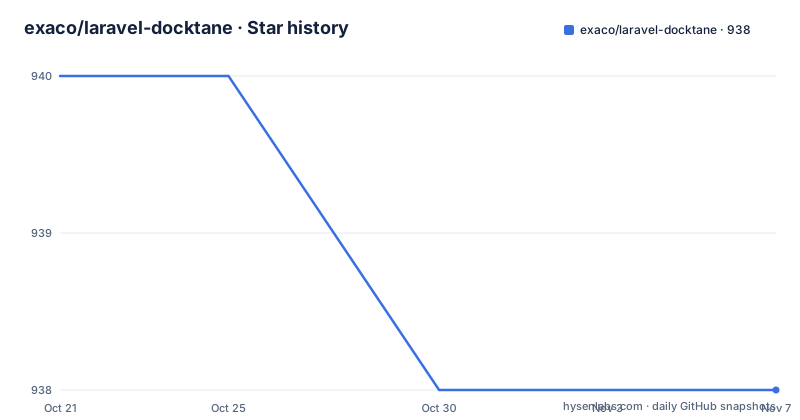
Star history
- exaco/laravel-docktane938 ★ · -2
| Repository | 2026-10-21 | 2026-11-07 |
|---|---|---|
| exaco/laravel-docktane | 940 | 938 |
-2 Stars in the last 17 days, measured from the daily GitHub snapshot. Compare with other projects
Editorial analysis
The container mode decides what the container does at runtime
The design decision that shapes everything else in this repository is the `CONTAINER_MODE` environment variable. One image, several jobs. The mode table in the README lists six of them, and the effect is that the same built image can serve web traffic, drain a queue, run cron, work as a generic background worker, host WebSockets, or serve an Inertia SSR bundle.
`http` is the default and runs the Laravel Octane application. `horizon` manages queued jobs, `scheduler` executes scheduled tasks at defined intervals, and `worker` is a dedicated worker for background processing. `reverb` covers real-time communication with Laravel Echo, and `ssr` runs the Inertia SSR server with the `bun` runtime.
That design has an obvious benefit. A queue worker and a web server are the same artefact with a different environment variable, so there is one Dockerfile to maintain, one image to build, and one place where a dependency bump happens. The cost is that the mode is decided at container start, not at build time, so an image tagged for one role can be started in another role by mistake. A health check in your orchestrator that only checks that the process is alive will not catch that, since a Horizon container happily runs in place of a web container and serves nothing.
Three Octane drivers, each with a Debian and an Alpine image
The repository ships a Dockerfile for every major Octane driver. At the top level you find `Swoole.Dockerfile`, `RoadRunner.Dockerfile` and `FrankenPHP.Dockerfile`, plus `Swoole.Alpine.Dockerfile`, `RoadRunner.Alpine.Dockerfile` and `FrankenPHP.Alpine.Dockerfile`, and a `static-build.Dockerfile` for compiled front-end assets.
Choosing between them is a real decision rather than a formality. The repository does not document the trade-offs between the three, so the choice comes down to what your application already uses and what your team can operate.
The Alpine and Debian pairs give you a second axis. Alpine images are smaller, Debian images are easier to debug when a native extension needs a build tool. Having both means you can pick the base that fits the deployment rather than living with whichever one was written first.
The `static-build.Dockerfile` covers a related need. Laravel front-end builds produce static assets, and building them inside the same pipeline keeps Node out of the runtime image.
Copying files into your project rather than pulling a package
The usage instructions are unusual and worth understanding before you start. There is no Composer package to require and no image to pull. You clone the repository, then copy the contents into your Laravel project: the `deployment` directory, the Dockerfile for whichever Octane driver you use, and the `.dockerignore` file.
git clone --depth 1 [email protected]:exaco/laravel-docktane.gitThe clone is shallow by design, which suits a copy-from template. From your project directory, the build is a plain `docker build` with an explicit Dockerfile:
docker build -t <image-name>:<tag> -f <your-octane-driver>.Dockerfile .The consequence of this model is that the repository stops being a dependency. Once the files are copied, your project owns them, and upstream changes arrive only when you choose to diff and merge. That is the right trade for infrastructure files that need local edits, and the wrong trade for anything you expect to stay in sync automatically.
The prerequisites list is short but load-bearing: Docker, Docker Compose, and a working setup of Laravel Octane, Laravel Horizon and Laravel Reverb. This repository does not install those for you. It assumes the application is already built to run on Octane.
One image, many roles, selected by environment variables at run time
The run commands in the README show the mode mechanism in practice. A plain web container maps a host port to port 8000 inside the container, while the other roles are started with an environment variable and no port mapping.
docker run -p <port>:8000 --rm <image-name>:<tag>
docker run -e CONTAINER_MODE=horizon --rm <image-name>:<tag>
docker run -e CONTAINER_MODE=scheduler --rm <image-name>:<tag>
docker run -e CONTAINER_MODE=reverb --rm <image-name>:<tag>
docker run -e CONTAINER_MODE=ssr --rm <image-name>:<tag>
There is a second family of variables that composes roles instead of replacing them. `WITH_HORIZON`, `WITH_SCHEDULER`, `WITH_REVERB` and `WITH_SSR` add a sidecar process inside the same container, which is the pattern to use when a small deployment should not need four separate containers.
docker run \
    -e WITH_SCHEDULER=true \
    -e WITH_HORIZON=true \
    -e WITH_REVERB=true \
    -e WITH_SSR=true \
    -p <port>:8000 \
    --rm <image-name>:<tag>
The `worker` mode is the odd one out, because it needs a command as well as a mode.
docker run \
    -e CONTAINER_MODE=worker \
    -e WORKER_COMMAND="php /var/www/html/artisan foo:bar" \
    --rm <image-name>:<tag>
A single command also runs without starting a server, which is the quickest way to check that an image is sane.
docker run --rm <image-name>:<tag> php artisan aboutThe Compose stack pulls in Postgres, Redis, object storage, search and monitoring
Beyond the image, the repository ships a production Compose file that assembles a full stack. To deploy with Compose you copy three files into your codebase: `compose.production.yaml`, `.env.production` and the `Makefile`.
The service list is broad. The application container serves web requests in `http` mode, with separate containers for Horizon and for the scheduler. A PostgreSQL container holds the database, PgBouncer sits in front of it as a connection pooler, and Redis acts as both cache and message broker for Horizon. RustFS provides distributed object storage, and Typesense provides a typo-tolerant open-source search engine.
Then the operations layer. pgAdmin and pghero cover database management and performance monitoring, a backup service performs automated database backups, Netdata containers give real-time infrastructure monitoring, Prometheus collects metrics from the application and the host, and Grafana visualises those metrics in dashboards.
The Makefile drives that stack. Its `DC_RUN_ARGS` variable pins the env file, the `app` and `administration` profiles, and the Compose file, so every target uses the same configuration.
Targets include `up`, `down`, `stop`, `logs`, `ps`, `build`, `restart`, `images:list` and `images:clean`. The `up` target passes `HOST_UID` and `HOST_GID` into the containers, and the Makefile computes them from your own user id, falling back to 1000 when the id resolves to zero, which is the case inside some CI runners.
Where this setup is the wrong tool
The stack is wide, and width has a cost. If your application does not need Typesense, RustFS, Prometheus, Grafana, Netdata, pgAdmin and pghero, then `compose.production.yaml` starts containers you do not use and you spend the rest of the project trimming them out. A single-service Compose file with your app, Postgres and Redis is smaller, faster to start and easier to reason about.
There is a second mismatch. The prerequisites require Laravel Octane, Horizon and Reverb to be set up already, so a team that has not decided on Octane gains nothing from this repository and inherits a decision it has not made. The Octane driver choice in particular is a genuine architectural commitment, and a Dockerfile for each driver is not the same as a guide to picking one.
The copy-the-files model creates a third issue worth naming plainly. Because the files are copied rather than depended on, nothing tells you that the copy has drifted from upstream, and the release tags of the template will not reach your repository. Teams that want to track upstream changes have to set up that comparison themselves.
A more conservative path exists. Take the driver Dockerfile and the `deployment` directory, write your own Compose file for the services you actually run, and keep the observability services as a separate decision. The value in this repository is the container image and the mode mechanism, not the service count.
MIT licensed, released on a major version line, last push in September 2026
The licence field on the repository says MIT, and the LICENSE file sits at the top level. That is a permissive licence, so you can copy these Dockerfiles and Compose files into a commercial application and modify them freely, keeping the notice intact. That is a reading of the identifier rather than legal advice, and the licence text itself governs.
The release history shows a steady major line: v5.4 on 2025-09-25, v5.5 on 2025-10-03, and v6.0 on 2026-01-29. A version 6 release in a Docker template usually means the Compose file or the image layout changed, so read the notes for v6.0 before copying files into a project that was still on v5.5. The last push to the repository was on 2026-09-05.
Continuous integration is visible in the repository as well. The README badges point at separate workflow files for RoadRunner, Swoole, FrankenPHP and a Compose test, which means each driver image and the Compose stack are exercised on their own pipeline. For a template whose whole value is that it works on a machine other than the author's, that per-driver testing is the most relevant signal, and it is visible without running anything.
Editorial conclusion
Laravel Docker Setup suits teams already running Laravel on Octane who want a hardened container image and a monitoring stack in one repository instead of writing their own. It does not suit a team that has not yet set up Octane, Horizon and Reverb, since all three are listed as prerequisites, and the Compose file assumes PostgreSQL, Redis, PgBouncer and RustFS. Before adopting it, copy `compose.production.yaml`, `.env.production` and the `Makefile` into your project, edit `.env.production` for your own hosts and credentials, and confirm that the `deployment` directory and the driver Dockerfile you choose match the Octane driver your application already uses.
Frequently asked questions
How do I build a Docker image for Laravel with Laravel Docker Setup?
Clone the repository, copy the `deployment` directory, the driver Dockerfile such as `Swoole.Dockerfile` and the `.dockerignore` file into your Laravel project, then run `docker build -t <image-name>:<tag> -f <your-octane-driver>.Dockerfile .` from the project directory.
What does the CONTAINER_MODE variable do?
It selects the job the container performs: `http` for the Octane application, `horizon` for queued jobs, `scheduler` for scheduled tasks, `worker` for background processing, `reverb` for WebSockets with Laravel Echo, and `ssr` for the Inertia SSR server.
Which Octane drivers are supported?
The repository ships Dockerfiles for Swoole, RoadRunner and FrankenPHP, each in a Debian and an Alpine variant, plus a `static-build.Dockerfile` for front-end assets. The README does not compare the drivers, so the choice follows the driver your application already uses.
What does the production Compose file include?
It orchestrates the application in `http` mode, Horizon, the scheduler, PostgreSQL with PgBouncer, Redis, RustFS object storage, Typesense search, pgAdmin and pghero, a backup service, Netdata monitoring, Prometheus metrics and Grafana dashboards. You deploy it by copying `compose.production.yaml`, `.env.production` and the `Makefile` into your codebase.
What are the prerequisites for Laravel Docker Setup?
The README lists Docker installed on your system, Docker Compose installed on your system, and a setup of Laravel Octane, Laravel Horizon and Laravel Reverb. The project does not install Octane or the queue layer for you.
Official sources
Add this badge to your README
If you maintain this project, the badge below links readers to this analysis and shows its maintenance status from the daily GitHub snapshot. Paste the markdown into your README; add ?metric=license or ?metric=stars to the image URL for a different field.

[](https://hysenlabs.com/projects/exaco-laravel-docktane)Star history chart for your README
[](https://hysenlabs.com/projects/exaco-laravel-docktane)Was this useful?