windsurf.vim: Windsurf autocomplete inside Vim and Neovim
Free, ultrafast Copilot alternative for Vim and Neovim
At a glance
- What is it?
- The Exafunction/windsurf.vim plugin brings AI completions to Vim and Neovim through a small set of codeium# functions. It is MIT licensed, and the repository is now archived.
- Who is it for?
- Adopt windsurf.vim if you already live in Vim or Neovim and want inline suggestions without switching editors; the whole surface is a handful of codeium# functions and a couple of g:codeium_ variables. Bear in mind that the repository is archived.
- Can I use it commercially?
- Yes. MIT is a permissive licence: you can use, modify and sell software built on it, as long as you keep its copyright and licence notices.
- Is it still maintained?
- No. The owners have archived the repository on GitHub, so it is read-only and no longer receives changes.
- What is it written in?
- Mainly Vim Script, according to GitHub's language statistics.
Answers come from the project's GitHub data, last synced on November 15, 2026, and from our analysis. They are not legal advice.
Star history
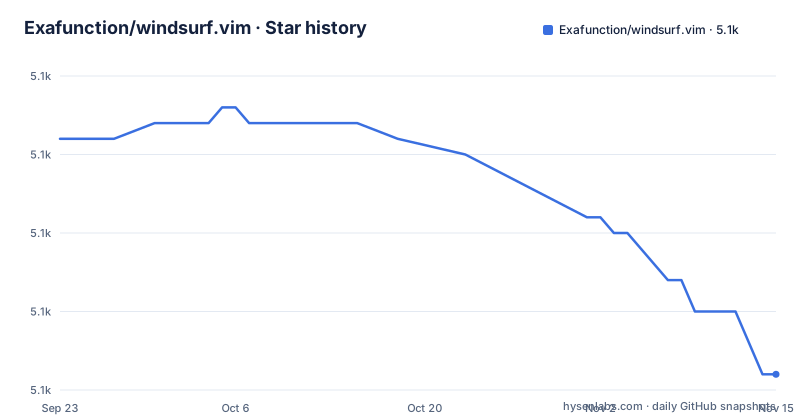
- Exafunction/windsurf.vim5,126 ★ · -15
| Repository | 2026-09-23 | 2026-11-15 |
|---|---|---|
| Exafunction/windsurf.vim | 5.1k | 5.1k |
-15 Stars in the last 53 days, measured from the daily GitHub snapshot. Compare with other projects
Editorial analysis
What windsurf.vim solves for Vim and Neovim users
Vim and Neovim have no built-in AI completion. The plugin fills that gap by inserting suggestions as you type, and it exposes them through editor commands rather than a separate application. The README describes it as a "Free, ultrafast Copilot alternative for Vim and Neovim" and says the implementation was launched to bring Windsurf autocompletion to more developers. The audience is narrow and specific: people who already edit in Vim or Neovim and do not want to leave for an IDE to get suggestions. The README also points to a web playground for trying Windsurf online, which suggests the plugin is one client among several rather than the product itself. That distinction matters when you evaluate it, because the plugin is a thin integration layer, not the completion engine.
How the plugin wires suggestions into your buffer
The repository layout is small: autoload/, plugin/, doc/, powershell/, plus the README, LICENSE and images. The autoload directory is where Vim looks up functions named with the codeium# prefix, so the functions listed in the README (codeium#Accept(), codeium#Clear(), codeium#Complete(), codeium#CycleCompletions(), codeium#AcceptNextWord(), codeium#AcceptNextLine(), codeium#GetStatusString()) resolve through that directory. The plugin/ directory holds the files Vim sources automatically at startup. The presence of :Codeium Auth implies an account-backed service, and the README points to :help codeium and docs.windsurf.com for further detail. Treat the plugin as a client whose server side is documented elsewhere.
Installing windsurf.vim and accepting your first suggestion
The README requires Vim at least 9.0.0185 or Neovim at least 0.6, then asks you to install Exafunction/windsurf.vim with your plugin manager or manually. With lazy.nvim or packer.nvim, the README gives a config block that also remaps the accept key away from Tab. Note the comment in that block about removing the use wrapper when you are on lazy.nvim.
use {
  'Exafunction/windsurf.vim',
  config = function ()
    vim.keymap.set('i', '<C-g>', function () return vim.fn['codeium#Accept']() end, { expr = true, silent = true })
    vim.keymap.set('i', '<c-;>', function() return vim.fn['codeium#CycleCompletions'](1) end, { expr = true, silent = true })
    vim.keymap.set('i', '<c-x>', function() return vim.fn['codeium#Clear']() end, { expr = true, silent = true })
  end
}
After installation the README says to run :Codeium Auth to set up the plugin. That command is the step that connects the editor to Windsurf, and the README repeats the reminder in the Neovim config section, so skipping it leaves you with keybindings that do nothing.
:Codeium AuthOnce authenticated, typing in insert mode should show gray suggestion text, and Tab accepts it by default. If you want to keep Tab for indentation, the README offers g:codeium_no_map_tab to drop only that binding, or g:codeium_disable_bindings to remove all of them and map the codeium# functions yourself. The README's Vim example shows the full set, including codeium#AcceptNextWord() and codeium#AcceptNextLine() for partial acceptance.
let g:codeium_disable_bindings = 1
imap <script><silent><nowait><expr> <C-g> codeium#Accept()
imap <script><silent><nowait><expr> <C-h> codeium#AcceptNextWord()
imap <script><silent><nowait><expr> <C-j> codeium#AcceptNextLine()
Where windsurf.vim gets in the way
Automatic suggestions are the default, and the README treats that as something you may need to turn off. Three separate options exist for it: g:codeium_manual disables automatic triggering, g:codeium_render disables the gray text, and g:codeium_enabled turns the plugin off entirely until you run :CodeiumEnable. The filetype controls have the same shape. You can disable per filetype with g:codeium_filetypes, or invert the whole model with g:codeium_filetypes_disabled_by_default and opt in only for rust and typescript, as the README's example does. If your work is mostly prose, configuration files or languages the service handles poorly, you will spend your first session writing exclusion lists rather than coding. For the full list of configuration options, the README points to :help codeium.
windsurf.vim against a language server approach
The closest structural alternative is a completion plugin built on the Language Server Protocol, where a local server computes suggestions and the editor talks to it over a standard protocol. The difference is architectural, not cosmetic. windsurf.vim exposes plain Vim functions and a set of g:codeium_* variables, and it authenticates through :Codeium Auth against a hosted service. An LSP-based setup instead has a server process you configure and can often run yourself, with completion candidates arriving through the same channel as diagnostics and go-to-definition. If your reason for wanting AI completion is that you already run an LSP client, the LSP route keeps one integration instead of two. If your reason is that you do not want to configure a server at all, windsurf.vim is the shorter path: install the plugin, run one command, and the defaults work. The README's own framing supports that reading, since it presents the plugin as a way to get Windsurf's completions into Vim without describing any server you manage.
Maintenance, licence and what upgrades cost you
The repository is archived, and the last push was on 2026-03-31. That is roughly seven months before today, so the project cannot be described as actively developed on the evidence here; the repository has no published GitHub releases. In practice an archived repository means no further changes are expected here. The MIT licence covers the plugin code, and the repository ships a LICENSE file at the top level. That licence does not extend to the Windsurf service the plugin talks to, and the README does not state the terms of the account you create through :Codeium Auth. If your organisation cares about where code is processed, read the service terms at docs.windsurf.com rather than the repository licence, because the two cover different things. None of this is legal advice; it is a pointer to which document answers which question.
Editorial conclusion
Adopt windsurf.vim if you already live in Vim or Neovim and want inline suggestions without switching editors; the whole surface is a handful of codeium# functions and a couple of g:codeium_ variables. Bear in mind that the repository is archived. Before rolling it out, run :Codeium Auth and confirm that codeium#GetStatusString() reports a working session in your filetypes.
Frequently asked questions
Can I use Windsurf in VS Code instead of Vim?
Yes. The README links Windsurf extensions for the Visual Studio Marketplace, JetBrains and Open VSX, and describes windsurf.vim as one implementation among several. The Vim and Neovim plugin is the subject of this repository.
What IDE does Windsurf use?
The README does not tie Windsurf to a single IDE. It links Visual Studio Marketplace, JetBrains and Open VSX extensions alongside this Vim and Neovim plugin, and points to docs.windsurf.com for the rest.
How do I change the windsurf.vim keybindings?
Set g:codeium_disable_bindings to 1 to remove the defaults, then map the codeium# functions yourself. The README shows Vim and Neovim examples for codeium#Accept(), codeium#AcceptNextWord(), codeium#AcceptNextLine(), codeium#CycleCompletions() and codeium#Clear().
Why do I see no suggestions after installing windsurf.vim?
The README says to run :Codeium Auth after installation to set up the plugin, and repeats that reminder in the Neovim config example. Without that step the plugin is installed but not connected.
How do I turn off windsurf.vim completions for certain filetypes?
Set g:codeium_filetypes to a dictionary mapping filetypes to v:true or v:false, as in the README's bash and typescript example. To invert the default, set g:codeium_filetypes_disabled_by_default to v:true and enable only the filetypes you want.
Official sources
Add this badge to your README
If you maintain this project, the badge below links readers to this analysis and shows its maintenance status from the daily GitHub snapshot. Paste the markdown into your README; add ?metric=license or ?metric=stars to the image URL for a different field.

[](https://hysenlabs.com/projects/exafunction-windsurf-vim)Star history chart for your README
[](https://hysenlabs.com/projects/exafunction-windsurf-vim)Was this useful?