LinOffice: running Microsoft Office 2024 and 365 on Linux through a hidden Windows VM
Microsoft Office Launcher for Linux
At a glance
- What is it?
- LinOffice is an AGPL-3.0 shell project that runs Microsoft Office in a background Windows container reached over FreeRDP, aiming at one-click setup on Linux. It needs KVM, an x86_64 CPU, up to 4 GB of RAM for the VM and about 8 GB of downloads, and it is a fork of WinApps rather than a general Windows app runner.
- Who is it for?
- LinOffice suits a Linux user who needs a recent Microsoft Office, has an x86_64 machine with KVM and around 8 GB free storage, and wants the Office windows to behave like native applications with shared home folder and clipboard. It does not suit someone who also wants to run arbitrary Windows applications, since the project is a focused fork of WinApps that covers Office only, and it does not suit an ARM machine, which is not supported yet.
- Can I use it commercially?
- Yes, with strict conditions. AGPL-3.0 is a network copyleft licence: if people use a modified version over a network, for example as a hosted service, you must offer them its source code under the same licence.
- Is it still maintained?
- Yes. The repository received new commits within the last day.
- What is it written in?
- Mainly Shell, according to GitHub's language statistics.
Answers come from the project's GitHub data, last synced on November 7, 2026, and from our analysis. They are not legal advice.
Star history
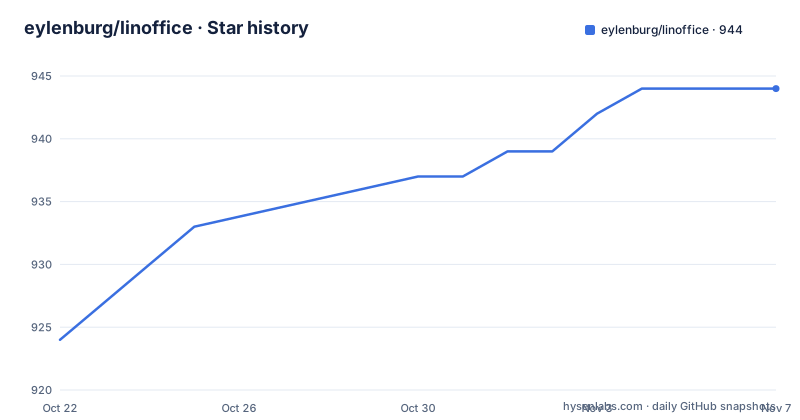
- eylenburg/linoffice944 ★ · +20
| Repository | 2026-10-22 | 2026-11-07 |
|---|---|---|
| eylenburg/linoffice | 924 | 944 |
20 Stars in the last 16 days, measured from the daily GitHub snapshot. Compare with other projects
Editorial analysis
A background Windows VM, reached over RDP, with Office on top
LinOffice is a Microsoft Office launcher for Linux, and the mechanism is deliberately unglamorous. In the background it runs a virtual machine with Windows and Office installed, and that machine is then accessed via FreeRDP. The stated aim is a one-click setup for Microsoft Office on Linux, so the pieces are WinApps, Dockur/Windows, FreeRDP, Podman and Qemu. The result is that the Office applications appear as native-looking Linux applications rather than a remote desktop window, with app launchers, file associations, access to the /home folder and a shared Linux clipboard. By default Microsoft Office 2024, Home and Retail, is installed, containing Word, Excel, Powerpoint, Onenote and Outlook. If you have a Microsoft Office 365 subscription you can log in with your Microsoft account and it should upgrade from 2024 to 365. The licence is your own to supply: you need your own Office licence for this to be legitimate.
A focused fork of WinApps, with the RDP ports renamed to avoid collisions
The project describes itself as a focused fork of WinApps that automates most of the VM setup and adds Office-specific improvements, and it explicitly says you can run LinOffice alongside WinApps because all the names and RDP ports have been changed to avoid conflicts between the two. That is the key architectural statement for anyone deciding whether to use it. WinApps is a general Windows application runner, so if your need extends past Office to other Windows software, the README itself points you at WinApps or Winboat instead. LinOffice narrows the scope to make the setup automatable: because the target application set is known in advance, the container can be preconfigured with the right versions and integration rather than being a blank Windows you have to prepare yourself. The repository layout matches that: linoffice.sh, quickstart.sh, setup.sh and uninstall.sh at the top level, with apps, config, gui and lib directories and updater.py for updates.
The installation path that needs only Flatpak and Podman
There are two installation options and the Flatpak one is the shortest by a wide margin. It bundles most of the dependencies, FreeRDP, podman-compose, Python and PySide6, so on the host you only need Flatpak itself and Podman. The install is a single command:
flatpak remote-add --if-not-exists --user linoffice https://eylenburg.github.io/linoffice/index.flatpakrepo && flatpak install --user linoffice io.github.eylenburg.LinOfficeYour browser will ask to open Discover or GNOME Software, which adds the LinOffice repository and installs the package, and the flatpakref file is there for the case where the browser only downloads it. The first time you open LinOffice it downloads Windows and Microsoft Office, about 8 GB in total, and installs them. The manual route is for people who prefer to control the dependencies: it needs Podman, podman-compose, FreeRDP 3, and Python 3 with PySide6 for the graphical interface. The README also carries a warning that FreeRDP 3.23 does not work with LinOffice, which is the kind of version pin worth noting before you pick a FreeRDP build from your distribution.
The hardware checks are strict enough to fail the setup early
The requirements are stated before the install steps rather than discovered during them. You need enough resources for the Windows virtual machine itself, up to 4 GB of RAM, 64 GB of storage and 4 CPU cores, and the setup checks for at least 8 GB of RAM and 64 GB of free storage before it continues. Virtualization support through KVM is required, and the CPU must be x86_64 because ARM is not supported yet. A fast connection is needed since setup downloads several GB from Microsoft. Those numbers tell you what kind of machine this is for. A background Windows VM that stays resident so that launching Word feels instant is a permanent commitment of several gigabytes of RAM and tens of gigabytes of disk, and on a laptop it also means the machine is never fully idle. The project does list automatic suspension of the Windows container when inactive and resumption when an Office app is started, which mitigates the idle cost but not the disk and setup cost.
Office-specific automation covers lock files, time drift, locale and telemetry
This is where the fork earns its name. Beyond running Office, LinOffice automates the small frictions that make a Windows VM annoying to live with. It deletes Office lock files like ~$file.docx automatically, so a crashed session does not leave a document locked against you. It forces a time sync in Windows after the Linux host wakes from sleep to avoid time drift, and sets the time zone to UTC for simplicity. It detects language, date format, thousand and decimal separator, currency symbol and keyboard layout automatically. It installs updates for Windows and Office, tidies the Quick Access pane in Windows File Explorer, and debloats Windows while disabling telemetry and ads using Win11Debloat. Publisher and Access can be run if you install them manually, and there are quick access tools for Powershell, Command Prompt, Windows Explorer, Registry Editor and Office Language Settings. There is also a full Windows session over RDP or VNC when you need it, and a network toggle that prevents Windows and Office from phoning home, plus a setting to circumvent geo-blocking for the Office installation.
Troubleshooting commands exist because a Windows container will eventually wedge
The README lists troubleshooting functions as a feature, and the specific items reveal what actually breaks in practice: forcing cleanup of Office lock files, recreating the .desktop files for the Office apps, rebooting the Windows container, and a container health check. Recreating the .desktop files is the one to understand, because that is the mechanism behind the native integration. If the launcher entries are missing or stale, the Office apps stop appearing as normal Linux applications and you are left launching through RDP by hand, which defeats the entire premise of the project. The container health check and container reboot address the other common failure, where the Windows image has ended up in a state that neither the host nor RDP can talk to. The upside is that these operations are scripted rather than something you have to diagnose manually through a remote desktop session, and the tradeoff is that the recovery path runs through the project rather than through standard container tooling.
AGPL-3.0, a v3.0.0 release, and a feature list that shows what is still missing
The licence field for the repository is AGPL-3.0, which is a strong copyleft licence. That matters more here than for a typical script, because the project downloads Windows and Office into a container and offers a Flatpak and an automated setup path; anyone redistributing a modified LinOffice, or offering it as a service, needs to read the terms rather than assume they are permissive. The project is not archived and the last push was on 2026-10-22, with v3.0.0 published on 2026-10-15, v2.99.0 on 2026-10-09 and v2.3.1 on 2026-09-28, so it is moving quickly. The planned features list is short and honest: translations for the GUI and an AppImage are both unchecked, and the lower priority list names ARM support, better support for non-core Office apps such as Access, Publisher and Visio, and support for older Office versions from 2016 onwards. An AppImage would matter for anyone who does not want Flatpak or Podman on the host, and its absence is the main gap in the install options today.
Editorial conclusion
LinOffice suits a Linux user who needs a recent Microsoft Office, has an x86_64 machine with KVM and around 8 GB free storage, and wants the Office windows to behave like native applications with shared home folder and clipboard. It does not suit someone who also wants to run arbitrary Windows applications, since the project is a focused fork of WinApps that covers Office only, and it does not suit an ARM machine, which is not supported yet. Before you commit, read the hardware requirement that the setup checks for at least 8 GB of RAM and 64 GB of storage, confirm your own Office licence is in place, and note that the FreeRDP 3.23 version is called out in the README as not working with LinOffice.
Frequently asked questions
How do I install LinOffice on Linux?
The Flatpak route is the simplest and needs only Flatpak and Podman on your system, since the flatpak bundles FreeRDP, podman-compose, Python and PySide6. The repository publishes a flatpakref and a flatpakrepo index for a one-command install.
Does LinOffice run Microsoft Office natively on Linux?
No. It runs a Windows virtual machine in the background and reaches it over FreeRDP, then presents the Office apps with Linux app launchers, file associations, home folder access and a shared clipboard. You need your own Office licence, and it works alongside WinApps.
What hardware does LinOffice need?
The Windows VM needs up to 4 GB of RAM, 64 GB of storage and 4 CPU cores, and setup checks for at least 8 GB of RAM and 64 GB of free storage before continuing. KVM virtualization support and an x86_64 CPU are required; ARM is not supported yet.
Which version of FreeRDP works with LinOffice?
FreeRDP 3 is listed among the manual installation dependencies, and the README carries a warning that FreeRDP 3.23 does not work with LinOffice, so check the version on your system before the manual setup.
Official sources
Add this badge to your README
If you maintain this project, the badge below links readers to this analysis and shows its maintenance status from the daily GitHub snapshot. Paste the markdown into your README; add ?metric=license or ?metric=stars to the image URL for a different field.

[](https://hysenlabs.com/projects/eylenburg-linoffice)Star history chart for your README
[](https://hysenlabs.com/projects/eylenburg-linoffice)Was this useful?