IPQuality: a one line shell script that grades your IP address
IP quality check script.
At a glance
- What is it?
- IPQuality is a single shell script, run straight from a URL, that grades one IP address across Maxmind base data, a set of risk databases, seven streaming services and twelve mail providers. It is quick and bilingual, but it publishes a shareable report unless you pass -p, and its mail module depends on a port your host may already have closed.
- Who is it for?
- IPQuality suits someone deciding whether to keep a VPS or a proxy they have just paid for, where one command that prints a risk score, a blacklist count and a streaming verdict is worth more than a browser dashboard. It is a poor fit for an unattended server, because the code arrives over curl with no tag to pin, and it is a poor fit for anyone whose network blocks outbound mail.
- Can I use it commercially?
- Yes, with strict conditions. AGPL-3.0 is a network copyleft licence: if people use a modified version over a network, for example as a hosted service, you must offer them its source code under the same licence.
- Is it still maintained?
- Yes. The repository last received commits 7 days ago.
- What is it written in?
- Mainly Shell, according to GitHub's language statistics.
Answers come from the project's GitHub data, last synced on November 13, 2026, and from our analysis. They are not legal advice.
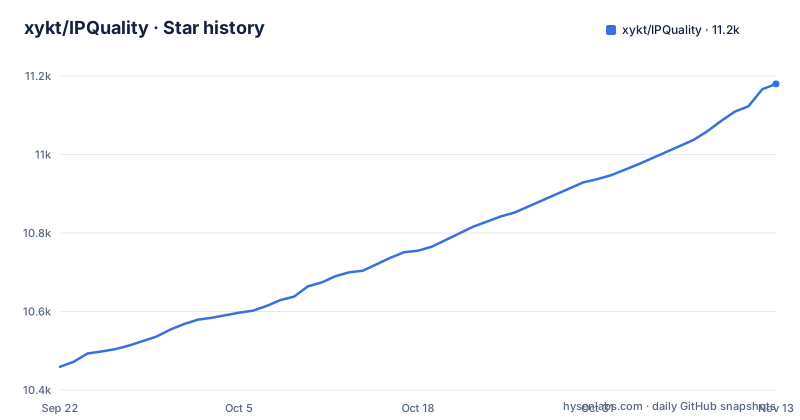
Star history
- xykt/IPQuality11,180 ★ · +721
| Repository | 2026-09-22 | 2026-11-13 |
|---|---|---|
| xykt/IPQuality | 10.5k | 11.2k |
721 Stars in the last 52 days, measured from the daily GitHub snapshot. Compare with other projects
Editorial analysis
IPQuality pipes a script straight from Check.Place into bash
IPQuality is not installed anywhere. The documented invocation feeds a URL into a process substitution:
bash <(curl -Ls https://IP.Check.Place)The shell fetches whatever that endpoint serves at the moment you run the line and hands it to bash in the same breath, and nothing in the repository pins what that is. There are no GitHub releases, so there is no tag to aim a curl at, and there is no lock file because there is no package manifest. The top level holds ip.sh, ref/, res/, two READMEs and a LICENSE. The consequence for a reader is that two people running the command on different days can execute different code, and a changed or compromised endpoint runs with your privileges. The AGPL-3.0 licence covers ip.sh as committed to the repository, which is a different guarantee from the version the URL happened to serve.
-I opens a menu and everything else is a flag on the same line
There are two ways in. The convenient mode opens an interactive interface:
bash <(curl -Ls https://Check.Place) -IAdvanced mode takes arguments instead, and the default there is a dual stack run covering both IPv4 and IPv6. Output language is chosen with -E or with -l en, while -l jp|es|de|fr|ru|pt switches the basic information module into Japanese, Spanish, German, French, Russian or Portuguese. -f makes the report print the full address rather than a shortened form. The README does not give a complete flag table beyond these examples, so the honest way to see what a given build accepts is the menu itself. For a reader the split matters: a menu is pleasant for a first look and a poor fit for repetition, because anything driven through prompts will not survive a timer or a panel that checks an address on a schedule.
-o writes a copy to disk but only -p keeps it off the internet
Output has three shapes. -j prints JSON, and -o sends ANSI, JSON or plain text to a file whose extension picks the format:
bash <(curl -Ls https://IP.Check.Place) -o /path/to/file.jsonThe extension is free form, and file.txtoranyother is offered as a valid target. What none of those flags does is stop the online report. A shareable SVG link was added on 2024/05/17, and the only switch for it is the privacy mode:
bash <(curl -Ls https://IP.Check.Place) -pThe consequence is the part to read twice. By default the risk score, the streaming verdicts and the mail reachability results derived from your address are turned into a link that can be pasted anywhere, and -o or -j only gives you a copy on top of that, not a private run. For anyone checking a machine with a real address behind it, the privacy flag belongs in the command from the first invocation rather than added after you notice it.
-4, -6, -i and -x decide whose address is actually measured
With no selector the script reports the default address of the machine. Four flags change that. -4 limits the run to IPv4 and -6 to IPv6:
bash <(curl -Ls https://IP.Check.Place) -4
bash <(curl -Ls https://IP.Check.Place) -6
-i binds the check to a named interface and -x routes it through a proxy, in http, https or socks5 form:
bash <(curl -Ls https://IP.Check.Place) -i eth0
bash <(curl -Ls https://IP.Check.Place) -x socks5://username:password@socksproxy:port
That pairing is how you grade a second address on a box holding several, or test a proxy before paying for it. It is also where an older build can contradict a newer one, since a bug where a specified interface or proxy still measured the default IP was fixed on 2024/05/28. Two people on different builds can reach opposite verdicts about the same interface. Note too that the proxy form carries credentials on the command line, where shell history and the process list both keep them.
The mail module rides on outbound port 25, which hosts close
One of the six modules tests whether mail providers answer: Gmail, Outlook, Yahoo, Apple, QQ, Mail.ru, AOL, GMX, Mail.com, 163, Sohu and Sina. That test needs outbound TCP 25, and the history shows how often it went wrong. The 2024/05/11 entry fixes mail detection taking far too long because a gateway blocked port 25, and the 2025/06/02 entry repairs faulty logic in the 25 port detection and standardises how provider connectivity is measured. The consequence is that the mail section is the least portable part of the report. Where 25 is blocked, a failed or slow mail result describes the network rather than the address,.
-y installs what it needs, -n skips the check, and dig does the resolving
The script runs its own dependency step. By default it identifies the operating system and asks before installing packages, an ask added on 2024/07/22, and you can accept up front with -y or decline the whole stage with -n:
bash <(curl -Ls https://IP.Check.Place) -y
bash <(curl -Ls https://IP.Check.Place) -n
This stage matters because IPQuality needs dig to resolve, and the 2024/05/08 entry records dig detection and installation being updated on the day the script shipped. The supported list is long, Ubuntu, Debian, Linux Mint, Fedora, RHEL, CentOS, Arch, Manjaro, Alpine, AlmaLinux, Rocky, macOS, Anolis OS, Alibaba Cloud Linux, SUSE, openSUSE and Void Linux, and it grew in steps across 2024 rather than arriving whole. Installing dependencies on systems without sudo was itself a bug, fixed on 2024/05/10, which tells you how much the install path assumes. On a managed host, read what -y would install before using it, because the code doing the installing arrived over curl.
Windows arrives only through Docker, and the image is deleted after each run
Every native platform in the support list is a Unix one. Windows appears only as Windows via Docker, and the Docker form takes arguments before the separator rather than after it:
docker run --rm --net=host -it xykt/ipquality && docker rmi xykt/ipquality > /dev/null 2>&1The CMD variant swaps the separator and the redirect target:
docker run --rm --net=host -it xykt/ipquality & docker rmi xykt/ipquality > NUL 2>&1Several things follow from those two lines. Host networking is what lets the container see the address you care about, so a Windows user needs host networking rather than the default bridge. The rmi at the end deletes the image straight away, which holds disk usage flat and also means every later run pulls it again. And the interactive Docker example is published under a different image name, xykt/check, so the two forms are not interchangeable when you compare what they report about the same host.
There is no tagged release and the written changelog stops at 2026/01/24
The repository publishes no GitHub releases, so nothing here is versioned for a user to pin. The only history kept is a dated changelog at the foot of the README, and its final entry is 2026/01/24, where Spotify streaming detection was swapped for Reddit detection. Earlier entries show the shape of the work: -p privacy mode on 2025/08/01, a Docker run mode on 2025/08/03, -o file output on 2025/04/23, -j JSON output on 2025/04/19, and a 2025/07/30 change that moved every HTTP request to HTTPS. The most recent push landed on 2026-09-30, about eight months after that last changelog entry, so any later changes are not recorded in the README changelog. Parts of the script's code are adapted from RegionRestrictionCheck, the original streaming unlock checker, and from the ecs script by other authors.
Editorial conclusion
IPQuality suits someone deciding whether to keep a VPS or a proxy they have just paid for, where one command that prints a risk score, a blacklist count and a streaming verdict is worth more than a browser dashboard. It is a poor fit for an unattended server, because the code arrives over curl with no tag to pin, and it is a poor fit for anyone whose network blocks outbound mail. Before running it on a machine you care about, add -p so the report is not published to a shareable link, read what -y installs before letting it install anything, and decide in advance whether a fail in the mail section means your host or your address.
Frequently asked questions
Is IPQs legitimate?
IPQS, short for IPQualityScore, appears as one of the risk data sources merged into the report, next to IPinfo, ipregistry, ipapi, AbuseIPDB, IP2Location, DB-IP and Scamalytics. The README makes no claim about any one provider's reliability and notes that the acknowledgment order carries no ranking.
What is IPQualityScore used for in IPQuality?
IPQualityScore supplies risk data for the risk score and risk factor modules. The script folds it together with IPinfo, ipregistry, ipapi, AbuseIPDB, IP2Location, DB-IP and Scamalytics, and separately checks the address against more than 400 IP blacklist databases.
What is IP quality?
In this project it is a six module report: basic information, IP type, risk score, risk factors, streaming unlock and mail server detection. Basic data comes from the Maxmind database, streaming checks cover TikTok, Disney+, Netflix, Youtube, AmazonPrimeVideo, Reddit and ChatGPT, and mail checks cover Gmail, Outlook, Yahoo, Apple, QQ, Mail.ru, AOL, GMX, Mail.com, 163, Sohu and Sina.
What does "IP reputation check" mean for IPQuality?
It is the abuse half of the report. The script checks the address against 400+ IP blacklist databases, and a Cloudflare risk score joined the risk data on 2024/11/09, the same update that fixed an intermittent IP type misjudgement coming from IP2Location.
Official sources
Add this badge to your README
If you maintain this project, the badge below links readers to this analysis and shows its maintenance status from the daily GitHub snapshot. Paste the markdown into your README; add ?metric=license or ?metric=stars to the image URL for a different field.

[](https://hysenlabs.com/projects/xykt-ipquality)Star history chart for your README
[](https://hysenlabs.com/projects/xykt-ipquality)Was this useful?