Pure's install paths, its deferred git checks, and the hook that reruns on every prompt redraw
Pretty, minimal and fast ZSH prompt
At a glance
- What is it?
- Pure is a MIT licensed ZSH prompt distributed as the npm package pure-prompt, and almost everything interesting about it is a tradeoff the project states plainly: npm or nothing, Git 2.15.2 and ZSH 5.2 as the floor, git status work deferred by default, and a customization hook that fires on async redraws.
- Who is it for?
- Pure fits a ZSH user who wants a fast, minimal prompt with a documented customization hook and no framework in the way. It does not fit Bash users, environments held below Git 2.15.2 or ZSH 5.2, or anyone who installs with scripts disabled, since the postinstall step is what makes the prompt visible to promptinit.
- Can I use it commercially?
- Yes. MIT is a permissive licence: you can use, modify and sell software built on it, as long as you keep its copyright and licence notices.
- Is it still maintained?
- Yes. The repository last received commits 38 days ago.
- What is it written in?
- Mainly Shell, according to GitHub's language statistics.
Answers come from the project's GitHub data, last synced on November 13, 2026, and from our analysis. They are not legal advice.
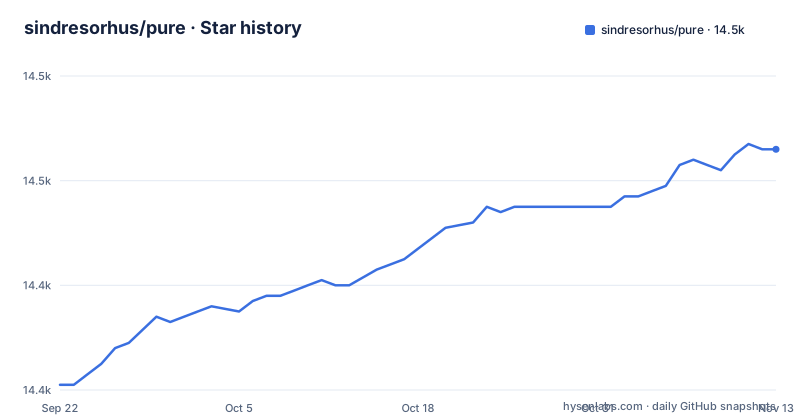
Star history
- sindresorhus/pure14,466 ★ · +45
| Repository | 2026-09-22 | 2026-11-13 |
|---|---|---|
| sindresorhus/pure | 14.4k | 14.5k |
45 Stars in the last 52 days, measured from the daily GitHub snapshot. Compare with other projects
Editorial analysis
Three install paths, and only two of them fix fpath for you
There are three supported routes, and the requirement line up front is specific: Git 2.15.2 or newer and ZSH 5.2 or newer, with older ZSH versions known to work but not recommended. The npm route is a single command:
npm install --global pure-promptThe project is explicit that npm is the package manager and not yarn. If `prompt -l` does not list `pure` afterwards, the documented fix is one line placed before `promptinit`:
fpath+=("$(npm root -g)/pure-prompt")Homebrew installs with `brew install pure`, and if you are not running the Homebrew build of ZSH you must add `$(brew --prefix)/share/zsh/site-functions` to fpath yourself. The manual route is a clone into `$HOME/.zsh/pure` plus an unquoted `fpath+=($HOME/.zsh/pure)` in your `.zshrc`. Each path hands you the same files, and two of them hand you an extra edit to make.
The prompt is initialized in two lines, and VI-mode needs a newer ZSH than the rest
Once the path is on fpath, activation is short:
# .zshrc
autoload -U promptinit; promptinit
prompt pure
That is the whole getting started procedure, and the ordering matters, because the fpath line from the npm section has to come before `promptinit` runs or the prompt will not be found. The feature list also mentions VI-mode indication through a reversed prompt symbol, and that one carries its own version condition: it is marked as requiring ZSH 5.3+, which is a step above the 5.2 floor stated for the rest of the prompt. So a session on exactly 5.2 gets the prompt without the mode indicator, and a session below 5.2 is in the range the project says works but does not recommend. That leaves a real gap for anyone on an older distribution ZSH, where nothing about the display is guaranteed.
Install runs a postinstall script that writes into your zsh site-functions
The npm package does more than copy files. Its postinstall script looks for ZSH in a fixed order, testing `/opt/homebrew/bin/zsh`, then `/usr/local/bin/zsh`, then `/bin/zsh` or `/usr/bin/zsh`, and when it finds a `site-functions` directory it creates two symbolic links there: `prompt_pure_setup` pointing at `pure.zsh`, and `async` pointing at `async.zsh`. If no candidate directory is found, it does not fail silently. It runs a second script that prints an error beginning with `ERROR: Could not automagically symlink the prompt` and then tells you to add the fpath line to your `.zshrc`. The consequence is worth understanding before running a global install: the package writes into a directory outside your home as part of installation, and an install with lifecycle scripts disabled leaves you with files that promptinit cannot see. The same two link names are generated rather than shipped, because prepack copies `pure.zsh` to `prompt_pure_setup` and postpack restores both files with git.
Git checks are deferred and switchable, so the prompt can tell you less on purpose
Pure shows the branch and marks a dirty tree with an asterisk, and it shows up and down arrows when local commits are unpushed or unpulled, with the project noting that this check is done asynchronously. Three of the ten environment options exist to slow that work down or skip it. `PURE_GIT_PULL` (default `1`) is the switch for preventing Pure from checking whether the remote has been updated, which would let the arrows go stale without telling you. `PURE_GIT_UNTRACKED_DIRTY` (also default `1`) is the switch for excluding untracked files from the dirtiness check, which the project calls out as mostly useful on large repositories such as WebKit, at the cost of a brand new file leaving the prompt clean. `PURE_GIT_DELAY_DIRTY_CHECK`, default `1800` seconds, skips dirty checking for half an hour whenever `git status` takes more than five seconds. These switches trade freshness for latency on big repositories.
prompt_pure_precustom runs on every redraw, so a slow command there is felt
Customization goes through one hook function you define in your `.zshrc` after `prompt pure`. Inside `prompt_pure_precustom` you set two prompt variables: `psvar[22]` for a custom prefix rendered before all built-in segments, and `psvar[23]` for a suffix rendered after them. The warning that comes with it is the important part. The function is called each time the prompt renders, including async redraws, so slow commands are discouraged, and the documented pattern is to cache expensive work in a `precmd` hook and read the cached value:
# .zshrc

# Cache expensive calls in precmd (runs once per command, not on async redraws).
my_kube_context=
my_precmd() {
	my_kube_context=$(kubectl config current-context 2>/dev/null)
}
add-zsh-hook precmd my_precmd

prompt_pure_precustom() {
	psvar[22]=$my_kube_context
	psvar[23]=$(date +%H:%M)
}
Put a network call in the wrong place and every prompt pays for it. The same caution applies to anything you add on the preprompt line, and the two psvar slots are the only sanctioned way to add content, so a custom segment that competes with a built-in one has to be ordered through the prefix or the suffix rather than inserted between them.
Ten options and a dozen zstyles, with the symbols individually replaceable
The customization surface splits in two. Environment variables set the defaults: `PURE_CMD_MAX_EXEC_TIME` at `5` seconds decides when a command's run time is shown after it exits, `PURE_PROMPT_SYMBOL` is the main arrow, `PURE_PROMPT_VICMD_SYMBOL` is the reversed one for VI-mode, and `PURE_SUSPENDED_JOBS_SYMBOL`, `PURE_GIT_STASH_SYMBOL`, `PURE_GIT_DOWN_ARROW`, and `PURE_GIT_UP_ARROW` cover the remaining glyphs, and the README says `PURE_SUSPENDED_JOBS_SYMBOL` and `PURE_GIT_STASH_SYMBOL` can be set to empty to disable them. Zstyles handle behavior that must be opted in, since several are off by default: git stash status, the upstream-only fetch mode, Node.js version display with its own `⬢` symbol, and detailed dirty indicators that split unstaged, staged, and untracked into three different marks instead of one asterisk. Path separator dimming is also opt-in. Others run until you stop them, including nix-shell, virtualenv, git, hostname, and terminal title.
The published tag lags the last commit, so main is ahead of what npm serves
This is a small shell project with an irregular release rhythm. The recent tags are v1.28.2 on 2026-07-13, v1.28.3 on 2026-07-16, and v1.28.4 on 2026-10-07. The repository itself is healthy rather than abandoned: the last push landed on 2026-10-07, the same day v1.28.4 was tagged, and the default branch is main, where package.json carries version 1.28.4. The version number is not hand maintained either. The package has a `version` script that writes `$npm_package_version` into a state variable inside `pure.zsh` with sed and stages the file with git, so the version travels inside the prompt source rather than in a separate manifest.
It is a ZSH prompt only, and it makes no case against Starship or Oh My Zsh
Two limits are worth stating plainly. First, scope: the package description is a ZSH prompt, the requirements name ZSH 5.2+, and every documented file is a zsh function or a zsh style rule. There is no Bash version here and no compatibility note about one. Second, positioning: the repository argues that most prompts are cluttered, ugly and slow, and presents Pure as visually pleasing that stays out of the way, with a perfect prompt character that the author says was found by walking the whole Unicode range, and describes it as an excellent starting point for your own custom prompt. For a reader shopping for a prompt, the evidence here is the option table and the hook, not a benchmark.
Editorial conclusion
Pure fits a ZSH user who wants a fast, minimal prompt with a documented customization hook and no framework in the way. It does not fit Bash users, environments held below Git 2.15.2 or ZSH 5.2, or anyone who installs with scripts disabled, since the postinstall step is what makes the prompt visible to promptinit. Before installing, read the three fpath variants, decide whether untracked files should count as dirty, and keep any expensive lookup inside precmd rather than in the render hook.
Frequently asked questions
Do I really need Oh My Zsh?
None of the documented install routes (npm, Homebrew or a manual clone) requires Oh My Zsh. Installing Pure on its own takes an fpath line plus two initialization lines in your `.zshrc`: `autoload -U promptinit; promptinit` followed by `prompt pure`.
What is the best prompt for Zsh?
Pure positions itself as pretty, minimal and fast, on the argument that most prompts are cluttered, ugly and slow. It also describes itself as an excellent starting point for your own custom prompt through the `prompt_pure_precustom` hook.
What is the most popular Zsh theme?
The README makes no popularity claim in its overview; the evidence it offers for itself is its feature list, its option table, and its zstyle options.
What are some good alternatives to Zsh?
Nothing here compares shells, because the project targets only ZSH. It requires Git 2.15.2+ and ZSH 5.2+, notes that older ZSH versions work but are not recommended, and adds that VI-mode indication needs ZSH 5.3 or newer.
Official sources
Add this badge to your README
If you maintain this project, the badge below links readers to this analysis and shows its maintenance status from the daily GitHub snapshot. Paste the markdown into your README; add ?metric=license or ?metric=stars to the image URL for a different field.

[](https://hysenlabs.com/projects/sindresorhus-pure)Star history chart for your README
[](https://hysenlabs.com/projects/sindresorhus-pure)Was this useful?