web-access: an agent skill that drives your logged in Chromium browser over CDP
A skill that gives Claude Code full internet access: three-tier channel scheduling, browser CDP, and parallel divide-and-conquer.
At a glance
- What is it?
- eze-is/web-access is a SKILL.md based skill that lets Claude Code and other agents choose between WebSearch, WebFetch, curl, Jina and a CDP connection to your everyday browser. It gives an agent your logins, your bookmarks and your history, ships without a declared license, and its v2.6 upgrade can delete saved data if you take the wrong path.
- Who is it for?
- web-access suits a developer who wants an agent to work inside real, logged in websites and internal systems from their own Chromium browser, and who accepts that the agent then acts with their sessions and can read their bookmarks and history. It does not suit shared machines, browsers holding sensitive accounts, or any setting that needs a clear license, since the repository declares none.
- Can I use it commercially?
- Not without permission. GitHub finds no licence file in the repository, and without a licence all rights are reserved by default: you may read the code but not reuse it. Check the README, or ask the authors, before using it.
- Is it still maintained?
- Yes. The repository last received commits 31 days ago.
- What is it written in?
- Mainly JavaScript, according to GitHub's language statistics.
Answers come from the project's GitHub data, last synced on November 14, 2026, and from our analysis. They are not legal advice.
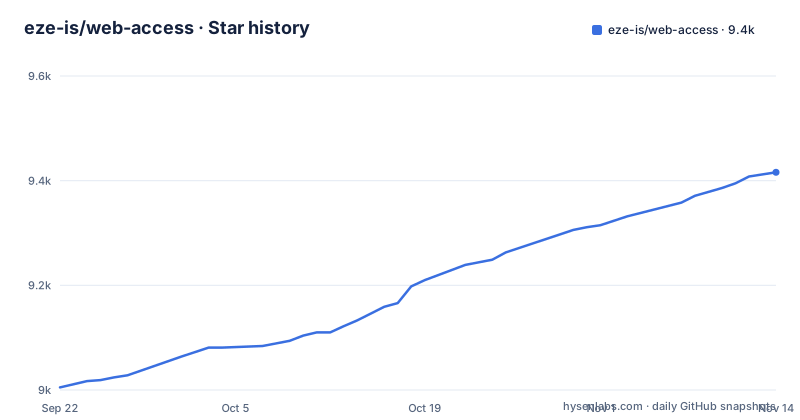
Star history
- eze-is/web-access9,416 ★ · +411
| Repository | 2026-09-22 | 2026-11-14 |
|---|---|---|
| eze-is/web-access | 9k | 9.4k |
411 Stars in the last 53 days, measured from the daily GitHub snapshot. Compare with other projects
Editorial analysis
One skill that chooses between WebSearch, WebFetch, curl, Jina and a CDP browser
web-access starts from a complaint about agents' built in networking: WebSearch and WebFetch have no scheduling strategy and no browser automation. The skill adds three things on top: a strategy for picking a network tool, browser operation over the Chrome DevTools Protocol, and accumulated per site experience. The agent decides per task between WebSearch, WebFetch, curl, Jina and CDP, and can combine them. Since v2.3 the skill explicitly encourages Jina where it fits, to save tokens.
The skill is packaged as a SKILL.md and claims compatibility with any agent that supports that format, naming Claude Code, Cursor, Gemini CLI and Codex CLI. The repository root carries SKILL.md alongside AGENTS.md, CLAUDE.md and GEMINI.md, plus scripts/, references/ and templates/ directories and a .claude-plugin/ folder for plugin installs. The design philosophy is set out in a long WeChat article linked from the README, under the heading of thinking like a human: goal driven rather than step driven browsing.
The CDP proxy drives your everyday browser, logged in sessions included
The central piece is a CDP Proxy that connects directly to the browser you already use: Chrome, Edge, Brave, Arc, Dia or any other Chromium based browser. Because it uses your real profile, it carries your login state, handles dynamic pages and interactions, and can grab frames from videos. That is the feature and also the risk. An agent driving this proxy can act on any site where you are signed in, with your identity.
Browser choice is pinned rather than guessed. Since v2.6, WEB_ACCESS_BROWSER takes the browser's user data directory, while the old values chrome and edge keep working. On first configuration the agent recognizes browsers only by the top level folder names in the application data directory, then uses browser-probe.mjs to look inside only the folder it recognized. If the preferred browser is not running or remote debugging is off, the proxy raises a hard error with steps to fix it instead of silently connecting to another browser. After the first successful connection the browser id is pinned to prevent drift. For Edge, you enable "Allow remote debugging for this browser instance" at edge://inspect/#remote-debugging. v2.6 also stopped scanning fixed ports such as 9222.
Three kinds of click and a frame aware eval for cross site iframes
The proxy exposes HTTP endpoints for page actions. /click performs a JavaScript click. /clickAt sends real mouse events through CDP. /clickXY clicks by coordinates, which can reach into cross site iframes without activating the tab. /setFiles handles file uploads. For content inside cross site iframes, GET /frames lists a page's frames and /eval?frame=<frameId> runs code inside one. Since v2.4.1 the skill also notes that eval can recurse through Shadow DOM and iframe boundaries that selectors cannot cross.
Several fixes in the changelog show where earlier versions went wrong. Since v2.5.3, /new and /navigate take the URL in a POST body, so an ampersand inside a query string is no longer split off. In v2.5.4, /new first creates about:blank and attaches CDP before navigating, so the browser's initial blank document is not mistaken for the target page. The same release added a readiness rule: a successful navigation or a complete readyState does not mean the task is done. When the agent hits a verification page, a login redirect or asynchronous rendering, it keeps observing until the target content appears or it confirms it is blocked.
find-url.mjs reads your bookmarks and history, but only in Chrome and Edge
scripts/find-url.mjs searches local browser bookmarks and history by keyword, time window and visit frequency. The intended uses are internal systems that public search cannot find, such as when you mention "our XX platform", pages you visited before but cannot remember the address of, and sites you visit often. By default it walks both Chrome and Edge, and --browser <chrome|edge> restricts it to one.
Two consequences follow. First, an agent with this skill can query your browsing history, which matters on a work machine or any profile you would not want summarized into an agent transcript. Second, coverage lags the proxy. The CDP proxy accepts any Chromium browser through its data directory since v2.6, but find-url is described as working across Chrome and Edge only. If your daily browser is Brave, Arc or Vivaldi, the agent can drive it yet cannot search its bookmarks and history with this script.
Sub agents share one proxy, isolated only by tab
When a task has several targets, web-access dispatches sub agents to work in parallel. They share a single proxy and are isolated at the tab level. Version 2.3 tightened the guidance for sub agent prompts, including how to load the skill and avoiding verbs that hint at a particular execution method.
Tab level isolation means the parallel agents all work in the same browser profile, with the same cookies and the same signed in accounts. A sub agent that logs out, changes an account setting or triggers a rate limit on one site affects the others using that site. Parallel runs speed up multi target research, but they are not separate identities. Alongside parallelism, the skill keeps site patterns per domain: URL patterns, platform characteristics and known traps, reused across sessions. The changelog gives Xiaohongshu as a worked case, covering its xsec_token mechanism, creator platform state checks and draft saving. Two related rules came in with v2.4: links generated by a site carry full context while hand built URLs may lack implicit parameters, and a platform's "content does not exist" message may reflect the access method rather than the content.
npx skills update deletes the skill folder, and with it your saved data
There are four ways to install. The recommended one uses the skills CLI, an open source package manager for agent skills that detects your agent environment:
npx skills add eze-is/web-accessFor Claude Code, the plugin route is:
claude plugin marketplace add https://github.com/eze-is/web-access
claude plugin install web-access@web-access --scope user
The manual route is a clone into the skills folder:
git clone https://github.com/eze-is/web-access ~/.claude/skills/web-accessYou can also ask the agent to install it from the GitHub URL. The routes differ sharply on upgrade. From v2.6, browser preferences in config.env and site experience in site-patterns/ live in ~/.web-access/ (on Windows, %USERPROFILE%\.web-access\). Git and plugin installs copy old data over automatically on the first preflight check after upgrading, only copying, never deleting or overwriting, and print a user-data: line. npx skills update, by contrast, deletes the whole skill directory before reinstalling, so anyone upgrading from an older version that way loses their data unless they back it up first, following references/migration-2.6.md. After upgrading, run check-deps.mjs once and restart the shared service with proxy-maintenance.mjs restart, which keeps the previous browser choice.
No declared license and a Chinese first README
The repository declares no license. Without one, there is no written grant to copy, modify or redistribute the code, which rules it out for teams whose policy requires an approved open source license before adopting a dependency. Anyone who wants to fork or bundle it has to ask the author.
The README is written in Chinese, with links to machine translated views in English, Japanese, Korean and other languages through openaitx, and the design write up lives on WeChat. Non Chinese readers depend on those translations for the upgrade warnings, which are the parts where a misreading costs data.
Releases are sparse but recent. v2.5.1, labeled a stable build, and v2.5.2, labeled a test build with Edge support, both appeared on May 15, 2026. v2.6.0 followed on October 14, 2026, the same day as the last push to main. Since v2.4.1 the scripts run on Node.js rather than bash, so Windows, Linux and macOS are all supported, and v2.4.3 fixed path conversion errors under Windows Git Bash.
Editorial conclusion
web-access suits a developer who wants an agent to work inside real, logged in websites and internal systems from their own Chromium browser, and who accepts that the agent then acts with their sessions and can read their bookmarks and history. It does not suit shared machines, browsers holding sensitive accounts, or any setting that needs a clear license, since the repository declares none. Before installing, decide which browser profile the proxy may use, and before upgrading from an older version, back up config.env and site-patterns/ if you installed with npx skills.
Frequently asked questions
What is web-access?
web-access is an agent skill from eze-is that adds a network strategy, CDP browser control and per site experience to agents that support SKILL.md, including Claude Code, Cursor, Gemini CLI and Codex CLI.
How does web-access access the web browser?
Through a CDP Proxy that connects to your everyday Chromium based browser, such as Chrome, Edge, Brave or Arc, using its existing login state. The browser is selected with WEB_ACCESS_BROWSER, which since v2.6 takes the browser's user data directory.
What is a web-access example command?
The recommended install is npx skills add eze-is/web-access. Once installed, the proxy exposes endpoints such as /clickXY for coordinate clicks and /frames for listing a page's iframes.
Official sources
Add this badge to your README
If you maintain this project, the badge below links readers to this analysis and shows its maintenance status from the daily GitHub snapshot. Paste the markdown into your README; add ?metric=license or ?metric=stars to the image URL for a different field.

[](https://hysenlabs.com/projects/eze-is-web-access)Star history chart for your README
[](https://hysenlabs.com/projects/eze-is-web-access)Was this useful?