Downright: A native Markdown editor that treats your files as the source of truth
Free native Markdown editor and reader for macOS. Beautiful typography, Quick Look, Finder previews, themes, exact source preservation, offline, MIT.
At a glance
- What is it?
- Downright is a free, MIT-licensed macOS Markdown editor and reader built on AppKit and TextKit 2. It renders your existing files without a vault or sync service, and it preserves your exact source text while offering Finder previews and a CLI.
- Who is it for?
- Adopt Downright if you work with plain Markdown files on macOS 14 or later, want a native editor that never rewrites your source, and need Finder integration without a vault or account. Skip it if you require Windows or Linux support, expect a plugin ecosystem, or need collaborative editing.
- Can I use it commercially?
- Yes. MIT is a permissive licence: you can use, modify and sell software built on it, as long as you keep its copyright and licence notices.
- Is it still maintained?
- Yes. The repository last received commits 32 days ago.
- What is it written in?
- Mainly Swift, according to GitHub's language statistics.
Answers come from the project's GitHub data, last synced on October 22, 2026, and from our analysis. They are not legal advice.
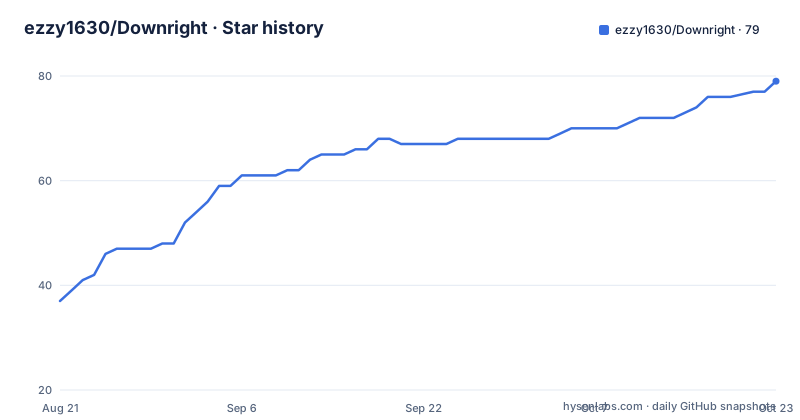
Star history
- ezzy1630/Downright77 ★ · +40
| Repository | 2026-08-21 | 2026-10-22 |
|---|---|---|
| ezzy1630/Downright | 37 | 77 |
40 Stars in the last 62 days, measured from the daily GitHub snapshot. Compare with other projects
Editorial analysis
The problem: Markdown files that feel like plain text, not documents
Most Markdown editors either lock your notes into a proprietary vault, force a sync account, or render through a web view that ignores macOS conventions. Downright takes a different route: it opens the files you already have, wherever they live, with no library to import and no vault to maintain. The README is explicit: there is no account, no web view pretending to be a desktop app. The app is for people who want Markdown to feel like a native Mac document, with proper selection, menus, typography, and accessibility, while keeping the original file authoritative on disk. It targets macOS 14 or later, and it is free, signed, and notarized. If you live in Obsidian or VS Code and want a lighter, file-first alternative, this is the audience.
How it renders without rewriting your source
The core design choice is that Downright decorates the original text storage rather than rebuilding or normalizing the document. The README says rendering decorates the original text storage; it does not rebuild or normalize. That means your Markdown source stays byte-for-byte identical when you save, which is a real advantage if you version-control your notes or process them with other tools. The renderer uses AppKit and TextKit 2, plus Core Text, SwiftMath, and native Mermaid rendering. There is no WebView. The Document and Source views share position and selection, so you can switch between reading and editing without losing your place. It supports CommonMark as the baseline and GitHub-flavored Markdown as the default interchange target, with opt-in extensions for math, Mermaid, tables, tasks, callouts, images, and footnotes. The exact compatibility boundary, including safe raw-HTML behavior, is documented in Docs/MARKDOWN-COMPATIBILITY.md, which is worth reading before you rely on any extension.
Getting it running: three installation paths
You can install Downright by downloading the DMG from downright.cc/download, dragging it into Applications, and launching it once to configure file associations, Quick Look, and the CLI. A Homebrew cask is available from the developer tap: brew tap ezzy1630/downright && brew trust --cask ezzy1630/downright/downright && brew install --cask downright. The README notes that the tap-free brew install --cask downright command is not advertised until an official Homebrew Cask is accepted. There is also a first-party shell installer: curl -fsSL https://downright.cc/install | bash, which verifies the published checksum and app signature, installs into /Applications, registers Finder integrations, and links the down and md commands. If you have Node.js 18 or newer, you can run npx --yes downright-installer, which runs the same macOS installer. All paths leave Sparkle updates enabled. The CLI includes commands like down PLAN.md to open a file, down open --line 42 --review PLAN.md to open at a line for review, and down read --json README.md to inspect without launching the app. You can also pipe Markdown in: printf '# Draft\n' | down.
The CLI and Finder integration are the differentiators
Downright is not just a GUI app. The command-line tool gives you structured access: down outline --json emits document structure, down export --format html -o out.html converts to HTML, down check --target github validates a render target, and down doctor produces a machine-readable support report. The md alias means you can use md PLAN.md or md read --json. This makes Downright useful for scripting and for coding agents that need to open a file at a specific line for review. The Finder integration includes Quick Look previews, thumbnails, and Spotlight metadata. The README says the app is file-first, with no workspace requirement or sync service. For someone who manages notes in a git repo and wants a native reader that also renders Mermaid and math, this is a compelling combination. The trade-off is that the CLI is macOS-only, and the npm launcher requires Node.js 18+, so it is not a cross-platform tool.
Handling external edits and local snapshots
A practical concern for any editor is what happens when another app or a coding agent rewrites an open file. Downright addresses this with external-change tracking and conflict protection. The README says external writes refresh in place while preserving the reading position, and dirty local edits are never silently replaced. You can review word-level differences in place, which is a useful extra for agent-driven workflows. The app also keeps local snapshots and a version timeline, accessible with the shortcut Option+Command+V. This is not a full version-control system, but it gives you a safety net for accidental changes. The review flow is optional, not a different way of owning your files. If you edit files with multiple tools simultaneously, this feature is worth testing early, because the documentation does not specify how it handles binary conflicts or very large files.
Where Downright is the wrong tool
Downright is deliberately narrow. It is a native macOS app, so Windows and Linux users are out of luck. It has no plugin runtime, no chat panel, and no sync service, which is a feature for some and a limitation for others. If you need collaborative editing, end-to-end encryption across devices, or a mobile companion, this is not the tool. The README does not mention any mobile version. The app supports a specific set of file extensions: .md, .markdown, .mdown, .mkd, .mdx, .mdc, .qmd, and .rmd. If you use a less common extension, you may need to configure associations manually. The Markdown compatibility document defines a boundary for extensions, but the README does not list every edge case. The biggest risk is that you adopt Downright for a feature like Mermaid or math, and then discover that a particular syntax is not supported or renders differently in Quick Look versus the app. The down check command can validate a render target, so you can test before committing.
Alternatives: Obsidian, Typora, and the web-view trade-off
The most direct alternative is Obsidian, which also renders Markdown natively (with an Electron shell) and supports a rich plugin ecosystem. The key difference is that Obsidian encourages a vault structure, while Downright is file-first and works with any folder. Obsidian offers sync and mobile apps, which Downright does not. Typora is another alternative: it is a paid, closed-source Markdown editor that focuses on seamless editing and export, but it does not have the same Finder integration or CLI. If you need a cross-platform editor with plugins, Obsidian is the safer choice. If you want a free, native macOS app that treats your existing files as the source of truth and gives you command-line access, Downright is more aligned. The trade-off is that Obsidian's ecosystem gives you more features at the cost of a heavier runtime and a vault-centric model.
Maintenance, licensing, and what to verify first
Downright is MIT-licensed, so you can use, modify, and redistribute it freely, including for commercial purposes, as long as you retain the copyright notice. The repository is actively maintained, with releases dated August 2026, and it uses Sparkle for automatic updates, which is a good sign for long-term maintenance. The changelog is available in CHANGELOG.md, and contributing guidelines exist, so the project appears open to community involvement. Before you adopt it, verify three things. First, test the external-change review flow with a real concurrent editor, because the README does not specify how it handles merge conflicts beyond word-level differences. Second, confirm that your Markdown extensions render correctly in both the app and Quick Look, especially if you rely on Mermaid or math. Third, decide whether you want the Homebrew cask or the shell installer, since both leave Sparkle updates enabled, which means the app will update itself automatically. If you prefer manual updates, you may need to disable Sparkle, but the README does not document how.
Editorial conclusion
Adopt Downright if you work with plain Markdown files on macOS 14 or later, want a native editor that never rewrites your source, and need Finder integration without a vault or account. Skip it if you require Windows or Linux support, expect a plugin ecosystem, or need collaborative editing. Before adopting, verify that your Markdown extensions (Mermaid, math, callouts) render correctly in the app and in Quick Look, and test the external-change review flow with a real concurrent editor. Also confirm the Homebrew cask installation matches your update policy, since it keeps Sparkle updates enabled.
Frequently asked questions
Which file types does Downright open?
Eight extensions: .md, .markdown, .mdown, .mkd, .mdx, .mdc, .qmd and .rmd. CommonMark is the portable baseline and GitHub-flavored Markdown is the default interchange target, and opt-in extensions are rendered without being rewritten into a proprietary format, with the exact boundary documented separately.
Does Downright need an account or an internet connection?
No account, and the app is described as offline, MIT licensed, and requiring macOS 14 or newer. Automatic updates are left enabled on every installation path, so the app does reach out when a new build is published, and a build released while the app is open is offered within about a minute.
How do I install Downright on macOS?
Three documented paths: drag the app from the signed and notarized disk image into Applications and launch it once to configure file associations, Quick Look and the CLI; install the developer tap cask with a trust command; or run the first-party shell installer with curl. An npm launcher wraps the same installer and needs Node 18 or newer.
What does the down doctor command do?
It diagnoses the installation. With a JSON flag it emits a machine-readable support report without modifying the machine, and given an application path it inspects a development bundle. The md command is installed as an alias for down, and down --help lists every command.
Does Downright rewrite or normalise my Markdown files?
No. Rendering decorates the original text storage rather than rebuilding or normalising the document, and external writes refresh in place while preserving the reading position, with dirty local edits never silently replaced. Word-level differences can be reviewed before anything is accepted.
Official sources
Add this badge to your README
If you maintain this project, the badge below links readers to this analysis and shows its maintenance status from the daily GitHub snapshot. Paste the markdown into your README; add ?metric=license or ?metric=stars to the image URL for a different field.

[](https://hysenlabs.com/projects/ezzy1630-downright)Star history chart for your README
[](https://hysenlabs.com/projects/ezzy1630-downright)