thebuggeddev/anatomy: the README is a starter template, not the anatomy explorer
An interactive 3D human anatomy explorer built using threejs with GPT 5.6 Sol
At a glance
- What is it?
- The repository description and the deployed homepage describe an interactive three dimensional human anatomy explorer, while the README is an unmodified full-stack starter template for a Cloudflare runtime. The dependencies are the only place the anatomy work shows up.
- Who is it for?
- Treat this repository as a deployed demonstration rather than a documented project. The application appears to be real, since the 3D and animation libraries are in the dependency list and the site is live, but the documentation describes the framework it was scaffolded from rather than the thing itself, so you will learn nothing here about anatomy data, model formats, interaction design or licensing of any assets.
- Can I use it commercially?
- The repository metadata does not identify a licence. Check the project’s published terms and any component-specific licences before reuse.
- Is it still maintained?
- Yes. The repository last received commits 108 days ago.
- What is it written in?
- Mainly TypeScript, according to GitHub's language statistics.
Answers come from the project's GitHub data, last synced on November 25, 2026, and from our analysis. They are not legal advice.
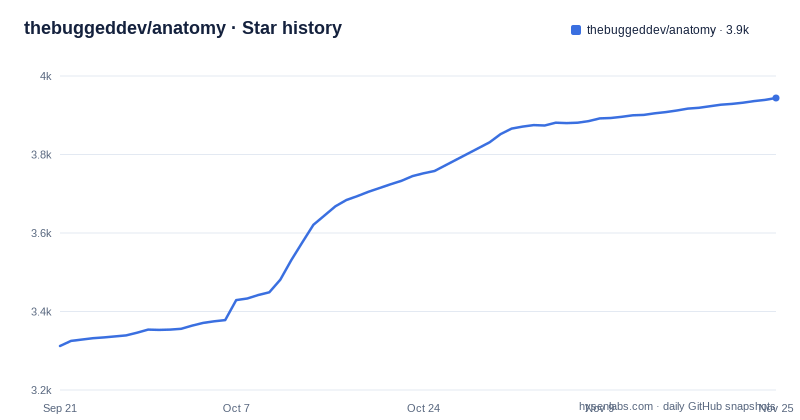
Star history
- thebuggeddev/anatomy3,944 ★ · +632
| Repository | 2026-09-21 | 2026-11-25 |
|---|---|---|
| thebuggeddev/anatomy | 3.3k | 3.9k |
632 Stars in the last 65 days, measured from the daily GitHub snapshot. Compare with other projects
Editorial analysis
The README documents the scaffold, not the product
Start with the mismatch, because it shapes everything else.
The repository description says this is an interactive 3D human anatomy explorer built with a JavaScript 3D library, and the declared homepage is a deployment on a hosted application platform. The README, however, is titled as a starter and describes a clean full-stack starter running on a particular edge runtime, with optional database bindings.
There is no anatomy content in it. No mention of models, meshes, organs, interaction, performance budgets or assets. Nothing about how the explorer loads or stores what it displays.
So the documentation describes the machine the application was built on, and the application itself is documented only by its source. That is not necessarily anybody's fault; these hosting platforms generate a starter with its own README, and a project that deploys one and keeps the generated file will look exactly like this. But it means the README answers a different question from the one a reader arrives with.
The useful response is to read the README as what it is, a deployment and configuration reference, and to read the code for the rest.
Node 22.13 and three commands is the whole install
The quick start section is three commands long, and the prerequisite is a version floor.
npm install
npm run dev
npm run build
You need Node 22.13 or newer, you install dependencies, and then you have a development command and a build command. There is also a separate note that the starter does not use one of the usual runtime configuration files, which is the kind of detail that saves an afternoon when you are looking for where the platform settings live.
The scripts themselves all point at the same runtime with the same logging path set, which is what tells you the toolchain is not Next's own commands but the edge runtime's, with a log file written into a hidden directory in the project.
So the installation surface is genuinely tiny, and the whole configuration story is concentrated in a handful of files: the runtime manifest, a build configuration, a database configuration and a lint configuration.
Bindings are declared, simulated locally, and optional
The included-shape section is the most informative part of the README, and it is about how you attach storage.
A file in a hidden configuration directory declares optional bindings for a database and an object store on the hosting platform. The build configuration simulates those declared bindings during local development, so you can write code against them on a laptop without provisioning anything.
The database schema starts intentionally empty, with an example directory holding an optional example surface, and a configuration file exists to generate migrations locally when you need them. The commands section confirms that with a migration generation command described as running after schema changes.
This is a well-judged default. A scaffold that ships an empty schema forces you to make the first decision about your own data rather than inheriting somebody else's example tables, and the simulation step means that decision is cheap to undo.
The identity story is owned by the platform, and it is identity only
There is a long section about authentication and almost all of it is about boundaries.
The platform injects the current user's email as a request header. For sites signed in through the workspace's own flow, a full name may also arrive, but only when the profile actually has a name, and it arrives percent-encoded with a companion header telling you the encoding. The instruction is to treat the name as optional and fall back to the email.
Then there are ready-made helpers, imported from one file in the app directory: one for optional signed-in user interface, one that requires a user and redirects anonymous visitors to sign in, and two for building links. The return path must be a same-origin relative path, which the helper validates and encodes for you.
Two rules carry most of the weight. Pages that depend on identity must be forced dynamic, because the headers differ per request. And the platform owns the sign-in route, the sign-out route, the callback, the session cookies and the header injection, so you must not write your own routes for those paths; a route that simply does not import the helper stays anonymous.
The security note is the one to remember. The workspace flow establishes identity, not membership. If you need a workspace-wide restriction, you use the hosting platform's access controls or your own server-side checks against an allow list. Leaving public content anonymous and protecting only account pages is the documented pattern.
Three deployment targets are visible in one tree
The repository tree and the README disagree about where this is meant to run, and both sides are visible.
For the hosted application platform the platform itself, there is an ignore file for that platform's build output and a configuration file for it. There is also an upload mask, which is what you add when you deploy a directory rather than a build artefact.
For the edge runtime the README describes, there is the runtime itself, its command line tool, the workers type definitions and a worker directory.
For the framework the README says the starter does not use directly, there is a framework configuration file and a second build script that invokes that framework's own build command directly.
And the build layer itself is doubled: a Vite configuration and Vite plugins for React and for server components, alongside the framework configuration, plus a Tailwind stylesheet step configured separately.
None of that is wrong; scaffolding layers accumulate. But it means the project is not pinned to one target, and the documented runtime and the configured deployments can drift apart. Check what your deployment actually uses rather than assuming the README is authoritative.
The test asserts a loading skeleton, and two scripts are undocumented
Two small things tell you what kind of project this is.
The first is the test. The test command builds the site and then runs a Node test file against the rendered HTML. What it verifies, according to the commands section, is that the starter's loading skeleton renders. That is a smoke test of the scaffold, not a test of the application, and there is no test in the repository that would catch a change to the explorer itself.
The second is the gap between the documented commands and the manifest. The README lists four commands: development, build, test and migration generation. The manifest defines those plus a lint command that ignores two build output directories, and plus two internationalisation scripts, one auditing and one exporting.
Those two scripts are the interesting omission, because their presence implies the application has locale data worth auditing, which is at least a hint that something was built beyond the scaffold. It is also a reminder that a generated README describes the scaffold's capabilities, so the manifest is the better place to look for what a project can actually do.
Editorial conclusion
Treat this repository as a deployed demonstration rather than a documented project. The application appears to be real, since the 3D and animation libraries are in the dependency list and the site is live, but the documentation describes the framework it was scaffolded from rather than the thing itself, so you will learn nothing here about anatomy data, model formats, interaction design or licensing of any assets. If you want to study the explorer, read the source and the live site; if you want to reuse the scaffold, this README is genuinely useful, because it documents the binding declarations, the migration workflow and the identity headers precisely. Before you build on either, note that the app is 3D content with no stated licence, so check what you are allowed to reuse, and note that the deployment targets in the tree are inconsistent with the README's stated runtime.
Frequently asked questions
What is thebuggeddev/anatomy?
The repository description and its hosted homepage present an interactive three dimensional human anatomy explorer built with a JavaScript 3D library. The source is a TypeScript application whose dependencies include the 3D library, an animation library and an icon set, and it is deployed on a hosted application platform.
Does the anatomy repository README document the app?
No. The README is the generic full-stack starter template for an edge runtime, covering prerequisites, local commands, optional database bindings and workspace sign-in helpers. It contains no anatomy content and nothing about models, interaction or assets.
What are the prerequisites to run it?
Node 22.13 or newer. Then install dependencies and use the development or build script, both of which invoke the edge runtime rather than the web framework directly, with a log path set inside the project.
How are database bindings handled?
A hosting configuration file declares optional database and object store bindings, the build configuration simulates them for local development, the schema file starts intentionally empty, an example database surface is included, and a separate configuration generates migrations after schema changes.
How does sign-in work in the starter?
Ready-made helpers give you an optional variant, a required variant that redirects anonymous visitors, and link builders. The platform owns the sign-in, sign-out and callback routes and injects identity headers; those headers establish identity but not workspace membership, so workspace-wide restrictions need the hosting platform's controls or explicit server-side checks.
What tests does the anatomy repository have?
One: the test command builds the site and runs a Node test against the rendered HTML to check the starter's loading skeleton. Nothing in the repository tests the explorer itself.
Official sources
Add this badge to your README
If you maintain this project, the badge below links readers to this analysis and shows its maintenance status from the daily GitHub snapshot. Paste the markdown into your README; add ?metric=license or ?metric=stars to the image URL for a different field.

[](https://hysenlabs.com/projects/thebuggeddev-anatomy)Star history chart for your README
[](https://hysenlabs.com/projects/thebuggeddev-anatomy)Was this useful?